1
VEGA 76
6.1.3. "HARM" mode
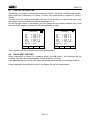
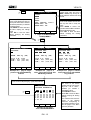
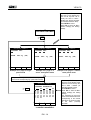
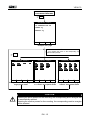
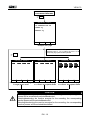
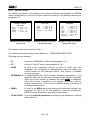
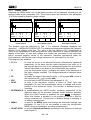
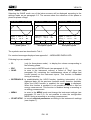
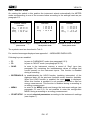
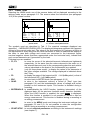
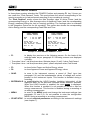
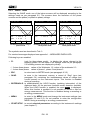
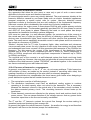
Selecting the HARM mode one of the below screens will be displayed according to the
settings made as per paragraph 5.22. The screens show the harmonics (see paragraph
16.2) of the phase or phase-to-phase voltage.
27.09.00
V1
h03
h03
ThdV
17:35:12
= 230.2
= 10.2
=
4.3
= 11.0
h49
←
V
V
%
%
27.09.00
V12
h03
h03
ThdV
→
Example of screen in singlephase system
ChgP
17:35:12
= 400.2
= 14.2
=
3.5
= 11.0
h49
←
V
V
%
%
27.09.00
V1 =
h03
h03
ThdV
→
Example of screen in “3 wires”
three-phase system
ChgP
17:35:12
230.2
V
= 10.2
V
=
4.3
%
= 11.0
%
h49
←
→
Example of screen in “4 wires”
three-phase system
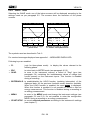
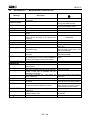
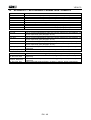
The symbols used are described in Tab. 1. For eventual messages displayed see
appendix 1 – MESSAGES DISPLAYED. The displayed histograms represent the harmonic
content of the voltage under test. The value of the first harmonic h01 (fundamental at
50Hz) is not represented in scale along with the other harmonics in order to maximize the
display of the latter. In case both voltage and current are connected to the instrument
inputs, eventual negative values of the harmonics (therefore represented under the
horizontal axis), indicate that such voltage harmonics are “generated” by the load.
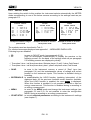
Following keys are enabled:
F3, F4:
to move the cursor of the selected harmonic leftwards and rightwards
respectively. At the same time the values relevant to the order no. of
the selected harmonic and to the corresponding absolute and relative
values (calculated on the basis of the fundamental) are updated.
F1
(only for three-phase mode): to display the values of the harmonics of
the other voltages available. The voltage displayed is indicated above
the F3 key.
F2:
to display the page of the harmonics h01 ÷ h24 (symbol h24) or that of
the harmonics h25 ÷ h49 (symbol h49).
ESC:
to return back to METER mode (see paragraph 6.1.2).
SAVE:
to save in the instrument memory a record of “Smp” type (see
paragraph 5.4) and the instantaneous values of voltage and current
present on the instrument inputs. This function is disabled during a
recording.
ENTER/HOLD: to enable/disable the HOLD function (updating interruption) of the
displayed data. All the previous functions remain however available.
When the HOLD function is enabled, the word HOLD is displayed.
When this function is enabled it’s not possible to record or take an
energy measurement. This function is disabled during a recording or
an energy measurement.
MENU:
to enter in the MENU mode and change the instrument settings (see
paragraph 5.2 and 5.3). It’s not possible to enter the configuration
MENU during a recording or an energy measurement.
START/STOP: to record selected parameters according to the instrument’s settings
(see chapter 7).
EN - 24







![TSD Series -40C ULT User Manual [EN]](http://vs1.manualzilla.com/store/data/005634658_1-66c9db561a67486106446026c707a26c-150x150.png)