1
Serial SD/MMC Card Module User Manual
SD/MMC
Max’s How-to using CUBLOC Study Board right from the
package
1)
2)
3)
4)
5)
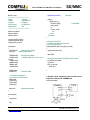
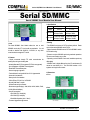
Connect 5V and GND of the SD Card Module to 5V and
GND of the study board.
Connect TXD and RXD of the SD Card Module to RX
and TX pin of CB280(on the upper right corer) on the
study board. (For CB280 connect to P10 and P11)
Connect your PC’s serial cable to the bottom serial port of
the study board.
Now you are ready to communicate to the SD Card
Run the Code: (you can download at www.cubloc.com
under Max’s Application Download under the title, “Max’s
CF/SD Card Library”
Comfile Technology Inc.
www.comfiletech.com
(888)9CUBLOC Fax (650)638-1360
SD/MMC User Manual page 13