1
2: Installation and Setup
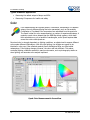
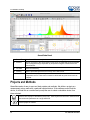
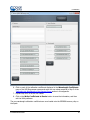
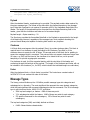
Saved Data Panel
1. Saved Files
List of saved files currently in the saved directory. Arrange by name or date.
2. Preview
Shows a preview of the saved spectra, time series or appended series saved data
can be stepped through acquisition by acquisition using the controls above the
saved files list.
3. File Path
Set the file directory.
4. Overlay
Set the previewed spectra as an overlay on the active view.
5. Notes
Enter notes about the saved spectra. Notes are saved with the same file name as
a separate .tsv file. These can be viewed or edited with any text viewer such as
notepad.
Projects and Methods
OceanView makes it easy to save and load projects and methods. We define a project as a
measurement set up made with a particular spectral device. If the software cannot find the
device, it will load this as a method and prompt the user to select a substitute device from
those selected.
Click to save a project. Alternatively select File | Save Project from the menu. Saves all view
and schematic parameters to a single ASCII file.
Load a project or method.
22
911-00000-000-02-201504