1
Discussion:
I have an app that has a background sound and a sound when someone clicks something. But when
they click the something sound it stops the background sound, which is supposed to loop. How can I
play both sounds and leave the background looping?
Answer:
I'm 99% sure that the PlaySound API (which SoundPlayer.Play is wrapping) does not support this
no matter how you do it. You will have to look at something like DirectX or multithreading if you really
want to do this.
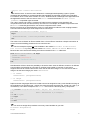
I'm trying to get the SoundPlayer to play two wav files at the same time. The documentation says is
should play asynchronously but when I try, it seems to end the play of the first SoundPlayer as soon
as the second one starts to play.
I read the documentation, and it doesn't imply that it will merge the two sounds, merely that the
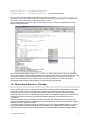
method call is asynchronous. Internally PlaySound calls the PlaySound API from mmsystem.h, with
the parameters SND_ASYNC and SND_NODEFAULT. This means so far that "The sound is played
asynchronously and PlaySound returns immediately after beginning the sound..." and "No default
sound event is used. If the sound cannot be found, PlaySound returns silently without playing the
default sound."
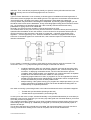
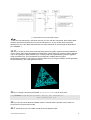
Chart 2: Message Driven Events in Windows
In a Win32/64 application, we start a message loop that fetches messages from a queue, translates
them and then dispatches them. Eventually, each message reaches our WndProc where the
associated event can be handled in a case construct.
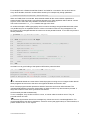
So the event is the timer which will be answered be the event handler WMTimerBeep and then
executed by the MessageBeep() or PlaySound().
The OS maintains a message or system-queue, where it puts the events (e.g., from interrupts or other
sources). It then sends the messages from that queue to all windows, depending on the message
(e.g., it won't send key messages to a window that doesn't have focus).
www.softwareschule.ch
4