1
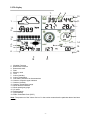
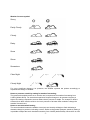
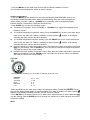
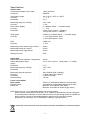
Weather forecast symbol:
Sunny
Partly Cloudy
Cloudy
Rainy
Snow
Storm
Snowstorm
Clear Night
Cloudy Night
For every significant change in air pressure, the weather symbols will update accordingly to
represent the change in weather.
Notes to pressure sensitivity setting for weather forecasting:
The pressure threshold can be set to suit the user’s requirement for weather forecasting from
2-4hPa (default 2hPa). For areas that experience frequent changes in air pressure requires a
higher hPa setting compared to an area where the air pressure is stable. For example if 4hPa is
selected, then there must be a fall or rise in air pressure of at least 4hPa needed to change the
weather forecast icons.
Notes to storm threshold setting
The storm threshold means the weather icons (rain and clouds) will begin to flash indicating a
dramatic change in pressure, indicating a storm. Similar to the general pressure sensitivity setting it
is possible to adjust the storm threshold sensitivity form 3-9hPa (default 4hPa). When there is a fall
-9-