1
NVR4POE / NVR8POE Quick Operation Guide
• VGA is the trademark of IBM.
• UPnPTM is a certification mark of the UPnPTM Implementers Corporation.
• Other names of companies and product contained in this manual may be trademarks or registered trademarks
of their respective owners.
NVR Pre-Installation
The NVR is highly advanced surveillance equipment that should be installed with care. Please take into
consideration the following precautionary steps before installation of the NVR.
1. Keep all liquids away from the NVR.
2. Install the NVR in a well-ventilated and dust-free area.
3. Ensure environmental conditions meet factory specifications.
4. Install a manufacturer recommended HDD.
NVR Installation
During the installation of the NVR:
1.
2.
3.
4.
5.
6.
7.
8.
Use brackets for rack mounting (NVR8POE Only).
Ensure there is ample room for audio and video cables.
When routing cables, ensure that the bend radius of the cables are no less than five times than its diameter.
Connect both the alarm and RS-485 cable.
Allow at least 2cm (≈0.75-inch) of space between racks mounted devices.
Ensure the NVR is grounded.
Environmental temperature should be within the range of -10 ºC ~ 55 ºC, 14ºF ~ 131ºF.
Environmental humidity should be within the range of 10% ~ 90%.
Front Panel
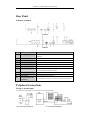
NVR4POE / NVR8POE Series
No.
Name
Description
Power
1
Status
Indicator
Status
Tx/Rx
Power indicator turns green when system is running.
Status indicator blinks red when data is being read from or written
to HDD.
Tx/Rx indictor blinks yellow when network connection is
functioning properly.
Universal Serial Bus (USB) ports for additional devices such as
2
USB Interface
USB mouse and USB Hard Disk Drive (HDD).
4