1
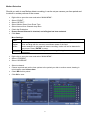
Set the Time and Date When using your DVR for the first time, you will have to set the SYSTEM TIME. Right clicking anywhere on the screen will bring up the password menu. Use the mouse to enter the DVR8E admin password with the on-screen keypad. Then Right click to open the menu and select “MAIN MENU”. Select “SETTING” Select “GENERAL” Set System Time, Date Format and DST (Daylight Saving Time) for your region. Click Save before clicking OK Important: If you change the date or time on your DVR8E after the recording function is activated, the recorded data may be deleted. After setting the date and time, it’s recommended to clear all HDD data, and start recording again. 7