1
ProSticks.com Ltd.
Fibonacci Projection
ProSticks Java Chart User Manual
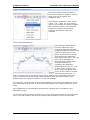
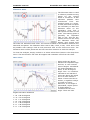
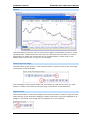
The Fibonacci Projection
function projects the
Fibonacci Retracement
levels of one retracement
onto any other point in
time. The function takes
three input points to draw
the projected rise or fall of
the price. First, click on a
high (low) point on the
chart to set the first point
of the Fibonacci Projection
function. Next, find a
second point, this time a
low (high) and click on the
chart once more. Then as
the cursor is dragged to
another point on the chart,
the projection point, purple horizontal lines, signalling key Fibonacci Retracement
levels (i.e. 0.618, 1.0, and 1.618), will appear and move as the cursor is moved.
Once the projection point is found, click on the chart once more to finalize the
coordinates of the three points. The purple horizontal support and resistance lines will
then preserve their positions and one can then continue on with the analysis.
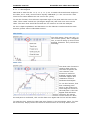
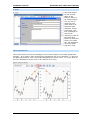
The parameters for the Fibonacci Projection function can be modified in the
Parameters menu.
To clear the analysis, simply uncheck it or select Clear Fibon./Gann in the drop-down
menu. The last function will clear all support and resistance tools from the chart.
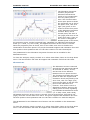
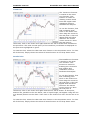
Fibonacci Arc
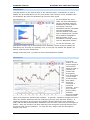
The Fibonacci Arcs are centered
around the first point and spaced
at intervals of 38.2%, 50.0%,
and 61.8% of the distance
between the two points chosen.
The function thus takes two input
points to draw the support and
resistance levels projected by the
arcs. First, click on a high (low)
point on the chart to set the first
point of the Fibonacci Arcs
function. Then as the cursor is
dragged to another point on the
chart, green arc lines, signalling
key Fibonacci Retracement levels
(i.e. 0.382, 0.500, and 0.618),
will appear and move as the cursor is moved. Find a second point, this time a low
(high), and click on the chart once more. The green support and resistance arc lines
will then preserve their positions and one can then continue on with the analysis.
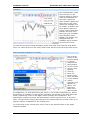
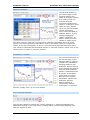
The parameters for the Fibonacci Arcs function can be mo dified in the Parameters
menu.
To clear the analysis, simply uncheck it or select Clear Fibon./Gann in the drop-down
menu. The last function will clear all support and resistance tools from the chart.
8