1
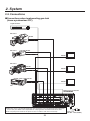
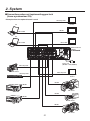
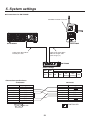
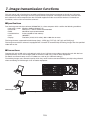
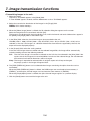
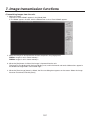
7. Image transmission functions This unit comes with a function for transmitting still images from the host computer to the unit via LAN and a function for importing still images from the unit into the host computer. The image transmission software must be installed in the host computer from the CD-ROM supplied in order to use these functions. For details on installation, refer to “How to install the software”. Specifications Run the image transmission software (HS400 Tool) in a host computer which satisfies the following conditions. • Operating system: Windows 2000 or Windows XP • Processor: Pentium III, 1 GHz or better recommended • RAM: 256 MB or more recommended • Hard disk drive: At least 50 MB of free memory • LAN: 10BASE-T • Display: TrueColor (24 bit, 32 bit color), 800 600 dots or more The image formats supported include bitmap (bmp), JPEG (jpg), TIFF (tif), GIF (gif) and PNG (png). The image transmission software is equipped with a function for automatically converting images into the specified video format size. Connections Connect this unit to LAN using a twisted pair cable. Use a LAN crossover cable to connect the unit with the host computer directly. Use a LAN straight cable to connect to LAN using a hub or other equipment. For details on network setup such as IP addresses, refer to [5-5. Network settings]. Transmitting images uses network capacity which may result in other connected devices possibly being affected when connecting to LAN through a hub and other equipment. POWER OUTPUTS SLOT2 SLOT1 Y 6 4 INPUTS 5 3 8 6 DVI/ANALOG OUTPUTS Pr Pb 7 5 SLOT2 SLOT1 DVI INPUTS DVI-I DVI-I ON DVI-I SLOT 2 OFF SLOT 2 ~IN Y ANALOG OUTPUTS Y Pr Pb Pb Y Pr ANALOG INPUTS Y Pr Pb Pb Pr SLOT 1 SLOT 1 SDI OUTPUTS 4 PGM 2 OUT 1 3 IN OUT SDI INPUTS IN 2 OUT LAN 1 IN OUT REF TALLY RS-422 GPI SIGNAL GND IN LAN crossover cable POWER OUTPUTS SLOT2 SLOT1 Y Pb 6 4 INPUTS 5 3 8 6 DVI/ANALOG OUTPUTS Pr DVI-I DVI-I 7 5 SLOT2 SLOT1 DVI INPUTS ON DVI-I SLOT 2 OFF SLOT 2 ~IN Y Pb ANALOG OUTPUTS Y Pr Pb Y Pr ANALOG INPUTS Y Pr Pb Pb Pr SLOT 1 SLOT 1 SDI OUTPUTS 4 PGM 2 1 LAN straight cable LAN straight cable HUB 103 OUT 3 IN OUT SDI INPUTS IN OUT 2 LAN 1 IN OUT IN RS-422 REF TALLY GPI SIGNAL GND