1
96
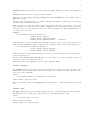
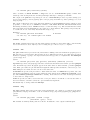
3. It will not run in real mode due to lack of memory.
4. TrueType fonts are not available in the graph window.
5. Drag-drop does not work.
34.49.69
X11
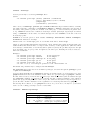
gnuplot provides the x11 terminal type for use with X servers. This terminal type is set automatically
at startup if the DISPLAY environment variable is set, if the TERM environment variable is set to
xterm, or if the -display command line option is used.
Syntax:
set terminal x11 {reset} {<n>}
Multiple plot windows are supported: set terminal x11 <n> directs the output to plot window number
n. If n>0, the terminal number will be appended to the window title and the icon will be labeled gplt
<n>. The active window may distinguished by a change in cursor (from default to crosshair.)
Plot windows remain open even when the gnuplot driver is changed to a different device. A plot window
can be closed by pressing the letter q while that window has input focus, or by choosing close from a
window manager menu. All plot windows can be closed by specifying reset, which actually terminates
the subprocess which maintains the windows (unless -persist was specified).
Plot windows will automatically be closed at the end of the session unless the -persist option was given.
The size or aspect ratio of a plot may be changed by resizing the gnuplot window.
Linewidths and pointsizes may be changed from within gnuplot with set linestyle.
For terminal type x11, gnuplot accepts (when initialized) the standard X Toolkit options and resources
such as geometry, font, and name from the command line arguments or a configuration file. See the X(1)
man page (or its equivalent) for a description of such options.
A number of other gnuplot options are available for the x11 terminal. These may be specified either as
command-line options when gnuplot is invoked or as resources in the configuration file "/.Xdefaults".
They are set upon initialization and cannot be altered during a gnuplot session.
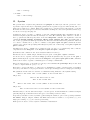
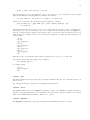
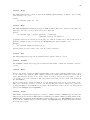
34.49.69.1 Command-line options In addition to the X Toolkit options, the following options
may be specified on the command line when starting gnuplot or as resources in your ".Xdefaults" file:
‘-mono‘
‘-gray‘
‘-clear‘
‘-tvtwm‘
‘-raise‘
‘-noraise‘
‘-persist‘
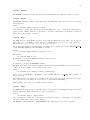
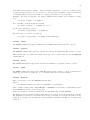
forces monochrome rendering on color displays.
requests grayscale rendering on grayscale or color displays.
(Grayscale displays receive monochrome rendering by default.)
requests that the window be cleared momentarily before a
new plot is displayed.
requests that geometry specifications for position of the
window be made relative to the currently displayed portion
of the virtual root.
raise plot window after each plot.
do not raise plot window after each plot.
plot windows survive after main gnuplot program exits.
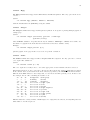
The options are shown above in their command-line syntax. When entered as resources in ".Xdefaults",
they require a different syntax.
Example:
gnuplot*gray: on