1
← D.
Screening Data
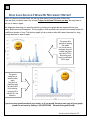
Why do I need to screen data?
When screening the data you are looking for several things.
1) The first is to determine if the data are valid. You will see some examples of invalid data below.
2) The second is to determine if there is enough wearing time in the file to be considered compliant
without asking for a re-wear.
.
It is important to screen the data right away in case you to go back to a participant for a
re-wear. It is imperative to screen the data prior to initializing it for another wearing in
case the unit has malfunctioned and you need to take it out of the rotation
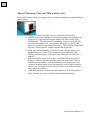
How to screen data in MeterPlus (See MeterPlus User’s Manual, section 5 (Viewing
Actigraph files) for detailed information about Viewing Files in MeterPlus)
1. Find the participant’s DAT or CSV file and drag it into MeterPlus. It is helpful to have the log to
look at simultaneously.
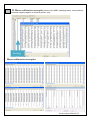
2. Go to Reports, then Header Details to screen for errors. If using an older model (7164 or 71256),
current memory address = 0 in the header of the file is an error!
3. MeterPlus shows you the date range from when the meter was initialized to when it was
downloaded and whether or not each day is valid. Double check that the date initialized is the
first date reflected in MeterPlus. If it isn’t, this could indicate a problem with the data file.
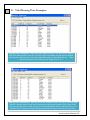
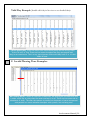
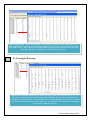
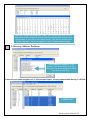
4. Open each wearing day in Detailed View by double clicking. Wearing days can be determined by
using the log or by checking the data in the absence of a log. Note whether the participant noted
the correct day of the week for the corresponding date. The detailed view in MeterPlus will show
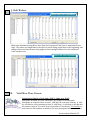
you the raw data. The data patterns of wearing the Actigraph and mail time are quite different, as
are patterns from devices that are not functioning properly. Often times, a mail day or a
malfunction will be listed as being valid, but upon reviewing the raw data, it will be clear that it is
not (see examples below). Note: there may be discrepancies between the meter log and the scored
data. Although most participants fill out the logs accurately, there are some who do not. There
may be days where the log reflects 12 hours of movement, but you see 14. The downloaded data is
likely more accurate than the log, so don’t worry about discrepancies.
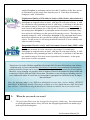
5. People will occasionally go to sleep with the Actigraph on. There will be movement between the
two days and it is hard to determine where one day ends and another begins. Just be aware that
this data looks confusing and consult the meter log. You should make a note of this in the Access
database so if cleaning of the file needs to occur later, these files will be easy to find.
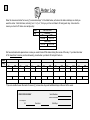
6. Once you’ve verified that the wearing days look valid, write the number of valid hours above each
corresponding day on the log, using a red pen. Another double check is to make sure the log start
time reflects the start time in the data file. You can check this by counting the rows of consecutive
zeros in the raw data file for a given day. Each row signifies an hour, starting at midnight.
7. Record the number of valid days in the Access tracking database. Also record the dates of wearing,
any flags for bad or repeated data, and information about each wearing day (e.g., valid day, why
not, day of week, etc.) Include any information here that otherwise would be gleaned from the log.
Accelerometer Manual | 27