1
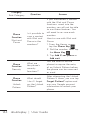
Silence the dial pad touch tones
1. From any Home screen, tap the Menu Key .
2. Tap Settings.
3. Tap Sound.
4. Tap Audible touch tones and Audible selection
check boxes to disable the functions. Make
sure that there is not checkmark in the box to
ensure that the function is disabled.
41