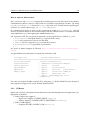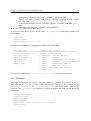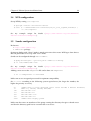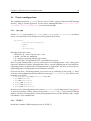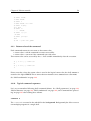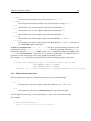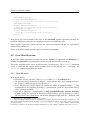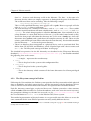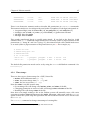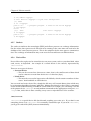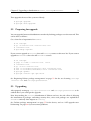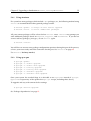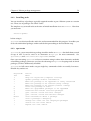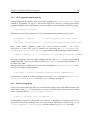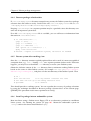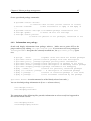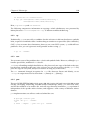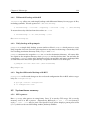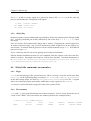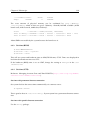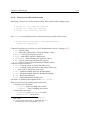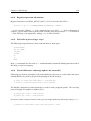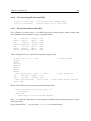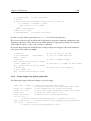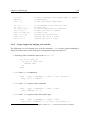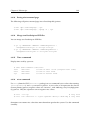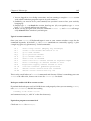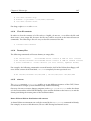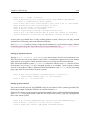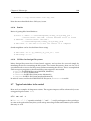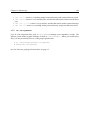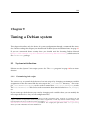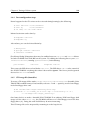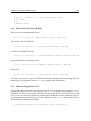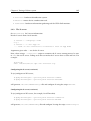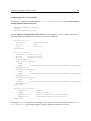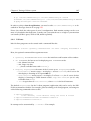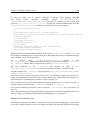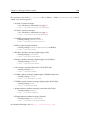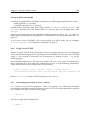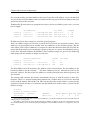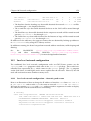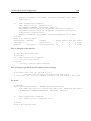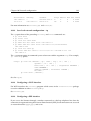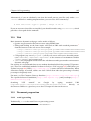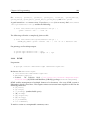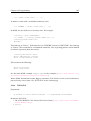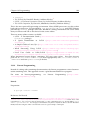
1
Debian Reference Osamu Aoki <[email protected]> Editor: David Sewell <[email protected]> ‘Authors’ on page 253 CVS, Fri Aug 13 02:13:33 UTC 2004 Abstract This Debian Reference (http://qref.sourceforge.net/) is intended to provide a broad overview of the Debian system as a post-installation user’s guide. It covers many aspects of system administration through shell-command examples. Basic tutorials, tips, and other information are provided for topics including fundamental concepts of the Debian system, system installation hints, Debian package management, the Linux kernel under Debian, system tuning, building a gateway, text editors, CVS, programming, and GnuPG for non-developers. Copyright Notice Copyright © 2001–2004 by Osamu Aoki <[email protected]>. Copyright (Chapter 2) © 1996–2001 by Software in the Public Interest. This document may be used under the terms of the GNU General Public License version 2 or higher. (http://www.gnu.org/copyleft/gpl.html) Permission is granted to make and distribute verbatim copies of this document provided the copyright notice and this permission notice are preserved on all copies. Permission is granted to copy and distribute modified versions of this document under the conditions for verbatim copying, provided that the entire resulting derived work is distributed under the terms of a permission notice identical to this one. Permission is granted to copy and distribute translations of this document into another language, under the above conditions for modified versions, except that this permission notice may be included in translations approved by the Free Software Foundation instead of in the original English. i Contents 1 2 Preface 1 1.1 Official document . . . . . . . . . . . . . . . . . . . . . . . . . . . . . . . . . . . . . 1 1.2 Document conventions . . . . . . . . . . . . . . . . . . . . . . . . . . . . . . . . . . 2 1.3 Example scripts . . . . . . . . . . . . . . . . . . . . . . . . . . . . . . . . . . . . . . 2 1.4 Basic setup . . . . . . . . . . . . . . . . . . . . . . . . . . . . . . . . . . . . . . . . . 2 1.5 Basics of the Debian distributions . . . . . . . . . . . . . . . . . . . . . . . . . . . . 3 Debian fundamentals 5 2.1 The Debian archives . . . . . . . . . . . . . . . . . . . . . . . . . . . . . . . . . . . 5 2.1.1 Directory structures . . . . . . . . . . . . . . . . . . . . . . . . . . . . . . . 5 2.1.2 Debian distributions . . . . . . . . . . . . . . . . . . . . . . . . . . . . . . . 6 2.1.3 The stable distribution . . . . . . . . . . . . . . . . . . . . . . . . . . . . 6 2.1.4 The testing distribution . . . . . . . . . . . . . . . . . . . . . . . . . . . . 7 2.1.5 The unstable distribution . . . . . . . . . . . . . . . . . . . . . . . . . . . 7 2.1.6 The frozen distribution . . . . . . . . . . . . . . . . . . . . . . . . . . . . 7 2.1.7 Debian distribution codenames . . . . . . . . . . . . . . . . . . . . . . . . . 8 2.1.8 Codenames used in the past . . . . . . . . . . . . . . . . . . . . . . . . . . . 8 2.1.9 The source for codenames . . . . . . . . . . . . . . . . . . . . . . . . . . . . 8 2.1.10 The pool directory . . . . . . . . . . . . . . . . . . . . . . . . . . . . . . . . 9 2.1.11 Historical notes about Sid . . . . . . . . . . . . . . . . . . . . . . . . . . . . 9 2.1.12 Uploaded packages in incoming/ . . . . . . . . . . . . . . . . . . . . . . 10 2.1.13 Retrieving an older package . . . . . . . . . . . . . . . . . . . . . . . . . . . 10 2.1.14 Architecture sections . . . . . . . . . . . . . . . . . . . . . . . . . . . . . . . 10 2.1.15 The source code . . . . . . . . . . . . . . . . . . . . . . . . . . . . . . . . . . 10 CONTENTS 2.2 ii The Debian package management system . . . . . . . . . . . . . . . . . . . . . . . 11 2.2.1 Overview of Debian packages . . . . . . . . . . . . . . . . . . . . . . . . . 11 2.2.2 Debian package format . . . . . . . . . . . . . . . . . . . . . . . . . . . . . 12 2.2.3 Naming conventions for Debian package filenames . . . . . . . . . . . . . 12 2.2.4 Preservation of local configuration . . . . . . . . . . . . . . . . . . . . . . . 13 2.2.5 Debian maintenance scripts . . . . . . . . . . . . . . . . . . . . . . . . . . . 13 2.2.6 Package priorities . . . . . . . . . . . . . . . . . . . . . . . . . . . . . . . . . 14 2.2.7 Virtual packages . . . . . . . . . . . . . . . . . . . . . . . . . . . . . . . . . 15 2.2.8 Package dependencies . . . . . . . . . . . . . . . . . . . . . . . . . . . . . . 15 2.2.9 The meaning of “Pre-Depends” . . . . . . . . . . . . . . . . . . . . . . . . . 16 2.2.10 Package status . . . . . . . . . . . . . . . . . . . . . . . . . . . . . . . . . . . 16 2.2.11 Holding back packages from an upgrade . . . . . . . . . . . . . . . . . . . 16 2.2.12 Source packages . . . . . . . . . . . . . . . . . . . . . . . . . . . . . . . . . 17 2.2.13 Building binary packages from a source package . . . . . . . . . . . . . . . 17 2.2.14 Creating new Debian packages . . . . . . . . . . . . . . . . . . . . . . . . . 18 2.3 2.4 Upgrading a Debian system . . . . . . . . . . . . . . . . . . . . . . . . . . . . . . . 18 2.3.1 dpkg . . . . . . . . . . . . . . . . . . . . . . . . . . . . . . . . . . . . . . . . 18 2.3.2 APT . . . . . . . . . . . . . . . . . . . . . . . . . . . . . . . . . . . . . . . . . 19 2.3.3 dselect . . . . . . . . . . . . . . . . . . . . . . . . . . . . . . . . . . . . . . 19 2.3.4 Upgrading a running system . . . . . . . . . . . . . . . . . . . . . . . . . . 19 2.3.5 Downloaded and cached .deb archive files . . . . . . . . . . . . . . . . . . 19 2.3.6 Record-keeping for upgrades . . . . . . . . . . . . . . . . . . . . . . . . . . 20 The Debian boot process . . . . . . . . . . . . . . . . . . . . . . . . . . . . . . . . . 20 2.4.1 The init program . . . . . . . . . . . . . . . . . . . . . . . . . . . . . . . . 20 2.4.2 Runlevels . . . . . . . . . . . . . . . . . . . . . . . . . . . . . . . . . . . . . 20 2.4.3 Customizing runlevels . . . . . . . . . . . . . . . . . . . . . . . . . . . . . . 21 2.5 Supporting diversity . . . . . . . . . . . . . . . . . . . . . . . . . . . . . . . . . . . 21 2.6 Internationalization . . . . . . . . . . . . . . . . . . . . . . . . . . . . . . . . . . . . 22 2.7 Debian and the kernel . . . . . . . . . . . . . . . . . . . . . . . . . . . . . . . . . . 22 2.7.1 Compiling a kernel from non-Debian source . . . . . . . . . . . . . . . . . 22 2.7.2 Tools to build custom kernels . . . . . . . . . . . . . . . . . . . . . . . . . . 23 CONTENTS iii 2.7.3 Alternative boot loaders . . . . . . . . . . . . . . . . . . . . . . . . . . . . . 23 2.7.4 Custom boot floppies . . . . . . . . . . . . . . . . . . . . . . . . . . . . . . 23 2.7.5 Special provisions for dealing with modules . . . . . . . . . . . . . . . . . 24 2.7.6 De-installing an old kernel package . . . . . . . . . . . . . . . . . . . . . . 24 3 Debian System installation hints 3.1 25 General Linux system installation hints . . . . . . . . . . . . . . . . . . . . . . . . 25 3.1.1 Hardware compatibility basics . . . . . . . . . . . . . . . . . . . . . . . . . 25 3.1.2 Determining a PC’s hardware and chip set . . . . . . . . . . . . . . . . . . 26 3.1.3 Determining a PC’s hardware via Debian . . . . . . . . . . . . . . . . . . . 26 3.1.4 Determining a PC’s hardware via other OSs . . . . . . . . . . . . . . . . . 27 3.1.5 A Lilo myth . . . . . . . . . . . . . . . . . . . . . . . . . . . . . . . . . . . . 27 3.1.6 GRUB . . . . . . . . . . . . . . . . . . . . . . . . . . . . . . . . . . . . . . . 28 3.1.7 Choice of boot floppies . . . . . . . . . . . . . . . . . . . . . . . . . . . . . . 28 3.1.8 Installation . . . . . . . . . . . . . . . . . . . . . . . . . . . . . . . . . . . . . 29 3.1.9 Hosts and IP to use for LAN . . . . . . . . . . . . . . . . . . . . . . . . . . 29 3.1.10 User accounts . . . . . . . . . . . . . . . . . . . . . . . . . . . . . . . . . . . 30 3.1.11 Creating filesystems . . . . . . . . . . . . . . . . . . . . . . . . . . . . . . . 30 3.1.12 DRAM memory guidelines . . . . . . . . . . . . . . . . . . . . . . . . . . . 33 3.1.13 Swap space . . . . . . . . . . . . . . . . . . . . . . . . . . . . . . . . . . . . 33 3.2 Bash configuration . . . . . . . . . . . . . . . . . . . . . . . . . . . . . . . . . . . . 34 3.3 Mouse configuration . . . . . . . . . . . . . . . . . . . . . . . . . . . . . . . . . . . 34 3.3.1 PS/2 mice . . . . . . . . . . . . . . . . . . . . . . . . . . . . . . . . . . . . . 34 3.3.2 USB mice . . . . . . . . . . . . . . . . . . . . . . . . . . . . . . . . . . . . . 36 3.3.3 Touchpad . . . . . . . . . . . . . . . . . . . . . . . . . . . . . . . . . . . . . 37 3.4 NFS configuration . . . . . . . . . . . . . . . . . . . . . . . . . . . . . . . . . . . . . 38 3.5 Samba configuration . . . . . . . . . . . . . . . . . . . . . . . . . . . . . . . . . . . 38 3.6 Printer configuration . . . . . . . . . . . . . . . . . . . . . . . . . . . . . . . . . . . 39 3.7 3.6.1 lpr/lpd . . . . . . . . . . . . . . . . . . . . . . . . . . . . . . . . . . . . . . 39 3.6.2 CUPS™ . . . . . . . . . . . . . . . . . . . . . . . . . . . . . . . . . . . . . . 39 Other host installation hints . . . . . . . . . . . . . . . . . . . . . . . . . . . . . . . 40 CONTENTS iv 3.7.1 Install a few more packages after initial install . . . . . . . . . . . . . . . . 40 3.7.2 Modules . . . . . . . . . . . . . . . . . . . . . . . . . . . . . . . . . . . . . . 41 3.7.3 CD-RW basic setup . . . . . . . . . . . . . . . . . . . . . . . . . . . . . . . . 41 3.7.4 Large memory and auto power-off . . . . . . . . . . . . . . . . . . . . . . . 41 3.7.5 Strange access problems with some websites . . . . . . . . . . . . . . . . . 42 3.7.6 Dialup PPP configuration . . . . . . . . . . . . . . . . . . . . . . . . . . . . 43 3.7.7 Other configuration files to tweak in /etc/ . . . . . . . . . . . . . . . . . 43 4 Debian tutorials 4.1 4.2 4.3 45 Getting started . . . . . . . . . . . . . . . . . . . . . . . . . . . . . . . . . . . . . . . 45 4.1.1 Login to a shell prompt as root . . . . . . . . . . . . . . . . . . . . . . . . . 45 4.1.2 Set up minimal newbie environment . . . . . . . . . . . . . . . . . . . . . . 46 4.1.3 Add a user account . . . . . . . . . . . . . . . . . . . . . . . . . . . . . . . . 47 4.1.4 Switch between virtual console . . . . . . . . . . . . . . . . . . . . . . . . . 47 4.1.5 How to shut down . . . . . . . . . . . . . . . . . . . . . . . . . . . . . . . . 47 4.1.6 Play time . . . . . . . . . . . . . . . . . . . . . . . . . . . . . . . . . . . . . . 48 Midnight Commander (MC) . . . . . . . . . . . . . . . . . . . . . . . . . . . . . . . 48 4.2.1 Enhance MC . . . . . . . . . . . . . . . . . . . . . . . . . . . . . . . . . . . . 49 4.2.2 Start MC . . . . . . . . . . . . . . . . . . . . . . . . . . . . . . . . . . . . . . 49 4.2.3 File manager in MC . . . . . . . . . . . . . . . . . . . . . . . . . . . . . . . 49 4.2.4 Command-line tricks in MC . . . . . . . . . . . . . . . . . . . . . . . . . . . 49 4.2.5 Editor in MC . . . . . . . . . . . . . . . . . . . . . . . . . . . . . . . . . . . 50 4.2.6 Viewer in MC . . . . . . . . . . . . . . . . . . . . . . . . . . . . . . . . . . . 50 4.2.7 Auto-start features of MC . . . . . . . . . . . . . . . . . . . . . . . . . . . . 51 4.2.8 FTP virtual filesystem of MC . . . . . . . . . . . . . . . . . . . . . . . . . . 51 Unix-like work environment . . . . . . . . . . . . . . . . . . . . . . . . . . . . . . . 51 4.3.1 Special key strokes . . . . . . . . . . . . . . . . . . . . . . . . . . . . . . . . 51 4.3.2 Basic Unix commands . . . . . . . . . . . . . . . . . . . . . . . . . . . . . . 52 4.3.3 The command execution . . . . . . . . . . . . . . . . . . . . . . . . . . . . . 56 4.3.4 Simple command . . . . . . . . . . . . . . . . . . . . . . . . . . . . . . . . . 56 4.3.5 Command execution and environment variable . . . . . . . . . . . . . . . 56 CONTENTS v 4.3.6 Command search path . . . . . . . . . . . . . . . . . . . . . . . . . . . . . . 57 4.3.7 Command line options . . . . . . . . . . . . . . . . . . . . . . . . . . . . . . 57 4.3.8 Shell wildcards . . . . . . . . . . . . . . . . . . . . . . . . . . . . . . . . . . 57 4.3.9 Return value of the command . . . . . . . . . . . . . . . . . . . . . . . . . . 58 4.3.10 Typical command sequences . . . . . . . . . . . . . . . . . . . . . . . . . . 58 4.3.11 Command alias . . . . . . . . . . . . . . . . . . . . . . . . . . . . . . . . . . 60 4.4 4.5 4.6 4.7 5 Unix-like text processing . . . . . . . . . . . . . . . . . . . . . . . . . . . . . . . . . 60 4.4.1 Regular expressions . . . . . . . . . . . . . . . . . . . . . . . . . . . . . . . 61 4.4.2 Replacement expressions . . . . . . . . . . . . . . . . . . . . . . . . . . . . 62 Unix-like filesystem . . . . . . . . . . . . . . . . . . . . . . . . . . . . . . . . . . . . 63 4.5.1 Unix file basics . . . . . . . . . . . . . . . . . . . . . . . . . . . . . . . . . . 63 4.5.2 The filesystem concept in Debian . . . . . . . . . . . . . . . . . . . . . . . . 64 4.5.3 File and directory access permissions . . . . . . . . . . . . . . . . . . . . . 65 4.5.4 Timestamps . . . . . . . . . . . . . . . . . . . . . . . . . . . . . . . . . . . . 67 4.5.5 Links . . . . . . . . . . . . . . . . . . . . . . . . . . . . . . . . . . . . . . . . 68 4.5.6 Named pipes (FIFOs) . . . . . . . . . . . . . . . . . . . . . . . . . . . . . . 68 4.5.7 Sockets . . . . . . . . . . . . . . . . . . . . . . . . . . . . . . . . . . . . . . . 69 4.5.8 Device files . . . . . . . . . . . . . . . . . . . . . . . . . . . . . . . . . . . . 69 4.5.9 /proc filesystem . . . . . . . . . . . . . . . . . . . . . . . . . . . . . . . . . 70 X Window System . . . . . . . . . . . . . . . . . . . . . . . . . . . . . . . . . . . . . 70 4.6.1 Start the X Window System . . . . . . . . . . . . . . . . . . . . . . . . . . . 71 4.6.2 Menu in the X Window System . . . . . . . . . . . . . . . . . . . . . . . . . 71 4.6.3 Keyboard sequence for the X Window System . . . . . . . . . . . . . . . . 71 Further study . . . . . . . . . . . . . . . . . . . . . . . . . . . . . . . . . . . . . . . 71 Upgrading a distribution to stable, testing or unstable 73 5.1 Upgrading from Potato to Woody . . . . . . . . . . . . . . . . . . . . . . . . . . . . 73 5.2 Preparing for upgrade . . . . . . . . . . . . . . . . . . . . . . . . . . . . . . . . . . 74 5.3 Upgrading . . . . . . . . . . . . . . . . . . . . . . . . . . . . . . . . . . . . . . . . . 74 5.3.1 Using dselect . . . . . . . . . . . . . . . . . . . . . . . . . . . . . . . . . . 75 5.3.2 Using apt-get . . . . . . . . . . . . . . . . . . . . . . . . . . . . . . . . . . 75 CONTENTS vi 6 77 Debian package management 6.1 6.2 6.3 6.4 Introduction . . . . . . . . . . . . . . . . . . . . . . . . . . . . . . . . . . . . . . . . 77 6.1.1 Main package management tools . . . . . . . . . . . . . . . . . . . . . . . . 78 6.1.2 Convenience tools . . . . . . . . . . . . . . . . . . . . . . . . . . . . . . . . 78 Beginning Debian package management . . . . . . . . . . . . . . . . . . . . . . . . 78 6.2.1 Set up APT . . . . . . . . . . . . . . . . . . . . . . . . . . . . . . . . . . . . 78 6.2.2 Installing tasks . . . . . . . . . . . . . . . . . . . . . . . . . . . . . . . . . . 79 6.2.3 aptitude . . . . . . . . . . . . . . . . . . . . . . . . . . . . . . . . . . . . . 79 6.2.4 dselect . . . . . . . . . . . . . . . . . . . . . . . . . . . . . . . . . . . . . . 80 6.2.5 Tracking a distribution using APT . . . . . . . . . . . . . . . . . . . . . . . 80 6.2.6 aptitude, apt-get and apt-cache commands . . . . . . . . . . . . . . 81 Debian survival commands . . . . . . . . . . . . . . . . . . . . . . . . . . . . . . . 83 6.3.1 Check bugs in Debian and seek help . . . . . . . . . . . . . . . . . . . . . . 83 6.3.2 APT upgrade troubleshooting . . . . . . . . . . . . . . . . . . . . . . . . . 84 6.3.3 Rescue using dpkg . . . . . . . . . . . . . . . . . . . . . . . . . . . . . . . . 84 6.3.4 Recover package selection data . . . . . . . . . . . . . . . . . . . . . . . . . 85 6.3.5 Rescue system after crashing /var . . . . . . . . . . . . . . . . . . . . . . . 85 6.3.6 Install a package into an unbootable system . . . . . . . . . . . . . . . . . 85 6.3.7 What to do if the dpkg command is broken . . . . . . . . . . . . . . . . . . 86 Debian nirvana commands . . . . . . . . . . . . . . . . . . . . . . . . . . . . . . . 86 6.4.1 Information on a file . . . . . . . . . . . . . . . . . . . . . . . . . . . . . . . 86 6.4.2 Information on a package . . . . . . . . . . . . . . . . . . . . . . . . . . . . 87 6.4.3 Unattended installation with APT . . . . . . . . . . . . . . . . . . . . . . . 88 6.4.4 Reconfigure installed packages . . . . . . . . . . . . . . . . . . . . . . . . . 88 6.4.5 Remove and purge packages . . . . . . . . . . . . . . . . . . . . . . . . . . 89 6.4.6 Holding older packages . . . . . . . . . . . . . . . . . . . . . . . . . . . . . 89 6.4.7 Mixed stable/testing/unstable system . . . . . . . . . . . . . . . . 89 6.4.8 Prune cached package files . . . . . . . . . . . . . . . . . . . . . . . . . . . 90 6.4.9 Record/copy system configuration . . . . . . . . . . . . . . . . . . . . . . . 90 6.4.10 Port a package to the stable system . . . . . . . . . . . . . . . . . . . . . 90 6.4.11 Local package archive . . . . . . . . . . . . . . . . . . . . . . . . . . . . . . 91 CONTENTS vii 6.4.12 Convert or install an alien binary package . . . . . . . . . . . . . . . . . . . 92 6.4.13 Automatically install command . . . . . . . . . . . . . . . . . . . . . . . . . 92 6.4.14 Verify installed package files . . . . . . . . . . . . . . . . . . . . . . . . . . 93 6.4.15 Optimized sources.list . . . . . . . . . . . . . . . . . . . . . . . . . . . 93 6.5 7 6.5.1 The dpkg-divert command . . . . . . . . . . . . . . . . . . . . . . . . . . 93 6.5.2 The equivs package . . . . . . . . . . . . . . . . . . . . . . . . . . . . . . . 94 6.5.3 Alternative commands . . . . . . . . . . . . . . . . . . . . . . . . . . . . . . 94 6.5.4 Runlevel usage . . . . . . . . . . . . . . . . . . . . . . . . . . . . . . . . . . 94 6.5.5 Disabled daemon services . . . . . . . . . . . . . . . . . . . . . . . . . . . . 95 The Linux kernel under Debian 7.1 7.2 7.3 8 Other Debian peculiarities . . . . . . . . . . . . . . . . . . . . . . . . . . . . . . . . 93 Kernel recompile . . . . . . . . . . . . . . . . . . . . . . . . . . . . . . . . . . . . . 97 7.1.1 Debian standard method . . . . . . . . . . . . . . . . . . . . . . . . . . . . 97 7.1.2 Classic method . . . . . . . . . . . . . . . . . . . . . . . . . . . . . . . . . . 98 7.1.3 Kernel headers . . . . . . . . . . . . . . . . . . . . . . . . . . . . . . . . . . 99 The modularized 2.4 kernel . . . . . . . . . . . . . . . . . . . . . . . . . . . . . . . 99 7.2.1 PCMCIA . . . . . . . . . . . . . . . . . . . . . . . . . . . . . . . . . . . . . . 99 7.2.2 SCSI . . . . . . . . . . . . . . . . . . . . . . . . . . . . . . . . . . . . . . . . 100 7.2.3 Network function . . . . . . . . . . . . . . . . . . . . . . . . . . . . . . . . . 100 7.2.4 EXT3 filesystem ( > 2.4.17) . . . . . . . . . . . . . . . . . . . . . . . . . . . . 101 7.2.5 Realtek RTL-8139 support in 2.4 . . . . . . . . . . . . . . . . . . . . . . . . 103 7.2.6 Parallel port support . . . . . . . . . . . . . . . . . . . . . . . . . . . . . . . 103 Tuning the kernel through the proc filesystem . . . . . . . . . . . . . . . . . . . . 103 7.3.1 Too many open files . . . . . . . . . . . . . . . . . . . . . . . . . . . . . . . 103 7.3.2 Disk flush intervals . . . . . . . . . . . . . . . . . . . . . . . . . . . . . . . . 104 7.3.3 Sluggish old low memory machines . . . . . . . . . . . . . . . . . . . . . . 104 Debian tips 8.1 97 105 Booting the system . . . . . . . . . . . . . . . . . . . . . . . . . . . . . . . . . . . . 105 8.1.1 “I forgot the root password!” (1) . . . . . . . . . . . . . . . . . . . . . . . . 105 8.1.2 “I forgot the root password!” (2) . . . . . . . . . . . . . . . . . . . . . . . . 106 CONTENTS viii 8.1.3 Cannot boot the system . . . . . . . . . . . . . . . . . . . . . . . . . . . . . 106 8.1.4 “Let me disable X on boot!” . . . . . . . . . . . . . . . . . . . . . . . . . . . 107 8.1.5 Other boot tricks with the boot prompt . . . . . . . . . . . . . . . . . . . . 107 8.1.6 Setting GRUB boot parameters . . . . . . . . . . . . . . . . . . . . . . . . . 108 8.2 8.3 8.4 8.5 8.6 Recording activities . . . . . . . . . . . . . . . . . . . . . . . . . . . . . . . . . . . . 108 8.2.1 Recording shell activities . . . . . . . . . . . . . . . . . . . . . . . . . . . . 108 8.2.2 Recording X activities . . . . . . . . . . . . . . . . . . . . . . . . . . . . . . 109 Copy and archive a whole subdirectory . . . . . . . . . . . . . . . . . . . . . . . . 109 8.3.1 Basic commands for copying a whole subdirectory . . . . . . . . . . . . . 109 8.3.2 cp . . . . . . . . . . . . . . . . . . . . . . . . . . . . . . . . . . . . . . . . . . 110 8.3.3 tar . . . . . . . . . . . . . . . . . . . . . . . . . . . . . . . . . . . . . . . . . 110 8.3.4 pax . . . . . . . . . . . . . . . . . . . . . . . . . . . . . . . . . . . . . . . . . 110 8.3.5 cpio . . . . . . . . . . . . . . . . . . . . . . . . . . . . . . . . . . . . . . . . 111 8.3.6 afio . . . . . . . . . . . . . . . . . . . . . . . . . . . . . . . . . . . . . . . . 111 Differential backup and data synchronization . . . . . . . . . . . . . . . . . . . . . 111 8.4.1 Differential backup with rdiff . . . . . . . . . . . . . . . . . . . . . . . . . . 112 8.4.2 Daily backup with pdumpfs . . . . . . . . . . . . . . . . . . . . . . . . . . 112 8.4.3 Regular differential backup with RCS . . . . . . . . . . . . . . . . . . . . . 112 System freeze recovery . . . . . . . . . . . . . . . . . . . . . . . . . . . . . . . . . . 112 8.5.1 Kill a process . . . . . . . . . . . . . . . . . . . . . . . . . . . . . . . . . . . 112 8.5.2 Alt-SysRq . . . . . . . . . . . . . . . . . . . . . . . . . . . . . . . . . . . . . 113 Nifty little commands to remember . . . . . . . . . . . . . . . . . . . . . . . . . . . 113 8.6.1 Pager . . . . . . . . . . . . . . . . . . . . . . . . . . . . . . . . . . . . . . . . 113 8.6.2 Free memory . . . . . . . . . . . . . . . . . . . . . . . . . . . . . . . . . . . 113 8.6.3 Set time (BIOS) . . . . . . . . . . . . . . . . . . . . . . . . . . . . . . . . . . 114 8.6.4 Set time (NTP) . . . . . . . . . . . . . . . . . . . . . . . . . . . . . . . . . . 114 8.6.5 How to control console features such as the screensaver . . . . . . . . . . 115 8.6.6 Search administrative database . . . . . . . . . . . . . . . . . . . . . . . . . 115 8.6.7 Disable sound (beep) . . . . . . . . . . . . . . . . . . . . . . . . . . . . . . . 115 8.6.8 Error messages on the console screen . . . . . . . . . . . . . . . . . . . . . 115 8.6.9 Set console to the correct type . . . . . . . . . . . . . . . . . . . . . . . . . . 116 CONTENTS ix 8.6.10 Get the console back to a sane state . . . . . . . . . . . . . . . . . . . . . . . 116 8.6.11 Convert a text file from DOS to Unix style . . . . . . . . . . . . . . . . . . . 116 8.6.12 Convert a text file with recode . . . . . . . . . . . . . . . . . . . . . . . . 117 8.6.13 Regular-expression substitution . . . . . . . . . . . . . . . . . . . . . . . . 118 8.6.14 Edit a file in place using a script . . . . . . . . . . . . . . . . . . . . . . . . 118 8.6.15 Extract differences and merge updates for source files . . . . . . . . . . . . 118 8.6.16 Convert a large file into small files . . . . . . . . . . . . . . . . . . . . . . . 119 8.6.17 Extract data from text file table . . . . . . . . . . . . . . . . . . . . . . . . . 119 8.6.18 Script snippets for piping commands . . . . . . . . . . . . . . . . . . . . . 120 8.6.19 Script snippets for looping over each file . . . . . . . . . . . . . . . . . . . 121 8.6.20 Perl short script madness . . . . . . . . . . . . . . . . . . . . . . . . . . . . 122 8.6.21 Get text or a mailing list archive from a web page . . . . . . . . . . . . . . 122 8.6.22 Pretty print a web page . . . . . . . . . . . . . . . . . . . . . . . . . . . . . 122 8.6.23 Pretty print a manual page . . . . . . . . . . . . . . . . . . . . . . . . . . . 123 8.6.24 Merge two PostScript or PDF files . . . . . . . . . . . . . . . . . . . . . . . 123 8.6.25 Time a command . . . . . . . . . . . . . . . . . . . . . . . . . . . . . . . . . 123 8.6.26 nice command . . . . . . . . . . . . . . . . . . . . . . . . . . . . . . . . . . 123 8.6.27 Schedule activity (cron, at) . . . . . . . . . . . . . . . . . . . . . . . . . . 124 8.6.28 Console switching with screen . . . . . . . . . . . . . . . . . . . . . . . . 124 8.6.29 Network testing basics . . . . . . . . . . . . . . . . . . . . . . . . . . . . . . 126 8.6.30 Flush mail from local spool . . . . . . . . . . . . . . . . . . . . . . . . . . . 126 8.6.31 Remove frozen mail from local spool . . . . . . . . . . . . . . . . . . . . . 126 8.6.32 Redeliver mbox contents . . . . . . . . . . . . . . . . . . . . . . . . . . . . . 126 8.6.33 Clear file contents . . . . . . . . . . . . . . . . . . . . . . . . . . . . . . . . . 127 8.6.34 Dummy files . . . . . . . . . . . . . . . . . . . . . . . . . . . . . . . . . . . . 127 8.6.35 chroot . . . . . . . . . . . . . . . . . . . . . . . . . . . . . . . . . . . . . . 127 8.6.36 How to check hard links . . . . . . . . . . . . . . . . . . . . . . . . . . . . . 129 8.6.37 mount hard disk image file . . . . . . . . . . . . . . . . . . . . . . . . . . . 129 8.6.38 Samba . . . . . . . . . . . . . . . . . . . . . . . . . . . . . . . . . . . . . . . 130 8.6.39 Utilities for foreign filesystems . . . . . . . . . . . . . . . . . . . . . . . . . 130 8.7 Typical mistakes to be noted . . . . . . . . . . . . . . . . . . . . . . . . . . . . . . . 130 8.7.1 rm -rf .* . . . . . . . . . . . . . . . . . . . . . . . . . . . . . . . . . . . . 130 8.7.2 rm /etc/passwd . . . . . . . . . . . . . . . . . . . . . . . . . . . . . . . . 131 CONTENTS 9 x Tuning a Debian system 9.1 9.2 9.3 133 System initialization . . . . . . . . . . . . . . . . . . . . . . . . . . . . . . . . . . . 133 9.1.1 Customizing init scripts . . . . . . . . . . . . . . . . . . . . . . . . . . . . . 133 9.1.2 Customizing system logging . . . . . . . . . . . . . . . . . . . . . . . . . . 134 9.1.3 Optimizing hardware . . . . . . . . . . . . . . . . . . . . . . . . . . . . . . 134 Restricting access . . . . . . . . . . . . . . . . . . . . . . . . . . . . . . . . . . . . . 135 9.2.1 Restricting logins with PAM . . . . . . . . . . . . . . . . . . . . . . . . . . . 135 9.2.2 “Why GNU su does not support the wheel group” . . . . . . . . . . . . . 136 9.2.3 Purposes of standard groups . . . . . . . . . . . . . . . . . . . . . . . . . . 136 9.2.4 Working more safely – sudo . . . . . . . . . . . . . . . . . . . . . . . . . . 137 9.2.5 Restricting access to services . . . . . . . . . . . . . . . . . . . . . . . . . . 137 9.2.6 Centralizing authentication – LDAP . . . . . . . . . . . . . . . . . . . . . . 138 CD writers . . . . . . . . . . . . . . . . . . . . . . . . . . . . . . . . . . . . . . . . . 138 9.3.1 Introduction . . . . . . . . . . . . . . . . . . . . . . . . . . . . . . . . . . . . 139 9.3.2 Approach 1: modules + lilo . . . . . . . . . . . . . . . . . . . . . . . . . . 139 9.3.3 Approach 2: recompile the kernel . . . . . . . . . . . . . . . . . . . . . . . 139 9.3.4 Post-configuration steps . . . . . . . . . . . . . . . . . . . . . . . . . . . . . 140 9.3.5 CD-image file (bootable) . . . . . . . . . . . . . . . . . . . . . . . . . . . . . 140 9.3.6 Write to the CD-writer (R, RW): . . . . . . . . . . . . . . . . . . . . . . . . . 141 9.3.7 Make an image file of a CD . . . . . . . . . . . . . . . . . . . . . . . . . . . 141 9.3.8 Debian CD images . . . . . . . . . . . . . . . . . . . . . . . . . . . . . . . . 142 9.3.9 Back up the system to CD-R . . . . . . . . . . . . . . . . . . . . . . . . . . . 142 9.3.10 Copy a music CD to CD-R . . . . . . . . . . . . . . . . . . . . . . . . . . . . 142 9.4 X . . . . . . . . . . . . . . . . . . . . . . . . . . . . . . . . . . . . . . . . . . . . . . . 143 9.4.1 X packages . . . . . . . . . . . . . . . . . . . . . . . . . . . . . . . . . . . . . 144 9.4.2 Hardware detection for X . . . . . . . . . . . . . . . . . . . . . . . . . . . . 144 9.4.3 The X server . . . . . . . . . . . . . . . . . . . . . . . . . . . . . . . . . . . . 145 9.4.4 X clients . . . . . . . . . . . . . . . . . . . . . . . . . . . . . . . . . . . . . . 147 9.4.5 X sessions . . . . . . . . . . . . . . . . . . . . . . . . . . . . . . . . . . . . . 148 9.4.6 Using X over TCP/IP . . . . . . . . . . . . . . . . . . . . . . . . . . . . . . 151 9.4.7 Connecting to a remote X server – xhost . . . . . . . . . . . . . . . . . . . 151 CONTENTS xi 9.4.8 Connecting to a remote X server – ssh . . . . . . . . . . . . . . . . . . . . 152 9.4.9 The X terminal emulator – xterm . . . . . . . . . . . . . . . . . . . . . . . 152 9.4.10 X resources . . . . . . . . . . . . . . . . . . . . . . . . . . . . . . . . . . . . 152 9.4.11 Keymaps and pointer button mappings in X . . . . . . . . . . . . . . . . . 153 9.4.12 Getting root in X . . . . . . . . . . . . . . . . . . . . . . . . . . . . . . . . . 153 9.4.13 TrueType fonts in X . . . . . . . . . . . . . . . . . . . . . . . . . . . . . . . . 155 9.4.14 Web browsers in X . . . . . . . . . . . . . . . . . . . . . . . . . . . . . . . . 157 9.5 9.6 9.7 SSH . . . . . . . . . . . . . . . . . . . . . . . . . . . . . . . . . . . . . . . . . . . . . 158 9.5.1 Basics of SSH . . . . . . . . . . . . . . . . . . . . . . . . . . . . . . . . . . . 158 9.5.2 Port forwarding for SMTP/POP3 tunneling . . . . . . . . . . . . . . . . . 159 9.5.3 Connecting with fewer passwords – RSA . . . . . . . . . . . . . . . . . . . 160 9.5.4 Dealing with alien SSH clients . . . . . . . . . . . . . . . . . . . . . . . . . 160 9.5.5 Setting up ssh-agent . . . . . . . . . . . . . . . . . . . . . . . . . . . . . . 161 9.5.6 Troubleshooting SSH . . . . . . . . . . . . . . . . . . . . . . . . . . . . . . . 161 Mail . . . . . . . . . . . . . . . . . . . . . . . . . . . . . . . . . . . . . . . . . . . . . 161 9.6.1 Mail transport agents (MTAs) . . . . . . . . . . . . . . . . . . . . . . . . . . 162 9.6.2 Fetching mail – Fetchmail . . . . . . . . . . . . . . . . . . . . . . . . . . . . 164 9.6.3 Processing mail – Procmail . . . . . . . . . . . . . . . . . . . . . . . . . . . 165 9.6.4 Processing spam with crm114 . . . . . . . . . . . . . . . . . . . . . . . . . 165 9.6.5 Reading mail – Mutt . . . . . . . . . . . . . . . . . . . . . . . . . . . . . . . 165 Localization . . . . . . . . . . . . . . . . . . . . . . . . . . . . . . . . . . . . . . . . 165 9.7.1 Basics of localization . . . . . . . . . . . . . . . . . . . . . . . . . . . . . . . 166 9.7.2 Locales . . . . . . . . . . . . . . . . . . . . . . . . . . . . . . . . . . . . . . . 167 9.7.3 Introduction to locales . . . . . . . . . . . . . . . . . . . . . . . . . . . . . . 167 9.7.4 Activating locale support . . . . . . . . . . . . . . . . . . . . . . . . . . . . 169 9.7.5 Activating a particular locale . . . . . . . . . . . . . . . . . . . . . . . . . . 169 9.7.6 ISO 8601 date format locale . . . . . . . . . . . . . . . . . . . . . . . . . . . 170 9.7.7 Example for the US (ISO-8859-1) . . . . . . . . . . . . . . . . . . . . . . . . 170 9.7.8 Example for France with Euro sign (ISO-8859-15) . . . . . . . . . . . . . . 170 9.7.9 Example for a multilingual X window system . . . . . . . . . . . . . . . . 170 9.7.10 Alternative X input methods . . . . . . . . . . . . . . . . . . . . . . . . . . 173 CONTENTS xii 9.7.11 X terminal emulators . . . . . . . . . . . . . . . . . . . . . . . . . . . . . . . 174 9.7.12 UTF-8 support for the X terminal emulator . . . . . . . . . . . . . . . . . . 174 9.7.13 Example for UTF-8 in a framebuffer console . . . . . . . . . . . . . . . . . 175 9.7.14 Beyond locales . . . . . . . . . . . . . . . . . . . . . . . . . . . . . . . . . . 175 10 Network configuration 177 10.1 Basics of IP networking . . . . . . . . . . . . . . . . . . . . . . . . . . . . . . . . . . 177 10.2 Low level network configuration . . . . . . . . . . . . . . . . . . . . . . . . . . . . 179 10.2.1 Low level network configuration – ifconfig and route . . . . . . . . . 179 10.2.2 Low level network configuration – ip . . . . . . . . . . . . . . . . . . . . . 181 10.2.3 Configuring a Wi-Fi interface . . . . . . . . . . . . . . . . . . . . . . . . . . 181 10.2.4 Configuring a PPP interface . . . . . . . . . . . . . . . . . . . . . . . . . . . 181 10.3 Naming the computer . . . . . . . . . . . . . . . . . . . . . . . . . . . . . . . . . . 185 10.3.1 Hostname . . . . . . . . . . . . . . . . . . . . . . . . . . . . . . . . . . . . . 185 10.3.2 Mailname . . . . . . . . . . . . . . . . . . . . . . . . . . . . . . . . . . . . . 185 10.4 Domain Name Service (DNS) . . . . . . . . . . . . . . . . . . . . . . . . . . . . . . 186 10.4.1 The resolver . . . . . . . . . . . . . . . . . . . . . . . . . . . . . . . . . . . . 186 10.4.2 Managing nameserver information – resolvconf . . . . . . . . . . . . . 187 10.4.3 Caching looked-up names – nscd, dnsmasq, pdnsd, bind9 . . . . . . . . 187 10.4.4 Providing Domain Name Service – bind . . . . . . . . . . . . . . . . . . . 187 10.5 Configuring network interfaces using DHCP . . . . . . . . . . . . . . . . . . . . . 188 10.6 High level network configuration in Debian . . . . . . . . . . . . . . . . . . . . . . 188 10.6.1 Configuring an interface with a static IP address . . . . . . . . . . . . . . . 189 10.6.2 Configuring an interface using DHCP . . . . . . . . . . . . . . . . . . . . . 190 10.6.3 Configuring a Wi-Fi interface . . . . . . . . . . . . . . . . . . . . . . . . . . 190 10.6.4 Configuring a PPP interface . . . . . . . . . . . . . . . . . . . . . . . . . . . 190 10.6.5 Configuring a PPPoE interface . . . . . . . . . . . . . . . . . . . . . . . . . 191 10.6.6 Configuring multiple Ethernet interfaces for a gateway . . . . . . . . . . . 191 10.6.7 Configuring virtual interfaces . . . . . . . . . . . . . . . . . . . . . . . . . . 192 10.7 Network configuration using logical interface definitions . . . . . . . . . . . . . . 192 10.8 Magic network configuration . . . . . . . . . . . . . . . . . . . . . . . . . . . . . . 193 CONTENTS xiii 10.8.1 Logical interface selection using guessnet . . . . . . . . . . . . . . . . . . . 194 10.8.2 Automatic network configuration using laptop-net . . . . . . . . . . . . . 195 10.9 Dealing with inconsistent naming of interfaces by the kernel . . . . . . . . . . . . 195 10.10Triggering network configuration . . . . . . . . . . . . . . . . . . . . . . . . . . . . 196 10.10.1 Triggering network configuration at boot time . . . . . . . . . . . . . . . . 196 10.10.2 Triggering network configuration – hotplug . . . . . . . . . . . . . . . . 197 10.10.3 Triggering network configuration – ifplugd . . . . . . . . . . . . . . . . 198 10.10.4 Triggering network configuration – waproamd . . . . . . . . . . . . . . . . 198 10.10.5 Network configuration and PCMCIA . . . . . . . . . . . . . . . . . . . . . 198 10.11Multi-stage mapping . . . . . . . . . . . . . . . . . . . . . . . . . . . . . . . . . . . 199 10.12Network service configuration . . . . . . . . . . . . . . . . . . . . . . . . . . . . . 200 10.13Network troubleshooting . . . . . . . . . . . . . . . . . . . . . . . . . . . . . . . . 201 10.14Building a gateway router . . . . . . . . . . . . . . . . . . . . . . . . . . . . . . . . 202 10.14.1 Netfilter configuration . . . . . . . . . . . . . . . . . . . . . . . . . . . . . . 202 10.14.2 Manage multiple net connections . . . . . . . . . . . . . . . . . . . . . . . . 205 11 Editors 207 11.1 Popular editors . . . . . . . . . . . . . . . . . . . . . . . . . . . . . . . . . . . . . . 207 11.2 Rescue editors . . . . . . . . . . . . . . . . . . . . . . . . . . . . . . . . . . . . . . . 207 11.3 Emacs and Vim . . . . . . . . . . . . . . . . . . . . . . . . . . . . . . . . . . . . . . 208 11.3.1 Vim hints . . . . . . . . . . . . . . . . . . . . . . . . . . . . . . . . . . . . . 208 11.3.2 Emacs hints . . . . . . . . . . . . . . . . . . . . . . . . . . . . . . . . . . . . 208 11.3.3 Starting the editor . . . . . . . . . . . . . . . . . . . . . . . . . . . . . . . . 208 11.3.4 Editor command summary (Emacs, Vim) . . . . . . . . . . . . . . . . . . . 209 11.3.5 Vim configuration . . . . . . . . . . . . . . . . . . . . . . . . . . . . . . . . 211 11.3.6 Ctags . . . . . . . . . . . . . . . . . . . . . . . . . . . . . . . . . . . . . . . . 211 11.3.7 Convert a syntax-highlighted screen to HTML source . . . . . . . . . . . . 211 11.3.8 Split screen with vim . . . . . . . . . . . . . . . . . . . . . . . . . . . . . . . 212 12 Version Control Systems 213 12.1 Concurrent Versions System (CVS) . . . . . . . . . . . . . . . . . . . . . . . . . . . 213 12.1.1 Installing a CVS server . . . . . . . . . . . . . . . . . . . . . . . . . . . . . . 213 CONTENTS xiv 12.1.2 CVS session examples . . . . . . . . . . . . . . . . . . . . . . . . . . . . . . 213 12.1.3 Troubleshooting CVS . . . . . . . . . . . . . . . . . . . . . . . . . . . . . . . 217 12.1.4 CVS commands . . . . . . . . . . . . . . . . . . . . . . . . . . . . . . . . . . 217 12.2 Subversion . . . . . . . . . . . . . . . . . . . . . . . . . . . . . . . . . . . . . . . . . 218 12.2.1 Installing a Subversion server . . . . . . . . . . . . . . . . . . . . . . . . . . 218 12.2.2 Moving a CVS repository to Subversion . . . . . . . . . . . . . . . . . . . . 219 12.2.3 Subversion usage examples . . . . . . . . . . . . . . . . . . . . . . . . . . . 219 13 Programming 221 13.1 Where to start . . . . . . . . . . . . . . . . . . . . . . . . . . . . . . . . . . . . . . . 221 13.2 Shell . . . . . . . . . . . . . . . . . . . . . . . . . . . . . . . . . . . . . . . . . . . . . 221 13.2.1 Bash – GNU standard interactive shell . . . . . . . . . . . . . . . . . . . . . 221 13.2.2 POSIX shells . . . . . . . . . . . . . . . . . . . . . . . . . . . . . . . . . . . . 222 13.2.3 Shell parameters . . . . . . . . . . . . . . . . . . . . . . . . . . . . . . . . . 223 13.2.4 Shell redirection . . . . . . . . . . . . . . . . . . . . . . . . . . . . . . . . . . 223 13.2.5 Shell conditionals . . . . . . . . . . . . . . . . . . . . . . . . . . . . . . . . . 224 13.2.6 Command-line processing . . . . . . . . . . . . . . . . . . . . . . . . . . . . 225 13.3 Awk . . . . . . . . . . . . . . . . . . . . . . . . . . . . . . . . . . . . . . . . . . . . . 226 13.4 Perl . . . . . . . . . . . . . . . . . . . . . . . . . . . . . . . . . . . . . . . . . . . . . 227 13.5 Python . . . . . . . . . . . . . . . . . . . . . . . . . . . . . . . . . . . . . . . . . . . 228 13.6 Make . . . . . . . . . . . . . . . . . . . . . . . . . . . . . . . . . . . . . . . . . . . . 229 13.7 C . . . . . . . . . . . . . . . . . . . . . . . . . . . . . . . . . . . . . . . . . . . . . . 230 13.7.1 Simple C program (gcc) . . . . . . . . . . . . . . . . . . . . . . . . . . . . . 231 13.7.2 Debugging . . . . . . . . . . . . . . . . . . . . . . . . . . . . . . . . . . . . . 231 13.7.3 Flex – a better Lex . . . . . . . . . . . . . . . . . . . . . . . . . . . . . . . . 233 13.7.4 Bison – a better Yacc . . . . . . . . . . . . . . . . . . . . . . . . . . . . . . . 234 13.7.5 Autoconf . . . . . . . . . . . . . . . . . . . . . . . . . . . . . . . . . . . . . . 234 13.8 Web . . . . . . . . . . . . . . . . . . . . . . . . . . . . . . . . . . . . . . . . . . . . . 235 13.9 Document preparation . . . . . . . . . . . . . . . . . . . . . . . . . . . . . . . . . . 235 13.9.1 roff typesetting . . . . . . . . . . . . . . . . . . . . . . . . . . . . . . . . . 235 13.9.2 SGML . . . . . . . . . . . . . . . . . . . . . . . . . . . . . . . . . . . . . . . 236 CONTENTS xv 13.9.3 TeX/LaTeX . . . . . . . . . . . . . . . . . . . . . . . . . . . . . . . . . . . . 237 13.9.4 Literate Programming . . . . . . . . . . . . . . . . . . . . . . . . . . . . . . 238 13.10Packaging . . . . . . . . . . . . . . . . . . . . . . . . . . . . . . . . . . . . . . . . . 239 13.10.1 Packaging a single binary . . . . . . . . . . . . . . . . . . . . . . . . . . . . 240 13.10.2 Packaging with tools . . . . . . . . . . . . . . . . . . . . . . . . . . . . . . . 240 14 GnuPG 241 14.1 Installing GnuPG . . . . . . . . . . . . . . . . . . . . . . . . . . . . . . . . . . . . . 241 14.2 Using GnuPG . . . . . . . . . . . . . . . . . . . . . . . . . . . . . . . . . . . . . . . 241 14.3 Managing GnuPG . . . . . . . . . . . . . . . . . . . . . . . . . . . . . . . . . . . . . 242 14.4 Using GnuPG with applications . . . . . . . . . . . . . . . . . . . . . . . . . . . . . 243 14.4.1 Using GnuPG with Mutt . . . . . . . . . . . . . . . . . . . . . . . . . . . . . 243 14.4.2 Using GnuPG with Vim . . . . . . . . . . . . . . . . . . . . . . . . . . . . . 243 15 Support for Debian 245 15.1 References . . . . . . . . . . . . . . . . . . . . . . . . . . . . . . . . . . . . . . . . . 245 15.2 Finding the meaning of a word . . . . . . . . . . . . . . . . . . . . . . . . . . . . . 249 15.3 Finding the popularity of a Debian package . . . . . . . . . . . . . . . . . . . . . . 250 15.4 The Debian bug tracking system . . . . . . . . . . . . . . . . . . . . . . . . . . . . 250 15.5 Mailing lists . . . . . . . . . . . . . . . . . . . . . . . . . . . . . . . . . . . . . . . . 250 15.6 Internet Relay Chat (IRC) . . . . . . . . . . . . . . . . . . . . . . . . . . . . . . . . 250 15.7 Search engines . . . . . . . . . . . . . . . . . . . . . . . . . . . . . . . . . . . . . . . 251 15.8 Websites . . . . . . . . . . . . . . . . . . . . . . . . . . . . . . . . . . . . . . . . . . 252 A Appendix 253 A.1 Authors . . . . . . . . . . . . . . . . . . . . . . . . . . . . . . . . . . . . . . . . . . . 253 A.2 Warranties . . . . . . . . . . . . . . . . . . . . . . . . . . . . . . . . . . . . . . . . . 256 A.3 Feedback . . . . . . . . . . . . . . . . . . . . . . . . . . . . . . . . . . . . . . . . . . 256 A.4 Document format . . . . . . . . . . . . . . . . . . . . . . . . . . . . . . . . . . . . . 256 A.5 The Debian maze . . . . . . . . . . . . . . . . . . . . . . . . . . . . . . . . . . . . . 256 A.6 The Debian quotes . . . . . . . . . . . . . . . . . . . . . . . . . . . . . . . . . . . . 257 CONTENTS xvi 1 Chapter 1 Preface This Debian Reference (http://qref.sourceforge.net/) is intended to provide a broad overview of the Debian system as a post-installation user’s guide. Its target reader is someone who is willing to read shell scripts. I expect the reader to have gained basic skills in Unix-like systems prior to reading this document. I made a conscious decision not to explain everything in detail if it can be found on a manual page, an info page, or in a HOWTO document. Instead of full explanations, I have tried to give more directly practical information by providing exact command sequences in the main text or example scripts under http://www.debian.org/doc/manuals/debian-reference/ examples/. You must understand the content of examples before issuing commands. Your system may require slightly different command sequences. Much of the information included consists of reminders or pointers to the authoritative references listed in ‘References’ on page 245. This document originated as a “quick reference” but it grew. Nevertheless, Keep It Short and Simple (KISS) is my guiding principle. For help with emergency system maintenance, proceed to ‘Debian survival commands’ on page 83 immediately. 1.1 Official document The latest official document is in the Debian archives with the package name debian-reference-en and is also available from http://www.debian.org/doc/ manuals/debian-reference/. The latest development version is http://qref.sourceforge.net/Debian/. The project is hosted at http://qref.sourceforge.net/, where this document is available for download in plain text, HTML, PDF, SGML, and PostScript formats. Chapter 1. Preface 2 1.2 Document conventions This Debian Reference provides information through short bash shell commands. Here are the conventions used: # command in root account $ command in user account ... description of action These shell command examples use PS2=“ ”. See ‘Bash – GNU standard interactive shell’ on page 221 for more information on bash. Reference to: • a UNIX-style manual page is given in the form: bash(1). • a GNU TEXINFO page is given in the form: info libc. • a book is given in the form: The C Programming Language. • a URL is given in the form: http://www.debian.org/doc/manuals/ debian-reference/. • a file on the system is given in the form: /usr/share/doc/Debian/reference/. The following abbreviations are used: • LDP: Linux Documentation Project (http://www.tldp.org/) • DDP: Debian Documentation Project (http://www.debian.org/doc/) Other abbreviations are defined in the text before they are used. In this document only URL references are given for LDP documents. However, LDP documents have been packaged for Debian; when the packages are installed the documents are available in /usr/share/doc/HOWTO/. See ‘References’ on page 245. 1.3 Example scripts Example scripts (http://www.debian.org/doc/manuals/debian-reference/ examples/) which accompany this document in the debian-reference-en package are available in /usr/share/doc/Debian/reference/examples/. The initial “.” in the filenames of hidden files is converted to underscore “_”. An additional extension has been added to filenames when several alternatives are provided. 1.4 Basic setup If the system is installed with the bare minimum of packages and you want to make the best use of this document then it is advisable to execute the following commands in order to install other packages containing useful documents: Chapter 1. Preface 3 # apt-get install info man-db doc-base dhelp apt apt-utils auto-apt \ dpkg less mc ssh nano-tiny elvis-tiny vim sash \ kernel-package \ manpages manpages-dev doc-debian doc-linux-text \ debian-policy developers-reference maint-guide \ apt-howto harden-doc install-doc \ libpam-doc glibc-doc samba-doc exim-doc cvsbook \ gnupg-doc # apt-get install debian-reference # for Sarge, do this too :) For Woody, add exim-doc-html to the above list. exim4-doc-html and exim4-doc-info. For Sarge, replace exim-doc with 1.5 Basics of the Debian distributions Debian maintains three different distributions simultaneously. These are: • stable: — Most useful for a production server since it is only updated with security fixes. See ‘The stable distribution’ on page 6. • testing — The preferred distribution for a workstation since it contains recent releases of desktop software which have received a bit of testing. See ‘The testing distribution’ on page 7. • unstable — Cutting edge. The choice of Debian developers. See ‘The unstable distribution’ on page 7. When packages in unstable have no release-critical (RC) bugs filed against them after the first week or so, they are automatically promoted to testing. Debian distributions also have code names as described in ‘Debian distribution codenames’ on page 8. Before Woody was released in August 2002, the three distributions were, respectively, Potato, Woody, and Sid. After Woody was released the three distributions were, respectively, Woody, Sarge, and Sid. When Sarge is released, the stable and unstable distributions will be Sarge and Sid; a new testing distribution will then be created (initially as a copy of stable) and given a new code name. Subscribe to the low-volume mailing list [email protected] for important announcements about Debian. See ‘The Debian archives’ on page 5. If you want to use versions of packages that are more current than the versions that were released with the distribution you are using, then you can either upgrade to a later distribution as described in ‘Upgrading a distribution to stable, testing or unstable’ on page 73, or you can upgrade only selected packages. If the package can’t be upgraded easily then you may want to backport it as described in ‘Port a package to the stable system’ on page 90. Chapter 1. Preface 4 Tracking the testing distribution can have the side effect of delaying the installation of packages containing security fixes. Such packages are uploaded to unstable and migrate to testing only after a delay. If you mix distributions, e.g., testing with stable or unstable with stable, you will eventually pull in core packages such as libc6 from testing or unstable and there is no guarantee that these will not contain bugs. You have been warned. Running the testing or unstable distribution increases your risk of hitting serious bugs. This risk can be managed by deploying a multibooting scheme with a more stable Debian distribution or by deploying the nice trick of using chroot as described in ‘chroot’ on page 127. The latter will enable running different Debian distributions simultaneously on different consoles. After an explanation of the fundamentals of the Debian distribution in ‘Debian fundamentals’ on the next page, you will be given some basic information to help you live happily with the latest software, taking advantage of the testing and unstable distributions of Debian. The impatient should proceed immediately to ‘Debian survival commands’ on page 83. Happy upgrading! 5 Chapter 2 Debian fundamentals This chapter provides fundamental information on the Debian system for non-developers. For authoritative information, see: • Debian Policy Manual • Debian Packaging Manual (Potato) • Debian Developer’s Reference • Debian New Maintainers’ Guide listed under ‘References’ on page 245. If you are looking for less detailed “how-to” explanations, jump directly to ‘Debian package management’ on page 77 or other relevant chapters. This chapter is based on documents taken from the “Debian FAQ”, greatly reorganized to allow the ordinary Debian system administrator to get started. 2.1 2.1.1 The Debian archives Directory structures The software that has been packaged for Debian is available in one of several directory trees on each Debian mirror site (http://www.debian.org/misc/README.mirrors) through FTP or HTTP. The following directories can be found on each Debian mirror site under the debian directory: dists/: This directory contains the “distributions”, and this used to be the canonical way to access the currently available packages in Debian releases and pre-releases. Some old packages and Packages.gz files are still in here. pool/: The new physical location for all packages of Debian releases and pre-releases. tools/: DOS utilities for creating boot disks, partitioning your disk drive, compressing/decompressing files, and booting Linux. Chapter 2. Debian fundamentals 6 doc/: The basic Debian documentation, such as the FAQ, the bug reporting system instructions, etc. indices/: The Maintainers file and the override files. project/: mostly developer-only materials, such as: project/experimental/: This directory contains packages and tools which are still being developed, and are still in the alpha testing stage. Users shouldn’t be using packages from here, because they can be dangerous and harmful even for the most experienced. project/orphaned/: Packages that have been orphaned by their old maintainers, and withdrawn from the distribution. 2.1.2 Debian distributions Normally there are three Debian distributions in the dists directory. They are named the stable distribution, the testing distribution, and the unstable distribution. Sometimes there is also a frozen distribution. Each distribution is defined as a symlink to the actual directory with a codename in the dists directory. 2.1.3 The stable distribution Package entries for the stable distribution, Debian Sarge (3.1r0), are recorded into the stable (symlink to sarge/) directory: • stable/main/: This directory contains the package versions belonging to the most recent official release of the Debian system. These packages are all free; that is, they all comply with the Debian Free Software Guidelines (http://www.debian.org/social_contract#guidelines) (DFSG) (also available as /usr/share/doc/debian/social-contract.txt installed by debian-doc). • stable/non-free/: This directory contains packages that fail to qualify as free according to the DFSG. For example, some packages have licenses that prohibit commercial distribution. Others can be redistributed but are shareware. • stable/contrib/: Each package in this directory is itself DFSG-free but somehow Depends on a package that is not DFSG-free. Now, in addition to the above locations, new physical packages are located under the pool directory (‘The pool directory’ on page 9). The current status of stable distribution bugs is reported on the Stable Problems (http: //ftp-master.debian.org/testing/stable_probs.html) web page. Chapter 2. Debian fundamentals 2.1.4 7 The testing distribution Package entries for the testing distribution, Debian Etch, are recorded into the testing (symlink to etch/) directory after they have undergone some degree of testing in unstable. Now, in addition to the above locations, new physical packages are located under the pool directory (‘The pool directory’ on page 9). There are also main, contrib, and non-free subdirectories in testing/, which serve the same functions as in stable/. These packages must be in sync on all architectures where they have been built and must be installable; they must also have fewer release-critical bugs than the versions currently in unstable. This way, we hope that testing is always close to being a release candidate. More details of the testing mechanism are at http://ftp-master.debian.org/testing/. The latest status of the testing distribution is reported at these sites: • update excuses (http://ftp-master.debian.org/testing/update_excuses. html) • testing problems (http://ftp-master.debian.org/testing/testing_probs. html) • release-critical bugs (http://bugs.debian.org/release-critical/) • base system bugs (http://bugs.qa.debian.org/cgi-bin/base.cgi) • bugs in standard and task packages (http://bugs.qa.debian.org/cgi-bin/ standard.cgi) • other bugs and bug-squashing party notes (http://bugs.qa.debian.org/) 2.1.5 The unstable distribution Package entries for the unstable distribution, always codenamed “Sid”, are recorded into the unstable (symlink to sid/) directory after they are uploaded to the Debian archive and stay here until they are moved to testing/. New physical packages are located under the pool directory (‘The pool directory’ on page 9). There are also main, contrib, and non-free subdirectories in unstable/, which serve the same functions as in stable/. The unstable distribution contains a snapshot of the most current development system. Users are welcome to use and test these packages, but are warned about their state of readiness. The advantage of using the unstable distribution is that you are always up-to-date with the latest in the Debian software project—but if it breaks, you get to keep both parts. :-) The current status of unstable distribution bugs is reported on the Unstable Problems (http://ftp-master.debian.org/testing/unstable_probs.html) web page. 2.1.6 The frozen distribution When the testing distribution is mature enough, it becomes frozen, meaning no new code is accepted anymore, just bugfixes, if necessary. Also, a new testing tree is created in the dists directory, assigned a new codename. The frozen distribution passes through a few months of testing, with intermittent updates and deep freezes called “test cycles”. (The recent Woody Chapter 2. Debian fundamentals 8 release process did not create a symbolic link frozen/, so frozen was not a distribution but just a development stage of the testing distribution.) We keep a record of bugs in the frozen distribution that can delay a package from being released or bugs that can hold back the whole release. Once that bug count lowers to maximum acceptable values, the frozen distribution becomes stable, it is released, and the previous stable distribution becomes obsolete (and moves to the archive). 2.1.7 Debian distribution codenames Physical directory names in the dists directory, such as sarge/ and etch/, are just “codenames”. When a Debian distribution is in the development stage, it has no version number, but a codename instead. The purpose of these codenames is to make the mirroring of the Debian distributions easier (if a real directory like unstable suddenly changed its name to stable /, a lot of stuff would have to be needlessly downloaded again). Currently, stable/ is a symbolic link to sarge/, and testing/ is a symbolic link to etch /. This means that Sarge is the current stable distribution and Etch is the current testing distribution. unstable/ is a permanent symbolic link to sid/, as Sid is always the unstable distribution. 2.1.8 Codenames used in the past Codenames that have already been used are: “Buzz” for release 1.1, “Rex” for release 1.2, “Bo” for releases 1.3.x, “Hamm” for release 2.0, “Slink” for release 2.1, “Potato” for release 2.2, “Woody” for release 3.0, and “Sarge” for release 3.1. 2.1.9 The source for codenames So far they have been characters taken from the movie Toy Story by Pixar. • Buzz (Buzz Lightyear) was the spaceman, • Rex was the tyrannosaurus, • Bo (Bo Peep) was the girl who took care of the sheep, • Hamm was the piggy bank, • Slink (Slinky Dog) was the toy dog, • Potato was, of course, Mr. Potato Head, • Woody was the cowboy, • Sarge was a leader of the Green Plastic Army Men, • Etch (Etch-a-Sketch) was the blackboard, • Sid was a boy next door who destroyed toys. Chapter 2. Debian fundamentals 2.1.10 9 The pool directory Historically, packages were kept in the subdirectory of dists corresponding to the distribution that contained them. This turned out to cause various problems, such as large bandwidth consumption on mirrors when major changes were made. Packages are now kept in a large “pool”, structured according to the name of the source package. To make this manageable, the pool is subdivided by section (main, contrib, and non-free) and by the first letter of the source package name. These directories contain several files: the binary packages for each architecture, and the source packages from which the binary packages were generated. You can find out where each package is placed by executing a command like apt-cache showsrc mypackagename and looking at the “Directory:” line. For example, the apache packages are stored in pool/main/a/apache/. Since there are so many lib* packages, these are treated specially: for instance, libpaper packages are stored in pool/main/libp /libpaper/. The dists directories are still used for the index files used by programs like apt. Also, at the time of writing, older distributions have not been converted to use pools, so you’ll see paths containing distribution names such as potato or woody in the “Directory” header field. Normally, you won’t have to worry about any of this, as new apt and probably older dpkg-ftp will handle it seamlessly. If you want more information, see the RFC: implementation of package pools (http://lists.debian.org/debian-devel-announce/2000/ debian-devel-announce-200010/msg00007.html). 2.1.11 Historical notes about Sid When the present-day Sid did not exist, the Debian archive site organization had one major flaw: there was an assumption that when an architecture was created in the current unstable /, it would be released when that distribution became the new stable. For many architectures that wasn’t the case, with the result that those directories had to be moved at release time. This was impractical because the move would chew up lots of bandwidth. The archive administrators worked around this problem for several years by placing binaries for unreleased architectures in a special directory called sid. For those architectures not yet released, the first time they were released there was a link from the current stable/ to sid /, and from then on they were created inside the unstable/ tree as usual. This layout was somewhat confusing to users. With the advent of package pools (see ‘The pool directory’ on this page) during the Woody distribution development, binary packages began to be stored in a canonical location in the pool, regardless of the distribution, so releasing a distribution no longer causes large bandwidth consumption on the mirrors (there is, however, a lot of gradual bandwidth consumption throughout the development process). Chapter 2. Debian fundamentals 2.1.12 10 Uploaded packages in incoming/ Uploaded packages are first located at http://incoming.debian.org/ after being checked to insure that they really come from a Debian developer (and are put in the DELAYED subdirectory in the case of a Non-Maintainer Upload (NMU)). Once a day, they are moved out of incoming/ to unstable/. In an emergency, you may want to install packages from incoming/ before they reach unstable/. 2.1.13 Retrieving an older package While the most recent Debian distributions are kept under the debian directory on each Debian mirror site (http://www.debian.org/misc/README.mirrors), archives for older Debian distributions such as Slink are kept on http://archive.debian.org/ or under the debian-archive directory on each Debian mirror site. Older testing and unstable packages can be located at http://snapshot.debian. net/. 2.1.14 Architecture sections Within each of the major directory trees (dists/stable/main, dists/stable/contrib, dists/stable/non-free, dists/unstable/main/, etc.), the binary package entries reside in subdirectories whose names indicate the chip architecture for which they were compiled. • binary-all/, for packages which are architecture-independent. These include, for example, Perl scripts, or pure documentation. • binary-platform/, for packages which execute on a particular binary platform. Please note that the actual binary packages for testing and unstable no longer reside in these directories, but in the top-level pool directory. The index files (Packages and Packages.gz) have been kept, though, for backwards compatibility. For the actual binary architectures supported, see the Release Notes for each distribution. They can be located at the Release Notes sites for stable (http://www.debian.org/releases/ stable/releasenotes) and testing (http://www.debian.org/releases/testing/ releasenotes). 2.1.15 The source code Source code is included for everything in the Debian system. Moreover, the license terms of most programs in the system require that source code be distributed along with the programs, or that an offer to provide the source code accompany the programs. Chapter 2. Debian fundamentals 11 Normally the source code is distributed in the source directories, which are parallel to all the architecture-specific binary directories, or more recently in the pool directory (see ‘The pool directory’ on page 9). To retrieve the source code without having to be familiar with the structure of the Debian archive, try a command like apt-get source mypackagename. Some packages, notably pine, are only available in a source package due to their licensing limitations. (Recently the pine-tracker package has been provided to facilitate Pine installation.) The procedures described in ‘Port a package to the stable system’ on page 90 and ‘Packaging’ on page 239 provide ways to build a package manually. Source code may or may not be available for packages in the contrib and non-free directories, which are not formally part of the Debian system. 2.2 2.2.1 The Debian package management system Overview of Debian packages Packages generally contain all of the files necessary to implement a set of related commands or features. There are two types of Debian packages: • Binary packages, which contain executables, configuration files, man/info pages, copyright information, and other documentation. These packages are distributed in a Debianspecific archive format (see ‘Debian package format’ on the following page); they are usually distinguished by having a .deb file extension. Binary packages can be unpacked using the Debian utility dpkg; details are given in its manual page. • Source packages, which consist of a .dsc file describing the source package (including the names of the following files), a .orig.tar.gz file that contains the original unmodified source in gzip-compressed tar format, and usually a .diff.gz file that contains the Debian-specific changes to the original source. The utility dpkg-source packs and unpacks Debian source archives; details are provided in its manual page. Installation of software by the package system uses “dependencies” which are declared by the package maintainers. These dependencies are documented in the control file associated with each package. For example, the package containing the GNU C compiler (gcc) Depends on the package binutils which includes the linker and assembler. If a user attempts to install gcc without having first installed binutils, the package management system (dpkg) will print an error message that it also needs binutils, and stop installing gcc. (However, this facility can be overridden by the insistent user; see dpkg(8).) For additional details, see ‘Package dependencies’ on page 15 below. Debian’s packaging tools can be used to: • manipulate and manage packages or parts of packages, Chapter 2. Debian fundamentals 12 • aid the user in the splitting of packages that must be transmitted through a limited-size medium such as floppy disks, • aid developers in the construction of package archives, and • aid users in the installation of packages which reside on a remote Debian archive site. 2.2.2 Debian package format A Debian “package”, or a Debian archive file, contains the executable files, libraries, and documentation associated with a particular program suite or set of related programs. Normally, a Debian archive file has a filename that ends in .deb. 1 The internals of this Debian binary package format are described in the deb(5) manual page. Because this internal format is subject to change (between major releases of Debian), always use dpkg-deb(8) for manipulating .deb files. Through at least the Sarge distribution, all Debian archive files have been manipulable by the standard Unix commands ar and tar, even when dpkg commands are not available. 2.2.3 Naming conventions for Debian package filenames The Debian package filenames conform to the following convention: foo_ver-rev_arch.deb where, usually, foo is the package name, ver is the upstream version number, rev is the Debian revision number, and arch is the target architecture. Files are easily renamed, of course. You can find out what package is really contained in any given file of name filename by running the following command: dpkg --info filename The Debian revision number is specified by the Debian developer or by whoever built the package. A change in revision number usually indicates that some aspect of the packaging has changed. 1 The debian-installer project introduced package filenames that ends in .udeb. In short, it is a micro.deb format which doesn’t need to follow Debian policy exactly, lacks contents such as documentation and is meant to be used only by the debian-installer, the new Debian installer being developed for the Sarge release. The file format of .deb and .udeb are identical. The udpkg program used to handle .udeb packages has limited capability than standard dpkg and supports fewer package relationships. The difference in name is because the Debian archive maintainers weren’t happy with .debs in the archive that didn’t follow policy, so a different name was chosen to accentuate this and to make it less likely that people would unwittingly install them on real systems. .udebs are used in an initial ramdisk during the base install only to create a very restricted Debian system. Chapter 2. Debian fundamentals 2.2.4 13 Preservation of local configuration Files that are intended to be changeable by the local administrator are kept in /etc/. Debian policy dictates that all changes to locally configurable files be preserved across package upgrades. If a default version of a locally configurable file is shipped in the package itself then the file is listed as a “conffile”. The package management system does not upgrade conffiles that have been changed by the administrator since the package was last installed without getting the administrator’s permission. On the other hand, if the conffile has not been changed by the administrator then the conffile will be upgraded along with the rest of the package. This is almost always desirable and so it is advantageous to minimize changes to conffiles. To list the conffiles belonging to a package run the following command: dpkg --status package The list follows the “Conffiles:” line. For more information about conffiles you can read the section of the Debian Policy Manual entitled “Configuration files”. (See ‘References’ on page 245). 2.2.5 Debian maintenance scripts Debian maintenance scripts are executable scripts which are automatically run before or after a package is installed. Along with a file named control, all of these files are part of the “control” section of a Debian archive file. The individual files are: preinst This script executes before its package is unpacked from its Debian archive (.deb) file. Many “preinst” scripts stop services for packages which are being upgraded until their installation or upgrade is completed (following the successful execution of the “postinst” script). postinst This script typically completes any required configuration of a package once it has been unpacked from its Debian archive (.deb) file. Often, “postinst” scripts ask the user for input, and/or warn the user that if he accepts default values, he should remember to go back and reconfigure the package as the situation warrants. Many “postinst” scripts then execute any commands necessary to start or restart a service once a new package has been installed or upgraded. prerm This script typically stops any daemons which are associated with a package. It is executed before the removal of files associated with the package. postrm This script typically modifies links or other files associated with a package, and/or removes files created by it. (Also see ‘Virtual packages’ on page 15.) Chapter 2. Debian fundamentals 14 Currently all of the control files can be found in the directory /var/lib/dpkg/info. The files relevant to package foo begin with the name “foo” and have file extensions of “preinst”, “postinst”, etc., as appropriate. The file foo.list in that directory lists all of the files that were installed with the package foo. (Note that the location of these files is a dpkg internal, and may be subject to change.) 2.2.6 Package priorities Each Debian package is assigned a priority by the distribution maintainers, as an aid to the package management system. The priorities are: • Required packages are necessary for the proper functioning of the system. This includes all tools that are necessary to repair system defects. You must not remove these packages or your system may become totally broken and you may not even be able to use dpkg to restore things. Systems with only the Required packages are probably inadequate for most purposes, but they do have enough functionality to allow the sysadmin to boot and install more software. • Important packages should be found on any Unix-like system. Other packages without which the system will not run well or be usable will carry this priority. This does not include Emacs or X11 or TeX or any other large applications. These packages only constitute the bare infrastructure. • Standard packages are standard on any Linux system, including a reasonably small but not too limited character-mode system. This is what will install by default if users do not select anything else. “Standard” does not include many large applications, but it does include Emacs (this is more a piece of infrastructure than an application) and a reasonable subset of TeX and LaTeX (if this turns out to be possible without X). • Optional packages include all those that you might reasonably want to install even if you are unfamiliar with them, and if you don’t have specialized requirements. This includes X11, a full TeX distribution, and lots of applications. • Extra packages either conflict with others with higher priorities, have little use to users who are unfamiliar with them, or have specialized requirements that make them unsuitable for “Optional”. Please note the differences among “Priority: required”, “Section: base” and “Essential: yes” in the package description. “Section: base” means that this package is installed before everything else on a new system. Most of the packages in “Section: base” have the “Priority: required” or at least “Priority: important”, and many of them are tagged with “Essential: yes”. “Essential: yes” means that this package requires to specify an extra force option to the package management system such as dpkg when removing from the system. For example, libc6, mawk, and makedev are “Priority: required” and “Section: base” but are not “Essential: yes”. Chapter 2. Debian fundamentals 2.2.7 15 Virtual packages A virtual package is a generic name that applies to any one of a group of packages, all of which provide similar basic functionality. For example, both the tin and trn programs are news readers, and either one should therefore satisfy the need of a program that requires a news reader on the system in order to be useful. They are therefore both said to Provide the “virtual package” called news-reader. Similarly, many packages such as exim, exim4, sendmail, and postfix, provide the functionality of a mail transport agent. They are therefore said to Provide the virtual package mail-transport-agent. If either one is installed, then any program that Depends on the installation of a mail transport agent will be satisfied by the existence of this virtual package. Debian has a mechanism such that, if more than one package which Provides the same virtual package is installed on a system, the system administrator can set one as the preferred package. The relevant command is update-alternatives, and is described further in ‘Alternative commands’ on page 94. 2.2.8 Package dependencies The Debian packaging system handles dependency declarations which are used to express the fact that one package requires another package to be installed in order to work or in order to work better. • Package A Depends on Package B if B absolutely must be installed in order to use A. In some cases, A Depends not only on B, but on a specific version of B. In this case, the version dependency is usually a lower limit, in the sense that A Depends on any version of B more recent than some specified version. • Package A Recommends Package B if the package maintainer judges that most users would not want A without also having the functionality provided by B. • Package A Suggests Package B if B contains files that are related to and enhance the functionality of A. The same relationship is expressed by declaring that Package B Enhances Package A. • Package A Conflicts with Package B when A will not operate properly if B is installed on the system. “Conflicts” status is often combined with “Replaces”. • Package A Replaces Package B when files installed by B are removed or overwritten by files in A. • Package A Provides Package B when all of the files and functionality of B are incorporated into A. More detailed information on the use of each these terms can be found in the Packaging Manual and the Policy Manual. Chapter 2. Debian fundamentals 16 Note that dselect has more fine-grained control over packages specified by Recommends and Suggests than apt-get, which simply pulls all the packages specified by Depends and leaves all the packages specified by Recommends and Suggests. Both programs in modern form use APT as their back end. 2.2.9 The meaning of “Pre-Depends” dpkg always configures a package upon which another package Depends before it configures the package that Depends on it. However, dpkg normally unpacks archive files in arbitrary order, independently of dependencies. (Unpacking consists of extracting files from the archive file and putting them in the right place.) If, however, a package Pre-Depends on another then the other package is unpacked and configured before the one that Pre-Depends is even unpacked. 2 The use of this dependency is kept to a minimum. 2.2.10 Package status Package status can be “unknown”, “install”, “remove”, “purge”, or “hold”. These “want” flags indicate what the user wanted to do with a package (either by making choices in the “Select” section of dselect, or by directly invoking dpkg). Their meanings are: • unknown - the user has never indicated whether he wants the package. • install - the user wants the package installed or upgraded. • remove - the user wants the package removed, but does not want to remove any existing configuration files. • purge - the user wants the package to be removed completely, including its configuration files. • hold - the user wants this package not to be processed, i.e., he wants to keep the current version with the current status, whatever that is. 2.2.11 Holding back packages from an upgrade There are two mechanisms for holding back packages from an upgrade, through dpkg, or, beginning with Woody, through APT. With dpkg, first export the list of package selections: dpkg --get-selections \* > selections.txt Then edit the resulting file selections.txt, changing the line containing the package you wish to hold, e.g. libc6, from this: 2 This mechanism was provided in order to support safe upgrading of systems from a.out format to ELF format, where the order in which packages were unpacked was critical. Chapter 2. Debian fundamentals libc6 17 install to this: libc6 hold Save the file, and reload it into dpkg database with: dpkg --set-selections < selections.txt Or, if you know the package name to hold, simply run: echo libc6 hold | dpkg --set-selections This procedure holds packages at the install process of each package file. The same effect can be obtained through dselect. Simply enter the [S]elect screen, find the package you wish to hold in its present state, and press the ‘=’ key (or ‘H’). The changes will take effect immediately after you exit the [S]elect screen. The APT system in the Woody distribution has a new alternative mechanism for holding packages during the archive retrieval process using Pin-Priority. See the manual page apt_preferences(5), along with http://www.debian.org/doc/manuals/ apt-howto/ or the apt-howto package. 2.2.12 Source packages Source packages are distributed in a directory called source, and you can either download them manually, or use apt-get source foo to fetch them (see the apt-get(8) manual page on how to set up APT for doing that). 2.2.13 Building binary packages from a source package For a package foo, you will need all of foo_*.dsc, foo_*.tar.gz, and foo_*.diff.gz to compile the source (note: there is no .diff.gz for a Debian native package). Once you have them, if you have the dpkg-dev package installed, the command $ dpkg-source -x foo_version-revision.dsc Chapter 2. Debian fundamentals 18 will extract the package into a directory called foo-version. Issue the following command to build the binary package: $ cd foo-version $ su -c "apt-get update ; apt-get install fakeroot" $ dpkg-buildpackage -rfakeroot -us -uc Then, # su -c "dpkg -i ../foo_version-revision_arch.deb" to install the newly built package. See ‘Port a package to the stable system’ on page 90. 2.2.14 Creating new Debian packages For detailed information on creating new packages, read the New Maintainers’ Guide, available in the maint-guide package, or at http://www.debian.org/doc/manuals/ maint-guide/. 2.3 Upgrading a Debian system One of Debian’s goals is to provide a smooth, secure and reliable upgrade process. The packaging system alerts the administrator to important changes and sometimes asks the administrator to take decisions. You should also read the Release Notes; it is shipped on all Debian CDs and is available on the WWW at http://www.debian.org/releases/stable/releasenotes or http://www.debian.org/releases/testing/releasenotes. A practical guide to upgrades is provided in ‘Debian package management’ on page 77. This section merely provides an outline, beginning with the packaging tools. 2.3.1 dpkg This is the main program for manipulating package files; read dpkg(8) for a full description. dpkg comes with several primitive supplemental programs. • dpkg-deb: Manipulate .deb files. dpkg-deb(1) • dpkg-ftp: An older package file retrieval command. dpkg-ftp(1) • dpkg-mountable: An older package file retrieval command. dpkg-mountable(1) • dpkg-split: Splits a large package into smaller files. dpkg-split(1) dpkg-ftp and dpkg-mountable have been superseded by the introduction of the APT system. Chapter 2. Debian fundamentals 2.3.2 19 APT APT (the Advanced Packaging Tool) is an advanced interface to the Debian packaging system consisting of several programs whose names typically begin with “apt-”. apt-get, apt-cache, and apt-cdrom are the command-line tools for handling packages. These also function as the user’s “back end” programs to other tools, such as dselect and aptitude. For more information, install the apt package and read apt-get(8), apt-cache(8), apt-cdrom(8), apt.conf(5), sources.list(5), apt_preferences(5) (Woody), and /usr/share/doc/apt/guide.html/index.html. An alternative source of information is the APT HOWTO (http://www.debian.org/doc/ manuals/apt-howto/). This can be installed by apt-howto at /usr/share/doc/Debian /apt-howto/. apt-get upgrade and apt-get dist-upgrade pull only the packages listed under “Depends:” and overlook all the packages listed under “Recommends:” and “Suggests:”. To avoid this, use dselect. 2.3.3 dselect This program is a menu-driven user interface to the Debian package management system. It is particularly useful for first-time installations and large-scale upgrades. See ‘dselect’ on page 80. For more information, install the install-doc package and read /usr/share/doc /install-doc/dselect-beginner.en.html or dselect Documentation for Beginners (http://www.debian.org/releases/woody/i386/dselect-beginner). 2.3.4 Upgrading a running system The kernel (filesystem) in Debian systems supports replacing files even while they’re being used. When packages are upgraded any services provided by those packages are restarted if they are configured to run in the current runlevel. The Debian system does not require use of the single-user mode to upgrade a running system. 2.3.5 Downloaded and cached .deb archive files If you have manually downloaded package files to your disk (which is not absolutely necessary, see above for the description of dpkg-ftp or APT), then after you have installed the packages, you can remove the .deb files from your system. If APT is used, these files are cached in the /var/cache/apt/archives directory. You may erase them after installation (apt-get clean) or copy them to another machine’s /var /cache/apt/archives directory to save downloading during subsequent installations. Chapter 2. Debian fundamentals 2.3.6 20 Record-keeping for upgrades dpkg keeps a record of the packages that have been unpacked, configured, removed, and/or purged, but does not (currently) keep a log of terminal activity that occurred while a package was being so manipulated. The simplest way to work around this is to run your dpkg, dselect, apt-get, etc., sessions within the script(1) program. 2.4 The Debian boot process 2.4.1 The init program Like all Unices, Debian boots up by executing the program init. The configuration file for init (which is /etc/inittab) specifies that the first script to be executed should be /etc /init.d/rcS. What happens next depends on whether the sysv-rc package or the file-rc package is installed. The following assumes that the sysv-rc package is installed. (file-rc contains its own /etc/init.d/rcS script and uses a file instead of symlinks in rc directories to control which services are started in which runlevels.) The /etc/init.d/rcS file from the sysv-rc package runs all of the scripts in /etc/rcS.d / in order to perform initialization such as checking and mounting file systems, loading modules, starting the network services, setting the clock, and so on. Then, for compatibility, it also runs all the files (except those with a ‘.’ in the filename) in /etc/rc.boot/. The latter directory is reserved for system administrator use, and using it is deprecated. See ‘System initialization’ on page 133 and System run levels and init.d scripts (http://www.debian.org/ doc/debian-policy/ch-opersys.html#s-sysvinit) in the Debian Policy Manual for more info. Debian does not use a BSD-style rc.local directory. 2.4.2 Runlevels After completing the boot process, init starts all services that are configured to run in the default runlevel. The default runlevel is given by the entry for id in /etc/inittab. Debian ships with id=2. Debian uses the following runlevels: • 1 (single-user mode), • 2 through 5 (multiuser modes), and • 0 (halt the system), • 6 (reboot the system). Runlevels 7, 8, and 9 can also be used but their rc directories are not populated when packages are installed. Chapter 2. Debian fundamentals 21 Switch runlevels using the telinit command. When entering a runlevel all scripts in /etc/rcrunlevel.d/ are executed. The first letter in the name of the script determines the way in which the script is run: scripts whose names begin with K are run with the argument stop. Scripts beginning with S are run with the argument start. The scripts are run in the alphabetical order of their names; thus “stop” scripts are run before “start” scripts and the two-digit numbers following the K or S determine the order in which the scripts are run. The scripts in /etc/rcrunlevel.d are in fact just symbolic links back to scripts in /etc /init.d/. These scripts also accept “restart” and “force-reload” as argument; the latter methods can be used after a system has been booted in order to restart services or force them to reload their configuration files. For example: # /etc/init.d/sendmail force-reload 2.4.3 Customizing runlevels Customizing runlevels is an advanced system administration task. The following advice holds for most services. To enable service service in runlevel R create the symbolic link /etc/rcR.d/Sxyservice with target .. /init.d/service. The sequence number xy should be the sequence number that was assigned to the service when the package was installed. The disable the service, rename the symbolic link so that its name begins with a K instead of with an S and its sequence number is 100 minus xy. It is convenient to use a runlevel editor such as sysv-rc-conf or ksysv for these purposes. It is possible to delete the S symlink for a service in a particular runlevel directory instead of renaming it. This does not disable the service but leaves it in a “floating” state as far as the sysv-rc init system is concerned: on runlevel changes the service will be neither started nor stopped but will be left as it was, whether running or not running. Note, however, that a service left in such a floating state will be started if its package is upgraded whether or not it was running before the upgrade. This is a known shortcoming of the current Debian system. Note also that you should retain a service’s K symlinks in runlevels 0 and 6. If you delete all the symlinks for a service then on upgrade the service’s package will restore the symlinks to their factory default state. It is not advisable to make any changes to symlinks in /etc/rcS.d/. 2.5 Supporting diversity Debian offers several avenues to accommodate any wishes of the system administrator without breaking the system. Chapter 2. Debian fundamentals 22 • dpkg-divert, see ‘The dpkg-divert command’ on page 93. • equivs, see ‘The equivs package’ on page 94. • update-alternative, see ‘Alternative commands’ on page 94. • make-kpkg can accommodate many boot loaders. See make-kpkg(1) and ‘Debian standard method’ on page 97. Any files under /usr/local/ belong to the system administrator and Debian will not touch them. Most files under /etc/ are conffiles and Debian will not overwrite them upon upgrade unless the system administrator requests so explicitly. 2.6 Internationalization The Debian system is internationalized and provides support for character display and entry in many languages, both within the console and under X. Many documents, manual pages, and system messages have been translated into a growing number of languages. During installation, Debian prompts the user to choose an installation language (and sometimes a local language variant). If your installed system does not support all the language features you need, or if you need to change languages or install a different keyboard to support your language, see ‘Localization’ on page 165. 2.7 Debian and the kernel See ‘The Linux kernel under Debian’ on page 97. 2.7.1 Compiling a kernel from non-Debian source One has to understand the Debian policy with respect to headers. The Debian C libraries are built with the most recent stable releases of the kernel headers. For example, the Debian-1.2 release used version 5.4.13 of the headers. This practice contrasts with the Linux kernel source packages distributed at all Linux FTP archive sites, which use even more recent versions of the headers. The kernel headers distributed with the kernel source are located in /usr/include/linux/include/. If you need to compile a program with kernel headers that are newer than those provided by libc6-dev, then you must add -I/usr/src/linux/include/ to your command line when compiling. This came up at one point, for example, with the packaging of the automounter daemon (amd). When new kernels changed some internals dealing with NFS, amd needed to know about them. This required the inclusion of the latest kernel headers. Chapter 2. Debian fundamentals 2.7.2 23 Tools to build custom kernels Users who wish to (or must) build a custom kernel are encouraged to download the package kernel-package. This package contains the script to build the kernel package, and provides the capability to create a Debian kernel-image package just by running the command # make-kpkg kernel_image in the top-level kernel source directory. Help is available by executing the command # make-kpkg --help and through the manual page make-kpkg(8) and ‘The Linux kernel under Debian’ on page 97. Users must separately download the source code for the most recent kernel (or the kernel of their choice) from their favorite Linux archive site, unless a kernel-source-version package is available (where version stands for the kernel version). The Debian initrd boot script requires a special kernel patch called initrd; see http://bugs.debian.org/149236. Detailed instructions for using the kernel-package package are given in the file /usr /share/doc/kernel-package/README.gz. 2.7.3 Alternative boot loaders To employ alternative boot loaders such as grub or loadlin, copy the compiled Linux kernel bzimage to other locations (e.g., to /boot/grub or to an MS-DOS partition). 2.7.4 Custom boot floppies The task of making a custom boot floppy was greatly aided by the Debian package boot-floppies, used to be found in the admin section of the Debian FTP archive for Potato and older. Shell scripts in this package produce boot floppies in syslinux format. These are MS-DOS formatted floppies whose master boot records have been altered so that they directly boot Linux (or whatever other operating system has been defined in the syslinux.cfg file on the floppy). Other scripts in this package produce emergency root disks and can even reproduce the base disks. You will find more information about this in the /usr/doc/boot-floppies/README file after installing the boot-floppies package. Chapter 2. Debian fundamentals 2.7.5 24 Special provisions for dealing with modules Debian’s modconf package provides a shell script (/usr/sbin/modconf) which can be used to customize the configuration of modules. This script presents a menu-based interface, prompting the user for particulars on the loadable device drivers in his system. The responses are used to customize the file /etc/modules.conf (which lists aliases, and other arguments that must be used in conjunction with various modules) through files in /etc/modutils/, and /etc/modules (which lists the modules that must be loaded at boot time). Like the (new) Configure.help files that are now available to support the construction of custom kernels, the modconf package comes with a series of help files (in /usr/share /modconf/) which provide detailed information on appropriate arguments for each of the modules. See ‘The modularized 2.4 kernel’ on page 99 for examples. 2.7.6 De-installing an old kernel package The kernel-image-NNN.prerm script checks to see whether the kernel you are currently running is the same as the kernel you are trying to de-install. Therefore you can safely remove unwanted kernel image packages using this command: # dpkg --purge --force-remove-essential kernel-image-NNN (Replace NNN with your kernel version and revision number, of course.) 25 Chapter 3 Debian System installation hints Official documentation for installing Debian is located at http://www.debian. org/releases/stable/ and http://www.debian.org/releases/stable/ installmanual. The development versions are located at http://www.debian.org/releases/testing/ and http://www.debian.org/releases/testing/installmanual (work in progress, sometimes this may not exist). Although this chapter was initially written during the days of the Potato installer, most of the contents have been updated to the Woody installer and they are very similar installers. Since Sarge will use a totally new installer, please use this as a reference point for the Sarge installer. Also some key packages have changed names and priorities. For example, default MTA of Sarge is exim4 instead of exim, and coreutils has been introduced to replace several packages. You may need to adjust actions. 3.1 General Linux system installation hints Do not forget to check http://www.debian.org/CD/netinst/ if you are looking for a compact CD image of the Debian installer. Running the testing or unstable distribution increases the risk of hitting serious bugs. This risk can be managed by deploying a multibooting scheme with a more stable Debian distribution or by using the nice trick provided by chroot as described in ‘chroot’ on page 127. The latter will enable running different Debian distributions simultaneously on different consoles. 3.1.1 Hardware compatibility basics Linux is compatible with most PC hardware and can be installed to almost any system. For me it was as easy as installing Windows 95/98/Me. The hardware compatibility list just seems to keep growing. Chapter 3. Debian System installation hints 26 If you have a laptop PC, check Linux on Laptops (http://www.linux-laptop.net/) for installation pointers by brand and model. My recommendation for desktop PC hardware is “Just be conservative”: • SCSI rather than IDE for work, IDE/ATAPI HD for private use. • IDE/ATAPI CD-ROM (or CD-RW). • PCI rather than ISA, especially for the network card (NIC). • Use a cheap NIC. Tulip for PCI, NE2000 for ISA are good. • Avoid PCMCIA (notebook) as your first Linux install. • No USB keyboard, mouse, . . . unless you want a challenge. If you have a slow machine, yanking out the hard drive and plugging it into another faster machine for installation is a good idea. 3.1.2 Determining a PC’s hardware and chip set During installation, one will be asked to identify the hardware or chip set of the PC. Sometimes that information may not seem easy to find. Here is one method: 1 Open your PC’s case and look inside. 2 Record the product ID codes on the large chips on the graphics card, network card, chip near serial ports, chip near IDE ports. 3 Record card names printed on the back of the PCI and ISA cards. 3.1.3 Determining a PC’s hardware via Debian The following commands on a Linux system should give some idea of actual hardware and configuration. $ $ $ $ pager pager pager pager /proc/pci /proc/interrupts /proc/ioports /proc/bus/usb/devices These commands can be run during the install process from the console screen by pressing Alt-F2. After the initial installation, with the installation of optional packages such as pciutils, usbutils, and lshw, you can obtain more extensive system information. $ lspci -v |pager $ lsusb -v |pager # lshw |pager Typical uses of interrupts: Chapter 3. Debian System installation hints 27 • IRQ0: timer output (8254) • IRQ1: keyboard controller • IRQ2: cascade to IRQ8–IRQ15 on PC-AT • IRQ3: secondary serial port (io-port=0x2F8) (/dev/ttyS1) • IRQ4: primary serial port (io-port=0x3F8) (/dev/ttyS0) • IRQ5: free [sound card (SB16: io-port=0x220, DMA-low=1, DMA-high=5)] • IRQ6: floppy disk controller (io-port=0x3F0) (/dev/fd0, /dev/fd1) • IRQ7: parport (io-port=0x378) (/dev/lp0) • IRQ8: rtc • IRQ9: software interrupt (int 0x0A), redirect to IRQ2 • IRQ10: free [network interface card (NE2000: io-port=0x300)] • IRQ11: free [(SB16-SCSI: io-port=0x340, SB16-IDE: io-port=0x1E8,0x3EE)] • IRQ12: PS/2 Mouse • IRQ13: free (was 80287 math coprocessor) • IRQ14: primary IDE controller (/dev/hda, /dev/hdb) • IRQ15: secondary IDE controller (/dev/hdc, /dev/hdd) For old non-PnP ISA cards, you may want to set IRQ5, IRQ10, and IRQ11 as non-PnP from the BIOS. For USB devices, device classes are listed in /proc/bus/usb/devices as Cls=nn: • Cls=00 : Unused • Cls=01 : Audio (speaker etc.) • Cls=02 : Communication (MODEM, NIC, . . . ) • Cls=03 : HID (Human Interface Device: KB, mouse, joystick) • Cls=07 : Printer • Cls=08 : Mass storage (FDD, CD/DVD drive, HDD, Flash, . . . ) • Cls=09 : Hub (USB hub) • Cls=255 : Vendor specific If the device class of a device is not 255, Linux supports the device. 3.1.4 Determining a PC’s hardware via other OSs Hardware information can also be obtained from other OSs: Install another commercial Linux distribution. Hardware detection on those tends to be better than on Debian as of now. (This situation should even out once debian-installer is introduced with Sarge.) Install Windows. Hardware configuration can be obtained by right-clicking “My Computer” to get to Properties / Device Manager. Record all resource information such as IRQ, I/O port address, and DMA. Some old ISA cards may need to be configured under DOS and used accordingly. 3.1.5 A Lilo myth “Lilo is limited to 1024 cylinders.” Wrong! Chapter 3. Debian System installation hints 28 The newer lilo used after Debian Potato has lba32 support. If the BIOS of your motherboard is recent enough to support lba32, lilo should be able to load beyond the old 1024-cylinder limitation. Just make sure to add a line reading “lba32” somewhere near the beginning of your lilo.conf file if you have kept an old lilo.conf. See /usr/share/doc/lilo /Manual.txt.gz. 3.1.6 GRUB The new boot loader grub from the GNU Hurd project can be installed on a Debian Woody system: # apt-get update # apt-get install grub-doc # mc /usr/share/doc/grub-doc/html/ ... read contents # apt-get install grub # pager /usr/share/doc/grub/README.Debian ... read it :) To edit the GRUB menu, edit /boot/grub/menu.lst. See ‘Setting GRUB boot parameters’ on page 108 for how to set boot parameters during the boot process since it is slightly different from lilo configuration. 3.1.7 Choice of boot floppies For Potato, I liked the IDEPCI disk set for normal install to a desktop. For Woody, I like the bf2.4 boot disk set. They both use a version of boot-floppies to create boot floppies. If you have a PCMCIA network card, you need to use the standard boot disk set (largest number of floppies but all driver modules available) and configure the NIC in the PCMCIA setup; do not try to set up an NIC card in the standard network setup dialogue. For special systems, you may need to create a custom rescue disk. This can be done by replacing the kernel image named “linux” on the Debian rescue disk by overwriting it with another compressed kernel image compiled off-site for the machine. Details are documented in readme.txt on the rescue disk. The rescue floppy uses the MS-DOS filesystem, so you can use any system to read and edit it. This should make life easier for people with a special network card, etc. For Sarge, debian-installer and/or pgi is expected to be used for creating boot floppies. Chapter 3. Debian System installation hints 3.1.8 29 Installation Follow the official instructions found in http://www.debian.org/releases/stable/ installmanual or http://www.debian.org/releases/testing/installmanual (work in progress, sometimes this may not exist). If you are installing a system using boot-floppies in the testing distribution, you may need to open a console terminal during the install process by pressing Alt-F2 and manually edit /etc/apt/sources.list entries, changing “stable” to “testing” to adjust APT sources. I tend to install lilo into places like /dev/hda3, while installing mbr into /dev/hda. This minimizes the risk of overwriting boot information. Here is what I choose during the install process. • MD5 passwords “yes” • shadow passwords “yes” • Install “advanced” (dselect **) and select – Exclude emacs (if selected), nvi, tex, telnet, talk(d); – Include mc, vim, either one of nano-tiny or elvis-tiny. See ‘dselect’ on page 80. Even if you are an Emacs fan, avoid it now and be content with nano during install. Also avoid installing other large packages such as TeX (Potato used to do this) at this stage. See ‘Rescue editors’ on page 207 for the reason for installing nano-tiny or elvis-tiny here. • All configuration questions = “y” (replace current) during each package install dialog. • exim: select 2 for machine since I send mail through my ISP’s SMTP server. For more information on dselect, see ‘dselect’ on page 80. 3.1.9 Hosts and IP to use for LAN Example of LAN configuration (C subnet: 192.168.1.0/24): Internet | +--- External ISP provides POP service (accessed by fetchmail) | Access point ISP provides DHCP service and SMTP relay service | : Cable modem (Dialup) | : LAN Gateway machine external port: eth0 (IP given by ISP’s DHCP) use old notebook PC (IBM Thinkpad, 486 DX2 50MHz, 20MB RAM) run Linux 2.4 kernel with ext3 filesystem. run "ipmasq" package (with stronger patch, NAT, and firewall) run "dhcp-client" package configured for eth0 (override DNS setting) run "dhcp" package configured for eth1 run "exim" as the smarthost (mode 2) Chapter 3. Debian System installation hints 30 run "fetchmail" with a long interval (fallback) run "bind" as the cache nameserver for Internet from LAN as authoritative nameserver for LAN domain from LAN run "ssh" on port 22 and 8080 (connect from anywhere) run "squid" as the cache server for the Debian archive (for APT) LAN Gateway machine internal port: eth1 (IP = 192.168.1.1, fixed) | +--- LAN Switch (100base T) ---+ | | Some fixed IP clients on LAN Some DHCP clients on LAN (IP = 192.168.1.2-127, fixed) (IP = 192.168.1.128-200, dynamic) See ‘Network configuration’ on page 177 for the details of configuring the network. See ‘Building a gateway router’ on page 202 for the details of configuring the LAN gateway server. 3.1.10 User accounts In order to have a consistent feel across machines, the first few accounts are always the same in my system. I always create a first user account with a name like “admin” (uid=1000). I forward all root email there. This account is given membership in the adm group (see “‘Why GNU su does not support the wheel group”’ on page 136), which can be given a good amount of root privilege through su using PAM or the sudo command. See ‘Add a user account’ on page 47 for details. 3.1.11 Creating filesystems Hard disk partition I prefer to use different partitions for different directory trees to limit damage upon system crash. E.g., / == == /tmp == /var == /home == /usr == /usr/local == (/ + /boot + /bin + /sbin) 50MB+ 100MB+ 100MB+ 100MB+ 700MB+ with X 100MB The size of the /usr directory is very dependent on X Window applications and documentation. /usr/ can be 300MB if one runs a console terminal only, whereas 2GB–3GB is not an unusual size if one has installed many Gnome applications. When /usr/ grows too big, moving out /usr/share/ to a different partition is the most effective cure. With the new large prepackaged Linux 2.4 kernels, / may need more than 200MB. Chapter 3. Debian System installation hints 31 For example, the current status of my Internet gateway machine is as follows (output of the df -h command): Filesystem /dev/hda3 /dev/hda7 /dev/hda8 /dev/hda6 /dev/hda9 /dev/hda10 /dev/hda11 Size 300M 100M 596M 100M 596M 596M 1.5G Used Avail Use% Mounted on 106M 179M 38% / 12M 82M 13% /home 53M 513M 10% /var 834k 94M 1% /var/lib/cvs 222M 343M 40% /usr 130M 436M 23% /var/cache/apt/archives 204M 1.2G 14% /var/spool/squid (The large area reserved for /var/spool/squid/ is for a proxy cache for package downloading.) Following is fdisk -l output to provide an idea of partition structure: # fdisk -l /dev/hda # comment /dev/hda1 /dev/hda2 /dev/hda3 /dev/hda4 /dev/hda5 /dev/hda6 /dev/hda7 /dev/hda8 /dev/hda9 /dev/hda10 /dev/hda11 * 1 42 85 127 127 144 158 172 254 336 418 41 84 126 629 143 157 171 253 335 417 629 309928+ 325080 317520 3802680 128488+ 105808+ 105808+ 619888+ 619888+ 619888+ 1602688+ 6 83 83 5 82 83 83 83 83 83 83 FAT16 # DOS Linux # (not used) Linux # Main Extended Linux swap Linux Linux Linux Linux Linux Linux A few unused partitions exist. These are for installing a second Linux distribution or as expansion space for growing directory trees. Mount filesystems Mounting the above filesystems properly is accomplished with the following /etc/fstab: # /etc/fstab: static filesystem # # filesystem mount point /dev/hda3 / /dev/hda5 none information. type ext2 swap options dump pass defaults,errors=remount-ro 0 1 sw 0 0 Chapter 3. Debian System installation hints proc /proc proc /dev/fd0 /floppy auto /dev/cdrom /cdrom iso9660 # # keep partitions separate /dev/hda7 /home ext2 /dev/hda8 /var ext2 /dev/hda6 /var/lib/cvs ext2 # noatime will speed up file access for /dev/hda9 /usr ext2 /dev/hda10 /var/cache/apt/archives # very big partition for proxy cache /dev/hda11 /var/spool/squid ext2 32 defaults 0 0 defaults,user,noauto 0 0 defaults,ro,user,noauto 0 0 defaults defaults defaults read access defaults,noatime ext2 defaults 0 2 0 2 0 2 0 2 0 2 rw 0 2 # backup bootable DOS /dev/hda1 /mnt/dos vfat rw,noauto 0 0 # backup bootable Linux system (not done) /dev/hda2 /mnt/linux ext2 rw,noauto 0 0 # # nfs mounts mickey:/ /mnt/mickey nfs ro,noauto,intr 0 0 goofy:/ /mnt/goofy nfs ro,noauto,intr 0 0 # minnie:/ /mnt/minnie smbfs ro,soft,intr,credentials={filename} 0 2 For NFS, I use noauto,intr combined with the default hard option. This way, it is possible to recover from a hung process due to a dead connection using Ctrl-C. For a Windows machine connected with Samba (smbfs), rw,auto,soft,intr may be good idea. See ‘Samba configuration’ on page 38. For a floppy drive, using noauto,rw,sync,user,exec instead prevents file corruption after accidental disk eject before unmount, but this slows the write process. Autofs mount Key points to auto mount: • Load the vfat module to allow /etc/auto.misc to contain -fstype=auto: # modprobe vfat # prior to the floppy access attempt ... or to automate this setting, # echo "vfat" >> /etc/modules ... and reboot the system. • Set /etc/auto.misc as follows: floppy -fstype=auto,sync,nodev,nosuid,gid=100,umask=000 :/dev/fd0 ... where gid=100 is "users". Chapter 3. Debian System installation hints 33 • Create cdrom and floppy links in /home/user, that point to /var/autofs/misc /cdrom and /var/autofs/misc/floppy respectively. • Add user to the “users” group. NFS mount The external Linux NFS server (goofy) resides behind a firewall (gateway). I have a very relaxed security policy on my LAN since I am the only user. To enable NFS access, the NFS server side needs to add /etc/exports as follows: # /etc/exports: the access control list for filesystems which may be # exported to NFS clients. See exports(5). / (rw,no_root_squash) This is needed to activate the NFS server in addition to installing and activating the NFS server and client packages. For simplicity, I usually create a single partition of 2GB for an experimental or secondary lazy Linux install. I optionally share swap and /tmp partitions for these installs. A multipartition scheme is too involved for these usages. If only a simple console system is needed, 500MB may be more than sufficient. 3.1.12 DRAM memory guidelines Following are rough guidelines for DRAM. 4MB: Bare minimum for Linux kernel to function. 16MB: Minimum for reasonable console system. 32MB: Minimum for simple X system. 64MB: Minimum for X system with GNOME/KDE. 128MB: Comfortable for X system with GNOME/KDE. 256MB (or more): Why not if you can afford it? DRAM is cheap. Using the boot option mem=4m (or lilo append=“mem=4m”) will show how the system would perform with 4MB of memory installed. A lilo boot parameter is needed for a system containing more than 64MB of memory with an old BIOS. 3.1.13 Swap space I use the following guidelines for swap space: • Each swap partition is < 128MB (if using an old 2.0 kernel), < 2GB (with recent kernels) • Total = either (1 to 2 times installed RAM) or (128MB to 2GB) as a guideline Chapter 3. Debian System installation hints 34 • Spread them on different drives and mount all of them with sw,pri=1 options in /etc /fstab. This ensures that the kernel does a striping RAID of the swap partitions and offers the maximum swap performance. • Use a central portion of the hard disk when possible. Even if you never need it, some swap space (128MB) is desirable so the system will slow down before it crashes hard with a program which leaks memory. 3.2 Bash configuration I modify shell startup scripts to my taste across the system: /etc/bash.bashrc /etc/profile /etc/skel/.bashrc /etc/skel/.profile /etc/skel/.bash_profile ~/.bashrc ~/.profile ~/.bash_profile Replace with private one Keep distribution copy ( \w -> \W) Replace with private copy Replace with private copy Replace with private copy Replace with private copy for all accounts Replace with private copy for all accounts Replace with private copy for all accounts See details in my example scripts (http://www.debian.org/doc/manuals/ debian-reference/examples/). I like a transparent system, so I set umask to 002 or 022. PATH is set by the following configuration files in this order: /etc/login.defs /etc/profile ~/.bash_profile 3.3 - before the shell sets PATH (may call /etc/bash.bashrc) (may call ~/.bashrc) Mouse configuration 3.3.1 PS/2 mice In the case of a PS/2-connector mouse on an ATX motherboard, the signal flow should be: mouse -> /dev/psaux -> gpm -> /dev/gpmdata = /dev/mouse -> X Here, a symlink /dev/mouse is created and is pointing to /dev/gpmdata to make some configuration utilities happy and to make reconfiguration easy. (E.g., if you decide not to use the gpm daemon after all, just point the symlink /dev/mouse to /dev/psaux after getting rid of the gpm daemon.) Chapter 3. Debian System installation hints 35 This signal flow allows the keyboard and mouse to be unplugged and reinitialized by restarting gpm upon reconnect. X will stay alive! The protocol of the signal flow between gpm output and X input can be implemented in either of two ways, as “ms3” (use the Microsoft 3-button serial mouse protocol) or “raw” (use the same protocol as the mouse that is connected), and this choice dictates the choice of protocol used in X configuration. I will demonstrate the configuration examples using a Logitech 3-button (traditional Unix-style mouse) PS/2 mouse as an example in the following. If you are one of the unfortunate whose graphics card is not supported by the new X4 and need to use the old X3 (some ATI 64 bit cards), configure /etc/X11/X86Config instead of /etc/X11/X86Config-4 in the following examples while installing X3 packages. The ms3 protocol approach /etc/gpm.conf | /etc/X11/X86Config-4 =========================+====================================== device=/dev/psaux | Section "InputDevice" responsiveness= | Identifier "Configured Mouse" repeat_type=ms3 | Driver "mouse" type=autops2 | Option "CorePointer" append="" | Option "Device" "/dev/mouse" sample_rate= | Option "Protocol" "IntelliMouse" | EndSection If this approach is used, the mouse type adjustment is done only by editing gpm.conf and X configuration stays constant. See my example scripts (http://www.debian.org/doc/ manuals/debian-reference/examples/). The raw protocol approach /etc/gpm.conf | /etc/X11/X86Config-4 =========================+====================================== device=/dev/psaux | Section "InputDevice" responsiveness= | Identifier "Configured Mouse" repeat_type=raw | Driver "mouse" type=autops2 | Option "CorePointer" append="" | Option "Device" "/dev/mouse" sample_rate= | Option "Protocol" "MouseManPlusPS/2" | EndSection If this approach is used, the mouse type adjustment is done by editing gpm.conf as well as adjusting X configuration. Chapter 3. Debian System installation hints 36 How to adjust to different mice The gpm device type autops2 is supposed to autodetect most of the PS/2 mice in the market. Unfortunately it doesn’t always work and it isn’t available in pre-Woody versions. Try using ps2, or imps2 in gpm.conf instead of autops2 for such cases. To find out the specific types of mouse gpm knows about, type: gpm -t help. See gpm(8). If a 2-button PS/2 mouse is used, set the X protocol to enable Emulate3Buttons. The difference of protocol between the 2-button mouse and the 3-button mouse is autodetected and auto-adjusted for gpm after tapping the middle button once. For X protocol with ‘The raw protocol approach’ on the page before or without gpm, use: • IntelliMouse: serial port mouse (gpm repeater with “ms3”) • PS/2: PS/2 port mouse (always test this first) • IMPS/2: any PS/2 port mice (2, 3, or scroll mice, better) • MouseManPlusPS/2: Logitech PS/2 port mouse • ... See more at Mouse Support in XFree86 (http://www.xfree86.org/current/mouse. html). A typical Microsoft scroll mouse is reported to work best with: /etc/gpm.conf | /etc/X11/X86Config-4 =========================+====================================== device=/dev/psaux | Section "InputDevice" responsiveness= | Identifier "Configured Mouse" repeat_type=raw | Driver "mouse" type=autops2 | Option "CorePointer" append="" | Option "Device" "/dev/mouse" sample_rate= | Option "Protocol" "IMPS/2" | Option "Buttons" "5" | Option "ZAxisMapping" "4 5" | EndSection For some recent thin Toshiba notebook PCs, activating gpm before PCMCIA in the System-V init script may help prevent system lockup. Weird but true. 3.3.2 USB mice Make sure you have all required kernel functions activated through kernel compile time configuration or modules: • Under “Input core support”: – “Input core support” (CONFIG_INPUT, input.o), – “Mouse support” (CONFIG_INPUT_MOUSEDEV, mousedev.o), • Under “USB support”: – “Support for USB” (CONFIG_USB, usbcore.o), Chapter 3. Debian System installation hints 37 – “Preliminary USB device filesystem” (CONFIG_USB_DEVICEFS), – “UHCI” or “OHCI” (CONFIG_USB_UHCI || CONFIG_USB_UHCI_ALT || CONFIG_USB_OHCI, usb-uhci.o || uhci.o || usb-ohci.o), – “USB Human Interface Device (full HID) support” (CONFIG_USB_HID, hid.o), and – “HID input layer support” (CONFIG_USB_HIDINPUT) Here, lower case names are module names. If you’re not using devfs, create a device node /dev/input/mice with major 13 and minor 63 as follows: # cd /dev # mkdir input # mknod input/mice c 13 63 For typical scroll USB mice, configuration combinations should be: /etc/gpm.conf | /etc/X11/X86Config-4 =========================+====================================== device=/dev/input/mice | Section "InputDevice" responsiveness= | Identifier "Generic Mouse" repeat_type=raw | Driver "mouse" type=autops2 | Option "SendCoreEvents" "true" append="" | Option "Device" "/dev/input/mice" sample_rate= | Option "Protocol" "IMPS/2" | Option "Buttons" "5" | Option "ZAxisMapping" "4 5" | EndSection See the Linux USB Project (http://www.linux-usb.org/) for more information. 3.3.3 Touchpad Although the touchpad on a laptop computer emulates a 2-button PS/2 mouse as the default behavior, the tpconfig package enables full control of the device. For example, setting OPTIONS=“--tapmode=0” in /etc/default/tpconfig will disable pesky “click by tap” behavior. Set /etc/gpm.conf as follows to use both touchpad and USB external mouse on the console: device=/dev/psaux responsiveness= repeat_type=ms3 type=autops2 append="-M -m /dev/input/mice -t autops2" sample_rate= Chapter 3. Debian System installation hints 38 3.4 NFS configuration Set up NFS by setting /etc/exports. # apt-get install nfs-kernel-server # echo "/ *.domainname-for-lan-hosts(rw,no_root_squash,nohide)" \ >> /etc/exports See my example scripts for details debian-reference/examples/). 3.5 (http://www.debian.org/doc/manuals/ Samba configuration References: • http://www.samba.org/ • samba-doc package Setting up Samba with “share” mode is much easier since this creates WfW-type share drives. But it is preferable to set it up with “user” mode. Samba can be configured through debconf or vi: # dpkg-reconfigure --priority=low samba # in Woody # vi /etc/samba/smb.conf See my example scripts for details debian-reference/examples/). (http://www.debian.org/doc/manuals/ Adding a new user to the smbpasswd file can be done via smbpasswd: $ su -c "smbpasswd -a username" Make sure to use encrypted passwords for optimum compatibility. Set os level according to the following system equivalences (the larger the number, the higher the priority as server): 0: 1: 16: 17: 32: 33: 255: Samba with a loose attitude (will never become a master browser) WfW 3.1, Win95, Win98, Win/Me? Win NT WS 3.51 Win NT WS 4.0 Win NT SVR 3.51 Win NT SVR 4.0 Samba with mighty power Make sure that users are members of the group owning the directory that gives shared access and that the directory path has its execution bit set to access. Chapter 3. Debian System installation hints 39 3.6 Printer configuration The traditional method is lpr/lpd. There is a new CUPS™ system (Common UNIX Printing System). PDQ is another approach. See the Linux Printing HOWTO (http://www.tldp. org/HOWTO/Printing-HOWTO.html) for more information. 3.6.1 lpr/lpd For the lpr/lpd type spoolers (lpr, lprng, and gnulpr), set up /etc/printcap as follows if they are connected to a PostScript or text-only printer (the basics): lp|alias:\ :sd=/var/spool/lpd/lp:\ :mx#0:\ :sh:\ :lp=/dev/lp0: Meaning of the above lines: • Head line: lp – name of spool, alias = alias • mx#0 – max file size unlimited • sh – suppress printing of burst page header • lp=/dev/lp0 – local printer device, or port@host for remote This is a good configuration if you are connected to a PostScript printer. Also, when printing from a Windows machine through Samba, this is a good configuration for any Windowssupported printer (no bidirectional communication is supported). You have to select the corresponding printer configuration on the Windows machine. If you do not have a PostScript printer, you need to set up a filtering system using gs. There are many autoconfiguration tools provided for setting up /etc/printcap. Any of these combinations is an option: • gnulpr, (lpr-ppd) and printtool—I use this. • lpr and apsfilter • lpr and magicfilter • lprng and lprngtool • lprng and apsfilter • lprng and magicfilter In order to run GUI configuration tools such as printtool, see ‘Getting root in X’ on page 153 to gain root privilege. Printer spools created with printtool use gs and act like PostScript printers. So when accessing them, use PostScript printer drivers. On the Windows side, “Apple LaserWriter” is the standard one. 3.6.2 CUPS™ Install the Common UNIX Printing System (or CUPS™): Chapter 3. Debian System installation hints 40 # apt-get install cupsys foomatic-bin foomatic-db # apt-get install cupsys-bsd cupsys-driver-gimpprint Then configure the system using any web browser: $ mybrowser http://localhost:631 For example, to add your printer on some port to the list of accessible printers: • click “Printers” from the main page, and then “Add Printer”, • enter “root” for the username and its password, • proceed to add the printer following the prompts, • go back to the “Printers” page and click “Configure Printer”, and • proceed to configure the paper size, resolution, and other parameters. See more information at http://localhost:631/documentation.html and http:// www.cups.org/cups-help.html. For a 2.4 kernel, see also ‘Parallel port support’ on page 103. 3.7 3.7.1 Other host installation hints Install a few more packages after initial install Once you have made it this far, you have a small but functioning Debian system. It is a good time to install bigger packages. • Run tasksel. See ‘Installing tasks’ on page 79. You may choose these if you need them: – End-user – X Window System – Development – C and C++ – Development – Python – Development – Tcl/Tk – Miscellaneous – TeX/LaTeX environment – For others, I prefer to use tasksel as a guide by looking into their components listed under <Task Info> and installing them selectively through dselect. • Run dselect. Here the first thing you may want to do is select your favorite editor and any programs you need. You can install many Emacs variants at the same time. See ‘dselect’ on page 80 and ‘Popular editors’ on page 207. Also you may replace some of the default packages with full-featured ones. Chapter 3. Debian System installation hints 41 – lynx-ssh (instead of lynx) – ... • ... I usually edit /etc/inittab for easy shutdown. ... # What to do when CTRL-ALT-DEL is pressed. ca:12345:ctrlaltdel:/sbin/shutdown -t1 -a -h now ... 3.7.2 Modules Modules for the device drivers are configured during the initial installation. modconf provides menu-driven module configuration afterward. This program is quite useful when some modules were left out during the initial installation or a new kernel was installed after the initial installation. All preloading module names need to be listed in /etc/modules. I also use lsmod and depmod to control them manually. Also make sure to add a few lines in /etc/modules to handle IP masquerading (FTP, etc.) for 2.4 kernels. See ‘The modularized 2.4 kernel’ on page 99, specifically ‘Network function’ on page 100. 3.7.3 CD-RW basic setup Edit the following files: /etc/lilo.conf /dev/cdrom /etc/modules (add append="hdc=ide-scsi ignore=hdc", run lilo to activate) (symlink # cd /dev; ln -sf scd0 cdrom) (add "ide-scsi" and "sg". If needed "sr" after this.) See ‘CD writers’ on page 138 for details. 3.7.4 Large memory and auto power-off Edit /etc/lilo.conf as follows to set boot-prompt parameters for large memory (for 2.2 kernels) and auto power-off (for APM): append="mem=128M apm=on apm=power-off noapic" Chapter 3. Debian System installation hints 42 Run lilo to install these settings. apm=power-off is needed for a SMP kernel and noapic is needed to avoid problems for my buggy SMP hardware. The same can be done directly by entering options at the boot prompt. See ‘Other boot tricks with the boot prompt’ on page 107. If APM is compiled as a module, as in Debian default 2.4 kernels, run insmod apm power_off=1 after boot or set /etc/modules by: # echo "apm power_off=1" >>/etc/modules Alternatively, compiling ACPI support achieves the same goal with newer kernels and seems to be more SMP-friendly (this requires a newer motherboard). The 2.4 kernel on newer motherboards should detect large memory correctly. CONFIG_PM=y CONFIG_ACPI=y ... CONFIG_ACPI_BUSMGR=m CONFIG_ACPI_SYS=m and add the following lines in /etc/modules in this order: ospm_busmgr ospm_system Or recompile the kernel with all of the kernel options above set to “y”. In any case, none of the boot-prompt parameters are needed with ACPI. 3.7.5 Strange access problems with some websites Recent Linux kernels enable ECN by default, which may cause access problems with some websites on bad routers. To check ECN status: # cat /proc/sys/net/ipv4/tcp_ecn ... or # sysctl net.ipv4.tcp_ecn To turn it off, use: # echo "0" > /proc/sys/net/ipv4/tcp_ecn ... or # sysctl -w net.ipv4.tcp_ecn=0 To disable TCP ECN on every boot, edit /etc/sysctl.conf and add: net.ipv4.tcp_ecn = 0 Chapter 3. Debian System installation hints 3.7.6 43 Dialup PPP configuration Install the pppconfig package to set up dialup PPP access. # apt-get install pppconfig # pppconfig ... follow the directions to configure dialup PPP # adduser user_name dip ... allow user_name to access dialup PPP Dialup PPP access can be initiated by the user (user_name): $ pon ISP_name # start PPP access to your ISP ... enjoy the Internet $ poff ISP_name # stop PPP access, ISP_name optional See ‘Configuring a PPP interface’ on page 181 for more details. 3.7.7 Other configuration files to tweak in /etc/ You may want to add an /etc/cron.deny file, missing from the standard Debian install (you can copy /etc/at.deny). Chapter 3. Debian System installation hints 44 45 Chapter 4 Debian tutorials This section provides a basic orientation to the Debian world for the real newbie. If you have been using any Unix-like system for a while, you probably know everything I explained here. Please use this as a reality check. 4.1 Getting started After the installation of the Debian system on your PC, you need to learn few things to make it useful. Let us give you an express training. 4.1.1 Login to a shell prompt as root Upon rebooting the system, you will be presented either the graphical login screen or the character based login screen depending on your initial selection of packages. For the sake of simplicity, if you are presented with the graphical login screen, press Ctrl-Alt-F1 1 to gain the character based login screen. Suppose your hostname is foo, the login prompt looks like: foo login: Type root , press the Enter-key and type the password which you selected during the install process. In the Debian system, following the Unix tradition, the password is case sensitive. Then the system starts with the greeting message and presents you with the root command prompt waiting for your input. 2 foo login: root 1 2 The left-Ctrl-key, the left-Alt-key, and the F1-key are pressed together. Note that if you edited the greeting message in /etc/motd, this will be different. Chapter 4. Debian tutorials 46 Password: Last login: Sun Oct 26 19:04:09 2003 on tty3 Linux foo 2.4.22-1-686 #6 Sat Oct 4 14:09:08 EST 2003 i686 GNU/Linux Most of the programs included with the Debian GNU/Linux system are freely redistributable; the exact distribution terms for each program are described in the individual files in /usr/share/doc/*/copyright Debian GNU/Linux comes with ABSOLUTELY NO WARRANTY, to the extent permitted by applicable law. root@foo:root# You are ready to perform the system administration from this root command prompt. This root account is also called superuser or privileged user. From this account, you can do anything: • read, write, and remove any files on the system irrespective of their file permissions • set file ownership and permission of any files on the system • set the password of any non-privileged users on the system • login to any accounts without their passwords It is extremely bad idea to share the access to the root account by sharing the password. Use of program such as sudo(8) is the good way to share the administrative privileges. Please note that it is considered a good Unix habit to login to the non-privileged user account first even when you plan to perform administrative activities. Use commands sudo, super, or su -c to gain the limited root privileged when needed. See ‘Working more safely – sudo’ on page 137. 3 4.1.2 Set up minimal newbie environment I think learning a computer system is like learning a new foreign language. Although tutorial books are helpful, you have to practice it with helper tools. In this context, I think it is a good idea to install few additional packages such as mc, vim, lynx, doc-linux-text, and debian-policy. 4 # apt-get update ... # apt-get install mc vim lynx doc-linux-text debian-policy ... If you already had these packages installed, nothing will be installed. 3 I have to admit I used to use the superuser account more often than needed just because it was easy and I was sloppy. 4 It may also be a good idea to install gpm, emacs21, and doc-linux-html. See ‘Mouse configuration’ on page 34 and ‘Editors’ on page 207. Chapter 4. Debian tutorials 4.1.3 47 Add a user account During the installation, you usually created a non-privileged user account who receives emails sent to the root account. 5 Since you do not want to use this special user account for the following training activities either, you should create another new user account. Suppose you wish this new username to be penguin, type: root@foo:root# adduser penguin ... answer all the questions will create it. 4.1.4 6 Before going further, let’s learn few things first. Switch between virtual console In the default Debian system, there are six independent pseudo-terminals available, i.e., you can use the PC’s VGA character console screen as 6 switchable VT-100 terminals. Switch from one to another by pressing the Left-Alt-key and one of the F1–F6 keys simultaneously. Each pseudo-terminal allows independent login to accounts. The multiuser environment is a great Unix feature, and very addictive. If you accidentally typed Alt-F7 on a system running the X Window System and the console screen displays graphic screen, regain the access to the character console by pressing Ctrl-AltF1. Just try to move to different console and come back to the original one to get used to this. 4.1.5 How to shut down Just like any other modern OSs where the file operation involves caching data in the memory, the Debian system needs the proper shutdown procedure before power can safely be turned off to maintain the integrity of files. Use the following command from the root command prompt to shutdown the system: # shutdown -h now This is for the normal multiuser mode. If you are in the single-user mode, use following from the root command prompt: # poweroff -i -f 5 I tend to name this account created during installation as admin but this can be any arbitrary name. You may want to add this user penguin to the adm group to enable read access to the many logfiles in /var/log/. See passwd(5), group(5), shadow(5), group(5), vipw(8), and vigr(8). For the official meanings of users and groups, see a recent version of the Users and Groups (/usr/share/doc/base-passwd/ users-and-groups.html) document. 6 Chapter 4. Debian tutorials Alternatively, you may type Ctrl-Alt-Delete to shutdown. 48 7 Wait until the system displays “System halted” then shut off power. If the APM or ACPI function has been turned on by the BIOS and Linux properly, the system will power down by itself. See ‘Large memory and auto power-off’ on page 41 for the detail. 4.1.6 Play time Now you are ready to play with the Debian system without risks as long as you use this nonprivileged user account penguin. 8 Let’s login to the penguin. If you are at root shell prompt, type Ctrl-D 9 at the root command prompt to close the root shell activity and return to the login prompt. Enter your newly created username penguin and the corresponding password. 10 You will be presented with the following command prompt. penguin@foo:penguin$ From here on, the example given will use simplified command prompt for the sake of simplicity. I will use: • # : root shell prompt • $ : non-privileged user shell prompt We will start learning the Debian system first with the easy way ‘Midnight Commander (MC)’ on the current page and later with the proper way ‘Unix-like work environment’ on page 51. 4.2 Midnight Commander (MC) Midnight Commander (MC) is a GNU “Swiss army knife” for the Linux console and other terminal environments. This gives newbie a menu driven console experience which is much easier to learn than standard Unix commands. Use this command to explore the Debian system. This is the best way to learn. Please explore few key locations just using the cursor keys and Enter key: • /etc and its subdirectories. 7 The left-Ctrl-key, the left-Alt-Key, and the Delete are pressed together from the console. In the default system, this will cause system reboot. You need to modify /etc/inittab to have shutdown command with -h option as described in ‘Install a few more packages after initial install’ on page 40. 8 This is because the Debian system is, even just after the default installation, configured with the proper file permissions which prevent non-privileged user to damage the system. Of course, there may still exist some holes which can be exploited but those who worry about this issue should not be reading this section but should be reading Securing Debian Manual (http://www.debian.org/doc/manuals/securing-debian-howto/). 9 The left-Ctrl-key and the d-key are pressed together. No need to press the Shift-key even though these control characters are referred as “control D” with the upper case. 10 If you enter root instead of penguin here and the corresponding password, you will gain the access to the root account. This procedure will be needed to regain the access to the root account. Chapter 4. Debian tutorials 49 • /var/log and its subdirectories. • /usr/share/doc and its subdirectories. • /sbin and /bin 4.2.1 Enhance MC In order to make MC to change working directory upon exit, you need to modify ~/.bashrc (or /etc/bash.bashrc, called from .bashrc), as detailed in its manual page, mc(1), under the -P option. 11 4.2.2 Start MC $ mc MC takes care of all file operations through its menu, requiring minimal user effort. Just press F1 to get the help screen. You can play with MC just by pressing cursor-keys and function-keys. 12 4.2.3 File manager in MC The default is two directory panels containing file lists. Another useful mode is to set the right window to “information” to see file access privilege information, etc. Following are some essential keystrokes. With the gpm daemon running, one can use a mouse, too. (Make sure to press the shift-key to obtain the normal behavior of cut and paste in MC.) • F1: Help menu • F3: Internal file viewer • F4: Internal editor • F9: Activate pulldown menu • F10: Exit Midnight Commander • Tab: Move between two windows • Insert: Mark file for a multiple-file operation such as copy • Del: Delete file (be careful—set MC to safe delete mode) • Cursor keys: Self-explanatory 4.2.4 Command-line tricks in MC • Any cd command will change the directory shown on the selected screen. • Ctrl-Enter or Alt-Enter will copy a filename to the command line. Use this with the cp or mv command together with command-line editing. • Alt-Tab will show shell filename expansion choices. 11 If you do not understand what exactly I am talking here, you can do this later. If one is in a terminal, such as kon and kterm for Japanese, that has issues with certain graphics characters, adding -a to MC’s command line may help prevent problems. 12 Chapter 4. Debian tutorials 50 • One can specify the starting directory for both windows as arguments to MC; for example, mc /etc /root. • Esc + numberkey == Fn (i.e., Esc + ‘1’ = F1, etc.; Esc + ‘0’ = F10) • Esc-key == Alt-key (= Meta, M-); i.e., type Esc + ‘c’ for Alt-C. 4.2.5 Editor in MC The internal editor has an interesting cut-and-paste scheme. Pressing F3 marks the start of a selection, a second F3 marks the end of selection and highlights the selection. Then you can move your cursor. If you press F6, the selected area will be moved to the cursor location. If you press F5, the selected area will be copied and inserted at the cursor location. F2 will save the file. F10 will get you out. Most cursor keys work intuitively. This editor can be directly started on a file: $ mc -e filename_to_edit $ mcedit filename_to_edit This is not a multi-window editor, but one can use multiple Linux consoles to achieve the same effect. To copy between windows, use Alt-Fn keys to switch virtual consoles and use “File->Insert file” or “File->Copy to file” to move a portion of a file to another file. This internal editor can be replaced with any external editor of choice. Also, many programs use environment variables EDITOR or VISUAL to decide which editor to use. If you are uncomfortable with vim, set these to mcedit by adding these lines to ~ /.bashrc: ... export EDITOR=mcedit export VISUAL=mcedit ... I do recommend setting these to vim if possible. Getting used to vim commands is the right thing to do, since Vi-editor is always there in the Linux/Unix world. 13 4.2.6 Viewer in MC Very smart viewer. This is a great tool for searching words in documents. I always use this for files in the /usr/share/doc directory. This is the fastest way to browse through masses of Linux information. This viewer can be directly started like so: $ mc -v filename_to_view 13 Actually, vi or nvi are the programs you find everywhere. I chose vim instead for newbie since it offers you help through F1 key while it is similar enough and more powerful. Chapter 4. Debian tutorials 4.2.7 51 Auto-start features of MC Press Enter on a file, and the appropriate program will handle the content of the file. This is a very convenient MC feature. executable file: man, html file: tar.gz, deb file: Execute command Pipe content to viewer software Browse its contents as if subdirectory In order to allow these viewer and virtual file features to function, viewable files should not be set as executable. Change their status using the chmod command or via the MC file menu. 4.2.8 FTP virtual filesystem of MC MC can be used to access files over the Internet using FTP. Go to the menu by pressing F9, then type ‘p’ to activate the FTP virtual filesystem. Enter a URL in the form username:[email protected], which will retrieve a remote directory that appears like a local one. Try http.us.debian.org/debian as URL and browse Debian file archive. See ‘The Debian archives’ on page 5 for how these are organized. 4.3 Unix-like work environment Although MC enables you to do almost everything, it is very important for you to learn how to use the command line tools invoked from the shell prompt and become familiar with the Unix-like work environment. 14 4.3.1 Special key strokes In the Unix-like environment, there are few key strokes which have special meanings. 15 • Ctrl-U: Erase line before cursor. • Ctrl-H: Erase a character before cursor. • Ctrl-D: Terminate input. (exit shell if you are using shell) • Ctrl-C: Terminate a running program. • Ctrl-Z: Temporarily stop program. (put it to the background job, see ‘command &’ on page 58) • Ctrl-S: Halt output to screen. 16 • Ctrl-Q: Reactivate output to screen. 14 In this tutorial chapter, the shell means bash. For more insight into the different shells, see ‘Shell’ on page 221. On a normal Linux character console, only the left-hand Ctrl and Alt keys work as expected. 16 You can disable this terminal feature using stty(1). 15 Chapter 4. Debian tutorials 52 The default shell, bash, has history-editing and tab-completion capabilities to aide the interactive use. • up-arrow: Start command history search. • Ctrl-R: Start incremental command history search. • TAB: Complete input of the filename to the command line. • Ctrl-V TAB: Input TAB without expansion to the command line. Other important keystrokes to remember: • Ctrl-Alt-Del: Reboot/halt the system, see ‘Install a few more packages after initial install’ on page 40. • Left-click-and-drag mouse: Select and copy to the clipboard. • Click middle mouse button: Paste clipboard at the cursor. • Meta-key (Emacs terminology) is assigned traditionally to Left-Alt-key. Some system may be configured to use Windows-key for Meta-key. Here, in order to use a mouse in the Linux character console, you need to have gpm running as daemon. 17 See ‘Mouse configuration’ on page 34. 4.3.2 Basic Unix commands Let’s learn the basic Unix commands. 18 Try all the following commands from the nonprivileged user account penguin : • pwd – Display name of current/working directory. • whoami – Display current user name. • file foo – Display a type of file for the file foo. • type -p commandname – Display a file location of command commandname. – which commandname does the same. 19 • type commandname – Display information on command commandname. • apropos key-word – Find commands related to key-word. – man -k key-word does the same. • whatis commandname – Display one line explanation on command commandname. • man -a commandname – Display explanation on command commandname. (Unix style) • info commandname – Display rather long explanation on command commandname. (GNU style) 17 In the X Window environment, the mouse functions in the same way with the Xterm program. Here I use “Unix” in its generic sense. Any Unix clone OSs usually offer the equivalent commands. The Debian system is no exception. Do not worry if some commands do not work as you wish now. These examples are not meant to be executed in this order. 19 If alias is used in the shell, their outputs are different. 18 Chapter 4. Debian tutorials 53 • ls • • • • • • • • • • • • • • • • • • 20 – List contents of directory. (non-dot files and directories) 20 ls -a – List contents of directory. (all files and directories) ls -A – List contents of directory. (almost all files and directories, i.e., skip “..” and “.”) ls -la – List all contents of directory with detail information. See ‘The filesystem concept in Debian’ on page 64. ls -d – List all directories under the current directory. lsof foo – List open status of file foo. mkdir foo – Make a new directory foo in the current directory. rmdir foo – Remove a directory foo in the current directory. cd foo – Change directory to the directory foo in the current directory or in the directory listed in the variable CDPATH. See cd command in builtins(7). cd / – Change directory to the root directory. cd – Change directory to the current user’s home directory. cd /foo – Change directory to the absolute path directory /foo. cd .. – Change directory to the parent directory. cd ~foo – Change directory to the home directory of the user foo. cd – Change directory to the previous directory. </etc/motd pager – Display contents of /etc/motd using the default pager. See ‘command < foo’ on page 60. 21 touch junkfile – Create a empty file junkfile. cp foo bar – Copy a existing file foo to a new file bar. rm junkfile – Remove a file junkfile. Unix has a tradition to hide filenames which start with “.”. They are traditionally files that contain configuration information and user preferences. 21 Default pager of the bare bone Debian system is more which can not scroll back. By installing less package using command line apt-get install less, less becomes default pager and you can scroll back with cursor keys. Chapter 4. Debian tutorials 54 • mv foo bar – Rename an existing file foo to a new name bar. • mv foo bar/baz – Move an existing file foo to a new location with a new name bar/baz. The directory bar must exist. • chmod 600 foo – Make an existing file foo to be non-readable and non-writable by the other people. (non-executable for all) • chmod 644 foo – Make an existing file foo to be readable but non-writable by the other people. (nonexecutable for all) • chmod 755 foo – Make an existing file foo to be readable but non-writable by the other people. (executable for all) • top – Display process information using full screen. Type “q” to quit. • ps aux | pager – Display information on all the running processes using BSD style output. See ‘command1 | command2’ on page 59. • ps -ef | pager – Display information on all the running processes using Unix system-V style output. • ps aux | grep -e “[e]xim4*” – Display all processes running exim or exim4. Learn the regular expression from grep(1) manual page by typing man grep. 22 • ps axf | pager – Display information on all the running processes with ASCII art output. • kill 1234 – Kill a process identified by the process ID: 1234. See ‘Kill a process’ on page 112. • grep -e “pattern” *.html – Find a “pattern” in all of the files ending with .html in current directory and display them all. • gzip foo – Compress foo to create foo.gz using the Lempel-Ziv coding (LZ77). • gunzip foo.gz – Decompress foo.gz to create foo. • bzip2 foo – Compress foo to create foo.bz2 using the Burrows-Wheeler block sorting text compression algorithm, and Huffman coding. (Better compression than gzip) • bunzip2 foo.bz2 – Decompress foo.bz2 to create foo. • tar -xvvf foo.tar – Extract files from foo.tar archive. • tar -xvvzf foo.tar.gz 22 The [ and ] in the regular expression enable grep to avoid matching itself. The 4* in the regular expression means 0 or more repeats of character 4 thus enables grep to match both exim and exim4. Although * is used in shell filename wild card and regular expression, their meanings are different. Chapter 4. Debian tutorials 55 – Extract files from gzipped foo.tar.gz archive. • tar -xvvf --bzip2 foo.tar.bz2 – Extract files from foo.tar.bz2 archive. 23 • tar -cvvf foo.tar bar/ – Archive contents of folder bar/ in foo.tar archive. • tar -cvvzf foo.tar.gz bar/ – Archive contents of folder bar/ in compressed foo.tar.gz archive. • tar -cvvf --bzip2 foo.tar.bz2 bar/ – Archive contents of folder bar/ in foo.tar.bz2 archive. 24 • zcat README.gz | pager – Display contents of compressed README.gz using the default pager. • zcat README.gz > foo – Create a file foo with the decompressed content of README.gz. • zcat README.gz >> foo – Append the decompressed content of README.gz to the end of the file foo. (If it does not exist, create it first.) • find . -name pattern – find matching filenames using shell pattern. (slower) • locate -d . pattern – find matching filenames using shell pattern. (quicker using regularly generated database) Please traverse directories and peek into the system using above commands as a training. If you have questions on any of the console commands, please make sure to read the manual page. For example, these commands are the good start: $ man man $ man bash $ man ls Also this is a good timing to start vim and press F1-key. You should at least read the first 35 lines. Then do the online training course by moving cursor to |tutor| and pressing Ctrl-]. See ‘Editors’ on page 207 to learn more about editors. Please note that many Unix-like commands including ones from GNU and BSD will display brief help information if you invoke them in one of the following ways (or without any arguments in some cases): $ commandname --help $ commandname -h Try also examples in ‘Debian tips’ on page 105 as your self training. 23 --bzip2 is used here instead of new short option -j to ensure this to work with old version of tar in Potato. 24 --bzip2 is used here again to ensure compatibility. Chapter 4. Debian tutorials 4.3.3 56 The command execution Now you have some feel on how to use the Debian system. Let’s look deep into the mechanism of the command execution in the Debian system. 25 4.3.4 Simple command A simple command is a sequence of 1 variable assignments (optional) 2 command name 3 arguments (optional) 4 redirections (optional: > , >> , < , << , etc.) 5 control operator (optional: && , || ; <newline> , ; , & , ( , ) ) For more complex commands with quotations and substitutions, see ‘Command-line processing’ on page 225. 4.3.5 Command execution and environment variable Typical command execution uses a shell line sequence like the following: 26 $ date Sun Oct 26 08:17:20 CET 2003 $ LC_ALL=fr_FR date dim oct 26 08:17:39 CET 2003 Here, the program date is executed in the foreground job. The environment variable LC_ALL is: • unset (system default, same as C) for the first command • set to fr_FR (French locale) for the second command Most command executions usually do not have preceding environment variable definition. For the above example, you can alternatively execute: $ LC_ALL=fr_FR $ date dim oct 26 08:17:39 CET 2003 As you can see here, the output of command is affected by the environment variable to produce French output. If you want the environment variable to be inherited to the subprocesses (e.g., when calling shell script), you need to “export” it instead by using: $ export LC_ALL 25 Here, I have simplified reality for the newbie. See bash(1) for the exact explanation. To obtain the following output, you need to install French locale, see ‘Locales’ on page 167. This is not essential for the tutorial. This is done only to indicate its potential effects. 26 Chapter 4. Debian tutorials 4.3.6 57 Command search path When you type a command into the shell, the shell searches the command in the list of directories contained in the PATH environment variable. The value of the PATH environment variable is also called the shell’s search path. In the default Debian installation, the PATH environment variable of user accounts may not include /sbin/. So if you want to run any commands such as ifconfig from /sbin/, you must change the PATH environment variable to include it. The PATH environment variable is usually set by the initialization file ~/.bash_profile, see ‘Bash configuration’ on page 34. 4.3.7 Command line options Some commands take arguments. The arguments starting with - or -- are called options and control the behavior of the command. $ date Mon Oct 27 23:02:09 CET 2003 $ date -R Mon, 27 Oct 2003 23:02:40 +0100 Here the command-line argument -R changes the date command behavior to output RFC2822 compliant date string. 4.3.8 Shell wildcards Often you want a command to work with a group of files without typing all of them. The filename expansion pattern using the shell wildcards facilitate this needs. • * – This matches any group of 0 or more characters. – This does not match a filename started with “.”. • ? – This matches exactly one character. • [...] – This matches exactly one character with any character enclosed in brackets • [a-z] – This matches exactly one character with any character between a and z. • [^...] – This matches exactly one character other than any character enclosed in brackets (excluding “^”). For example, try the following and think yourself: $ mkdir junk; cd junk; touch 1.txt 2.txt 3.c 4.h .5.txt Chapter 4. Debian tutorials 58 $ echo *.txt 1.txt 2.txt $ echo * 1.txt 2.txt 3.c 4.h $ echo *.[hc] 3.c 4.h $ echo .* . .. .5.txt $ echo .[^.]* .5.txt $ echo [^1-3]* 4.h $ cd ..; rm -rf junk 4.3.9 Return value of the command Each command returns its exit status as the return value. • return value = 0 if the command executes successfully. • return value = non-zero if the command exits with error. This return value can be accessed by the $? shell variable immediately after the execution. $ [ 1 = 1 ] ; echo $? 0 $ [ 1 = 2 ] ; echo $? 1 Please note that, when the return value is used in the logical context for the shell, success is treated as the logical TRUE. This is somewhat non-intuitive since success bears value zero. See ‘Shell conditionals’ on page 224. 4.3.10 Typical command sequences Let’s try to remember following shell command idioms. See ‘Shell parameters’ on page 223, ‘Shell redirection’ on page 223, ‘Shell conditionals’ on page 224, and ‘Command-line processing’ on page 225 after reading these idioms. command & The command is executed in the subshell in the background. Background jobs allow users to run multiple programs in a single shell. Chapter 4. Debian tutorials 59 The management of the background process involves the shell built-ins: jobs, fg, bg, and kill. Please read the sections of the bash(1) manual page under “SIGNALS”, “JOB CONTROL”, and “SHELL BUILTIN COMMANDS”. 27 command1 | command2 The standard output of command1 is fed to the standard input of command2 . Both commands may be running concurrently. This is called pipeline. command1 ; command2 The command1 and command2 are executed sequentially. command1 && command2 The command1 is executed. If successful, command2 is also executed sequentially. Return success if both command1 and command2 are successful. command1 || command2 The command1 is executed. If not successful, command2 is also executed sequentially. Return success if command1 or command2 are successful. command > foo Redirect standard output of command to a file foo. (overwrite) command >> foo Redirect standard output of command to a file foo. (append) command > foo 2>&1 Redirect both standard output and standard error of command to a file foo. 27 The Debian system is a multi-tasking system. Chapter 4. Debian tutorials 60 command < foo Redirect standard input of command to a file foo. Try: $ </etc/motd pager ... (the greetings) $ pager </etc/motd ... (the greetings) $ pager /etc/motd ... (the greetings) $ cat /etc/motd | pager ... (the greetings) Although all 4 syntaxes display the same thing, the last example runs extra cat command and wastes resources with no reason. 4.3.11 Command alias You can set an alias for the frequently used command. For example: $ alias la=’ls -la’ Now, la works as a short hand for ls -la which lists all files in the long listing format. You can identity exact path or identity of the command using type command. For example: $ type ls ls is hashed (/bin/ls) $ type la la is aliased to ‘ls -la’ $ type echo echo is a shell builtin $ type file file is /usr/bin/file Here ls was recently searched while file was not, thus ls is “hashed”, i.e., the shell has an internal record for the quick access to the location of the ls command. 4.4 Unix-like text processing There are few standard text processing tools which are used very often on the Unix-like system. • No regular expression is used: Chapter 4. Debian tutorials 61 – head outputs the first part of files. – tail outputs the last part of files. – sort sorts lines of text files. – uniq removes duplicate lines from a sorted file. – tr translates or deletes characters. – diff compares files line by line. • Basic regular expression (BRE) is used: – grep matches text with the pattern. – ed is a primitive line editor. – sed is a stream editor. – vi is a screen editor. – emacs is a screen editor. • Extended regular expression (ERE) is used: – egrep matches text with pattern. – awk does simple text processing. See ‘Awk’ on page 226. – perl does every conceivable text processing. See ‘Perl’ on page 227. See ‘Regular-expression substitution’ on page 118, ‘Script snippets for piping commands’ on page 120, and ‘Perl short script madness’ on page 122 for some script examples. 4.4.1 Regular expressions Regular expressions are used in many text processing tools. They are analogous to the shell wildcards (see ‘Shell wildcards’ on page 57), but they are both more complicated and more powerful. The regular expression describes the matching pattern and is made up of text characters and metacharacters. The metacharacter is just a character with a special meaning. There are 2 major styles, BRE and ERE, depending on the text tools as described in ‘Unix-like text processing’ on the facing page. For the EREs, the metacharacters include “\ . [ ] ^ $ * + ? ular expression means: • c – This matches the non-metacharacter “c”. • \c – This matches the literal character “c”. • . – This matches any character including newline. • ^ – This matches the beginning of a string. • $ – This matches the end of a string. • \< – This matches the beginning of a word. • \> – This matches the end of a word. ( ) { } |”. The reg- Chapter 4. Debian tutorials 62 • [abc...] – This character list matches any of the characters “abc...”. • [^abc...] – This negated character list matches any of the characters except “abc...”. • r* – This matches zero or more regular expressions identified by “r”. • r+ – This matches one or more regular expressions identified by “r”. • r? – This matches zero or one regular expressions identified by “r”. • r1|r2 – This matches one of the regular expressions identified by “r1” or “r2”. • (r1|r2) – This matches one of the regular expressions identified by “r1” or “r2” and treats it as a bracketed regular expression. In BREs the metacharacters “+ ? ( ) { } |” lose their special meaning; instead use the backslashed versions “\+ \? \( \) \{ \} \|”. Thus the grouping construct (r1|r2) needs to be quoted as \(r1|r2\) in BREs. Since emacs, although being basically BRE, treats “+ ?” as the metacharacters. Thus there are no needs to quote them. See ‘Replacement expressions’ on the current page for how the grouping construct is used. For example, grep can be used to perform the text search using the regular expression: $ egrep ’GNU.*LICENSE|Yoyodyne’ /usr/share/common-licenses/GPL GNU GENERAL PUBLIC LICENSE GNU GENERAL PUBLIC LICENSE Yoyodyne, Inc., hereby disclaims all copyright interest in the program 4.4.2 Replacement expressions For the replacement expression, following characters have special meanings: • & – This represents what the regular expression matched. (use \& in emacs) • \n – This represents what the n-th bracketed regular expression matched. For Perl replacement string, $n is used instead of \n and & has no special meaning. For example: $ echo zzz1abc2efg3hij4 | \ sed -e ’s/\(1[a-z]*\)[0-9]*\(.*\)$/=&=/’ Chapter 4. Debian tutorials 63 zzz=1abc2efg3hij4= $ echo zzz1abc2efg3hij4 | \ sed -e ’s/\(1[a-z]*\)[0-9]*\(.*\)$/\2===\1/’ zzzefg3hij4===1abc $ echo zzz1abc2efg3hij4 | \ perl -pe ’s/(1[a-z]*)[0-9]*(.*)$/$2===$1/’ zzzefg3hij4===1abc $ echo zzz1abc2efg3hij4 | \ perl -pe ’s/(1[a-z]*)[0-9]*(.*)$/=&=/’ zzz=&= Here please pay extra attention to the style of the bracketed regular expression and how the matched strings are used in the text replacement process on different tools. These regular expressions can be used for the cursor movements and the text replacement actions in the editors too. Please read all the related manual pages to learn these commands. 4.5 Unix-like filesystem In the GNU/Linux and other Unix-like OS systems, the files are organized into directories. All files and directories are arranged in one big tree, the file hierarchy, rooted at /. 28 These files and directories can be spread out over several devices. The mount(8) command serves to attach the file system found on some device to the big file tree. Conversely, the umount(8) command will detach it again. 4.5.1 Unix file basics Here are the basics: • Filenames are case sensitive. That is, MYFILE and MyFile are different files. • The root directory is referred to as simply /. Don’t confuse this “root” with the root user. See ‘Login to a shell prompt as root’ on page 45. • Every directory has a name which can contain any letters or symbols except /. 29 The root directory is an exception; its name is / (pronounced “slash” or “the root directory”) and it cannot be renamed. • Each file or directory is designated by a fully-qualified filename, absolute filename, or path, giving the sequence of directories which must be passed through to reach it. The three terms are synonymous. All absolute filenames begin with the / directory, and 28 Directories are called folders on some other systems. While you can use almost any letters or symbols in a file name, in practice it’s a bad idea. It is better to avoid any characters that often have special meanings on the command line, including spaces, tabs, newlines, and other special characters: { } ( ) [ ] ’ ‘ " \ / > < | ; ! # & ^ * % @ $ . If you want to separate words in a name, good choices are the period, hyphen, and underscore. You could also capitalize each word, LikeThis. 29 Chapter 4. Debian tutorials 64 there’s a / between each directory or file in the filename. The first / is the name of a directory, but the others are simply separators to distinguish the parts of the filename. The words used here can be confusing. Take the following example: /usr/share/keytables/us.map.gz This is a fully-qualified filename; some people call it a path. However, people will also refer to us.map.gz alone as a filename. 30 • The root directory has a number of branches, such as /etc/ and /usr/. These subdirectories in turn branch into still more subdirectories, such as /etc/init.d/ and /usr /local/. The whole thing together is called the directory tree. You can think of an absolute filename as a route from the base of the tree (/) to the end of some branch (a file). You’ll also hear people talk about the directory tree as if it were a family tree: thus subdirectories have parents, and a path shows the complete ancestry of a file. There are also relative paths that begin somewhere other than the root directory. You should remember that the directory .. / refers to the parent directory. • There’s no directory that corresponds to a physical device, such as your hard disk. This differs from CP/M, DOS, and Windows, where all paths begin with a device name such as C:\. See ‘The filesystem concept in Debian’ on this page. The detailed best practices for the file hierarchy are described in the Filesystem Hierarchy Standard (/usr/share/doc/debian-policy/fhs/fhs.txt.gz). You should remember the following facts as the starter: • / – A simple / represents the root directory. • /etc/ – This is the place for the system wide configuration files. • /var/log/ – This is the place for the system log files. • /home/ – This is the directory which contains all the home directories for all non-privileged users. 4.5.2 The filesystem concept in Debian Following the Unix tradition, the Debian system provides the filesystem under which physical data on harddisks and other storage devices, and the interaction with the hardware devices such as console screens and remote serial consoles are represented in an unified manner. Each file, directory, named pipe, or physical device on a Debian system has a data structure called an inode which describes its associated attributes such as the user who owns it (owner), the group that it belongs to, the time last accessed, etc. See /usr/include/linux/fs.h for the exact definition of struct inode in the Debian GNU/Linux system. This unified representation of physical entities is very powerful since this allows us to use the same command for the same kind of operation on many totally different devices. 30 There is also another use for the word path. See ‘Command search path’ on page 57. The intended meaning is usually clear from the context. Chapter 4. Debian tutorials 65 All your files could be on one disk — or you could have 20 disks, some of them connected to a different computer elsewhere on the network. You can’t tell just by looking at the directory tree, and nearly all commands work just the same way no matter what physical device(s) your files are really on. 4.5.3 File and directory access permissions File and directory access permissions are defined separately for the following three categories of affected users: • the user who owns the file (u), • other users in the group which the file belongs to (g), and • all other users (o). For a file, each corresponding permission allows: • read (r): to examine contents of the file, • write (w): to modify the file, and • execute (x): to run the file as a command. For a directory, each corresponding permission allows: • read (r): to list contents of the directory, • write (w): to add or remove files in the directory, and • execute (x): to access files in the directory. Here, execute permission on the directory means not only to allow reading of files in its directory but also to allow viewing their attributes, such as the size and the modification time. To display permission information (and more) for files and directories, ls is used. See ls(1). When ls invoked with the -l option, it displays the following information in the order given: • the type of file (first character) – -: normal file – d: directory – l: symlink – c: character device node – b: block device node – p: named pipe – s: socket • the file’s access permissions (the next nine characters, consisting of three characters each for user, group, and other in this order) • the number of hard links to the file • the name of the user who owns the file • the name of the group which the file belongs to • the size of the file in characters (bytes) • the date and time of the file (mtime) • the name of the file. To change the owner of the file, chown is used from the root account. To change the group of the file, chgrp is used from the file’s owner or root account. To change file and directory access permissions, chmod is used from the file’s owner or root account. Basic syntax to manipulate Chapter 4. Debian tutorials 66 foo file is: # chown newowner foo # chgrp newgroup foo # chmod [ugoa][+-=][rwx][,...] foo See chown(1), chgrp(1), and chmod(1) for the detail. For example, in order to make a directory tree to be owned by a user foo and shared by a group bar, issue the following commands from the root account: # cd /some/location/ # chown -R foo:bar . # chmod -R ug+rwX,o=rX . There are three more special permission bits: • set user ID (s or S instead of user’s x), • set group ID (s or S instead of group’s x), and • sticky bit (t or T instead of other’s x). Here the output of ls -l for these bits is capitalized if execution bits hidden by these outputs are unset. Setting set user ID on an executable file allows a user to execute the executable file with the owner ID of the file (for example root). Similarly, setting set group ID on an executable file allows a user to execute the executable file with the group ID of the file (for example root). Because these settings can cause security risks, enabling them requires extra caution. Setting set group ID on a directory enables the BSD-like file creation scheme where all files created in the directory belong to the group of the directory. Setting the sticky bit on a directory prevents a file in the directory from being removed by a user who is not the owner of the file. In order to secure the contents of a file in worldwritable directories such as /tmp or in group-writable directories, one must not only set write permission off for the file but also set the sticky bit on the directory. Otherwise, the file can be removed and a new file can be created with the same name by any user who has write access to the directory. Here are a few interesting examples of the file permissions. $ ls -l /etc/passwd /etc/shadow /dev/ppp /usr/sbin/pppd crw-rw---1 root dip 108, 0 Jan 18 13:32 -rw-r--r-1 root root 1051 Jan 26 08:29 -rw-r----1 root shadow 746 Jan 26 08:29 -rwsr-xr-1 root dip 234504 Nov 24 03:58 $ ls -ld /tmp /var/tmp /usr/local /var/mail /usr/src drwxrwxrwt 4 root root 4096 Feb 9 16:35 drwxrwsr-x 10 root staff 4096 Jan 18 13:31 /dev/ppp /etc/passwd /etc/shadow /usr/sbin/pppd /tmp /usr/local Chapter 4. Debian tutorials drwxrwsr-x drwxrwsr-x drwxrwxrwt 3 root 2 root 3 root 67 src mail root 4096 Jan 19 08:36 /usr/src 4096 Feb 2 22:19 /var/mail 4096 Jan 25 02:48 /var/tmp There is an alternative numeric mode to describe file permissions in chmod(1) commands. This numeric mode uses 3 to 4 digit wide octal (radix=8) numbers. Each digit corresponds to: • 1st optional digit: sum of set user ID (=4), set group ID (=2), and sticky bit (=1) • 2nd digit: sum of read (=4), write (=2), and execute (=1) permissions for user • 3rd digit: ditto for group • 4th digit: ditto for other This sounds complicated but it is actually quite simple. If you look at the first few (2-10) columns from ls -l command output and read it as a binary (radix=2) representation of file permissions (“-” being “0” and “rwx” being “1”), this numeric mode value should make sense as an octal (radix=8) representation of file permissions to you. 31 For example, try: $ touch foo bar $ chmod u=rw,go=r foo $ chmod 644 bar $ ls -l foo bar -rw-r--r-1 penguin -rw-r--r-1 penguin penguin penguin 0 Nov 0 Nov 3 23:30 3 23:30 foo bar The default file permission mask can be set by using the umask shell built-in command. See builtins(7). 4.5.4 Timestamps There are three types of timestamps for a GNU/Linux file: • mtime: the modification time (ls -l), • ctime: the status change time (ls -lc), and • atime: the last access time (ls -lu). Note that ctime is not file creation time. • Overwriting a file will change all of mtime, ctime, and atime of the file. • Changing permission or owner of a file will change ctime and atime of the file. • Reading a file will change atime of the file. Note that even simply reading a file on the Debian system will normally cause a file write operation to update atime information in the inode. Mounting a filesystem with the noatime option will let the system skip this operation and will result in faster file access for the read. See mount(8). Use touch(1) command to change timestamps of existing files. 31 Of course this method works only for 3 digit wide numeric mode. Chapter 4. Debian tutorials 4.5.5 68 Links There are two methods of associating a file foo with a different filename bar. • a hard link is a duplicate name for an existing file (ln foo bar), • a symbolic link, or “symlink”, is a special file that points to another file by name (ln -s foo bar). See the following example for the changes in link counts and the subtle differences in the result of the rm command. $ echo "Original Content" > foo $ ls -l foo -rw-r--r-1 osamu osamu $ ln foo bar # hard link $ ln -s foo baz # symlink $ ls -l foo bar baz -rw-r--r-2 osamu osamu lrwxrwxrwx 1 osamu osamu -rw-r--r-2 osamu osamu $ rm foo $ echo "New Content" > foo $ cat bar Original Content $ cat baz New Content 4 Feb 9 22:26 foo 4 Feb 3 Feb 4 Feb 9 22:26 bar 9 22:28 baz -> foo 9 22:26 foo The symlink always has nominal file access permissions of “rwxrwxrwx”, as shown in the above example, with the effective access permissions dictated by the permissions of the file that it points to. The . directory links to the directory that it appears in, thus the link count of any new directory starts at 2. The .. directory links to the parent directory, thus the link count of the directory increases with the addition of new subdirectories. 4.5.6 Named pipes (FIFOs) A named pipe is a file that acts like a pipe. You put something into the file, and it comes out the other end. Thus it’s called a FIFO, or First-In-First-Out: the first thing you put in the pipe is the first thing to come out the other end. If you write to a named pipe, the process which is writing to the pipe doesn’t terminate until the information being written is read from the pipe. If you read from a named pipe, the reading process waits until there’s something to read before terminating. The size of the pipe is always zero — it doesn’t store data, it just links two processes like the shell |. However, since this pipe has a name, the two processes don’t have to be on the same command line or even be run by the same user. You can try it by doing the following: Chapter 4. Debian tutorials 69 $ cd; mkfifo mypipe $ echo "hello" >mypipe & # put into background [1] 5952 $ ls -l mypipe prw-r--r-1 penguin penguin 0 2003-11-06 23:18 mypipe $ cat mypipe hello [1]+ Done echo hello >mypipe $ ls mypipe prw-r--r-1 penguin penguin 0 2003-11-06 23:20 mypipe $ rm mypipe 4.5.7 Sockets The socket is similar to the named pipe (FIFO) and allows processes to exchange information. For the socket, those processes do not need to be running at the same time nor need to be the children of the same ancestor process. This is the endpoint for the inter process communication. The exchange of information may occur over the network between different hosts. 4.5.8 Device files Device files refer to physical or virtual devices on your system, such as your hard disk, video card, screen, or keyboard. An example of a virtual device is the console, represented by /dev/console. There are two types of devices: • character device – This can be accessed one character at a time, that is, the smallest unit of data which can be written to or read from the device is a character (byte). • block device – This must be accessed in larger units called blocks, which contain a number of characters. Your hard disk is a block device. You can read and write device files, though the file may well contain binary data which may be an incomprehensible-to-humans gibberish. Writing data directly to these files is sometimes useful for the troubleshooting of hardware connections. For example, you can dump a text file to the printer device /dev/lp0 or send modem commands to the appropriate serial port /dev /ttyS0. But, unless this is done carefully, it may cause a major disaster. So be cautious. /dev/null etc. /dev/null is a special device file that discards anything you write to it. If you don’t want something, throw it in /dev/null. It’s essentially a bottomless pit. If you read /dev/null, you’ll get an end-of-file (EOF) character immediately. Chapter 4. Debian tutorials 70 /dev/zero is similar, only if you read from it you get the \0 character (not the same as the number zero ASCII). See ‘Dummy files’ on page 127. Device node number The device node number are displayed by executing ls as: $ ls -l /dev/hda /dev/ttyS0 /dev/zero brw-rw---1 root disk 3, crw-rw---1 root dialout 4, crw-rw-rw1 root root 1, 0 Mar 14 2002 /dev/hda 64 Nov 15 09:51 /dev/ttyS0 5 Aug 31 03:03 /dev/zero Here, • /dev/hda has the major device number 3 and the minor device number 0. This is read/write accessible by the user who belongs to disk group, • /dev/ttyS0 has the major device number 4 and the minor device number 64. This is read/write accessible by the user who belongs to dialout group, and • /dev/zero has the major device number 1 and the minor device number 5. This is read/write accessible by anyone. In the older system, the installation process creates the device nodes using /sbin/MAKEDEV command. See MAKEDEV(8). In the newer system, the filesystem under in the /dev is automatically populated by the device filesystem similar to the /proc filesystem. 4.5.9 /proc filesystem The /proc filesystem is a pseudo-filesystem and contains information about the system and running processes. People frequently panic when they notice one file in particular - /proc/kcore - which is generally huge. This is (more or less) a copy of the contents of your computer’s memory. It’s used to debug the kernel. It doesn’t actually exist anywhere, so don’t worry about its size. See ‘Tuning the kernel through the proc filesystem’ on page 103 and proc(5). 4.6 X Window System See ‘X’ on page 143. Chapter 4. Debian tutorials 4.6.1 71 Start the X Window System The X Window System can be started automatically with xdm-like graphical login daemon or type following from the console. $ exec startx 4.6.2 Menu in the X Window System Since X environment can accommodate many window managers, their user interfaces vary quite a bit. Please remember that right-clicking the root window will bring up menu selections. This is always available. • To gain the shell command prompt, start Xterm from menu: – “XShells” –> “XTerm”. • For graphical browsing of the web pages, start Mozilla from menu: – “Apps” –> “Net” –> “Mozilla Navigator”. • For graphical browsing of the PDF files, start Xpdf from menu: – “Apps” –> “Viewers” –> “Xpdf”. If you do not find menu entry, install the pertinent packages. See ‘Beginning Debian package management’ on page 78. 4.6.3 Keyboard sequence for the X Window System Followings are the important keystrokes to remember when running the X Window System. • Ctrl-Alt-F1 through F6: Switch to other pseudo-terminals (from an X window, DOSEMU, etc.) • Alt-F7: Switch back to X window • Ctrl-Alt-minus: Change screen resolution in X window (minus refers to the keys on the numeric keypad) • Ctrl-Alt-plus: Change screen resolution opposite way in X window (plus refers to the keys on the numeric keypad) • Ctrl-Alt-Backspace: Terminate the X Server program • Alt-X, Alt-C, Alt-V: Usual Windows/Mac Cut, Copy, Paste keys combinations with Ctrlkeys are replaced by these Alt- keys in some programs such as Netscape Composer. 4.7 Further study At this moment, I recommend you to read the key guide books from The Linux Documentation Project: Guides (http://www.tldp.org/guides.html): • “The Linux System Administrators’ Guide”, – This covers all of the aspects of keeping the system running, handling user accounts, backups, configuration of the system. Chapter 4. Debian tutorials 72 – package: sysadmin-guide – file: /usr/share/doc/sysadmin-guide/sag.html/index.html – web: http://www.tldp.org/LDP/sag/index.html • “The Linux Network Administrator’s Guide, Second Edition”, – This is a single reference for network administration in a Linux environment. – package: (not available) – file: (notapplicable) – web: http://www.tldp.org/LDP/nag2/index.html • “The Linux Cookbook”, – This provides over 1,500 time-saving recipes and hints for busy modern computer users. – package: linuxcookbook – file: /usr/share/doc/linuxcookbook/cookbook_toc.html – web: http://www.tldp.org/LDP/linuxcookbook/html/index.html See ‘Support for Debian’ on page 245 for more learning resources. 73 Chapter 5 Upgrading a distribution to stable, testing or unstable Official release notes for upgrading are located at http://www.debian.org/releases/ stable/releasenotes and http://www.debian.org/releases/testing/ releasenotes (work in progress). Upgrading a system to the stable, testing or unstable distribution may require several steps which must be in the following order: • Upgrade to Woody (if your system is earlier than Woody) • Upgrade to stable • Upgrade to testing • Upgrade to unstable Debian does not support upgrades that skip intermediate releases. 5.1 Upgrading from Potato to Woody This procedure is described separately because Potato’s APT did not have all the features described in the current apt_preferences(5) manpage. After including only Woody sources in /etc/apt/sources.list, upgrade APT and required core packages to Woody versions by doing the following. # apt-get update # apt-get install libc6 perl libdb2 debconf # apt-get install apt apt-utils dselect dpkg Chapter 5. Upgrading a distribution to stable, testing or unstable 74 Then upgrade the rest of the system to Woody. # apt-get upgrade # apt-get dist-upgrade 5.2 Preparing for upgrade You can upgrade from one distribution to another by fetching packages over the network. This can be done as follows. Get a clean list of repositories for stable: # # # # cd /etc/apt cp -f sources.list sources.list.old :>sources.list apt-setup noprobe If you want to upgrade to testing then add testing sources to this new list. If you want to upgrade to unstable then also add unstable sources. # # # # # # # # cd /etc/apt grep -e "^deb " sources.list >srcs :>sources.list cp -f srcs sources.list sed -e "s/stable/testing/" srcs >>sources.list sed -e "s/stable/unstable/" srcs >>sources.list apt-get update apt-get install apt apt-utils See ‘Beginning Debian package management’ on page 78 for the art of tuning /etc/apt /sources.list and /etc/apt/preferences. 5.3 Upgrading After properly setting up /etc/apt/sources.list and /etc/apt/preferences as described above you can begin the upgrade. Note that tracking the testing distribution of Debian can have the side effect of delaying the installation of packages containing security fixes, since such packages are uploaded to unstable and only later migrate to testing. See ‘Debian package management’ on page 77 for the basics, and see ‘APT upgrade troubleshooting’ on page 84 if you encounter problems. Chapter 5. Upgrading a distribution to stable, testing or unstable 5.3.1 75 Using dselect If a system has many packages which include -dev packages, etc., the following method using dselect is recommended for fine-grained package control. # dselect update # dselect select # always do this before upgrade # select additional packages All your current packages will be selected when dselect starts. dselect may prompt you with additional packages based on Depends, Suggests, and Recommends. If you do not want to add any packages, just type Q to exit dselect again. # dselect install You will have to answer some package configuration questions during this part of the process, so have your notes ready and allow some time for this part. See ‘dselect’ on page 80. Use dselect. It always works :) 5.3.2 # # # # # # # Using apt-get apt-get apt-get apt-get apt-get apt-get apt-get apt-get update -t stable upgrade -t stable dist-upgrade -t testing upgrade -t testing dist-upgrade -t unstable upgrade -t unstable dist-upgrade Once your system has reached Sarge it is advisable to use aptitude instead of apt-get. (aptitude accepts many of the options that apt-get accepts, including those above.) To upgrade and stay with current dselect settings: # apt-get dselect-upgrade See ‘Package dependencies’ on page 15. Chapter 5. Upgrading a distribution to stable, testing or unstable 76 77 Chapter 6 Debian package management aptitude is now the preferred text front end for APT, the Advanced Package Tool. It remembers which packages you deliberately installed and which packages were pulled in through dependencies; the latter packages are automatically de-installed by aptitude when they are no longer needed by any deliberately installed packages. It has advanced package-filtering features but these can be difficult to configure. synaptic is now the preferred Gtk GUI front end for APT. Its package filtering capability is easier to use than aptitude’s. It also has experimental support for Debian Package Tags (http://deb-usability.alioth.debian.org/debtags/). To reduce the network load on the Debian repositories and to speed up your downloads you should get packages from Debian mirror sites. If you need to install the same package on several machines on your local network then you can set up a local HTTP proxy using squid for packages downloaded through APT. If necessary, set the http_proxy environment variable or set the http value in /etc/apt/apt.conf. Although APT’s pinning feature, described in apt_preferences(5), is powerful, its effects can be difficult to understand and manage. You should consider it an Advanced Feature. The use of the method described in ‘chroot’ on page 127 is desirable for simultaneously securing both system stability and access to the latest versions of software. This chapter is based on a post-Woody system. Some features may require a Sarge system or later. 6.1 Introduction If reading all the developer documentation is too much for you, read this chapter first and start enjoying the full power of Debian with testing/unstable :-) Chapter 6. Debian package management 6.1.1 78 Main package management tools dpkg apt-get aptitude synaptic dselect tasksel - Debian package file installer Command line front end for APT Advanced text and command line front end for APT Gtk GUI front end for APT Menu-driven package manager Task installer These tools aren’t all alternatives to one another. For example, dselect uses both APT and dpkg. APT uses /var/lib/apt/lists/* for tracking available packages while dpkg uses /var /lib/dpkg/available. If you have installed packages using aptitude or other APT front ends and you want to use dselect to install packages then the first thing you should do is update /var/lib/dpkg/available by selecting [U]pdate from dselect’s menu (or by running “dselect update”). apt-get automatically installs all packages upon which a requested package Depends. It does not install the packages that a requested package merely Recommends or Suggests. aptitude, in contrast, can be configured to install packages that a requested package Recommends or Suggests. dselect presents the user with a list of packages that a selected package Recommends or Suggests and allows these to be selected or deselected individually. See ‘Package dependencies’ on page 15. 6.1.2 Convenience tools dpkg-reconfigure - reconfigure an already installed package (if it uses debconf) dpkg-source - manage source package file dpkg-buildpackage - automate the building of a package file apt-cache - check package archive in local cache 6.2 6.2.1 Beginning Debian package management Set up APT Set up sources.list as described in ‘Preparing for upgrade’ on page 74. 1 Also refer to ‘Debian System installation hints’ on page 25, ‘Upgrading a distribution to stable, testing or unstable’ on page 73, and ‘Rescue editors’ on page 207. 1 If you track testing or unstable you can remove references to stable from /etc/apt/sources.list and /etc/apt/preferences because testing starts as a copy of stable. Chapter 6. Debian package management 6.2.2 79 Installing tasks You can install sets of packages typically required in order to put a Debian system to a certain use. These sets of packages are called “tasks”. The simplest way to install tasks at the time of initial installation is to use tasksel. Note that you must run dselect update before using it. aptitude can also install tasks and is the tool recommended for this purpose. It enables you to deselect individual packages within tasks before proceeding to the installation step. 6.2.3 aptitude aptitude is a new menu-driven package installer similar to dselect but built from scratch on top of APT. It can be used as an alternative to apt-get for most commands. See aptitude(1) and /usr/share/doc/aptitude/README. Once you start using aptitude it is best to continue using it rather than alternative methods of installing packages; otherwise you lose the advantage of aptitude keeping track of which packages you have deliberately installed. aptitude in full screen mode accepts single-key commands which are usually lowercase. Notable key strokes are: Keystroke F10 ? u + _ = U g q x Enter C l / \ Action Menu Help for keystroke (complete listing) Update package archive information Mark the package to be upgraded or newly installed Mark the package to be removed (keep config) Mark the package to be purged (remove config) Place the package on hold Mark all upgradable packages to be upgraded Download and install selected packages Quit current screen and save changes Quit current screen and discard changes View information about a package View a package’s changelog Change the limit for the displayed packages Search for the first match Repeat the last search Chapter 6. Debian package management 80 Like apt-get, aptitude installs packages upon which a selected package Depends. aptitude also offers the option to pull in packages that a to-be-installed package Recommends or Suggests. You can change the default behavior by choosing F10 -> Options -> Dependency handling in its menu. Other advantages of aptitude are: • aptitude offers access to all versions of a package. • aptitude logs its actions in /var/log/aptitude. • aptitude makes it easy to keep track of obsolete software by listing under “Obsolete and Locally Created Packages”. • aptitude includes a fairly powerful system for searching particular packages and limiting the package display. Users familiar with mutt will pick up quickly, as mutt was the inspiration for the expression syntax. See “SEARCHING, LIMITING, AND EXPRESSIONS” in /usr/share/doc/aptitude/README. • aptitude in full screen mode has su functionality embeded and can be run from normal user until you really need administrative privileges. 6.2.4 dselect In stable releases up to and including Potato, dselect was the principal package maintenance tool. For Sarge, you should consider using aptitude instead. When started, dselect automatically selects all “Required”, “Important”, and “Standard” packages. dselect has a somewhat strange user interface. Most people get used to it, however. It has four commands (Capital means CAPITAL!): Key-stroke Q R D U Action Quit. Confirm current selection and quit anyway. (override dependencies) Revert! I did not mean it. Damn it! I do not care what dselect thinks. Just Do it! Set all to sUggested state With D and Q, you can select conflicting selections at your own risk. Handle these commands with care. Add a line containing the option “expert” in /etc/dpkg/dselect.cfg to reduce noise. If your machine runs dselect slowly then you might consider running dselect on another (faster) machine in order to determine the packages you want to install, then use apt-get install on the slow machine to install them. 6.2.5 Tracking a distribution using APT To track the testing distribution as it changes, make your /etc/apt/preferences file look like this: Chapter 6. Debian package management 81 Package: * Pin: release a=testing Pin-Priority: 800 Package: * Pin: release a=stable Pin-Priority: 600 Note that tracking the testing distribution can have the side effect of delaying the installation of packages containing security fixes. Such packages are uploaded to unstable and migrate to testing only after a delay. See apt_preferences(5) for more complicated examples which will allow you, for example, to track testing while installing selected packages from unstable. Examples which lock particular packages at particular versions while tracking other packages as they are released are available in the examples subdirectory (http://www.debian. org/doc/manuals/debian-reference/examples/) as preferences.testing and preferences.unstable. If you mix distributions, e.g., testing with stable or unstable with stable, you will eventually pull in core packages such as libc6 from testing or unstable and there is no guarantee that these will not contain bugs. You have been warned. Another example, preferences.stable, forces all packages to be downgraded to stable. Downgrading from a later release of a package to an earlier one is not officially supported in Debian. However, you may find that you have to downgrade a specific package in order to re-install a version of a package that works when a new version malfunctions. You may find these previous package files locally in /var/cache/apt/archives/ or remotely at http: //snapshot.debian.net/. See also ‘Rescue using dpkg’ on page 84. Downgrading from a later release of a distribution to an earlier one is not officially supported either and is very likely to cause problems. However, this may be worth trying as a last resort if you are desperate. 6.2.6 aptitude, apt-get and apt-cache commands While tracking testing as described in the above example you can manage the system by using the following commands: • aptitude upgrade (or apt-get upgrade or aptitude dist-upgrade or apt-get dist-upgrade) These track the testing distribution — they upgrade each package on the system, after installing versions of packages upon which it Depends, from the testing distribution. 2 2 The difference between upgrade and dist-upgrade only appears when new versions of packages stand in Chapter 6. Debian package management 82 • apt-get dselect-upgrade This tracks the testing distribution — it upgrades each package on the system according to the selections of dselect. • aptitude -R -G install package (or apt-get install package) This installs package and packages upon which it Depends from the testing distribution. • aptitude -r -G install package This installs package and packages upon which it Depends and packages that it Recommends from the testing distribution. • aptitude -r -g install package This installs package and packages upon which it Depends and packages that it Recommends or Suggests from the testing distribution. • aptitude install package/unstable This installs package from the unstable distribution while installing its dependencies from the testing distribution. • aptitude install -t unstable package This installs package from the unstable distribution while installing its dependencies also from the unstable distribution by setting the Pin-Priority of unstable to 990. • apt-cache policy foo bar ... This checks the status of packages foo bar . . . . • aptitude show foo bar ... less) | less (or apt-cache show foo bar ... | This checks the information for packages foo bar . . . . • aptitude install foo=2.2.4-1 This installs the particular version 2.2.4-1 of the foo package. • aptitude install foo barThis installs the foo package and removes the bar package • aptitude remove bar This removes the bar package but not its configuration files. • aptitude purge bar This removes the bar package together with all its configuration files. different dependency relationships from old versions of those packages. See apt-get(8) for details. aptitude upgrade and aptitude dist-upgrade start aptitude in the commandline mode. You can switch these to full screen mode by pressing e key. Chapter 6. Debian package management 83 In the above examples, giving apt-get the -u option causes it to print a list of all packages that are to be upgraded and to prompt the user before taking action. The following makes apt-get always do this: $ cat >> /etc/apt/apt.conf << . // Always show packages to be upgraded (-u) APT::Get::Show-Upgraded "true"; . Use the --no-act option to simulate actions without actually installing, removing, etc., any packages. 6.3 Debian survival commands With this knowledge you can live the life of eternal upgrade :-) 6.3.1 Check bugs in Debian and seek help If you are experiencing problems with a specific package, make sure to check out these sites first before you seek help or file a bug report. (lynx, links, and w3m work equally well): $ lynx http://bugs.debian.org/ $ lynx http://bugs.debian.org/package-name $ lynx http://bugs.debian.org/bugnumber # if you know package name # if you know bug number Search Google (www.google.com) with search words including “site:debian.org”. When in doubt, read the fine manual. Set CDPATH as follows: export CDPATH=.:/usr/local:/usr/share/doc and type $ cd packagename $ pager README.Debian # if this exists $ mc More support resources are listed at ‘Support for Debian’ on page 245. Chapter 6. Debian package management 6.3.2 84 APT upgrade troubleshooting Package dependency problems may occur when upgrading in unstable or testing as described in ‘Upgrading’ on page 74. Most of the time this is because a package that will be upgraded Depends on a package that is not yet available. These problems are fixed by using # aptitude dist-upgrade If this does not work, then repeat one of the following until the problem resolves itself: # aptitude -f upgrade ... or # aptitude -f dist-upgrade # continue upgrade even after error # continue dist-upgrade even after error Some really broken upgrade scripts may cause persistent trouble. It is usually better to resolve this type of situation by inspecting the /var/lib/dpkg/info /packagename.{post,pre}{inst,rm} scripts of the offending package and then running: # dpkg --configure -a # configures all partially installed packages If a script complains about a missing configuration file, look in /etc/ for the corresponding configuration file. If one exists with an extension of .dpkg-new (or something similar), mv it to remove the suffix. Package dependency problems may occur when installing in unstable or testing. There are ways to circumvent dependencies. # aptitude -f install package # override broken dependencies An alternative method to fix these situations is to use the equivs package. See /usr/share /doc/equivs/README.Debian and ‘The equivs package’ on page 94. 6.3.3 Rescue using dpkg If you reach a dead end using APT you can download package files from Debian mirrors and install them using dpkg. If you do have not access to the network you can look for cached copies of package files in /var/cache/apt/archives/. # dpkg -i fetchmail_6.2.5-4_i386.deb If attempting to install a package this way fails due to dependency violations and you really need to install the package then you can override dependency checks using dpkg’s --ignore-depends, --force-depends and other options. See dpkg(8) for details. Chapter 6. Debian package management 6.3.4 85 Recover package selection data If /var/lib/dpkg/status becomes corrupt for any reason, the Debian system loses package selection data and suffers severely. Look for the old /var/lib/dpkg/status file at /var /lib/dpkg/status-old or /var/backups/dpkg.status.*. Keeping /var/backups/ in a separate partition may be a good idea since this directory contains lots of important system data. If no old /var/lib/dpkg/status file is available, you can still recover information from directories in /usr/share/doc/. # ls /usr/share/doc | \ grep -v [A-Z] | \ grep -v ’^texmf$’ | \ grep -v ’^debian$’ | \ awk ’{print $1 " install"}’ | \ dpkg --set-selections # dselect --expert # reinstall system, de-select as needed 6.3.5 Rescue system after crashing /var Since the /var directory contains regularly updated data such as mail, it is more susceptible of corruption than, e.g., /usr/. Putting /var/ on a separate partition reduces risks. If disaster happens, you may have to rebuild the /var directory to rescue your Debian system. Obtain the skeleton content of the /var directory from a minimum working Debian system based on the same or older Debian version, for example var.tar.gz(http://people. debian.org/~osamu/pub/), and place it in the root directory of the broken system. Then # # # # cd / mv var var-old # if any useful contents are left tar xvzf var.tar.gz # use Woody skeleton file aptitude # or dselect This should provide a working system. You can expedite the recovery of package selections by using the technique described in ‘Recover package selection data’ on the current page. ([FIXME]: This procedure needs more experiments to verify.) 6.3.6 Install a package into an unbootable system Boot into Linux using a Debian rescue floppy/CD or an alternative partition in a multiboot Linux system. See ‘Booting the system’ on page 105. Mount the unbootable system on /target and use the chroot install mode of dpkg. Chapter 6. Debian package management 86 # dpkg --root /target -i packagefile.deb Then configure and fix problems. By the way, if a broken lilo is all that prevents booting, you can boot using a standard Debian rescue disk. At boot prompt, assuming the root partition of your Linux installation is in /dev /hda12 and you want runlevel 3, enter: boot: rescue root=/dev/hda12 3 Then you are booted into an almost fully functional system with the kernel on floppy disk. (There may be minor glitches due to lack of kernel features or modules.) 6.3.7 What to do if the dpkg command is broken A broken dpkg may make it impossible to install any .deb files. A procedure like the following will help you recover from this situation. (In the first line, you can replace “links” with your favorite browser command.) $ links http://http.us.debian.org/debian/pool/main/d/dpkg/ ... download the good dpkg_version_arch.deb $ su password: ***** # ar x dpkg_version_arch.deb # mv data.tar.gz /data.tar.gz # cd / # tar xzfv data.tar.gz For i386, http://packages.debian.org/dpkg may also be used as the URL. 6.4 Debian nirvana commands Enlightenment with these commands will save a person from the eternal karmic struggle of upgrade hell and let him reach Debian nirvana. :-) 6.4.1 Information on a file To find the package to which a particular file belongs: $ dpkg {-S|--search} pattern # search for pattern in installed packages $ zgrep -e pattern /local/copy/of/debian/woody/Contents-i386.gz # find filename-pattern of files in the debian archive Chapter 6. Debian package management 87 Or use specialized package commands: # aptitude install dlocate # conflicts with slocate (secure version of locate) $ dlocate filename # fast alternative to dpkg -L and dpkg -S ... # aptitude install auto-apt # on-demand package installation tool # auto-apt update # create db file for auto-apt $ auto-apt search pattern # search for pattern in all packages, installed or not 6.4.2 Information on a package Search and display information from package archives. Make sure to point APT to the proper archive(s) by editing /etc/apt/sources.list. If you want to see how packages in testing/unstable do against the currently installed one, use apt-cache policy—quite nice. # $ $ $ $ $ # $ $ $ apt-get check # update cache and check for broken packages apt-cache search pattern # search package from text description apt-cache policy package # package priority/dists information apt-cache show -a package # show description of package in all dists apt-cache showsrc package # show description of matching source package apt-cache showpkg package # package information for debugging dpkg --audit|-C # search for partially installed packages dpkg {-s|--status} package ... # description of installed package dpkg -l package ... # status of installed package (1 line each) dpkg -L package ... # list filenames installed by the package apt-cache showsrc is not documented as of the Woody release but works :) You can also find package information in (I use mc to browse these): /var/lib/apt/lists/* /var/lib/dpkg/available The comparison of the following files provides information on what exactly has happened in the last few install sessions. /var/lib/dpkg/status /var/backups/dpkg.status* Chapter 6. Debian package management 6.4.3 88 Unattended installation with APT For an unattended installation, add the following line in /etc/apt/apt.conf: Dpkg::Options {"--force-confold";} This equivalent to running aptitude -y install packagename or apt-get -q -y install packagename. Because this automatically answers “yes” to all prompts, it may cause problems, so use this trick with care. See apt.conf(5) and dpkg(1). You can configure any particular packages later by following ‘Reconfigure installed packages’ on the current page. 6.4.4 Reconfigure installed packages Use the following to reconfigure any already-installed package. # # # # dpkg-reconfigure dpkg-reconfigure dpkg-reconfigure dpkg-reconfigure --priority=medium package [...] --all # reconfigure all packages locales # generate any extra locales --p=low xserver-xfree86 # reconfigure X server Do this for debconf if you need to change the debconf dialog mode permanently. Some programs come with special configuration scripts. 3 apt-setup - create /etc/apt/sources.list install-mbr - install a Master Boot Record manager tzconfig - set the local time zone gpmconfig - set gpm mouse daemon sambaconfig - configure Samba in Potato (Woody uses debconf) eximconfig - configure Exim (MTA) texconfig - configure teTeX apacheconfig - configure Apache (httpd) cvsconfig - configure CVS sndconfig - configure sound system ... update-alternatives - set default command, e.g., vim as vi update-rc.d - System-V init script management update-menus - Debian menu system ... 3 Some *config scripts are disappearing in the newer Sarge releases and the package configuration functionality are moved to the debconf system. Chapter 6. Debian package management 6.4.5 89 Remove and purge packages Remove a package while maintaining its configuration: # aptitude remove package ... # dpkg --remove package ... Remove a package and all configuration: # aptitude purge # dpkg --purge 6.4.6 package ... package ... Holding older packages For example, holding of libc6 and libc6-dev for dselect and aptitude install package can be done as follows: # echo -e "libc6 hold\nlibc6-dev hold" | dpkg --set-selections aptitude install package will not be hindered by this “hold”. To hold a package through forcing automatic downgrade for aptitude upgrade package or aptitude dist-upgrade, add the following to /etc/apt/preferences: Package: libc6 Pin: release a=stable Pin-Priority: 2000 Here the “Package:” entry cannot use entries such as “libc6*”. If you need to keep all binary packages related to the glibc source package in a synchronized version, you need to list them explicitly. The following will list packages on hold: dpkg --get-selections "*"|grep -e "hold$" 6.4.7 Mixed stable/testing/unstable system apt-show-versions can list available package versions by distribution. $ apt-show-versions | fgrep /testing | wc ... how many packages you have from testing $ apt-show-versions -u ... list of upgradeable packages $ aptitude install ‘apt-show-versions -u -b | fgrep /unstable‘ ... upgrade all unstable packages to their newest versions Chapter 6. Debian package management 6.4.8 90 Prune cached package files Package installation with APT leaves cached package files in /var/cache/apt/archives/ and these need to be cleaned. # aptitude autoclean # removes only useless package files # aptitude clean # removes all cached package files 6.4.9 Record/copy system configuration To make a local copy of the package selection states: $ dpkg --get-selections "*" >myselections # or use \* “*” makes myselections include package entries for “purge” too. You can transfer this file to another computer, and install it there with: # dselect update # dpkg --set-selections <myselections # apt-get -u dselect-upgrade # or dselect install 6.4.10 Port a package to the stable system For partial upgrades of the stable system, rebuilding a package within its environment using the source package is desirable. This avoids massive package upgrades due to their dependencies. First, add the following entries to /etc/apt/sources.list: deb-src http://http.us.debian.org/debian testing \ main contrib non-free deb-src http://non-us.debian.org/debian-non-US testing/non-US \ main contrib non-free deb-src http://http.us.debian.org/debian unstable \ main contrib non-free deb-src http://non-us.debian.org/debian-non-US unstable/non-US \ main contrib non-free Here each entry for deb-src is broken into two lines because of printing constraints, but the actual entry in sources.list should consist of a single line. Then get the source and make a local package: Chapter 6. Debian package management $ $ $ $ 91 apt-get update # update the source package search list apt-get source package dpkg-source -x package.dsc cd package-version ... inspect required packages (Build-Depends in .dsc file) and install them too. You need the "fakeroot" package also. $ dpkg-buildpackage -rfakeroot ...or (no sig) $ dpkg-buildpackage -rfakeroot -us -uc # use "debsign" later if needed ...Then to install $ su -c "dpkg -i packagefile.deb" Usually, one needs to install a few packages with the “-dev” suffix to satisfy package dependencies. debsign is in the devscripts package. auto-apt may ease satisfying these dependencies. Use of fakeroot avoids unnecessary use of the root account. In Woody, these dependency issues can be simplified. For example, to compile a source-only pine package: # apt-get build-dep pine # apt-get source -b pine 6.4.11 Local package archive In order to create a local package archive which is compatible with APT and the dselect system, Packages needs to be created and package files need to be populated in a particular directory tree. A local deb repository similar to an official Debian archive can be made in this way: # # # # # # # aptitude install dpkg-dev cd /usr/local install -d pool # physical packages are located here install -d dists/unstable/main/binary-i386 ls -1 pool | sed ’s/_.*$/ priority section/’ | uniq > override editor override # adjust priority and section dpkg-scanpackages pool override /usr/local/ \ > dists/unstable/main/binary-i386/Packages # cat > dists/unstable/main/Release << EOF Archive: unstable Version: 3.0 Component: main Chapter 6. Debian package management 92 Origin: Local Label: Local Architecture: i386 EOF # echo "deb file:/usr/local unstable main" \ >> /etc/apt/sources.list Alternatively, a quick-and-dirty local deb repository can be made: # # # # aptitude install dpkg-dev mkdir /usr/local/debian mv /some/where/package.deb /usr/local/debian dpkg-scanpackages /usr/local/debian /dev/null | \ gzip - > /usr/local/debian/Packages.gz # echo "deb file:/usr/local/debian ./" >> /etc/apt/sources.list These archives can be remotely accessed by providing access to these directories through either HTTP or FTP methods and changing entries in /etc/apt/sources.list accordingly. 6.4.12 Convert or install an alien binary package alien enables the conversion of binary packages provided in Red Hat rpm, Stampede slp, Slackware tgz, and Solaris pkg file formats into a Debian deb package. If you want to use a package from another Linux distribution than the one you have installed on your system, you can use alien to convert it to your preferred package format and install it. alien also supports LSB packages. 6.4.13 Automatically install command auto-apt is an on-demand package installation tool. $ sudo auto-apt update ... update database $ auto-apt -x -y run Entering auto-apt mode: /bin/bash Exit the command to leave auto-apt mode. $ less /usr/share/doc/med-bio/copyright # access non-existing file ... Install the package which provide this file. ... Also install dependencies Chapter 6. Debian package management 6.4.14 93 Verify installed package files debsums enables verification of installed package files against MD5 checksums. Some packages do not have available MD5 checksums. A possible temporary fix for sysadmins: # cat >>/etc/apt/apt.conf.d/90debsums DPkg::Post-Install-Pkgs {"xargs /usr/bin/debsums -sg";}; ^D per Joerg Wendland <[email protected]> (untested). 6.4.15 Optimized sources.list In short, fancy efforts to create an optimized sources.list did not produce a significant improvement for me from a location in the USA. I manually chose a nearby site using apt-setup. apt-spy creates sources.list automatically, based on latency and bandwidth. netselect-apt creates a more complete sources.list, but uses an inferior method of choosing the best mirror (ping time comparison). # aptitude install apt-spy # cd /etc/apt ; mv sources.list sources.list.org # apt-spy -d testing -l sources.apt 6.5 Other Debian peculiarities 6.5.1 The dpkg-divert command File diversions are a way of forcing dpkg not to install a file into its default location, but to a diverted location. Diversions can be used through the Debian package scripts to move a file away when it causes a conflict. System administrators can also use a diversion to override a package’s configuration file, or whenever some files (which aren’t marked as conffiles) need to be preserved by dpkg, when installing a newer version of a package which contains those files (see ‘Preservation of local configuration’ on page 13). # dpkg-divert [--add] filename # add "diversion" # dpkg-divert --remove filename # remove "diversion" It’s usually a good idea not to use dpkg-divert unless it is absolutely necessary. Chapter 6. Debian package management 6.5.2 94 The equivs package If you compile a program from source, it is best to make it into a real local debianized package (*.deb). Use equivs as a last resort. Package: equivs Priority: extra Section: admin Description: Circumventing Debian package dependencies This is a dummy package which can be used to create Debian packages, which only contain dependency information. 6.5.3 Alternative commands To make the command vi run vim, use update-alternatives: # update-alternatives --display vi ... # update-alternatives --config vi Selection Command ----------------------------------------------1 /usr/bin/elvis-tiny 2 /usr/bin/vim *+ 3 /usr/bin/nvi Enter to keep the default[*], or type selection number: 2 Items in the Debian alternatives system are kept in /etc/alternatives/ as symlinks. To set your favorite X Window environment, apply update-alternatives to /usr/bin /x-session-manager and /usr/bin/x-window-manager. For details, see ‘Custom X sessions’ on page 148. /bin/sh is a direct symlink to /bin/bash or /bin/dash. It’s safer to use /bin/bash to be compatible with old Bashism-contaminated scripts but better discipline to use /bin/dash to enforce POSIX compliance. Upgrading to a 2.4 Linux kernel tends to set this to /bin/dash. 6.5.4 Runlevel usage When installed, most Debian packages configure their services to run in runlevels 2 through 5. Thus, there are no differences between runlevels 2, 3, 4 and 5 on a Debian system that has not been customized; Debian leaves it up to the local administrator to customize runlevels as described in ‘Customizing runlevels’ on page 21. This differs from the way runlevels are used by some other popular GNU/Linux distributions. One change you may want to make is to Chapter 6. Debian package management 95 disable xdm or gdm in runlevel 2 so that the X display manager is not started at the end of the boot sequence; you can then start it by switching to runlevel 3. For more information about runlevels see ‘Runlevels’ on page 20. 6.5.5 Disabled daemon services Debian developers take system security seriously. Many daemon services are installed with the fewest services and features enabled. Run ps aux or check the contents of /etc/init.d/* and /etc/inetd.conf, if you have any doubts (about Exim, DHCP, . . . ). Also check /etc/hosts.deny as in ‘Restricting logins with PAM’ on page 135. The pidof command is also useful (see pidof(8)). X11 doesn’t allow TCP/IP (remote) connections by default in recent versions of Debian. See ‘Using X over TCP/IP’ on page 151. X forwarding in SSH is also disabled. See ‘Connecting to a remote X server – ssh’ on page 152. Chapter 6. Debian package management 96 97 Chapter 7 The Linux kernel under Debian Debian has its own method of recompiling the kernel and related modules. See also ‘Debian and the kernel’ on page 22. 7.1 Kernel recompile The use of gcc, binutils, and modutils from Debian unstable may help when compiling the latest Linux kernel. See /usr/share/doc/kernel-package/README.gz, especially the bottom of this, for the official information. Since it is a moving target, kernel compilation is a difficult subject that may confuse even the most admired developer: Manoj Srivastava wrote: --initrd requires a Debian-only cramfs patch. Herbert Xu wrote: No it does not, all you have to do to use a filesystem other than CRAMFS is to set MKIMAGE in /etc/mkinitrd/mkinitrd.conf. Be careful and always rely on the /usr/share/doc/kernel-package/README.gz by Manoj and Kent. Make sure to obtain the latest unstable version of the kernel-package package if you are to compile the latest version of the kernel. initrd is not needed for a kernel compiled only for one machine. I use it since I want my kernel to be almost the same as the one provided by the kernel-image packages. If you use initrd, make sure to read mkinitrd(8) and mkinitrd.conf(5). See also http://bugs.debian.org/149236. 7.1.1 Debian standard method Watch out for bug reports on kernel-package, gcc, binutils, and modutils. Use new versions of them as needed. Compiling a custom kernel from source under a Debian system requires special care. Use the new --append_to_version with make-kpkg to build multiple kernel-images. Chapter 7. The Linux kernel under Debian 98 # # # # $ $ $ $ $ $ $ apt-get install debhelper modutils kernel-package libncurses5-dev apt-get install kernel-source-2.4.18 # use latest version apt-get install fakeroot vi /etc/kernel-pkg.conf # input my name and email cd /usr/src # build directory tar --bzip2 -xvf kernel-source-2.4.18.tar.bz2 cd kernel-source-2.4.18 # if this is your kernel source cp /boot/config-2.4.18-386 .config # get current config as default make menuconfig # customize as one wishes make-kpkg clean # must run (per: man make-kpkg) fakeroot make-kpkg --append_to_version -486 --initrd \ --revision=rev.01 kernel_image \ modules_image # modules_image is for pcmcia-cs* etc. $ cd .. # dpkg -i kernel-image*.deb pcmcia-cs*.deb # install make-kpkg kernel_image actually does make oldconfig and make dep. Do not use --initrd if initrd is not used. If one wants to use modules from pcmcia-cs or no pcmcia, one should select “General setup —>” to “PCMCIA/CardBus support —>” in make menuconfig and set the configuration to “< > PCMCIA/CardBus support” (i.e., uncheck the box). On an SMP machine, set CONCURRENCY_LEVEL according to kernel-pkg.conf(5). 7.1.2 Classic method Get pristine sources from: • Linux: http://www.kernel.org/ • pcmcia-cs: http://pcmcia-cs.sourceforge.net/ or use equivalent sources in Debian and do the following: # cd /usr/src # tar xfvz linux-whatever.tar.gz # rm -rf linux # ln -s linux-whatever linux # tar xfvz pcmcia-cs-whatever.tar.gz # ln -s pcmcia-cs-whatever pcmcia # cd linux # make menuconfig ... configure stuff ... # make dep # make bzImage ... edits for lilo / grub ... ... move /usr/src/linux/arch/i386/boot/bzImage to boot ... Chapter 7. The Linux kernel under Debian 99 ... /sbin/lilo or whatever you do for grub # make modules; make modules_install # cd ../pcmcia # make config # make all # make install ... add needed module names to /etc/modules # shutdown -r now ... boot to new kernel ... 7.1.3 Kernel headers Most “normal” programs don’t need kernel headers and in fact may break if you use them directly; instead they should be compiled against the headers with which glibc was built, which are the versions in /usr/include/linux and /usr/include/asm of the Debian system. So do not put symlinks to the directories in /usr/src/linux from /usr/include/linux and /usr/include/asm, as suggested by some outdated documents. If you need particular kernel headers for some kernel-specific application programs, alter the makefile(s) so that their include path points to dir-of-particular-kernel-headers /include/linux and dir-of-particular-kernel-headers/include/asm. 7.2 The modularized 2.4 kernel The new Debian 2.4 kernels provided by kernel-image-2.4.NN are very modularized. You have to make sure those modules are activated to make the kernel function as you intend. Although I have many examples for /etc/modules in the following section as a quick fix, I hear that the correct way to fix these module-related issues is to provide an alias for the device in a file in /etc/modutils/ since there are enough aliases available with current kernels. Some modules may be auto activated by hardware detection programs such as discover. See also ‘Hardware detection for X’ on page 144. See ‘Special provisions for dealing with modules’ on page 24 and Documentation/*.txt in the Linux source for the precise information. 7.2.1 PCMCIA /etc/modules may need to contain the following for some old PCMCIA to function: # ISA PnP driver isa-pnp Chapter 7. The Linux kernel under Debian 100 # New Low level PCMCIA driver # yenta_socket # does not seem to be needed in my case The rest is taken care of by PCMCIA scripts (from the pcmcia-cs package), depmod and kmod. I think I needed isa-pnp because my laptop is an old ISA-PCMCIA. Recent laptops with CardBus/PCMCIA may not require this. Voice of the genius Miquel van Smoorenburg <[email protected]>: “I simply removed the entire pcmcia stuff from the laptop here at work, including the cardmgr etc and just installed a 2.4 kernel with cardbus support, and the new hotplug package from woody. As long as you only have 32-bit cards you don’t need the pcmcia package; 2.4 has card services built in. And the standard tulip driver should work fine with your dlink card. —Mike.” See Linux PCMCIA HOWTO (http://www.tldp.org/HOWTO/PCMCIA-HOWTO.html) and ‘Network configuration and PCMCIA’ on page 198. 7.2.2 SCSI [NOT TESTED] /etc/modules needs to contain the following for SCSI to function: # SCSI core scsi_mod # SCSI generic driver sg # SCSI disk sd_mod # All other needed HW modules ... depmod may take care of some of the above modules. 7.2.3 Network function /etc/modules needs to contain the following for extra network function: # net/ipv-4 ip_gre ipip # net/ipv-4/netfilter Chapter 7. The Linux kernel under Debian 101 # iptable (in order) ip_tables ip_conntrack ip_conntrack_ftp iptable_nat iptable_filter iptable_mangle # ip_nat_ftp ip_queue # ipt_LOG ipt_MARK ipt_MASQUERADE ipt_MIRROR ipt_REDIRECT ipt_REJECT ipt_TCPMSS ipt_TOS ipt_limit ipt_mac ipt_mark ipt_multiport ipt_owner ipt_state ipt_tcpmss ipt_tos ipt_unclean # #ipchains #ipfwadm The preceding may not be optimized. depmod may take care of some of the above modules. 7.2.4 EXT3 filesystem ( > 2.4.17) Enabling a journaling filesystem with the EXT3 FS involves the following steps using a Debian precompiled kernel-image ( > 2.4.17) package: # cd /etc; mv fstab fstab.old # sed ’s/ext2/ext3,ext2/g’ <fstab.old >fstab # vi /etc/fstab ... set root filesystem type to "auto" instead of "ext3,ext2" # cd /etc/mkinitrd Chapter 7. The Linux kernel under Debian 102 # echo jbd >>modules # echo ext3 >>modules # echo ext2 >>modules # cd / # apt-get update; apt-get install kernel-image-2.4.17-686-smp ... install latest kernel and set up boot (lilo is run here) # tune2fs -j -i 0 /dev/hda1 # tune2fs -j -i 0 /dev/hda2 ... For all EXT2 FS’s converted to EXT3 # shutdown -r now Now EXT3 journaling is enabled. Using ext3,ext2 as the fstab “type” entry ensures safe fallback to EXT2 if the kernel does not support EXT3 for non-root partitions. If you have previously installed a 2.4 kernel and do not wish to reinstall, perform the above steps up to the apt-get commands, then: # mkinitrd -o /boot/initrd.img-2.4.17-686-smp /lib/modules/2.4.17-686-smp # lilo # tune2fs -j -i 0 /dev/hda1 # tune2fs -j -i 0 /dev/hda2 ... for all EXT2 FS’s converted to EXT3 # shutdown -r now Now EXT3 journaling is enabled. If /etc/mkinitrd/modules was not set when mkinitrd was run and you would like to add some modules at boot time: ... at initrd prompt to gain shell (5 sec.), type RETURN # insmod jbd # insmod ext3 # modprobe ext3 may take care of everything # insmod ext2 # ^D ... continue booting At the system boot screen (dmesg), “cramfs: wrong magic” may appear but this is known to be harmless. This issue has been resolved in Sarge (2002/10). See http:// bugs.debian.org/135537 and the EXT3 File System mini-HOWTO (http://www.zip. com.au/~akpm/linux/ext3/ext3-usage.html) or /usr/share/doc/HOWTO/en-txt /mini/extra/ext3-mini-HOWTO.gz for more information. Some systems are reported to experience severe kernel lockup if EXT3 is enabled but I had no problem (as of 2.4.17). Chapter 7. The Linux kernel under Debian 7.2.5 103 Realtek RTL-8139 support in 2.4 For whatever reason, the RTL-8139 support module is no longer called rtl8139, it’s now called 8139too. Just edit your /etc/modules to reflect this change when upgrading a 2.2 kernel to a 2.4 kernel. 7.2.6 Parallel port support For kernel-image-2.4.*, parallel port support is provided as a module. Enable it by: # modprobe lp # echo lp >> /etc/modules See Documentation/parport.txt in the Linux source. 7.3 Tuning the kernel through the proc filesystem The behavior of the Linux kernel can be changed on the fly using the proc filesystem. For basic information on changing kernel parameters through the /proc filesystem, read Documentation/sysctl/* in the Linux source. See some examples of kernel parameter manipulations in /etc/init.d/networking and ‘Strange access problems with some websites’ on page 42. See sysctl.conf(5) for how to set up the boot time kernel configuration through /proc filesystem with /etc/init.d/procps.sh script usually run from /etc/rcS.d /S30procps.sh. 7.3.1 Too many open files The Linux kernel may complain “Too many open files”. This is due to the small default value (8096) for file-max. To fix this problem, run the following command as root: # echo "65536" > /proc/sys/fs/file-max # for 2.2 and 2.4 kernel # echo "131072" > /proc/sys/fs/inode-max # for 2.2 kernel only or put the following into /etc/sysctl.conf for the permanent change: file-max=65536 # for 2.2 and 2.4 kernel inode-max=131072 # for 2.2 kernel only Chapter 7. The Linux kernel under Debian 7.3.2 104 Disk flush intervals You can change disk flush intervals through the proc filesystem. The following will shorten its interval from the default five seconds to one second. # echo "40 0 0 0 100 30000 60 0 0" > /proc/sys/vm/bdflush This may negatively impact file I/O performance a little bit. But this secures file contents except for the last one second which is shorter than the default five seconds. This is true even for journaling filesystems. 7.3.3 Sluggish old low memory machines For some old low memory systems, it may still be useful to enable over-commit of memory through the proc filesystem: # echo 1 > /proc/sys/vm/overcommit_memory 105 Chapter 8 Debian tips 8.1 Booting the system See the LDP BootPrompt-HOWTO (http://www.tldp.org/HOWTO/ BootPrompt-HOWTO.html) for detailed information on the boot prompt. 8.1.1 “I forgot the root password!” (1) It is possible to boot a system and log on to the root account without knowing the root password as long as one has access to the console keyboard. (This assumes there are no password requests from the BIOS or from a boot loader such as lilo that would prevent one from booting the system.) This is a procedure which requires no external boot disks and no change in BIOS boot settings. Here, “Linux” is the label for booting the Linux kernel in the default Debian install. At the lilo boot screen, as soon as boot: appears (you must press a shift key at this point on some systems to prevent automatic booting and when lilo uses the framebuffer you have to press TAB to see the options you type), enter: boot: Linux init=/bin/sh This causes the system to boot the kernel and run /bin/sh instead of its standard init. Now you have gained root privileges and a root shell. Since / is currently mounted read-only and many disk partitions have not been mounted yet, you must do the following to have a reasonably functioning system. init-2.03# init-2.03# init-2.03# init-2.03# init-2.03# mount -n -o remount,rw / mount -avt nonfs,noproc,nosmbfs cd /etc vi passwd vi shadow Chapter 8. Debian tips 106 (If the second data field in /etc/passwd is “x” for every username, your system uses shadow passwords, and you must edit /etc/shadow.) To disable the root password, edit the second data field in the password file so that it is empty. Now the system can be rebooted and you can log on as root without a password. When booting into runlevel 1, Debian (at least after Potato) requires a password, which some older distributions did not. It is a good idea to have a minimal editor in /bin/ in case /usr/ is not accessible (see ‘Rescue editors’ on page 207). Also consider installing the sash package. When the system becomes unbootable, execute: boot: Linux init=/bin/sash sash serves as an interactive substitute for sh even when /bin/sh is unusable. It’s statically linked, and includes many standard utilities as built-ins (type “help” at the prompt for a reference list). 8.1.2 “I forgot the root password!” (2) Boot from any emergency boot/root disk set. If /dev/hda3 is the original root partition, the following will let one edit the password file just as easily as the above. # # # # # mkdir fixit mount /dev/hda3 fixit cd fixit/etc vi shadow vi passwd The advantage of this approach over the previous method is one does not need to know the lilo password (if any). But to use it one must be able to access the BIOS setup to allow the system to boot from floppy disk or CD, if that is not already set. 8.1.3 Cannot boot the system No problem, even if you didn’t bother to make a boot disk during install. If lilo is broken, grab the boot disk from the Debian installation set and boot your system from it. At the boot prompt, assuming the root partition of your Linux installation is on /dev/hda12 and you want runlevel 3, enter: boot: rescue root=/dev/hda12 3 Then you are booted into an almost fully functional system using the kernel on the floppy. (There may be minor glitches due to lack of kernel features or modules.) See also ‘Install a package into an unbootable system’ on page 85 if you have a broken system. If you need a custom boot floppy, follow readme.txt on the rescue disk. Chapter 8. Debian tips 8.1.4 107 “Let me disable X on boot!” Chasing unstable/sid is fun, but buggy xdm, gdm, kdm, and wdm started during the boot process can bite you bad. First get the root shell by entering the following at the boot prompt: boot: Linux vga=normal s Here, Linux is the label for the kernel image you are booting; “vga=normal” will make sure lilo runs in normal VGA screen, and “s” (or “S”) is the parameter passed to init to invoke single-user mode. Enter the root password at the prompt. There are few ways to disable all the X starting daemons: • run update-rc.d ?dm stop 99 1 2 3 4 5 6 . • insert “exit 0” at the start of all /etc/init.d/?dm files. • rename all /etc/rc2.d/S99?dm files to /etc/rc2.d/K99?dm. • remove all /etc/rc2.d/S99?dm files. • run :>/etc/X11/default-display-manager Here, number in rc2.d must correspond to the runlevel specified in the /etc/inittab. Also ?dm means that you need to run the command multiple times by substituting it with all of the xdm, gdm, kdm, and wdm. Only the first one in the list is “the one true way” in Debian. The last one is easy but only works on Debian and requires you to set the display manager again later using dpkg-reconfigure. Others are generic methods to disable daemons. You can still start X with the startx command from any console shell. 8.1.5 Other boot tricks with the boot prompt The system can be booted into a particular runlevel and configuration using the lilo boot prompt. Details are given in the BootPrompt-HOWTO (http://www.tldp.org/HOWTO/ BootPrompt-HOWTO.html) (LDP). If you want to boot the system into runlevel 4, use the following input at the lilo boot prompt. boot: Linux 4 If you want to boot the system into normally functioning single-user mode and you know the root password, one of the following examples at the lilo boot prompt will work. Chapter 8. Debian tips 108 boot: Linux S boot: Linux 1 boot: Linux -s If you want to boot the system with less memory than system actually has (say 48MB for a system with 64MB), use this input at the lilo boot prompt: boot: Linux mem=48M Make sure not to specify more than the actual memory size here, otherwise the kernel will crash. If one has more than 64MB of memory, e.g. 128MB, unless one executes mem=128M at the boot prompt or includes a similar append line in /etc/lilo.conf, old kernels and/or a motherboard with an old BIOS will not use memory beyond 64MB. 8.1.6 Setting GRUB boot parameters GRUB is a new boot manager from the GNU Hurd project and is much more flexible than Lilo but has slightly different handling of boot parameters. grub> grub> grub> grub> grub> find /vmlinuz root (hd0,0) kernel /vmlinuz root=/dev/hda1 initrd /initrd boot Here, you must be aware of the Hurd device names: the Hurd/GRUB (fd0) (hd0,0) (hd0,3) (hd1,3) Linux /dev/fd0 /dev/hda1 /dev/hda4 /dev/hdb4 MSDOS/Windows A: C: (usually) F: (usually) ? See /usr/share/doc/grub/README.Debian and /usr/share/doc/grub-doc/html/ for details. 8.2 Recording activities 8.2.1 Recording shell activities System administration involves much more elaborate tasks in a Unix environment than in an ordinary personal computer environment. Make sure to know the most basic means of Chapter 8. Debian tips 109 configuration in case you need to recover from system trouble. X11-based GUI configuration tools look nice and convenient but are often unsuitable in these emergency situations. In this context, recording shell activities is a good practice, especially as root. Emacs: Use M-x shell to start recording into a buffer, and use C-x C-w to write the buffer to a file. Shell: Use the screen command with “^A H” as described in ‘Console switching with screen’ on page 124; or use the script command. $ script Script started, file is typescript ... do whatever ... Ctrl-D $ col -bx <typescript >savefile $ vi savefile The following can be used instead of script: $ bash -i 2>&1 | tee typescript 8.2.2 Recording X activities If you need to record the graphic image of an X application, including an xterm display, use gimp (GUI). It can capture each window or the whole screen. Alternatives are xwd (xbase-clients), import (imagemagick), and scrot (scrot). 8.3 Copy and archive a whole subdirectory 8.3.1 Basic commands for copying a whole subdirectory If you need to rearrange file structure, move content including file links by: Standard method: # cp -a /source/directory /dest/directory # requires GNU cp # (cd /source/directory && tar cf - . ) | \ (cd /dest/directory && tar xvfp - ) If a hard link is involved, a pedantic method is needed: # cd /path/to/old/directory # find . -depth -print0 | afio -p -xv -0a /mount/point/of/new/directory If remote: # (cd /source/directory && tar cf - . ) | \ ssh [email protected] (cd /dest/directory && tar xvfp - ) Chapter 8. Debian tips 110 If there are no linked files: # scp -pr [email protected]:/source/directory \ [email protected]:/dest/directory Here, scp <==> rcp and ssh <==> rsh. The following comparative information on copying a whole subdirectory was presented by Manoj Srivastava <[email protected]> to [email protected]. 8.3.2 cp Traditionally, cp was not really a candidate for this task since it did not dereference symbolic links, or preserve hard links either. Another thing to consider was sparse files (files with holes). GNU cp has overcome these limitations; however, on a non-GNU system, cp could still have problems. Also, you can’t generate small, portable archives using cp. % cp -a . newdir 8.3.3 tar Tar overcame some of the problems that cp had with symbolic links. However, although cpio handles special files, traditional tar doesn’t. tar’s way of handling multiple hard links to a file places only one copy of the link on the tape, but the name attached to that copy is the only one you can use to retrieve the file; cpio’s way puts one copy for every link, but you can retrieve it using any of the names. The tar command changed its option for .bz2 files between Potato and Woody, so use --bzip2 in scripts instead of its short form -I (Potato) or -j (Woody). 8.3.4 pax The new, POSIX (IEEE Std 1003.2-1992, pages 380–388 (section 4.48) and pages 936–940 (section E.4.48)), all-singing, all-dancing, Portable Archive Interchange utility. pax will read, write, and list the members of an archive file, and will copy directory hierarchies. pax operation is independent of the specific archive format, and supports a wide variety of different archive formats. pax implementations are still new and wet behind the ears. # apt-get install pax $ pax -rw -p e . newdir or $ find . -depth | pax -rw -p e newdir Chapter 8. Debian tips 8.3.5 111 cpio cpio copies files into or out of a cpio or tar archive. The archive can be another file on the disk, a magnetic tape, or a pipe. $ find . -depth -print0 | cpio --null --sparse -pvd new-dir 8.3.6 afio afio is a better way of dealing with cpio-format archives. It is generally faster than cpio, provides more diverse magnetic tape options and deals somewhat gracefully with input data corruption. It supports multivolume archives during interactive operation. afio can make compressed archives that are much safer than compressed tar or cpio archives. afio is best used as an “archive engine” in a backup script. $ find . -depth -print0 | afio -px -0a new-dir All my backups onto tape use afio. 8.4 Differential backup and data synchronization Differential backup and data synchronization can be implemented with several methods: • rcs: backup and history, text-only • rdiff-backup: backup and history. symlink OK. • pdumpfs: backup and history within a filesystem. symlink OK • rsync: 1-way synchronization • unison: 2-way synchronization • cvs: multi-way synchronization with server backup and history, text-only, mature. See ‘Concurrent Versions System (CVS)’ on page 213. • arch: multi-way synchronization with server backup and history, no such thing as a “working directory”. • subversion: multi-way synchronization with server backup and history, Apache. Combination of one of these with the archiving method described in ‘Copy and archive a whole subdirectory’ on page 109 and the automated regular job described in ‘Schedule activity (cron, at)’ on page 124 will make a nice backup system. I will explain three easy-to-use utilities. Chapter 8. Debian tips 8.4.1 112 Differential backup with rdiff rdiff-backup offers nice and simple backup with differential history for any types of files, including symlinks. To back up most of ~/ to /mnt/backup: $ rdiff-backup --include ~/tmp/keep --exclude ~/tmp ~/ /mnt/backup To restore three-day-old data from this archive to ~/old: $ rdiff-backup -r 3D /mnt/backup ~/old See rdiff-backup(1). 8.4.2 Daily backup with pdumpfs pdumpfs is a simple daily backup system similar to Plan9’s dumpfs which preserves every daily snapshot. You can access the past snapshots at any time for retrieving a certain day’s file. Let’s backup your home directory with pdumpfs and cron! pdumpfs constructs the snapshot YYYY/MM/DD in the destination directory. All source files are copied to the snapshot directory when pdumpfs is run for the first time. On and after the second time, pdumpfs copies only updated or newly created files and stores unchanged files as hard links to the files of the previous day’s snapshot in order to save disk space. $ pdumpfs src-dir dest-dir [dest-basename] See pdumpfs(8). 8.4.3 Regular differential backup with RCS Changetrack will record changes to the text-based configuration files in RCS archives regularly. See changetrack(1). # apt-get install changetrack # vi changetrack.conf 8.5 8.5.1 System freeze recovery Kill a process Run top to see what process is acting funny. Press ‘P’ to sort by CPU usage, ‘M’ to sort by memory, and ‘k’ to kill a process. Alternatively, BSD-style ps aux | less or System-Vstyle ps -efH | less may be used. The System-V-style syntax displays parent process IDs (PPID) which can be used for killing zombie (defunct) children. Chapter 8. Debian tips 113 Use kill to kill (or send a signal to) a process by process ID, killall to do the same by process command name. Frequently used signals: 1: HUP, restart daemon 15: TERM, normal kill 9: KILL, kill hard 8.5.2 Alt-SysRq Insurance against system malfunction is provided by the kernel compile option “Magic SysRq key”. Pressing Alt-SysRq on an i386, followed by one of the keys r 0 k e i s u b, does the magic. Un‘r’aw restores the keyboard after things like X crashes. Changing the console loglevel to ‘0’ reduces error messages. sa‘k’ (system attention key) kills all processes on the current virtual console. t‘e’rminate kills all processes on the current terminal except init. k‘i’ll kills all processes except init. ‘S’ync, ‘u’mount, and re‘b’oot are for getting out of really bad situations. Debian default installation kernels are not compiled with this option at the time this document is written. Recompile the kernel to activate this function. Detailed information is in /usr/share/doc/kernel-doc-version/Documentation/sysrq.txt.gz or /usr /src/kernel-version/Documentation/sysrq.txt.gz. 8.6 Nifty little commands to remember 8.6.1 Pager less is the default pager (file content browser). Hit ‘h’ for help. It can do much more than more. less can be supercharged by executing eval $(lesspipe) or eval $(lessfile) in the shell startup script. See more in /usr/share/doc/lessf/LESSOPEN. The -R option allows raw character output and enables ANSI color escape sequences. See less(1). w3m may be a useful alternative pager for some code systems (EUC). 8.6.2 Free memory free and top give good information on memory resources. Do not worry about the size of “used” in the “Mem:” line, but read the one under it (38792 in the example below). $ free -k # for 256MB machine total used Mem: 257136 230456 free 26680 shared 45736 buffers cached 116136 75528 Chapter 8. Debian tips -/+ buffers/cache: Swap: 264996 114 38792 0 218344 264996 The exact amount of physical memory can be confirmed by grep ’^Memory’ /var/log/dmesg, which in this case gives “Memory: 256984k/262144k available (1652k kernel code, 412k reserved, 2944k data, 152k init)”. Total = 262144k = 256M (1k=1024, 1M=1024k) Free to dmesg = 256984k = Total - kernel - reserved - data - init Free to shell = 257136k = Total - kernel - reserved - data About 5MB is not usable by the system because the kernel uses it. 8.6.3 Set time (BIOS) # date MMDDhhmmCCYY # hwclock --utc --systohc # hwclock --show This will set system and hardware time to MM/DD hh:mm, CCYY. Times are displayed in local time but hardware time uses UTC. If the hardware (BIOS) time is set to GMT, change the setting to UTC=yes in the /etc /default/rcS. 8.6.4 Set time (NTP) Reference: Managing Accurate Date and Time HOWTO (http://www.tldp.org/HOWTO/ TimePrecision-HOWTO/index.html). Set time with permanent Internet connection Set system clock to the correct time automatically via a remote server: # ntpdate server This is good to have in /etc/cron.daily/ if your system has a permanent Internet connection. Set time with sporadic Internet connection Use the chrony package. Chapter 8. Debian tips 8.6.5 115 How to control console features such as the screensaver For disabling the screensaver, use following commands. In the Linux console: # setterm -powersave off Start the kon2 (kanji) console with: # kon -SaveTime 0 While running X: # xset s off or # xset -dpms or # xscreensaver-command -prefs Read the corresponding manpages for controlling other console features. See also stty(1) for changing and printing terminal line settings. 8.6.6 Search administrative database Glibc offers getent(1) for searching entries from administrative databases, i.e., passwd, group, hosts, services, protocols, or networks. getent database [key ...] 8.6.7 Disable sound (beep) One can always unplug the PC speaker. ;-) For the Bash shell: echo "set bell-style none">> ~/.inputrc 8.6.8 Error messages on the console screen In order to quiet on-screen error messages, the first place to check is /etc/init.d/klogd. Set KLOGD=“-c 3” in this script and run /etc/init.d/klogd restart. An alternative method is to run dmesg -n3. Here error levels mean: Chapter 8. Debian tips • • • • • • • • 0: 1: 2: 3: 4: 5: 6: 7: 116 KERN_EMERG, system is unusable KERN_ALERT, action must be taken immediately KERN_CRIT, critical conditions KERN_ERR, error conditions KERN_WARNING, warning conditions KERN_NOTICE, normal but significant condition KERN_INFO, informational KERN_DEBUG, debug-level messages If one particular useless error message bothers you a lot, consider making a trivial kernel patch like shutup-abit-bp6 (available in the examples subdirectory (http://www.debian. org/doc/manuals/debian-reference/examples/)). Another place to look may be /etc/syslog.conf; check to see whether any messages are logged to a console device. 8.6.9 Set console to the correct type Console screens in Unix-like systems are usually accessed using (n)curses library routines. These give the user a terminal-independent method of updating character screens with reasonable optimization. See ncurses(3X) and terminfo(5). On a Debian system, there are quite a lot of predefined entries: $ toe | less $ toe /etc/terminfo/ | less # all entries # user reconfigurable entries Export your selection as environment variable TERM. If the terminfo entry for xterm doesn’t work with a non-Debian xterm, change your terminal type from “xterm” to one of the feature-limited versions such as “xterm-r6” when you log in to a Debian system remotely. See /usr/share/doc/libncurses5/FAQ for more. “dumb” is the lowest common denominator for terminfo. 8.6.10 Get the console back to a sane state When the screen goes berserk after cat some-binary-file (you may not be able to see the command echoed as you type): $ reset 8.6.11 Convert a text file from DOS to Unix style Convert a DOS text file (end-of-line = ^M^J) to a Unix text file (end-of-line = ^J). # apt-get install sysutils $ dos2unix dosfile Chapter 8. Debian tips 8.6.12 Convert a text file with recode Following will convert text files between DOS, Mac, and Unix line ending styles: $ recode /cl../cr <dos.txt >mac.txt $ recode /cr.. <mac.txt >unix.txt $ recode ../cl <unix.txt >dos.txt Free recode converts files between various character sets and surfaces with: $ recode charset1/surface1..charset2/surface2 \ <input.txt >output.txt Common character sets used are (see also ‘Introduction to locales’ on page 167) 1 : • us — ASCII (7 bits) • l1 — ISO Latin-1 (ISO-8859-1, Western Europe, 8 bits) • EUCJP — EUC-JP for Japanese (Unix) • SJIS — Shift-JIS for Japanese (Microsoft) • ISO2022JP — Mail encoding for Japanese (7 bits) • u2 — UCS-2 (Universal Character Set, 2 bytes) • u8 — UTF-8 (Universal Transformation Format, 8 bits) Common surfaces used are 2 : • /cr — Carriage return as end of line (Mac text) • /cl — Carriage return line feed as end of line (DOS text) • / — Line feed as end of line (Unix text) • /d1 — Human readable bytewise decimal dump • /x1 — Human readable bytewise hexidecimal dump • /64 — Base64 encoded text • /QP — Quoted-Printable encoded text For more, see pertinent description in the info recode. There are also more specialized conversion tools: • character set conversion: – iconv — locale encoding conversions – konwert — fancy encoding conversions • binary file conversion: – uuencode and uudecode — for Unix. – mimencode — for the mail. 1 recode allows more convenient aliases than iconv. End of lines: • Carriage return means ASCII 13, ASCII 0xD, ^M, or \r . • Line feed means ASCII 10, ASCII 0xA, ^J, or \n . 2 117 Chapter 8. Debian tips 8.6.13 118 Regular-expression substitution Replace all instances of FROM_REGEX with TO_TEXT in all of the files FILES . . . : $ perl -i -p -e ’s/FROM_REGEX/TO_TEXT/g;’ FILES ... -i is for “in-place editing”, -p is for “implicit loop over FILES . . . ”. If the substitution is complex, you can make recovery from errors easier by using the parameter -i.bak instead of -i; this will keep each original file, adding .bak as a file extension. 8.6.14 Edit a file in place using a script The following script will remove lines 5–10 and lines 16–20 in place. #!/bin/bash ed $1 <<EOF 16,20d 5,10d w q EOF Here, ed commands are the same as vi command-mode commands. Editing from the back of file makes it easy for scripting. 8.6.15 Extract differences and merge updates for source files Following one of these procedures will extract differences between two source files and create unified diff files file.patch0 or file.patch1 depending on the file location: $ diff -u file.old file.new1 > file.patch0 $ diff -u old/file new1/file > file.patch1 The diff file (alternatively called patch file) is used to send a program update. The receiving party will apply this update to another file by: $ patch -p0 file < file.patch0 $ patch -p1 file < file.patch1 If you have three versions of source code, you can merge them more effectively using diff3: $ diff3 -m file.mine file.old file.yours > file Chapter 8. Debian tips 8.6.16 119 Convert a large file into small files $ split -b 650m file $ cat x* >largefile # split file into 650MB chunks # merge files into 1 large file 8.6.17 Extract data from text file table Let’s consider a text file called DPL in which all previous Debian project leader’s names and their initiation days are listed in a space-separated format. Ian Bruce Ian Wichert Ben Bdale Martin Murdock Perens Jackson Akkerman Collins Garbee Michlmayr August April January January April April March 1993 1996 1998 1999 2001 2002 2003 Awk is frequently used to extract data from these types of files. $ awk ’{ print $3 }’ <DPL # month started August April January January April April March $ awk ’($1=="Ian") { print }’ <DPL # DPL called Ian Ian Murdock August 1993 Ian Jackson January 1998 $ awk ’($2=="Perens") { print $3,$4 }’ <DPL # When Perens started April 1996 Shells such as Bash can be also used to parse this kind of file: $ while read first last month year; do echo $month done <DPL ... same output as the first Awk example Here, read built-in command uses the characters in $IFS (internal field separators) to split lines into words. If you change IFS to “:”, you can parse /etc/passwd with shell nicely: Chapter 8. Debian tips 120 $ oldIFS="$IFS" # save old value $ IFS=":" $ while read user password uid gid rest_of_line; do if [ "$user" = "osamu" ]; then echo "$user’s ID is $uid" fi done < /etc/passwd osamu’s ID is 1001 $ IFS="$oldIFS" # restore old value (If Awk is used to do the equivalent, use FS=“:” to set the field separator.) IFS is also used by the shell to split results of parameter expansion, command substitution, and arithmetic expansion. These do not occur within double or single quoted words. The default value of IFS is <space>, <tab>, and <newline> combined. Be careful about using this shell IFS tricks. Strange things may happen, when shell interprets some parts of the script as its input. $ IFS=":," $ echo IFS=$IFS, IFS="$IFS" IFS= , IFS=:, $ date -R Sat, 23 Aug 2003 08:30:15 +0200 $ echo $(date -R) Sat 23 Aug 2003 08 30 36 +0200 $ unset IFS $ echo $(date -R) Sat, 23 Aug 2003 08:30:50 +0200 8.6.18 # use ":" and "," as IFS # echo is a Bash built-in # just a command output # sub shell --> input to main shell # reset IFS to the default Script snippets for piping commands The following scripts will do nice things as a part of a pipe. find /usr | egrep -v "/usr/var|/usr/tmp|/usr/local" # find all files in /usr excluding some files xargs -n 1 command # run command for all items from stdin xargs -n 1 echo | # split white-space-separated items into lines xargs echo | # merge all lines into a line grep -e pattern| # extract lines containing pattern cut -d: -f3 -| # extract third field separated by : (passwd file etc.) awk ’{ print $3 }’ | # extract third field separated by whitespaces awk -F’\t’ ’{ print $3 }’ | # extract third field separated by tab Chapter 8. Debian tips 121 col -bx | expand -| sort -u| # remove backspace and expand tabs to spaces # expand tabs # sort and remove duplicates tr ’\n’ ’ ’| tr ’\r’ ’’| tr ’A-Z’ ’a-z’| sed ’s/^/# /’| sed ’s/\.ext//g’| sed -n -e 2p| head -n 2 -| tail -n 2 -| # # # # # # # # 8.6.19 concatenate lines into one line remove CR convert uppercase to lowercase make each line a comment remove .ext print the second line print the first 2 lines print the last 2 lines Script snippets for looping over each file The following ways of looping over each file matching *.ext ensures proper handling of funny file names such as ones with spaces and performs equivalent process: • Shell loop (This is multi line input with PS2=“> ”) 3 : for x in *.ext; do if test -f "$x"; then command "$x" fi done • find and xargs combination: find . -type f -maxdepth 1 -name ’*.ext’ -print0 | \ xargs -0 -n 1 command • find with -exec option with a command: find . -type f -maxdepth 1 -name ’*.ext’ \ -exec command ’{}’ \; • find with -exec option with a short shell script: find . -type f -maxdepth 1 -name ’*.ext’ \ -exec sh -c "command ’{}’ && echo ’successful’" \; 3 If you type this in one line, you need to add few semicolons, “;”, to mark the end of shell commands. Chapter 8. Debian tips 8.6.20 122 Perl short script madness Although any Awk scripts can be automatically rewritten in Perl using a2p(1), one-liner Awk scripts are best converted to one-liner perl scripts manually. For example awk ’($2=="1957") { print $3 }’ | is equivalent to any one of the following lines: perl perl perl perl -ne ’@f=split; if ($f[1] eq "1957") { print "$f[2]\n"}’ | -ne ’if ((@f=split)[1] eq "1957") { print "$f[2]\n"}’ | -ne ’@f=split; print $f[2] if ( $f[1]==1957 )’ | -lane ’print $F[2] if $F[1] eq "1957"’ | Since all the whitespace in the arguments to perl in the line above can be removed, and taking advantage of the automatic conversions between numbers and strings in Perl: perl -lane ’print$F[2]if$F[1]eq+1957’ | See perlrun(1) for the command-line options. For more crazy Perl scripts, http:// perlgolf.sourceforge.net may be interesting. 8.6.21 Get text or a mailing list archive from a web page The following will read a web page into a text file. Very useful when copying configurations off the Web. $ lynx -dump http://www.remote-site.com/help-info.html >textfile links and w3m can be used here, too, with slight differences in rendering. If this is a mailing list archive, use munpack to obtain mime contents from text. 8.6.22 Pretty print a web page The following will print a web page into a PostScript file/printer. $ apt-get install html2ps $ html2ps URL | lpr See ‘lpr/lpd’ on page 39. Also check a2ps and mpage packages for creating PostScript files. Chapter 8. Debian tips 8.6.23 123 Pretty print a manual page The following will print a manual page into a PostScript file/printer. $ man -Tps some-manpage | lpr $ man -Tps some-manpage | mpage -2 | lpr 8.6.24 Merge two PostScript or PDF files You can merge two PostScript or PDF files. $ gs -q -dNOPAUSE -dBATCH -sDEVICE=pswrite \ -sOutputFile=bla.ps -f foo1.ps foo2.ps $ gs -q -dNOPAUSE -dBATCH -sDEVICE=pdfwrite \ -sOutputFile=bla.pdf -f foo1.pdf foo2.pdf 8.6.25 Time a command Display time used by a process. # time some-command >/dev/null real 0m0.035s # time on wall clock (elapsed real time) user 0m0.000s # time in user mode sys 0m0.020s # time in kernel mode 8.6.26 nice command Use nice (from the GNU shellutils package) to set a command’s nice value when starting. renice (bsdutils) and top can renice a process. A nice value of 19 represents the slowest (lowest priority) process; negative values are “not-nice”, with -20 being a very fast (high priority) process. Only the superuser can set negative nice values. # nice -19 top # very nice # nice --20 cdrecord -v -eject speed=2 dev=0,0 disk.img # very fast Sometimes an extreme nice value does more harm than good to the system. Use this command carefully. Chapter 8. Debian tips 8.6.27 124 Schedule activity (cron, at) Use cron and at to schedule tasks under Linux. See at(1), crontab(5), crontab(8). Run the command crontab -e to create or edit a crontab file to set up regularly scheduled events. Example of a crontab file: # use /bin/sh to run commands, no matter what /etc/passwd says SHELL=/bin/sh # mail any output to ‘paul’, no matter whose crontab this is MAILTO=paul # Min Hour DayOfMonth Month DayOfWeek command (Day... are OR’ed) # run at 00:05, every day 5 0 * * * $HOME/bin/daily.job >> $HOME/tmp/out 2>&1 # run at 14:15 on the first of every month -- output mailed to paul 15 14 1 * * $HOME/bin/monthly # run at 22:00 on weekdays(1-5), annoy Joe. % for newline, last % for cc: 0 22 * * 1-5 mail -s "It’s 10pm" joe%Joe,%%Where are your kids?%.%% 23 */2 1 2 * echo "run 23 minutes after 0am, 2am, 4am ..., on Feb 1" 5 4 * * sun echo "run at 04:05 every sunday" # run at 03:40 on the first Monday of each month 40 3 1-7 * * [ "$(date +%a)" == "Mon" ] && command -args Run the at command to schedule a one-time job: $ echo ’command -args’| at 3:40 monday 8.6.28 Console switching with screen The screen program allows you to run multiple virtual terminals, each with its own interactive shell, on a single physical terminal or terminal emulation window. Even if you use Linux virtual consoles or multiple xterm windows, it is worth exploring screen for its rich feature set, which includes • scrollback history, • copy-and-paste, • output logging, • digraph entry, and • the ability to detach an entire screen session from your terminal and reattach it later. Remote access scenario If you frequently log on to a Linux machine from a remote terminal or using a VT100 terminal program, screen will make your life much easier with the detach feature. Chapter 8. Debian tips 125 1 You are logged in via a dialup connection, and are running a complex screen session with editors and other programs open in several windows. 2 Suddenly you need to leave your terminal, but you don’t want to lose your work by hanging up. 3 Simply type ^A d to detach the session, then log out. (Or, even quicker, type ^A DD to have screen detach and log you out itself.) 4 When you log on again later, enter the command screen -r, and screen will magically reattach all the windows you had open. Typical screen commands Once you start screen, all keyboard input is sent to your current window except for the command keystroke, by default ^A. All screen commands are entered by typing ^A plus a single key [plus any parameters]. Useful commands: ^A ^A ^A ^A ^A ^A ^A ^A ^A ^A ^A ^A ? c n p 0 w a h H ^X d DD show a help screen (display key bindings) create a new window and switch to it go to next window go to previous window go to window number 0 show a list of windows send a Ctrl-A to current window as keyboard input write a hardcopy of current window to file begin/end logging current window to file lock the terminal (password protected) detach screen session from the terminal detach screen session and log out This is only a small subset of screen’s commands and features. If there’s something you want screen to be able to do, chances are it can! See screen(1) for details. Backspace and/or Ctrl-H in screen session If you find that backspace and/or Ctrl-H do not work properly when you are running screen, edit /etc/screenrc, find the line reading bindkey -k kb stuff "\177" and comment it out (i.e., add “#” as the first character). Equivalent program to screen for X Check out xmove. See xmove(1). Chapter 8. Debian tips 8.6.29 126 Network testing basics Install netkit-ping, traceroute, dnsutils, ipchains (for 2.2 kernel), iptables (for 2.4 kernel), and net-tools packages and: $ $ $ $ $ $ $ $ $ $ 8.6.30 ping yahoo.com # check Internet connection traceroute yahoo.com # trace IP packets ifconfig # check host config route -n # check routing config dig [@dns-server.com] host.dom [{a|mx|any}] |less # check host.dom DNS records by dns-server.com # for a {a|mx|any} record ipchains -L -n |less # check packet filter (2.2 kernel) iptables -L -n |less # check packet filter (2.4 kernel) netstat -a # find all open ports netstat -l --inet # find listening ports netstat -ln --tcp # find listening TCP ports (numeric) Flush mail from local spool To flush mail from the local spool: # exim -q # exim -qf # exim -qff # flush waiting mail # flush all mail # flush even frozen mail -qff may be better as an option in the /etc/ppp/ip-up.d/exim script. For Sarge, replace exim with exim4. 8.6.31 Remove frozen mail from local spool To remove frozen mail from the local spool with a delivery error message: # exim -Mg ‘mailq | grep frozen | awk ’{ print $3 }’‘ For Sarge, replace exim with exim4. 8.6.32 Redeliver mbox contents You need to manually deliver mails to the sorted mailboxes in your home directory from /var /mail/username if your home directory became full and procmail failed. After making disk space in the home directory, run: Chapter 8. Debian tips 127 # /etc/init.d/exim stop # formail -s procmail </var/mail/username # /etc/init.d/exim start For Sarge, replace exim with exim4. 8.6.33 Clear file contents In order to clear the contents of a file such as a logfile, do not use rm to delete the file and then create a new empty file, because the file may still be accessed in the interval between commands. The following is the safe way to clear the contents of the file. $ :>file-to-be-cleared 8.6.34 Dummy files The following commands will create dummy or empty files: $ dd if=/dev/zero of=filename bs=1k count=5 # 5KB of zero content $ dd if=/dev/urandom of=filename bs=1m count=7 # 7MB of random content $ touch filename # create 0B file (if file exists, updates mtime) For example, the following commands executed from the shell of the Debian boot floppy will erase all the content of the hard disk /dev/hda completely for most practical uses. # dd if=/dev/urandom of=/dev/hda ; dd if=/dev/zero of=/dev/hda 8.6.35 chroot The chroot program, chroot(8), enables us to run different instances of the GNU/Linux environment on a single system simultaneously without rebooting. One may also run a resource hungry program such as apt-get or dselect under the chroot of a fast host machine while NFS-mounting a slow satellite machine to the host as r/w and the chroot point being the mount point of the satellite machine. Run a different Debian distribution with chroot A chroot Debian environment can easily be created by the debootstrap command in Woody. For example, to create a Sid chroot on /sid-root while having fast Internet access: Chapter 8. Debian tips 128 main # cd / ; mkdir /sid-root main # debootstrap sid /sid-root http://ftp.debian.org/debian/ ... watch it download the whole system main # echo "proc-sid /sid-root/proc proc none 0 0" >> /etc/fstab main # mount proc-sid /sid-root/proc -t proc main # cp /etc/hosts /sid-root/etc/hosts main # chroot /sid-root /bin/bash chroot # apt-setup # set-up /etc/apt/sources.list chroot # vi /etc/apt/sources.list # point the source to unstable chroot # dselect # you may use aptitude, install mc and vim :-) At this point you should have a fully working Debian system, where you can play around without fear of affecting your main Debian installation. This debootstrap trick can also be used to install Debian to a system without using a Debian install disk, but instead one for another GNU/Linux distribution. See http://www.debian. org/releases/stable/i386/ch-preparing#s-linux-upgrade. Setting up login for chroot Typing chroot /sid-root /bin/bash is easy, but it retains all sorts of environment variables that you may not want, and has other issues. A much better approach is to run another login process on a separate virtual terminal where you can log in to the chroot directly. Since on default Debian systems tty1 to tty6 run Linux consoles and tty7 runs the X Window System, let’s set up tty8 for a chrooted console as an example. After creating a chroot system as described in ‘Run a different Debian distribution with chroot’ on the preceding page, type from the root shell of the main system: main # echo "8:23:respawn:/usr/sbin/chroot /sid-root "\ "/sbin/getty 38400 tty8" >> /etc/inittab main # init q # reload init Setting up X for chroot You want to run the latest X and GNOME safely in your chroot? That’s entirely possible! The following example will make GDM run on virtual terminal vt9. First install a chroot system using the method described in ‘Run a different Debian distribution with chroot’ on the page before. From the root of the main system, copy key configuration files to the chroot system. main # cp /etc/X11/XF86Config-4 /sid-root/etc/X11/XF86Config-4 main # chroot /sid-root # or use chroot console chroot # apt-get install gdm gnome x-window-system Chapter 8. Debian tips 129 chroot # vi /etc/gdm/gdm.conf # do s/vt7/vt9/ in [servers] section chroot # /etc/init.d/gdm start Here, /etc/gdm/gdm.conf was edited to change the first virtual console from vt7 to vt9. Now you can easily switch back and forth between full X environments in your chroot and your main system just by switching between Linux virtual terminals; e.g. by using Ctrl-Alt-F7 and Ctrl-Alt-F9. Have fun! [FIXME] Add a comment and link to the init script of the chrooted gdm. Run other distributions with chroot A chroot environment for another Linux distribution can easily be created. You install a system into separate partitions using the installer of the other distribution. If its root partition is in /dev/hda9: main # cd / ; mkdir /other-dist main # mount -t ext3 /dev/hda9 /other-dist main # chroot /other-dist /bin/bash Then proceed as in ‘Run a different Debian distribution with chroot’ on page 127, ‘Setting up login for chroot’ on the preceding page, and ‘Setting up X for chroot’ on the facing page. Build a package with chroot There is a more specialized chroot package, pbuilder, which constructs a chroot system and builds a package inside the chroot. It is an ideal system to use to check that a package’s builddependencies are correct, and to be sure that unnecessary and wrong build dependencies will not exist in the resulting package. 8.6.36 How to check hard links You can check whether two files are the same file with two hard links by: $ ls -li file1 file2 8.6.37 mount hard disk image file If file.img contains an image of hard disk contents and the original hard disk had a disk configuration which gives xxxx = (bytes/sector) * (sectors/cylinder), then the following will mount it to /mnt: Chapter 8. Debian tips 130 # mount -o loop,offset=xxxx file.img /mnt Note that most hard disks have 512 bytes/sector. 8.6.38 Samba Basics of getting files from Windows: # mount -t smbfs -o username=myname,uid=my_uid,gid=my_gid \ //server/share /mnt/smb # mount Windows files to Linux # smbmount //server/share /mnt/smb \ -o "username=myname,uid=my_uid,gid=my_gid" # smbclient -L 192.168.1.2 # list the shares on a computer Samba neighbors can be checked from Linux using: # smbclient -N -L ip_address_of_your_PC | less # nmblookup -T "*" 8.6.39 Utilities for foreign filesystems Many foreign filesystems have Linux kernel support, and can thus be accessed simply by mounting the devices containing the filesystems. For certain filesystems, there are also a few specialized tools to access the filesystems without mounting the devices. This is accomplished with user-space programs so that kernel filesystem support is not needed. • mtools: for MSDOS filesystem (MS-DOS, Windows) • cpmtools: for CP-M filesystem • hfsutils: for HFS filesystem (native Macintosh) • hfsplus: for HFS+ filesystem (modern Macintosh) In order to create and check an MS-DOS FAT filesystem, dosfstools is useful. 8.7 Typical mistakes to be noted Here are few examples of dangerous actions. The negative impacts will be enhanced if you are using privileged account: root. 8.7.1 rm -rf .* In “rm -rf .*”, “.*” expands to include “.” and “..”, and if you happen to have privileges to write to the parent directory then you’ll end up removing all directories next to your current directory as well. Chapter 8. Debian tips • “rm -rf • “rm -rf tory • “rm -rf • “rm -rf 8.7.2 131 .” : removes everything under current directory and current directory itself. *” : removes every non-dot files and non-dot directories under current direc.[^.]*” : removes every dot files and dot-directories under current directory. .*” : removes everything under parent directory and parent directory itself. rm /etc/passwd Loss of some important files such as /etc/passwd through your stupidity is tough. The Debian system makes regular backups of them in /var/backups/. When you restore these files, you may manually have to set the proper permissions. # cp /var/backups/passwd /etc/passwd # chmod 644 /etc/passwd See also ‘Recover package selection data’ on page 85. Chapter 8. Debian tips 132 133 Chapter 9 Tuning a Debian system This chapter describes only the basics of system configuration through a command-line interface. Before reading this chapter you should read ‘Debian System installation hints’ on page 25. If you are concerned about security then you should read the Securing Debian Manual (http://www.debian.org/doc/manuals/securing-debian-howto/) which comes in the harden-doc package. 9.1 System initialization Debian uses the System V init script system. See ‘The init program’ on page 20 for an introduction. 9.1.1 Customizing init scripts The easiest way to control the behavior of an init script is by changing environment variable assignments in the file named like the init script in the /etc/default directory. 1 For example, /etc/default/hotplug can be used to control how /etc/init.d/hotplug works. The /etc/default/rcS file can be used to customize boot-time defaults for motd, sulogin, etc. If you cannot get the behavior you want by changing such variables then you can modify the init scripts themselves: they are all configuration files. 1 Files in /etc/default/ contain environment variable assignments only. Each file is sourced by the init script to which it corresponds in such a way that these assignments override any default variable settings in the init script itself. The choice of directory name is peculiar (http://lists.debian.org/debian-devel/2003/ debian-devel-200308/msg02114.html) to Debian. It is roughly the equivalent of the /etc/sysconfig directory found in Red Hat and other distributions. Chapter 9. Tuning a Debian system 9.1.2 134 Customizing system logging System log mode can be configured using /etc/syslog.conf. Check the colorize package for a program to colorize system logfiles. See also syslogd(8) and syslog.conf(5). 9.1.3 Optimizing hardware There are a few hardware optimization configurations that Debian leaves to the sysadmin to take care of. • hdparm – Hard disk access optimization. Very effective. – Dangerous. You must read hdparm(8) first. – hdparm -tT /dev/hda to test disk access speed. – hdparm -q -c3 -d1 -u1 -m16 /dev/hda to speed up a modern IDE system. (It may be dangerous.) • setcd – Compact disc drive access optimization. – setcd -x 2 to slow down to 2x speed. – See setcd(1). • setserial – Collection of tools for serial port management. • scsitools – Collection of tools for SCSI hardware management. • memtest86 – Collection of tools for memory hardware management. • hwtools – Collection of tools for low-level hardware management. * irqtune: changes the IRQ priority of devices to allow devices that require high priority and fast service (e.g. serial ports, modems) to have it. 3x speedup of serial/modem throughput is possible. * scanport: scans I/O space from 0x100 to 0x3ff looking for installed ISA devices. * inb: a quick little hack that reads an I/O port and dumps the value in hex and binary. • schedutils – Linux scheduler utilities. – taskset, irqset, lsrt, and rt are included. – Together with nice and renice (not included), they allow full control of process scheduling parameters. Chapter 9. Tuning a Debian system 135 Mounting a filesystem with the noatime option is also very effective in speeding up read access to the file. See fstab(5) and mount(8). Some hardware can be tuned directly by the Linux kernel itself through the proc filesystem. See ‘Tuning the kernel through the proc filesystem’ on page 103. There are many hardware-specific configuration utilities in Debian. Many of them address needs specific to the laptop PC. Here are some interesting packages available in Debian: • tpconfig - A program to configure touchpad devices • apmd - Utilities for Advanced Power Management (APM) • acpi - displays information on ACPI devices • acpid - Utilities for using ACPI • lphdisk - prepares hibernation partition for Phoenix NoteBIOS • sleepd - puts a laptop to sleep during inactivity • noflushd - allow idle hard disks to spin down • big-cursor - larger mouse cursors for X • acme - Enables the “multimedia buttons” found on laptops • tpctl - IBM ThinkPad hardware configuration tools • mwavem - Mwave/ACP modem support • toshset - Access much of the Toshiba laptop hardware interface • toshutils - Toshiba laptop utilities • sjog - A program to use the “Jog Dial” on Sony Vaio Laptops • spicctrl - Sony Vaio controller program to set LCD backlight brightness Here, ACPI is a newer framework for the power management system than APM. Some of these packages require special kernel modules. They are already included in the latest kernel source in many cases. In case of trouble, you may need to apply the latest patch to the kernel yourself. 9.2 Restricting access 9.2.1 Restricting logins with PAM PAM (Pluggable Authentication Modules) allow you to control how users log in. /etc/pam.d/* /etc/pam.d/login /etc/security/* /etc/securetty /etc/login.defs # # # # # PAM control files PAM control file for login PAM module parameters this controls root login by console (login) this controls login behaviors (login) Change the contents of /etc/pam.d/login as follows, if you want insecure but passwordless console terminals at your own risk. #auth auth required required pam_unix.so nullok pam_permit.so Chapter 9. Tuning a Debian system 136 Similar tricks can be applied for xdm, gdm, . . . , for passwordless console X. On the other hand, install cracklib2 and set /etc/pam.d/passwd as follows, if you want to enforce a good password policy. password required pam_cracklib.so retry=3 minlen=6 difok=3 A one-time login password for account activation may also help. For this, use the passwd command with the -e option. See passwd(1). The maximum number of processes can be set with ulimit -u 1000 in a Bash shell or with settings in /etc/security/limits.conf from PAM. Other parameters such as core can be set similarly. The initial value of PATH can be set by /etc/login.defs before the shell startup script. The documentation for PAM is packaged in the libpam-doc package. The Linux-PAM System Administrator’s Guide covers configuring PAM, what modules are available, etc. The documentation also includes The Linux-PAM Application Developers’ Guide and The Linux-PAM Module Writers’ Guide. 9.2.2 “Why GNU su does not support the wheel group” This is the famous phrase at the bottom of the old info su page by Richard M. Stallman. Not to worry: the current su in Debian uses PAM, so that one can restrict the ability to use su to any group using pam_wheel.so in /etc/pam.d/su. The following will set the adm group in a Debian system as an equivalent of the BSD wheel group and allow su without a password for its members. # anti-RMS configuration in /etc/pam.d/su auth required pam_wheel.so group=adm # Wheel members to be able to su without a password auth sufficient pam_wheel.so trust group=adm 9.2.3 Purposes of standard groups A few interesting groups: • root group is the default wheel group for su if pam_wheel.so is used without the group= argument. • adm group can read logfiles. • cdrom group can be used locally to give a set of users access to a CD-ROM drive. • floppy group can be used locally to give a set of users access to a floppy drive. • audio group can be used locally to give a set of users access to an audio device. • src group owns source code, including files in /usr/src. It can be used locally to give a user the ability to manage system source code. Chapter 9. Tuning a Debian system 137 • staff membership is useful for helpdesk types or junior sysadmins, giving them the ability to do things in /usr/local and to create directories in /home. For a complete list, see the “FAQ” section in the Securing Debian Manual (http://www. debian.org/doc/manuals/securing-debian-howto/), which can also be found as the harden-doc package in Woody. Also the new base-passwd (>3.4.6) contains an authoritative list: /usr/share/doc/base-passwd/users-and-groups.html. 9.2.4 Working more safely – sudo My usage of sudo is mostly a protection from my own stupidity. Personally, I consider using sudo a better alternative to always using the system as root. Install sudo and activate it by setting options in /etc/sudoers(http://www.debian. org/doc/manuals/debian-reference/examples/). Also check out the sudo group feature in /usr/share/doc/sudo/OPTIONS. The sample configuration provides “staff” group members access to any commands run as root under sudo and also gives “src” members access to selected commands run as root under sudo. The advantage of sudo is that it only requires an ordinary user’s password to log in, and activity is monitored. This is a nice way to give some authority to a junior administrator. For example: $ sudo chown -R myself:mygrp . Of course if you know the root password (as most home users do), any command can be run under root from a user account: $ su -c "shutdown -h now" Password: (I know I should tighten the admin account’s sudo privileges. But since this is my home server, I have not bothered yet.) For a different program that allows ordinary users to run commands with root privileges, see the super package. 9.2.5 Restricting access to services The Internet super-server, inetd, is started at boot time by /etc/rc2.d/S20inetd (for RUNLEVEL=2), which is a symlink to /etc/init.d/inetd. Essentially, inetd allows one running daemon to invoke several others, reducing load on the system. Chapter 9. Tuning a Debian system 138 Whenever a request for service arrives, its protocol and service are identified by looking them up in the databases in /etc/protocols and /etc/services. inetd then looks up a normal Internet service in the /etc/inetd.conf database, or a Sun-RPC based service in /etc /rpc.conf. For system security, make sure to disable unused services in /etc/inetd.conf. Sun-RPC services need to be active for NFS and other RPC-based programs. Sometimes, inetd does not start the intended server directly but starts the tcpd TCP/IP daemon wrapper program with the intended server name as its argument in /etc/inetd.conf. In this case, tcpd runs the appropriate server program after logging the request and doing some additional checks using /etc/hosts.deny and /etc/hosts.allow. If you have problems with remote access in a recent Debian system, comment out “ALL: PARANOID” in /etc/hosts.deny if it exists. For details, see inetd(8), inetd.conf(5), protocols(5), services(5), tcpd(8), hosts_access(5), and hosts_options(5). For more information on Sun-RPC, see rpcinfo(8), portmap(8), and /usr/share/doc /portmap/portmapper.txt.gz. 9.2.6 Centralizing authentication – LDAP Use Lightweight Directory Access Protocol (LDAP). References: • OpenLDAP (http://www.openldap.org/) • OpenLDAP Admin Guide in the openldap-guide package • LDP: LDAP Linux HOWTO (http://www.tldp.org/HOWTO/LDAP-HOWTO/index. html) • LDP: LDAP Implementation HOWTO (http://www.tldp.org/HOWTO/ LDAP-Implementation-HOWTO/index.html) • OpenLDAP, extensive use reports (http://portal.aphroland.org/~aphro/ ldap-docs/ldap.html) • Open LDAP with Courier IMAP and Postfix (http://annapolislinux.org/docs/ plc/postfix-courier-howto.txt) 9.3 CD writers CD-writers with ATAPI/IDE interfaces have recently become a very popular option. It is a nice medium for system backup and archiving for the home user needing < 640MB capacity. For the most authoritative information, see the LDP CD-Writing-HOWTO (http://www.tldp. org/HOWTO/CD-Writing-HOWTO.html). Chapter 9. Tuning a Debian system 9.3.1 139 Introduction First, any disruption of data sent to the CD-writer will cause irrecoverable damage to the CD. Get a CD-writer with as large a buffer as possible. If money is no object, do not bother with ATAPI/IDE, just get a SCSI version. If you have a choice of IDE interface to be connected, use the one on the PCI-bus (i.e., on the motherboard) rather than one on the ISA-bus (an SB16 card, etc.). When a CD-writer is connected to IDE, it has to be driven by the IDE-SCSI driver instead of an ordinary IDE CD driver for Linux 2.2 and 2.4 kernels. Also, the SCSI generic driver needs to be activated. There are two possible approaches to doing this, assuming a kernel distributed with modern distributions (as of March 2001). 9.3.2 Approach 1: modules + lilo Add the following line to /etc/lilo.conf if you are using a stock Debian kernel. If multiple options are used, list them separated by spaces: append="hdx=ide-scsi ignore=hdx" Here the location of the CD-writer, which is accessed through the ide-scsi driver, is indicated by hdx, where x represents one of the following: hda hdb hdc hdd hde ... hdh for for for for for a a a a a master on the first IDE port slave on the first IDE port master on the second IDE port slave on the second IDE port drive on an external IDE port or ATA66/100 IDE port Type the following commands as root to activate after finishing all the configuration: # lilo # shutdown -h now 9.3.3 Approach 2: recompile the kernel Debian uses make-kpkg to create a kernel. Use the new --append_to_version with make-kpkg to build multiple kernel images. See ‘The Linux kernel under Debian’ on page 97. Use the following setup through make menuconfig: • bzImage • Exclude the IDE CD driver (not a must, but simpler to do this) • Compile in ide-scsi and sg, or make them modules Chapter 9. Tuning a Debian system 9.3.4 140 Post-configuration steps Kernel support for the CD-writer can be activated during booting by the following: # echo ide-scsi >>/etc/modules # echo sg >>/etc/modules # cd /dev; ln -sf scd0 cdrom Manual activation can be done by: # modprobe ide-scsi # modprobe sg After reboot, you can check installation by: $ dmesg|less # apt-get install cdrecord # cdrecord -scanbus [Per Warren Dodge] Sometimes there may be conflicts between ide-scsi and ide-cd if there are both CD-ROM and CD-R/RW on the system. Try adding the following line to your /etc /modutils/aliases, running update-modules, and rebooting. pre-install ide-scsi modprobe ide-cd This causes the IDE driver to load before ide-scsi. The IDE driver ide-cd takes control of the ATAPI CD-ROM—anything that it hasn’t been told to ignore. That leaves just the ignored devices for ide-scsi to control. 9.3.5 CD-image file (bootable) To create a CD-image of files under target-directory/ as cd-image.raw (bootable, Joliet TRANS.TBL-enabled format; if not bootable, take out -b and -c options), insert a boot floppy in the first floppy drive and # dd if=/dev/fd0 target-directory/boot.img # mkisofs -r -V volume_id -b boot.img -c bootcatalog -J -T \ -o cd-image.raw target_directory/ One funny hack is to make a bootable DOS CD-ROM. If an ordinary DOS boot floppy disk image is in the above boot.img, the CD-ROM will boot as if a DOS floppy were in the first floppy drive (A:). Doing this with freeDOS may be more interesting. This CD-image file can be inspected by mounting it on the loop device. Chapter 9. Tuning a Debian system # # # # 9.3.6 141 mount -t iso9660 -o ro,loop cd-image.raw /cdrom cd /cdrom mc umount /cdrom Write to the CD-writer (R, RW): First test with (assuming double speed) # nice --10 cdrecord -dummy speed=2 dev=0,0 disk.img Then if OK, write to CD-R with # nice --10 cdrecord -v -eject speed=2 dev=0,0 disk.img Or write to a CD-RW disk with # nice --10 cdrecord -v -eject blank=fast speed=2 dev=0,0 disk.img Some CD-RW drives work better with # nice --10 cdrecord -v blank=all speed=2 dev=0,0 disk.img followed by # nice --10 cdrecord -v -eject speed=2 dev=0,0 disk.img Two steps are needed to prevent SCSI timeouts during blanking from interfering with the burning step. The argument value to nice may require some adjustments. 9.3.7 Make an image file of a CD Some CD-Rs and commercial CDs have junk sectors at the end that make copying by dd impossible (the Windows 98 CD is one of them). The cdrecord package comes with the readcd command. Use this to copy any CD contents to an image file. If it is a data disk, mount it and run df to see its actual size. Divide the number shown in blocks (1 block = 1024 bytes) by 2 to get the number of actual CD sectors (1 sector = 2048 bytes). Run readcd with options and use this disk image to burn the CD-R/RW. # readcd dev=target,lun,scsibusno # select function 11 Chapter 9. Tuning a Debian system 142 Here, set all three parameters to 0 for most cases. Usually the number of sectors given by readcd is excessive! Use the above number from an actual mount for better results. It should be noted that the use of dd has a few problems if used on CD-ROM. The first run of the dd command may cause an error message and may yield a shorter disk image with a lost tail-end. The second run of dd command may yield a larger disk image with garbage data attached at the end on some systems if the data size is not specified. Only the second run of the dd command with the correct data size specified, and without ejecting the CD after an error message, seems to avoid these problems. If for example the image size displayed by df is 46301184 blocks, use the following command twice to get the right image (this is my empirical information): # dd if=/dev/cdrom of=cd.img bs=2048 count=$((46301184/2)) 9.3.8 Debian CD images To obtain the latest information on Debian CDs, visit the Debian CD site (http://www. debian.org/CD/). If you have a fast Internet connection, think about installing over the network using: • a few floppy images (http://www.debian.org/distrib/floppyinst). • a minimal bootable CD image (http://www.debian.org/CD/netinst/). If you do not have a fast Internet connection, think about purchasing CDs from a CD vendor (http://www.debian.org/CD/vendors/). Please do not waste bandwidth by downloading standard CD images unless you are a CD image tester (even with the new jigdo method). One noteworthy CD image is KNOPPIX - Live Linux Filesystem On CD (http://www. knopper.net/knoppix/index-en.html). This CD will boot a functioning Debian system without installing itself to the hard disk. 9.3.9 Back up the system to CD-R To copy key configuration files and data files to CD-R, use the example backup script backup (http://www.debian.org/doc/manuals/debian-reference/examples/). Also see ‘Copy and archive a whole subdirectory’ on page 109 and ‘Differential backup and data synchronization’ on page 111. 9.3.10 Copy a music CD to CD-R Not tested by me: # apt-get install cdrecord cdparanoia # cdparanoia -s -B # cdrecord dev=0,0,0 speed=2 -v -dao -eject defpregap=1 -audio *.wav Chapter 9. Tuning a Debian system 143 or, # apt-get install cdrdao #disk at once # cdrdao read-cd --device /dev/cdrom --paranoia-mode 3 my_cd # read cd # cdrdao write --device /dev/cdrom --speed 8 my_cd # write a new CD cdrdao does a real copy (no gaps, etc. . . ). 9.4 X The X Window System is provided by XFree86 (http://www.xfree86.org/). There are two major versions of X server available on the Debian system: XFree86 Version 3.3 (XF3) and XFree86 Version 4.x series (XF4) both based on X11R6 specifications by X.Org (http: //www.x.org/). For the basics of X, refer to X(7), the LDP XWindow-User-HOWTO (http:// www.tldp.org/HOWTO/XWindow-User-HOWTO.html), and the Remote X Apps miniHOWTO (http://www.tldp.org/HOWTO/mini/Remote-X-Apps.html). For a Debianspecific user guide, read /usr/share/doc/xfree86-common/FAQ.gz provided in the xfree86-common package. This contains an interesting and authoritative review of the key binding issues by Branden Robinson. ‘The X server’ on page 145 a program on a local host that displays an X window and/or desktop on a user’s monitor (CRT, LCD) and accepts keyboard and mouse input. ‘X clients’ on page 147 a program on a (local or remote) host that runs X-compatible application software. This reverses the ordinary use of “server” and “client” in other contexts. There are several ways of getting the “X server” (display side) to accept remote connections from an “X client” (application side): • xhost method – the host list mechanism (very insecure). – non-encrypted protocol (prone to eavesdropping attack). – Do not use this, if possible. – See ‘Connecting to a remote X server – xhost’ on page 151 and xhost(1x). • xauth method – the MIT magic cookie mechanism (insecure but better than xhost). – non-encrypted protocol (prone to eavesdropping attack). – use this only for local connection since it is less CPU-intensive than ssh -X. – See ‘Getting root in X’ on page 153 and xauth(1x). Chapter 9. Tuning a Debian system 144 • xdm, wdm, gdm, kdm, . . . methods – the MIT magic cookie mechanism (insecure as xauth). – See xdm(1x) and Xsecurity(7) for the basics of X display access control. – See wdm(1x), gdm(8), and kdm.options(5) for more information, if these are installed. – See ‘Customizing runlevels’ on page 21 for how to disable xdm to gain a Linux console upon boot without purging the xdm package. • ssh – – – – -X method port forwarding mechanism through secure shell (secure). encrypted protocol (a waste of resources if used locally). use this for remote connections. See ‘Connecting to a remote X server – ssh’ on page 152. All remote connection methods, except ssh, require TCP/IP connection enabled on the X server. See ‘Using X over TCP/IP’ on page 151. 9.4.1 X packages There are a few (meta)packages provided to ease installation of the X system in Woody. x-window-system-core This metapackage provides the essential components for a standalone workstation running the X Window System. It provides the X libraries, an X server (xserver-xfree86), a set of fonts, and a group of basic X clients and utilities. x-window-system This metapackage provides substantially all the components of the X Window System as developed by the XFree86 Project, as well as a set of historically popular accessory programs. (Notably, it depends on x-window-system-core, twm, and xdm, i.e., no need to install x-window-system-core if you install this.) xserver-common-v3 Files and utilities common to XFree86 3.x X servers (XF3) xserver-* Supplemental XF3 server packages to support hardware not supported by the new XF4 server (xserver-xfree86) for whatever reason. Some old ATI mach64 cards are not supported in XF4, other cards hang badly in the Woody version of XF4, etc. (For available packages, use apt-cache search xserver-|less. All of these XF3 servers depend on xserver-common-v3.) For most cases, x-window-system is the package to install. (If you want console login, be sure to disable xdm as described in “‘Let me disable X on boot!”’ on page 107.) 9.4.2 Hardware detection for X To enable hardware detection during the X configuration stage, install the following packages prior to installing the X system: Chapter 9. Tuning a Debian system 145 • discover – hardware identification system. • mdetect – mouse device autodetection tool. • read-edid – hardware information-gathering tool for VESA PnP monitors. 9.4.3 The X server See XFree86(1x) for X server information. Invoke X server from a local console: $ startx -- :<display> vtXX e.g.: $ startx -- :1 vt8 -bpp 16 ... start on vt8 connected to localhost:1 with 16 bpp mode Arguments given after -- are for the X server. Note, when using a ~/.xserverrc script to customize the X server startup process, be sure to exec the real X server. Failing to do this can make the X server slow to start and exit. For example: #!/bin/sh exec /usr/bin/X11/X -dpi 100 -nolisten tcp Configuring the X server (version 4) To (re-)configure an XF4 server, # dpkg-reconfigure --priority=low xserver-common # dpkg-reconfigure --priority=low xserver-xfree86 will generate /etc/X11/XF86Config-4 file and configure X using the script dexconf. Configuring the X server (version 3) To (re-)configure an XF3 server, for example, for ATI mach64, # dpkg-reconfigure --priority=low xserver-common-v3 # dpkg-reconfigure --priority=low xserver-mach64 will generate /etc/X11/XF86Config file and configure X using the script xf86config-v3. Chapter 9. Tuning a Debian system 146 Configuring the X server manually For Woody, to add user customizations to /etc/X11/XF86Config-4 file, do not edit the configuration file between the text: ### BEGIN DEBCONF SECTION [snip] ### END DEBCONF SECTION Instead, add the customizations before the text. For example, to use a custom video device, add something resembling the following text to the top of the file: Section "Device" Identifier Driver Option EndSection "Custom Device" "ati" "NoAccel" Section "Screen" Identifier "Custom Screen" Device "Custom Device" Monitor "Generic Monitor" DefaultDepth 24 Subsection "Display" Depth 8 Modes "1280x960" "1152x864" "1024x768" "800x600" "640x480" EndSubsection Subsection "Display" Depth 16 Modes "1280x960" "1152x864" "1024x768" "800x600" "640x480" EndSubsection Subsection "Display" Depth 24 Modes "1280x960" "1152x864" "1024x768" "800x600" "640x480" EndSubsection EndSection Section "ServerLayout" Identifier "Custom" Screen "Custom Screen" InputDevice "Generic Keyboard" "CoreKeyboard" InputDevice "Configured Mouse" "CorePointer" EndSection For Sarge (testing at the time of writing), if you wish to retain user customizations to /etc /X11/XF86Config file through upgrade, run the following commands as root: Chapter 9. Tuning a Debian system 147 # cp /etc/X11/XF86Config-4 /etc/X11/XF86Config-4.custom # md5sum /etc/X11/XF86Config-4 > /var/lib/xfree86/XF86Config-4.md5sum # dpkg-reconfigure xserver-xfree86 In order to achieve font de-uglification, you need to edit /etc/X11/XF86Config-4 as described in ‘TrueType fonts in X’ on page 155. Please also check the other parts of your X configuration. Bad monitor settings can be even more of a headache than bad fonts, so make sure your refresh rate is as high as your monitor can handle (85 Hz is great, 75 Hz is OK, 60 Hz is painful). 9.4.4 X clients Most X client programs can be started with a command like this: client $ xterm -geometry 80x24+30+200 -fn 6x10 -display hostname:0 & Here, the optional command-line arguments mean: • -geometry WIDTHxHEIGHT+XOFF+YOFF: the initial size and location of the window. • -fn – – – FONTNAME: the font to use for displaying text. FONTNAME can be: a14: Normal size font a24: Large size font . . . (check available fonts with xlsfont.) • -display displayname: the name of the X server to use. displayname can be: – hostname:D.S means screen S on display D of host hostname; the X server for this display is listening to TCP port 6000+D. – host/unix:D.S means screen S on display D of host host; the X server for this display is listening to UNIX domain socket /tmp/.X11-unix/XD (so it’s only reachable from host). – :D.S is equivalent to host/unix:D.S, where host is the local hostname. The default displayname for the X client program (application side) can be set by the DISPLAY environment variable. For example, prior to running an X client program, executing one of the following commands achieves this: $ export DISPLAY=:0 # The default, local machine using the first X screen $ export DISPLAY=hostname.fulldomain.name:0.2 $ export DISPLAY=localhost:0 Its startup can be customized by ~/.xinitrc. For example: Chapter 9. Tuning a Debian system 148 xrdb -load $HOME/.Xresources xsetroot -solid gray & xclock -g 50x50-0+0 -bw 0 & xload -g 50x50-50+0 -bw 0 & xterm -g 80x24+0+0 & xterm -g 80x24+0-0 & twm As described in ‘Custom X sessions’ on the current page, this overrides everything normal execution of Xsession does when started from startx. Use ~/.xsession instead and use this approach only as the last resort. See xsetroot(1x), xset(1x), and ‘X resources’ on page 152. 9.4.5 X sessions An X session (X server + X client) can be started by: • startx: wrapper script command for xinit to start an X server and client from a Linux character console. If ~/.xinitrc does not exist, /etc/X11/Xsession is executed through /etc/X11/xinit/xinitrc. • xdm, gdm, kdm, or wdm: X display manager daemons to start the X server and client, and to control login via a GUI screen. /etc/X11/Xsession is directly executed. The console can be made available as in “‘Let me disable X on boot!”’ on page 107. Custom X sessions The default startup script /etc/X11/Xsession is effectively a combination of /etc/X11 /Xsession.d/50xfree86-common_determine-startup and /etc/X11/Xsession.d /99xfree86-common_start. Execution of /etc/X11/Xsession is somewhat affected by /etc/X11 /Xsession.options and is essentially an execution of a program which was first found in the following order with the exec command: 1 ~/.xsession or ~/.Xsession, if it is defined. 2 /usr/bin/x-session-manager, if it is defined. 3 /usr/bin/x-window-manager, if it is defined. 4 /usr/bin/x-terminal-emulator, if it is defined. The exact meaning of these commands is determined by the Debian alternative system described in ‘Alternative commands’ on page 94. For example: # update-alternatives --config x-session-manager ... or # update-alternatives --config x-window-manager Chapter 9. Tuning a Debian system 149 In order to make any X window manager a default while keeping GNOME and KDE session managers installed, replace /etc/X11/Xsession.d /50xfree86-common_determine-startup with the one attached in the second bug report at http://bugs.debian.org/168347 (I hope this will be included soon) and edit /etc/X11/Xsession.options as follows to disallow the X session manager: # /etc/X11/Xsession.options # # configuration options for /etc/X11/Xsession # See Xsession.options(5) for an explanation of the available options. # Default enabled allow-failsafe allow-user-resources allow-user-xsession use-ssh-agent # Default disabled (enable them by uncommenting) do-not-use-x-session-manager #do-not-use-x-window-manager Without the above mentioned modification to the system, gnome-session and kdebase are the packages containing these X session managers. Removing them allows X window manager to be a default. (Yack, any better idea?) On a system where /etc/X11/Xsession.options contains a line allow-user-xsession without preceding characters, any user who defines ~/.xsession or ~/.Xsession will be able to customize the action of /etc/X11/Xsession. The last command in the ~/.xsession file should use form of exec some-window/session-manager to start your favorite X window/session manager. A good example of an ~/.xsession script is given at /usr/share/doc/xfree86-common /examples/xsession.gz. I use this to set the window manager, screen access, and language support for each user account. See ‘Starting an X session for a user’ on the current page, ‘Getting root in X’ on page 153, and ‘Example for a multilingual X window system’ on page 170. If you wish to have several X client programs started automatically, see ‘X clients’ on page 147 examples and invoke them from ~/.xsession instead of ~/.xinitrc. User-specific additional X resources can be stored in ~/.Xresources. See ‘X resources’ on page 152. User-customized keymaps and pointer button mappings in X can also be specified in the user’s start up script. See ‘Keymaps and pointer button mappings in X’ on page 153. Starting an X session for a user Following the principle described at ‘Custom X sessions’ on the preceding page, a user-specific X session/window manager can be activated by installing the package indicated and setting Chapter 9. Tuning a Debian system 150 the contents at the end of ~/.xsession file as follows. (I like blackbox/fluxbox for its simple style and fast speed.): • default X session manager – See ‘Alternative commands’ on page 94 – exec /usr/bin/x-session-manager • default X window manager – See ‘Alternative commands’ on page 94 – exec /usr/bin/x-window-manager • GNOME session manager (loaded) – Install package: gnome-session – exec /usr/bin/gnome-session • KDE session manager (loaded) – Install package: kdebase (or kdebase3 for KDE3) – exec /usr/bin/kde2 • Blackbox window manager (lightweight, slick) – Install package: blackbox – exec /usr/bin/blackbox • Fluxbox window manager (lightweight, new blackbox) – Install package: fluxbox – exec /usr/bin/fluxbox • Xfce window manager (Mac OS-X, SUN CDE–like) – Install package: xfce – exec /usr/bin/xfwm • IceWM window manager (lightweight, GNOME alternative) – Install package: icewm – exec /usr/bin/X11/icewm • FVWM2 virtual window manager (lightweight, Win95-like) – Install package: fvwm – exec /usr/bin/fvwm2 • Windowmaker window manager (somewhat NexT-like) – Install package: wmaker – exec /usr/bin/wmaker • Enlightenment window manager (loaded) – Install package: enlightenment – exec /usr/bin/enlightenment See Window Managers for X (http://www.xwinman.org). Chapter 9. Tuning a Debian system 151 Setting up KDE and GNOME In order to setup full KDE or GNOME environment, the following metapackages are useful: • KDE: install the kde package • GNOME: install the gnome package Installing these packages with tools which handle Recommends, such as dselect and aptitude, provides you with richer choices of software than just installing these with apt-get. If you want console login, be sure to disable X display managers, such as kdm, gdm, and wdm, which may be pulled in by the dependencies, as described in “‘Let me disable X on boot!”’ on page 107. If you want to have GNOME as the system default over KDE, make sure to configure x-session-manager as in ‘Alternative commands’ on page 94. 9.4.6 Using X over TCP/IP Because a remote TCP/IP socket connection without encryption is prone to an eavesdropping attack, the default setting for X in recent Debian versions disables the TCP/IP socket. Consider using ssh for a remote X connection (see ‘Connecting to a remote X server – ssh’ on the following page). The method described here is not encouraged unless one is in a very secure environment behind a good firewall system with only trusted users present. Use the following command to verify your current X server setting for the TCP/IP socket: # find /etc/X11 -type f -print0 | xargs -0 grep nolisten /etc/X11/xinit/xserverrc:exec /usr/bin/X11/X -dpi 100 -nolisten tcp Remove -nolisten to restore TCP/IP listening on the X server. 9.4.7 Connecting to a remote X server – xhost xhost allows access based on hostnames. This is very insecure. The following will disable host checking and allow connections from anywhere if a TCP/IP socket connection is allowed (see ‘Using X over TCP/IP’ on the current page): $ xhost + You can re-enable host checking with: $ xhost - Chapter 9. Tuning a Debian system 152 xhost does not distinguish between different users on the remote host. Also, hostnames (addresses actually) can be spoofed. This method must be avoided even with more restrictive host criteria if you’re on an untrusted network (for instance with dial-up PPP access to the Internet). See xhost(1x). 9.4.8 Connecting to a remote X server – ssh The use of ssh enables a secure connection from a local X server to a remote application server. • Set X11Forwarding and AllowTcpForwarding entries to yes in /etc/ssh /sshd_config of the remote host, if you want to avoid corresponding command-line options. • Start the X server on the local host. • Open an xterm in the local host. • Run ssh to establish a connection with the remote site. localname @ localhost $ ssh -q -X -l loginname remotehost.domain Password: ..... • Run X application commands on the remote site. loginname @ remotehost $ gimp & This method allows the display of the remote X client output as if it were locally connected through a local UNIX domain socket. 9.4.9 The X terminal emulator – xterm Learn everything about xterm at http://dickey.his.com/xterm/xterm.faq.html. 9.4.10 X resources Many older X programs, such as xterm, use the X resource database to configure their appearance. The file ~/.Xresources is used to store user resource specifications. This file is automatically merged into the default X resources upon login. The system-wide defaults of X resources are stored in /etc/X11/Xresources/* and application defaults of them are stored in /etc/X11/app-defaults/*. Use these settings as the starting points. Here are some helpful settings to add to your ~/.Xresources file: Chapter 9. Tuning a Debian system 153 ! Set the font to a more readable 9x15 XTerm*font: 9x15 ! Display a scrollbar XTerm*scrollBar: true ! Set the size of the buffer to 1000 lines XTerm*saveLines: 1000 ! Large kterm screen KTerm*VT100*fontList: -*-fixed-medium-r-normal--24-*,\ -*-gothic-medium-r-normal--24-*,\ -*-mincho-medium-r-normal--24-* To make these settings take effect immediately, merge them into the database using the command: xrdb -merge ~/.Xresources See xrdb(1x). 9.4.11 Keymaps and pointer button mappings in X The xmodmap program is used to edit and display the keyboard modifier map and keymap table that are used by client applications to convert event keycodes into keysyms in X. $ xmodmap -pm ... display the current modifier map $ xmodmap -pk | pager ... display the current keymap table $ xmodmap -e "pointer = 3 2 1" # set mouse for the left hand. $ xmodmap ~/.xmodmaprc # set keyboad as in ~/.xmodmaprc It is usually run from the user’s session startup script, ~/.xsession. To get the keycode, run xev in X and press keys. To get the meaning of keysym, look into the MACRO definition in /usr/include/X11/keysymdef.h file. All the #define statements in this file are named as XK_ prepended to the keysym names. See xmodmap(1x). 9.4.12 Getting root in X If a GUI program needs to be run with root privilege, use the following procedures to display program output on a user’s X server. Never attempt to start an X server directly from the root account in order to avoid possible security risks. Chapter 9. Tuning a Debian system 154 Start the X server as a normal user and open an xterm console. Then: $ XAUTHORITY=$HOME/.Xauthority $ export XAUTHORITY $ su root Password:***** # printtool & When using this trick to su to a non-root user, make sure ~/.Xauthority is group readable by this non-root user. To automate this command sequence, create a file ~/.xsession from the user’s account, containing the following lines: # This makes X work when I su to the root account. if [ -z "$XAUTHORITY" ]; then XAUTHORITY=$HOME/.Xauthority export XAUTHORITY fi unset XSTARTUP # If a particular window/session manager is desired, uncomment # the following and edit it to fit your needs. #XSTARTUP=/usr/bin/blackbox # This starts x-window/session-manager program if [ -z "$XSTARTUP" ]; then if [ -x /usr/bin/x-session-manager ]; then XSTARTUP=x-session-manager elif [ -x /usr/bin/x-window-manager ]; then XSTARTUP=x-window-manager elif [ -x /usr/bin/x-terminal-emulator ]; then XSTARTUP=x-terminal-emulator fi fi # execute auto selected X window/session manager exec $XSTARTUP Then run su (not su -) in an xterm window of the user. Now GUI programs started from this xterm can display output on this user’s X window while running with root privilege. This trick works as long as the default /etc/X11/Xsession is executed. If a user set up his customization using ~/.xinitrc or ~/.xsession, the above mentioned environment variable XAUTHORITY needs to be set similarly in those scripts. Alternatively, sudo can be used to automate the command sequence: $ sudo xterm ... or $ sudo -H -s Chapter 9. Tuning a Debian system 155 Here /root/.bashrc should contain: if [ $SUDO_USER ]; then sudo -H -u $SUDO_USER xauth extract - $DISPLAY | xauth merge fi This works fine even with the home directory of the user on an NFS mount, because root does not read the .Xauthority file. There are also several specialized packages for this purpose: kdesu, gksu, gksudo, gnome-sudo, and xsu. Some other methods can be used to achieve similar results: creating a symlink from /root/.Xauthority to the user’s corresponding one; use of the script sux (http://fgouget.free.fr/sux/sux-readme.shtml); or putting “xauth merge ~USER_RUNNING_X/.Xauthority” in the root initialization script. See more on the debian-devel mailing list (http://lists.debian.org/debian-devel/ 2002/debian-devel-200207/msg00259.html). 9.4.13 TrueType fonts in X The standard xfs in XFree86-4 works fine with TrueType fonts. You have to install a thirdparty font server such as xfs-xtt, if you are using XFree86-3. You just need to make sure that whatever applications you want to use the TrueType fonts are linked against libXft or libfreetype (you probably don’t even have to worry about this if you’re using pre-compiled .debs). First set up font support infrastructure: • Install x-ttcidfont-conf and defoma packages. This automates generation of the fonts.scale and fonts.dir files. # apt-get install x-ttcidfont-conf • Edit /etc/X11/XF86Config-4 in the Section “Files” as: Section "Files" FontPath "/var/lib/defoma/x-ttcidfont-conf.d/dirs/TrueType" FontPath "/usr/share/fonts/truetype" FontPath "/usr/lib/X11/fonts/CID" FontPath "/usr/lib/X11/fonts/Speedo" FontPath "/usr/lib/X11/fonts/misc" FontPath "/usr/lib/X11/fonts/cyrillic" FontPath "/usr/lib/X11/fonts/100dpi:unscaled" FontPath "/usr/lib/X11/fonts/75dpi:unscaled" FontPath "/usr/lib/X11/fonts/Type1" EndSection The first line will setup XFree86 to use any TrueType fonts you install from Debian packages. Type1 font entry is moved down since XFree86 does a rather poor job of rendering Type1 fonts. The :unscaled trick for bitmap fonts should not be needed for new XF4 Chapter 9. Tuning a Debian system 156 anymore but I included it here just be sure. In order to preserve manual changes of /etc/X11/XF86Config-4 follow instructions in ‘Configuring the X server manually’ on page 146. Then install DFSG font packages: • Western TrueType fonts: – ttf-bitstream-vera: A set of high-quality TrueType fonts created by Bitstream, Inc. 2 – ttf-freefont: A set of free high-quality TrueType fonts covering the UCS character set. – ttf-thryomanes: A TrueType Unicode font covering Latin, Greek, Cyrillic, and IPA. • Asian fonts: – tfm-arphic-bsmi00lp: Chinese Arphic “AR PL Mingti2L Big5” TrueType font TeX font metric data – tfm-arphic-bkai00mp: Chinese Arphic “AR PL KaitiM Big5” TrueType font TeX font metric data – tfm-arphic-gbsn00lp: Chinese Arphic “AR PL SungtiL GB” TrueType font TeX font metric data – tfm-arphic-gkai00mp: Chinese Arphic “AR PL KaitiM GB” TrueType font TeX font metric data – ttf-baekmuk: Korean Baekmuk series TrueType fonts – hbf-jfs56: Chinese Jianti Fangsong 56x56 bitmap font (GB2312) for CJK – hbf-cns40-b5: Chinese Fanti Song 40x40 bitmap font (Big5) for CJK – hbf-kanji48: Japanese Kanji 48x48 bitmap font (JIS X-0208) for CJK Since Free fonts are sometimes limited, installing or sharing some commercial TrueType fonts is an option for a Debian users. In order to make this process easy for the user, some convenience packages have been created: • ttf-commercial • msttcorefonts (>1.1.0) 3 You’ll have a really good selection of TrueType fonts at the expense of contaminating your Free system with non-Free fonts. All these font packages in Debian should work without any efforts and appear available to all X programs that use the regular “core” font system. This includes things like Xterm, Emacs, and most other non-KDE and non-GNOME applications. Now, run xfontsel and select any TrueType fonts in the fndry menu, you should be able to see many ungrayed out entries in the “fmly” menu. For KDE2.2 and GNOME1.4 (with libgdkxft0, which is a hack to get GTK 1.2 to do anti-aliased font rendering), you need to setup Xft1, as well. Xft1 is highly deprecated, and is basically only used by GNOME1.4 and KDE2.2. Edit /etc/X11/XftConfig and add a line like dir "/var/lib/defoma/x-ttcidfont-conf.d/dirs/TrueType" 2 Though this is not available in Woody, you can install this from Sarge. The package in Woody does not work as of 8/2002 due to a change in Microsoft’s website. Use Sarge version even in Woody instead. 3 Chapter 9. Tuning a Debian system before the other dir lines. 157 4 For GNOME2 and KDE3 (post Sarge release), you need to setup fontconfig which Xft2 uses to find fonts. 5 You shouldn’t need to install anything extra for this because every package using fontconfig Depends on it (indirectly) already. First, look in /etc/fonts/fonts.conf. There should be a line like the one below. If not, open up /etc/fonts/local.conf and add this <dir>/var/lib/defoma/x-ttcidfont-conf.d/dirs/TrueType</dir> just after the <fontconfig> line. Fontconfig should pick these up immediately, and “fc-list” should list your new fonts. Another neat feature of fontconfig is that you can just drop fonts in ~/.fonts/ and all your fontconfigified programs will have access to them immediately. If you manually install a new set of TrueType fonts while in X without using Debian package, run # xset fp rehash to get XFree86 to look at the contents of that directory again and to pickup new ones. 9.4.14 Web browsers in X There are a few web browser packages with graphical display capabilities as of the Woody release: • mozilla The Mozilla browser (new) • galeon Mozilla-based browser with a Gnome UI (new) • konqueror KDE browser • dillo GTK browser • amaya-gtk W3C reference browser • amaya-lesstif W3C reference browser • netscape-... (many, old) • communicator-... (many, old) • ... The version of mozilla must match the version that galeon requires. Although they differ in UI, these two programs share the Gecko HTML rendering engine. Plug-ins for browsers such as mozilla and galeon can be enabled by installing “*.so” manually in the plug-in directory and restarting the browsers. Plug-in resources: 4 I don’t have any xft1 stuff on my machine anymore, so I’m not sure if you need to restart X or not before this change will take effect. I seem to remember that “xftcache” would update the Xft1 cache, but it’d be good if someone could confirm that for me. 5 Fontconfig does not exist in Woody. Chapter 9. Tuning a Debian system 158 • Java plug-in: install binary “J2SE” from http://java.sun.com. • Flash plug-in: install binary “Macromedia Flash Player 5” from http://www. macromedia.com/software/flashplayer/. • freewrl: VRML browser and Netscape plug-in • ... 9.5 SSH SSH (Secure SHell) is the secure way to connect over the Internet. A free version of SSH called OpenSSH is available as the ssh package in Debian. 9.5.1 Basics of SSH First install the OpenSSH server and client. # apt-get update && apt-get install ssh The non-US entry in the /etc/apt/source.list is required. /etc/ssh /sshd_not_to_be_run must not be present if one wishes to run the OpenSSH server. SSH has two authentication protocols: • SSH protocol version 1: – Potato version only supports this protocol. – available authentication methods: * RSAAuthentication: RSA identity key based user authentication * RhostsAuthentication: .rhosts based host authentication (insecure, disabled) * RhostsRSAAuthentication: .rhosts authentication combined with RSA host key (disabled) * ChallengeResponseAuthentication: RSA challenge-response authentication * PasswordAuthentication: password based authentication • SSH protocol version 2: – post-Woody versions use this as the primary protocol. – available authentication methods: * PubkeyAuthentication: public key based user authentication * HostbasedAuthentication: .rhosts or /etc/hosts.equiv authentication combined with public key client host authentication (disabled) * ChallengeResponseAuthentication: challenge-response authentication * PasswordAuthentication: password based authentication Be careful about these differences if you are migrating to Woody or using a non-Debian system. Chapter 9. Tuning a Debian system 159 See /usr/share/doc/ssh/README.Debian.gz, ssh(1), sshd(8), ssh-agent(1), and ssh-keygen(1) for details. Following are the key configuration files: • /etc/ssh/ssh_config: SSH client defaults. See ssh(1). Notable entries are: – Host: Restricts the following declarations (up to the next Host keyword) to be only for those hosts that match one of the patterns given after the keyword. – Protocol: Specifies the SSH protocol versions. The default is “2,1”. – PreferredAuthentications: Specifies the SSH2 client authentication method. The default is “hostbased,publickey,keyboard-interactive,password”. – PasswordAuthentication: If you want to log in with a password, you have to make sure this is not set no. – ForwardX11: The default is disabled. This can be overridden by the command-line option “-X”. • /etc/ssh/sshd_config: SSH server defaults. See sshd(8). Notable entries are: – ListenAddress: Specifies the local addresses sshd should listen on. Multiple options are permitted. – AllowTcpForwarding: The default is disabled. – X11Forwarding: The default is disabled. • $HOME/.ssh/authorized_keys: the lists of the default public keys that clients use to connect to this account on this host. See ssh-keygen(1). • $HOME/.ssh/identity: See ssh-add(1) and ssh-agent(1). The following will start an ssh connection from a client. $ ssh [email protected] $ ssh -1 [email protected] # Force SSH version 1 $ ssh -1 -o RSAAuthentication=no -l username foo.host # force password on SSH1 $ ssh -o PreferredAuthentications=password -l username foo.host # force password on SSH2 For the user, ssh functions as a smarter and more secure telnet (will not bomb with ^]). 9.5.2 Port forwarding for SMTP/POP3 tunneling To establish a pipe to connect to port 25 of remote-server from port 4025 of localhost, and to port 110 of remote-server from port 4110 of localhost through ssh, execute on the local machine: # ssh -q -L 4025:remote-server:25 4110:remote-server:110 \ username@remote-server This is a secure way to make connections to SMTP/POP3 servers over the Internet. Set the AllowTcpForwarding entry to yes in /etc/ssh/sshd_config of the remote host. Chapter 9. Tuning a Debian system 9.5.3 160 Connecting with fewer passwords – RSA One can avoid having to remember a password for each remote system by using RSAAuthentication (SSH1 protocol) or PubkeyAuthentication (SSH2 protocol). On the remote system, set the respective entries, “RSAAuthentication yes” or “PubkeyAuthentication yes”, in /etc/ssh/sshd_config. Then generate authentication keys locally and install the public key on the remote system: $ ssh-keygen # RSAAuthentication: RSA1 key for SSH1 $ cat .ssh/identity.pub | ssh user1@remote \ "cat - >>.ssh/authorized_keys" ... $ ssh-keygen -t rsa # PubkeyAuthentication: RSA key for SSH2 $ cat .ssh/id_rsa.pub | ssh user1@remote \ "cat - >>.ssh/authorized_keys" ... $ ssh-keygen -t dsa # PubkeyAuthentication: DSA key for SSH2 $ cat .ssh/id_dsa.pub | ssh user1@remote \ "cat - >>.ssh/authorized_keys" One can change the passphrase later with “ssh-keygen -p”. Make sure to verify settings by testing the connection. In case of any problem, use “ssh -v”. You can add options to the entries in authorized_keys to limit hosts and to run specific commands. See sshd(8) for details. Note that SSH2 has HostbasedAuthentication. For this to work, you must adjust the settings of HostbasedAuthentication to yes in both /etc/ssh/sshd_config on the server machine and /etc/ssh/ssh_config or $HOME/.ssh/config on the client machine. 9.5.4 Dealing with alien SSH clients There are a few free SSH clients available for non-Unix-like platforms. Windows puTTY (GPL) (http://www.chiark.greenend.org.uk/~sgtatham/putty/) Windows (cygwin) SSH in cygwin (http://www.cygwin.com/) (GPL) Macintosh Classic macSSH (http://www.macssh.com/) (GPL) [Note that Mac OS X includes OpenSSH; use ssh in the Terminal application] See also SourceForge.net, site documentation (http://www.sourceforge.net/docman/ ?group_id=1), “6. CVS Instructions”. Chapter 9. Tuning a Debian system 9.5.5 161 Setting up ssh-agent It is safer to protect your SSH authentication key with a passphrase. If it was not set, use ssh-keygen -p to set it. Place your public key (e.g. ~/.ssh/id_rsa.pub) into ~/.ssh/authorized_keys on a remote host using a password-based connection to the remote host as described in ‘Connecting with fewer passwords – RSA’ on the preceding page. $ ssh-agent bash # or run zsh/tcsh/pdksh program instead. $ ssh-add ~/.ssh/id_rsa Enter passphrase for /home/osamu/.ssh/id_rsa: Identity added: /home/osamu/.ssh/id_rsa (/home/osamu/.ssh/id_rsa) $ scp foo [email protected]:foo ... no passphrase needed from here on :-) $^D ... terminating ssh-agent session For the X server, normal Debian startup scripts execute ssh-agent as parent process. So you only need to execute ssh-add once. For more, read ssh-agent(1)and ssh-add(1). 9.5.6 Troubleshooting SSH If you have problems, check the permissions of configuration files and run ssh with the “-v” option. Use the “-P” option if you are root and have trouble with a firewall; this avoids the use of server ports 1–1023. If ssh connections to a remote site suddenly stop working, it may be the result of tinkering by the sysadmin, most likely a change in host_key during system maintenance. After making sure this is the case and nobody is trying to fake the remote host by some clever hack, one can regain a connection by removing the host_key entry from $HOME/.ssh/known_hosts on the local machine. 9.6 Mail Mail configuration divides into three categories: • mail transfer agent (MTA): exim4, exim, postfix, sendmail, qmail, ssmtp, nullmailer, . . . • mail utilities: procmail, fetchmail, mailx, crm114, . . . • mail user agent (MUA): mutt, emacs+gnus, . . . Chapter 9. Tuning a Debian system 9.6.1 162 Mail transport agents (MTAs) For a full-featured MTA, use exim in Woody and use exim4 in Sarge. 6 References: • exim-doc and exim-doc-html packages for exim • exim4-doc-info and exim4-doc-html packages for exim4 • http://www.exim.org/ The only reasonable alternative MTA is postfix if you care about security. sendmail and qmail are available as Debian packages but are not recommended. If you do not need the relay capability of an MTA as in the case of a satellite system such as a laptop PC, you may consider using one of these lightweight packages: • ssmtp: needs an SMTP connection and is alias-capable, or • nullmailer: can spool but is not alias-capable. At this moment, I find exim to be more suitable even for my personal workstation machine, which is a laptop PC. You may need to remove exim for the installation of these conflicting packages: # dpkg -P --force-depends exim # apt-get install nullmailer # or ssmtp Smarthost If you are running exim4 or exim on a host which is connected through the consumer grade services, please make sure to send outgoing mail through a smarthost offered by your ISP or some others. 7 There are few good reasons: • to ensure SMTP retries since your ISP’s smarthost usually have more reliably connection. • to avoid sending mail directly from a dynamic IP address which will likely be blocked by dial-up spam lists. • to save your local bandwidth to send mails with multiple recipients. The only conceivable exceptions are: • the emergency cure for your ISP’s SMTP service trouble. • an experiment for the educational purpose. • your host being a professionally hosted server. Basic configuration of Exim In order to use exim4 or exim as your MTA, configure the following: /etc/exim/exim.conf 6 "eximconfig" to create and edit (exim) Following sections use exim in examples. For Sarge replace this with exim4 as needed. You must follow this rule for any hosts on dial-up, DSL, cable services or LAN through some broadband router. Even if your home host has a fixed IP from your ISP, it is still a good idea to follow this rule. Most workstations and home servers fall into this category. 7 Chapter 9. Tuning a Debian system /etc/exim4/* /etc/inetd.conf /etc/email-addresses 163 "dpkg-reconfigure exim4" to create and edit (exim4) comment out smtp to run exim as daemon Add spoofed source address lists check filters using exim4 or exim with -brw, -bf, -bF, -bV, ... etc. Setting up a catchall for nonexistent email addresses under Exim In /etc/exim/exim.conf (Woody or later), in the DIRECTORS part, at the end (after the localuser: director) add a catch-all director that matches all addresses that the previous directors couldn’t resolve (per Miquel van Smoorenburg): catchall: driver = smartuser new_address = [email protected] If one wants to have more a detailed recipe for each virtual domain, etc., add the following at the end of /etc/exim/exim.conf (per me, not well tested): *@yourdomain.com ${lookup{$1}lsearch*{/etc/email-addresses} \ {$value}fail} T Then have an “*” entry in /etc/email-addresses. Configuring selective address rewriting for outgoing mail under Exim Selective address rewrite for outgoing mail to produce proper “From:” headers can be done using exim by configuring near the end of /etc/exim/exim.conf: *@host1.something.dyndns.org \ "${if eq {${lookup{$1}lsearch{/etc/passwd}{1}{0}}} {1} {$0}{[email protected]}}" frFs \ This rewrites all addresses matching *@host1.something.dyndns.org. 1 It searches through /etc/password to see if the local part ($1) is a local user or not. 2 If it is a local user, it rewrites the address to the same thing it was in the first place ($0). 3 If it is not a local user, it rewrites the domain part. Chapter 9. Tuning a Debian system 164 Configuring SMTP authentication under Exim Some SMTP services such as yahoo.com require SMTP auth. /exim.conf as follows: Configure /etc/exim remote_smtp: driver = smtp authenticate_hosts = smtp.mail.yahoo.com ... smarthost: driver = domainlist transport = remote_smtp route_list = "* smtp.mail.yahoo.com bydns_a" ... plain: driver = plaintext public_name = PLAIN client_send = "^cmatheson3^this_is_my_password" Do not forget double quotes in the last line. 9.6.2 Fetching mail – Fetchmail fetchmail is run in daemon mode to fetch mail from a POP3 account with an ISP into the local mail system. Configure: /etc/init.d/fetchmail /etc/rc?.d/???fetchmail run update-rc.d fetchmail default priority 30 /etc/fetchmailrc configuration file (chown 600, owned by fetchmail) Information on how to start fetchmail as a daemon from the init.d script for Potato is confusing (Woody fixed this). See the sample /etc/init.d/fetchmail and /etc /fetchmailrc files in the example scripts (http://www.debian.org/doc/manuals/ debian-reference/examples/). If your email headers are contaminated by ^M due to your ISP’s mailer, add “stripcr” to your options in $HOME/.fetchmailrc: options fetchall no keep stripcr Chapter 9. Tuning a Debian system 9.6.3 165 Processing mail – Procmail procmail is a local mail delivery and filter program. One needs to create $HOME /.procmailrc for each account that uses it. Example: _procmailrc (http://www.debian. org/doc/manuals/debian-reference/examples/) 9.6.4 Processing spam with crm114 crm114 package provides /usr/share/crm114/mailfilter.crm script which is written in CRM114. This script provides a very effective spam filter which can be trained by feeding the spam and the ham. CRM114 is a small language designed to write filters in; consider it to be a version of grep with super powers. See crm(1). 9.6.5 Reading mail – Mutt Use mutt as the mail user agent (MUA) in combination with vim. /.muttrc; for example: Customize with ~ # use visual mode and "gq" to reformat quotes set editor="vim -c ’set tw=72 et ft=mail’" # # header weeding taken from the manual (Sven’s Draconian header weeding) # ignore * unignore from: date subject to cc unignore user-agent x-mailer hdr_order from subject to cc date user-agent x-mailer auto_view application/msword .... Add the following to /etc/mailcap or $HOME/.mailcap to display HTML mail and MS Word attachments inline: text/html; lynx -force_html %s; needsterminal; application/msword; /usr/bin/antiword ’%s’; copiousoutput; description="Microsoft Word Text"; nametemplate=%s.doc 9.7 Localization Debian is internationalized, offering support for a growing number of languages and local usage conventions. The next subsection lists some of the forms of diversity that Debian currently Chapter 9. Tuning a Debian system 166 supports, and the following subsections discuss localization, the process of customizing your working environment to allow current input and output of your chosen language(s) and conventions for dates, numeric and monetary formats, and other aspects of a system that differ according to your region. 9.7.1 Basics of localization There are several aspects to customizing for localization and national language support. Localizing the keyboard Debian is distributed with keymaps for nearly two dozen keyboards. In Woody, reconfigure the keyboard by: • dpkg-reconfigure --priority=low console-data # console • dpkg-reconfigure --priority=low xserver-xfree86 # XF4 • dpkg-reconfigure --priority=low xserver-common-v3 # XF3 Localizing data files The vast majority of Debian software packages support data handling of non-US-ASCII characters through the LC_CTYPE environment variable offered by the locale technology in glibc. • 8-bit clean: practically all programs • other Latin character sets (e.g. ISO-8859-1 or ISO-8859-2): the majority of programs • multibyte languages such as Chinese, Japanese, or Korean: many new applications Localizing the display X can display any coding, including UTF-8, and supports all fonts. The list includes not only all the 8-bit fonts but also 16-bit fonts such as Chinese, Japanese, or Korean. Multibyte character input method is supported by the ‘Alternative X input methods’ on page 173 mechanism. See ‘Example for a multilingual X window system’ on page 170 and ‘UTF-8 support for the X terminal emulator’ on page 174. Japanese EUC code display is also available in a (S)VGA graphics console through the kon2 package. There is an alternative new Japanese display, jfbterm, which uses a frame-buffer console, too. In these console environments, the Japanese input method must be supplied by the application. Use egg package for Emacs and use japanized jvim package for a Vim environment. Installation of non Unicode fonts to X will help in displaying documents with any encoding in X. So do not worry too much about encoding of fonts. Chapter 9. Tuning a Debian system 167 Localizing messages and documentation Translations exist for many of the text messages and documents that are displayed in the Debian system, such as error messages, standard program output, menus, and manual pages. Currently, support for manual pages in German, Spanish, Finnish, French, Hungarian, Italian, Japanese, Korean, Polish, Portuguese, Chinese, and Russian is provided through the manpages-LANG packages (where LANG is a comma-separated list of two-letter ISO country codes. Use apt-cache search manpages-|less to get a list of available Unix manual pages.) To access an NLS manual page, the user must set the environment variable LC_MESSAGES to the appropriate string. For example, in the case of the Italian-language manual pages, LC_MESSAGES needs to be set to it. The man program will then search for Italian manual pages under /usr/share/man/it/. 9.7.2 Locales Debian supports locale technology. Locale is a mechanism that allows programs to provide suitable output and functionality according to local conventions such as character set, format for date and time, currency symbol, and so on. It uses environment variables to determine the appropriate behavior. For example, assuming you have both the American English and German locales installed on your system, the error messages of many programs can be multilingual: $ LANG="en_US" cat foo cat: foo: No such file or directory $ LANG="de_DE" cat foo cat: foo: Datei oder Verzeichnis nicht gefunden Glibc offers support for this functionality to programs as a library. See locale(7). 9.7.3 Introduction to locales Full locale description consists of 3 parts: xx_YY.ZZZZ. • xx: ISO 639 language codes (lower case) • YY: ISO 3166 country codes (upper case) • ZZZZ: codeset, i.e., character set or encoding identifier. For language codes and country codes, see pertinent description in the info gettext. Please note this codeset part may be normalized internally to achieve cross platform compatibility by removing all - and by converting all characters into lower case. Typical codesets are: • UTF-8: Unicode for all regions, mostly in 1-3 Octets (new de facto standard) • ISO-8859-1: western Europe (de facto old standard) Chapter 9. Tuning a Debian system 168 • ISO-8859-2: eastern Europe (Bosnian, Croatian, Czech, Hungarian, Polish, Romanian, Serbian, Slovak, Slovenian) • ISO-8859-3: Maltese • ISO-8859-5: Macedonian, Serbian • ISO-8859-6: Arabic • ISO-8859-7: Greek • ISO-8859-8: Hebrew • ISO-8859-9: Turkish • ISO-8859-11: Thai (=TIS-620) • ISO-8859-13: Latvian, Lithuanian, Maori • ISO-8859-14: Welsh • ISO-8859-15: western Europe with euro • KOI8-R: Russian • KOI8-U: Ukrainian • CP1250: Czech, Hungarian, Polish (MS Windows origin) • CP1251: Bulgarian, Byelorussian (MS Windows origin) • eucJP: Unix style Japanese (=ujis) • eucKR: Unix style Korean • GB2312: Unix style Simplified Chinese (=GB, =eucCN) for zh_CN • Big5: Traditional Chinese for zh_TW • sjis: Microsoft style Japanese (Shift-JIS) As for the meaning of basic encoding system jargons: • ASCII: 7 bits (0-0x7f) • ISO-8859-?: 8 bits (0-0xff) • ISO-10646-1: Universal Character Set (UCS) (31 bits, 0-0x7fffffff) • UCS-2: First 16 bit of UCS as straight 2 Octets (Unicode: 0-0xffff) • UCS-4: UCS as straight 4 Octets (UCS: 0-0x7fffffff) • UTF-8: UCS encoded in 1-6 Octets (mostly in 3 Octets) • ISO-2022: 7 bits (0-0xff) with the escape sequence. ISO-2022-JP is the most popular encoding for the Japanese e-mail. • EUC: 8 bits + 16 bits combination (0-0xff), Unix style • Shift-JIS: 8 bits + 16 bits combination (0-0xff), Microsoft style. ISO-8859-?, EUC, ISO-10646-1, UCS-2, UCS-4, and UTF-8 share the same code with ASCII for the 7 bit characters. EUC or Shift-JIS uses high-bit characters (0x80-0xff) to indicate that part of encoding is 16 bit. UTF-8 also uses high-bit characters (0x80-0xff) to indicate non 7 bit character sequence bytes and this is the most sane encoding system to handle non-ASCII characters. Please note the byte order difference of Unicode implementation: • Standard UCS-2, UCS-4: big endian • Microsoft UCS-2, UCS-4: little endian for ix86 (machine-dependent) See ‘Convert a text file with recode’ on page 117 for conversion between various character sets. For more see Introduction to i18n (http://www.debian.org/doc/manuals/ intro-i18n/). Chapter 9. Tuning a Debian system 9.7.4 169 Activating locale support Debian does not come with all available locales pre-compiled. Check /usr/lib/locale to see which locales (besides the default “C”) are compiled for your system. If the one you need is not present, you have two options: • Edit /etc/locale.gen to add the desired locale, then run locale-gen as root to compile it. See locale-gen(8) and the manpages listed in its “SEE ALSO” section. • Run dpkg-reconfigure locales to reconfigure the locales package. Or if it is not already installed, installing locales will invoke the debconf interface to let you choose needed locales and compile the database. 9.7.5 Activating a particular locale The following environment variables are evaluated in this order to provide particular locale values to programs: 1 LANGUAGE: This environment variable consists of a colon-separated list of locale names in order of priority. Used only if the POSIX locale is set to a value other than “C” [in Woody; the Potato version always has priority over the POSIX locale]. (GNU extension) 2 LC_ALL: If this is non-null, the value is used for all locale categories. (POSIX.1) Usually “” (null). 15 LC_*: If this is non-null, the value is used for the corresponding category (POSIX.1). Usually “C”. LC_* variables are: • LC_CTYPE: Character classification and case conversion. • LC_COLLATE: Collation order. • LC_TIME: Date and time formats. • LC_NUMERIC: Non-monetary numeric formats. • LC_MONETARY: Monetary formats. • LC_MESSAGES: Formats of informative and diagnostic messages and interactive responses. • LC_PAPER: Paper size. • LC_NAME: Name formats. • LC_ADDRESS: Address formats and location information. • LC_TELEPHONE: Telephone number formats. • LC_MEASUREMENT: Measurement units (Metric or Other). • LC_IDENTIFICATION: Metadata about the locale information. 16 LANG: If this is non-null and LC_ALL is undefined, the value is used for all LC_* locale categories with undefined values. (POSIX.1) Usually “C”. Note that some applications (e.g., Netscape 4) ignore LC_* settings. Chapter 9. Tuning a Debian system 170 The locale program can display active locale settings and available locales; see locale(1). (NOTE: locale -a lists all the locales that your system knows about; this does not mean that all of them are compiled! See ‘Activating locale support’ on the preceding page.) 9.7.6 ISO 8601 date format locale The locale support for the international date standard of yyyy-mm-dd (ISO 8601 date format) is provided by the locale called en_DK, “English in Denmark”, which is a bit of joke :-) This seems to work only in a console screen for ls. 9.7.7 Example for the US (ISO-8859-1) Add the following lines to ~/.bash_profile: LC_CTYPE=en_US.ISO-8859-1 export LC_CTYPE 9.7.8 Example for France with Euro sign (ISO-8859-15) Add the following lines to ~/.bash_profile: LANG=fr_FR@euro export LANG LC_CTYPE=fr_FR@euro export LC_CTYPE Configure the keyboard for French “AZERTY” as described in ‘Localizing the keyboard’ on page 166; add French manual pages by installing manpages-fr. The Right-Alt key in the US is called Alt-Gr in Europe. Pressing this together with other keys creates numerous accented and special characters. For example, Alt-Gr+E creates a Euro sign. Most western European languages can be configured similarly. See Debian Euro HOWTO (http://www.debian.org/doc/manuals/ debian-euro-support/) for adding support for the new Euro currency and Utiliser et configurer Debian pour le français (http://www.debian.org/doc/manuals/fr/ debian-fr-howto/) for more details in French. 9.7.9 Example for a multilingual X window system Let us set up a multilingual X window system which simultaneously supports Japanese, English, German, and French with EUC, UTF-8, and ISO-8859-1 encodings in different consoles. Chapter 9. Tuning a Debian system 171 I will show you a customization using the Debian menu system. See the details of Debian menu system in /usr/share/doc/menu/html/index.html. I also create a shortcut to the mozilla web browser in this example. 8 • add locale support for the Japanese ja_JP.eucJP locale and other required locales using the method described at ‘Localization’ on page 165. (for all) • install Kana-to-Kanji conversion system and dictionary (for Japanese): – canna – Local server (“free-beer” license), or – freewnn-jserver – Network-extensible server (Public Domain) • install Japanese input method system (for Japanese): – kinput2-canna – for X, or – kinput2-canna-wnn – for X, and – egg – directly works with Emacsen even in console (optional) • Install compatible terminals (for all): – xterm – X (for ISO-8859-1 and UTF-8), – kterm – X (for Japanese EUC), and – mlterm – X (multilingual). • add all the required font packages. (for all) • create the ~/.xsession that sets the user-specific X environment as described in ‘Custom X sessions’ on page 148 (for all): #!/bin/sh # This makes X work when I su to root. if [ -z "$XAUTHORITY" ]; then XAUTHORITY=$HOME/.Xauthority export XAUTHORITY fi # Set specific environment through debian menu system. # Reset locale unset LC_CTYPE LC_NUMERIC LC_TIME LC_COLLATE LC_MONETARY LC_MESSAGES unset LC_PAPER LC_NAME LC_ADDRESS LC_TELEPHONE LC_MEASUREMENT unset LC_IDENTIFICATION LC_ALL LANG LANGUAGE PAGER # set locale default in X LANG=C # export locale export LC_CTYPE LC_NUMERIC LC_TIME LC_COLLATE LC_MONETARY LC_MESSAGES export LC_PAPER LC_NAME LC_ADDRESS LC_TELEPHONE LC_MEASUREMENT export LC_IDENTIFICATION LC_ALL LANG LANGUAGE PAGER 8 In this example, 2 bug work arounds are deployed for the version of blackbox in 2003. I use sh -c in command. Also ~/.menu/* entry is not used but root requiring /etc/menu/* was used instead. Chapter 9. Tuning a Debian system 172 ### # activate input method for Japanese with kinput2 kinput2 & XMODIFIERS="@im=kinput2" export XMODIFIERS # How about blackbox window manager (lightweight) exec blackbox #exec xfwm #exec wmaker • set locale in ~/.bash_profile for Linux consoles (for all). • remove locale settings from ~/.bashrc, if existed (for all). • create few files in /etc/menu/ (for all). – /etc/menu/xterm-local: (add new entries to menu) 9 ?package(xterm):\ needs=x11\ section=XShells\ longtitle="XTerm: terminal emulator (en_US.ISO-8859-1)"\ title="XTerm (en_US.ISO-8859-1)"\ command="sh -c ’LC_ALL=en_US.ISO-8859-1 xterm’" ?package(xterm):\ needs=x11\ section=XShells\ longtitle="XTerm: terminal emulator (de_DE.ISO-8859-1)"\ title="XTerm (de_DE.ISO-8859-1)"\ command="sh -c ’LC_ALL=de_DE.ISO-8859-1 xterm -T xterm-de’" ?package(xterm):\ needs=x11\ section=XShells\ longtitle="XTerm: terminal emulator for X with Unicode support (J title="UXTerm (ja_JP.UTF-8)"\ command="sh -c ’LC_ALL=ja_JP.UTF-8 uxterm’" – /etc/menu/kterm: (override the system default) 10 ?package(kterm):\ needs="x11"\ section="XShells"\ command="sh -c ’LC_ALL=ja_JP.eucJP PAGER=w3m /usr/X11R6/bin/kterm title="Kanji Terminal" ?package(kterm):\ needs="x11"\ section="XShells"\ command="sh -c ’LANG=ja_JP.eucJP \ 9 10 Use a file name which does not overwrap with any package names. Use a file name which overwraps with the package name. Chapter 9. Tuning a Debian system 173 LC_MESSAGES=en_US.ISO-8859-1 PAGER=w3m /usr/X11R6/bin/kt title="Kanji Terminal (bilingal)" – /etc/menu/mozilla-local: (add a new shortcut) 11 ?package(mozilla-browser):needs="x11" section="/" \ title=" Mozilla Navigator" command="mozilla-1.5" hints="We icon=/usr/share/pixmaps/mozilla.xpm – run update-menus from the root account. • add the following lines to ~/.muttrc (for Japanese): # UTF-8 support is not popular in popular Japanese EMACS environment # 7-bit encoding of iso-2022-jp is easier for everyone. # default encoding order = us-ascii --> iso-8859-1 --> iso-2022-jp set send_charset="us-ascii:iso-8859-1:iso-2022-jp" set allow_8bit=no • activate XIM kinput2 for X applications (for Japanese): – add *inputMethod: kinput2 and KTerm*VT100*OpenIm: true to your X resources file, ~/.Xresources (it looks like Debian takes care of this automatically somehow). – Some applications (such as mlterm) also allow you to set up *inputMethod: and other information dynamically at runtime (press Ctrl-MouseButton-3 in mlterm). • start X by typing startx or from one of the display managers (xdm, gdm, kdm, wdm, . . . ) (for all). • start a Japanese-compatible application such as Vim 6, (x)emacs21, mc-4.5, mutt-1.4, . . . in kterm (for Japanese). (Emacs seems to be the most popular platform, though I do not use it.) • press Shift+Space to toggle Japanese character input mode on and off (for Japanese). • read the localized manual page by starting command in localized console (for all). For other CJK language supports, see the following sections and SuSE pages for CJK (http: //www.suse.de/~mfabian/suse-cjk/suse-cjk.html). 9.7.10 Alternative X input methods There are many alternative X input methods support packages available: 11 The slash in section=“/” enables entry to the initial menu, and the leading space in title=“ Mozilla Navigator” enables entry to the top of the list. Chapter 9. Tuning a Debian system Language Japanese Korean Chinese(T) Chinese(S) LC_CTYPE ja_JP* ko_KR* zh_TW.Big5 zh_CN.GB2312 174 XIM server kinput2 ami xcin xcin XMODIFIERS "@im=kinput2" "@im=Ami" "@im=xcin-zh_TW.big5" "@im=xcin-zh_CN.GB2312" Start key Shift-Space Shift-Space Ctrl-Space Ctrl-Space Japanese input method kinput2 is offered by the packages such as kinput2-canna-wnn, kinput2-canna, and kinput2-wnn. Japanese needs dictionary server such as canna and freewnn-jserver to be practical. 9.7.11 X terminal emulators There are many X consoles which support simple 8 bit encodings when pertinent font packages are installed: • xterm – The X terminal emulator • gnome-terminal – xterm for Gnome • konsole – xterm for KDE • rxvt – VT102 terminal (lighter) • aterm – VT102 for Afterstep WM • eterm – VT102 for Enlightment WM • wterm – VT102 for WindowMaker WM Multi-byte encoding supports of X console are provided by xterm through UTF-8 encoding (‘UTF-8 support for the X terminal emulator’ on this page). Other traditional encoding supports are in progress (as of 2003). Following packages offer traditional encoding supports: • aterm-ml – Multi-lingual • kterm – Multi-lingual (Japanese, . . . ) • rxvt-ml – Multi-lingual • wterm-ml – Multi-lingual • cxterm-big5 – Chinese (Trad., Big5) • cxterm-gb – Chinese (Simp., GB) • cxterm-ks – Chinese (KS) • cxterm-jis – Japanese • hanterm-classic – Korean (Hangul) • hanterm-xf – Korean (Hangul) • hztty – Chinese (GB, Big5, zW/HZ) For kterm (and possibly others), you may want to activate XIM through menu after Ctrlmiddle-click mouse action. 9.7.12 UTF-8 support for the X terminal emulator UTF-8 support for X terminal emulator is provided by the uxterm program in the xterm package for XFree86 4.x. It enables support for all languages. It is a wrapper around the xterm(1) program that invokes the latter program with the “UXTerm” X resource class set. Chapter 9. Tuning a Debian system 175 For example, to enable nice large display of English, Russian, Japanese, Chinese, and Korean characters, add following to your ~/.Xresources after installing all the pertinent fonts: ! set large font UXTerm*font: -misc-fixed-medium-r-normal-*-18-120-100-100-c-90-iso10646-1 ! Use XIM for Japanese *inputMethod: kinput2 Then run xrdb -merge ~/.Xresources to update X resources as described in ‘X resources’ on page 152. Although most of the popular console program packages such as vim, mutt, and emacs have been made compatible with UTF-8 recently (Woody-Sarge). Program such as mc still is not UTF-8 compatible but simply 8-bit clean. If you are editing 7 bit ASCII part of unknown or mixed encoding file, it is safer to use the locale unaware 8-bit clean editor. See The Unicode HOWTO (http://www.tldp.org/HOWTO/Unicode-HOWTO.html). 9.7.13 Example for UTF-8 in a framebuffer console UTF-8 support on a FB console is provided by bterm used in the debian-installer. 9.7.14 Beyond locales When you are first setting the system up for a national language environment, please consider using tasksel or aptitude to find out what packages are selected by choosing the corresponding language environment task. The package choice made is useful even for a multilingual setup. If you encounter any package dependency conflicts during the install to your carefully configured system, avoid installing any software that conflicts with the existing system. You may have to use update-alternative to regain the original state for some commands since a newly installed one may have higher priority than existing ones. Newer major programs are using glibc 2.2 and are mostly internationalized. So a specially localized version such as jvim for Vim may not be needed as its functionality is offered by vim version 6.0 in X. In reality, it is still somewhat rough-edged. Since jvim has a version compiled with direct Japanese input method (canna) support even in the console and addresses many other Japanese-specific issues maturely, you may still want it :-) Programs may need to be configured beyond locale configuration to enable a comfortable working environment. The language-env package and its command set-language-env greatly eases this process. Also see the internationalization document, Introduction to i18n (http://www.debian. org/doc/manuals/intro-i18n/). It is aimed at developers but is also useful for system administrators. Chapter 9. Tuning a Debian system 176 177 Chapter 10 Network configuration This chapter focuses on network administration in Debian. For a general introduction to GNU/Linux networking read the Net-HOWTO (http://www.tldp.org/HOWTO/ Net-HOWTO/index.html). In order for a Debian host to be able to access the Internet its network interfaces need to be supported by the kernel and properly configured. The first requirement is kernel support for network interface devices such as Ethernet cards, Wi-Fi cards, and modems. To obtain this support you may need to recompile the kernel or add modules to it as described in ‘The Linux kernel under Debian’ on page 97. Configuration of network devices is explained below. The information in this chapter has been updated for Sarge. Much of it does not apply to earlier releases. 10.1 Basics of IP networking A Debian host may have several interfaces each with a different Internet Protocol (IP) address. Interfaces may be of several different types, including: • Loopback: lo • Ethernet: eth0, eth1, . . . • Wi-Fi: wlan0, wlan1, . . . 1 • Token Ring: tr0, tr1, . . . • PPP: ppp0, ppp1, . . . There is a wide range of other network devices available, including SLIP, PLIP (serial and parallel line IP), “shaper” devices for controlling the traffic on certain interfaces, frame relay, AX.25, X.25, ARCnet, and LocalTalk. Every network interface connected directly to the Internet (or to any IP-based network) is identified by a unique 32 bit IP address. 2 The IP address can be divided into the part that addresses 1 Note that a Wi-Fi interface is really an alias for an Ethernet interface that gives access to the configuration parameters peculiar to Wi-Fi. These parameters are controlled using the iwconfig program. 2 This is true if IP version 4 is being used. In IPv6 addresses are 128 bits. See http://www.ipv6.org/. Chapter 10. Network configuration 178 the network and the part that addresses the host. If you take an IP address, set to 1 the bits that are part of the network address and set to 0 the bits that are part of the host address then you get the net mask of the network. Traditionally, IP networks were grouped into classes whose net address parts were 8, 16 or 24 bits in length. 3 Class A Class B Class C IP addresses 1.0.0.0 - 126.255.255.255 128.0.0.0 - 191.255.255.255 192.0.0.0 - 223.255.255.255 net mask 255.0.0.0 255.255.0.0 255.255.255.0 length = /8 = /16 = /24 IP addresses not in these ranges are used for special purposes. There are address ranges in each class reserved for use on local area networks (LANs). These addresses are guaranteed not to conflict with any addresses on the Internet proper. (By the same token, if one of these addresses is assigned to a host then that host must not access the Internet directly but must access it through a gateway that acts as a proxy for individual services or else does Network Address Translation.) These address ranges are given in the following table along with the number of ranges in each class. Class A Class B Class C network addresses 10.x.x.x 172.16.x.x - 172.31.x.x 192.168.0.x - 192.168.255.x length /8 /16 /24 how many 1 16 256 The first address in an IP network is the address of the network itself. The last address is the broadcast address for the network. 4 All other addresses may be allocated to hosts on the network. Of these, the first or the last address is usually allocated to the Internet gateway for the network. The routing table contains the kernel’s information on how to send IP packets to their destinations. Here is a sample routing table printout for a Debian host on a local area network (LAN) with IP address 192.168.50.x/24. Host 192.168.50.1 (also on the LAN) is a router for the corporate network 172.20.x.x/16 and host 192.168.50.254 (also on the LAN) is a router for the Internet at large. # route Kernel IP routing table Destination Gateway 127.0.0.0 * 3 Genmask 255.0.0.0 Flags Metric Ref Use Iface U 0 0 2 lo This system was inflexible and wasted many IP addresses, so today IPv4 networks are allocated with network address parts of varying length. 4 The address of the network can be obtained by bitwise ANDing an address on the network with the net mask. The broadcast address can be obtained by bitwise ORing the network address with the 1’s complement of the net mask. Chapter 10. Network configuration 192.168.50.0 172.20.0.0 default * 255.255.255.0 U 192.168.50.1 255.255.0.0 UG 192.168.50.254 0.0.0.0 UG 179 0 1 1 0 0 0 137 eth0 7 eth0 36 eth0 • The first line after the heading says that traffic destined for network 127.x.x.x will be routed through lo, the loopback interface. • The second line says that traffic destined for hosts on the LAN will be routed through eth0. • The third line says that traffic destined for the corporate network will be routed toward gateway 192.168.50.1 also through eth0. • The fourth line says that traffic destined for the Internet at large will be routed toward gateway 192.168.50.254 also through eth0. IP addresses in the table may also appear as names that are obtained by looking up addresses in /etc/networks or by using the C Library resolver. In addition to routing, the kernel can perform network address translation, traffic shaping and filtering. See the Net-HOWTO (http://www.tldp.org/HOWTO/Net-HOWTO/index. html) and other networking HOWTOs (http://www.tldp.org/HOWTO/ Networking-Overview-HOWTO.html) for more background information. 10.2 Low level network configuration The traditional low level network configuration tools on GNU/Linux systems are the ifconfig and route programs which come in the net-tools package. These tools have officially been superseded by ip which comes in the iproute package. The ip program works with Linux 2.2 and higher and is more capable than the old tools. However, the old tools still work and are more familiar to many users. 10.2.1 Low level network configuration – ifconfig and route Here is an illustration of how to change the IP address of interface eth0 from 192.168.0.3 to 192.168.0.111 and to make eth0 the route to network 10.0.0.0 via 192.168.0.1. We begin by running ifconfig and route without interface arguments in order to display the current status of all network interfaces and routing. # ifconfig eth0 Link encap:Ethernet HWaddr 08:00:46:7A:02:B0 inet addr:192.168.0.3 Bcast:192.168.255.255 Mask:255.255.0.0 UP BROADCAST RUNNING MULTICAST MTU:1500 Metric:1 RX packets:23363 errors:0 dropped:0 overruns:0 frame:0 TX packets:21798 errors:0 dropped:0 overruns:0 carrier:0 collisions:0 txqueuelen:100 Chapter 10. Network configuration RX bytes:13479541 (12.8 MiB) Interrupt:9 180 TX bytes:20262643 (19.3 MiB) lo Link encap:Local Loopback inet addr:127.0.0.1 Mask:255.0.0.0 UP LOOPBACK RUNNING MTU:16436 Metric:1 RX packets:230172 errors:0 dropped:0 overruns:0 frame:0 TX packets:230172 errors:0 dropped:0 overruns:0 carrier:0 collisions:0 txqueuelen:0 RX bytes:22685256 (21.6 MiB) TX bytes:22685256 (21.6 MiB) # route Kernel IP routing table Destination Gateway Genmask Flags Metric Ref Use Iface 192.168.0.0 * 255.255.0.0 U 0 0 0 eth0 default 192.168.0.1 255.255.255.255 UG 0 0 0 eth0 First we bring down the interface. # ifconfig eth0 inet down # ifconfig lo Link encap:Local Loopback ... (no more eth0 entry) # route ... (no more routing table entries) Then we bring it up with the new IP address and new routing. # ifconfig eth0 inet up 192.168.0.111 \ netmask 255.255.255.0 broadcast 192.168.0.255 # route add -net 10.0.0.0 netmask 255.0.0.0 gw 192.168.0.1 dev eth0 The result: # ifconfig eth0 Link encap:Ethernet HWaddr 08:00:46:7A:02:B0 inet addr:192.168.0.111 Bcast:192.168.0.255 Mask:255.255.255.0 UP BROADCAST RUNNING MULTICAST MTU:1500 Metric:1 ... lo Link encap:Local Loopback inet addr:127.0.0.1 Mask:255.0.0.0 ... # route Kernel IP routing table Chapter 10. Network configuration Destination 192.168.0.0 10.0.0.0 Gateway * 192.168.0.1 181 Genmask 255.255.255.0 255.0.0.0 Flags Metric Ref Use Iface U 0 0 0 eth0 UG 0 0 0 eth0 For more information see ifconfig(8) and route(8). 10.2.2 Low level network configuration – ip The ip equivalents of the preceding ifconfig and route commands are: • ip link show • ip route list • ip link set eth0 down • ip addr del dev eth0 local 192.168.0.3 • ip addr add dev eth0 local 192.168.0.111/24 broadcast 192.168.0.255 • ip link set eth0 up • ip route add dev eth0 to 10.0.0.0/8 src 192.168.0.111 via 192.168.0.1 The ip program prints its command syntax when run with the argument help. For example, ip link help prints: Usage: ip link set DEVICE { up | down | arp { on | off } | dynamic { on | off } | multicast { on | off } | txqueuelen PACKETS | name NEWNAME | address LLADDR | broadcast LLADDR | mtu MTU } ip link show [ DEVICE ] See also ip(8). 10.2.3 Configuring a Wi-Fi interface For Wi-Fi interfaces the iwconfig program which comes in the wireless-tools package is used in addition to either ifconfig or ip. See iwconfig(8). 10.2.4 Configuring a PPP interface If you access the Internet through a modem connected to a dial-up telephone line then the connection is negotiated using the Point-to-Point Protocol (PPP). Such connections are accessed as network interface ppp0, ppp1, and so on. Chapter 10. Network configuration 182 A PPP interface is managed by the PPP daemon pppd which comes in the ppp package. Thus, for the user, configuring a PPP interface means configuring pppd. Configuring pppd manually For a network link to be established, a communication port (usually a serial port) needs to be opened, commands have to be sent to a communication device (usually a modem), a telephone number may have to be dialed, identity has to be authenticated to a foreign PPP daemon, a PPP interface has to be created and then routing tables have to be modified so that traffic can be sent over the link. pppd can do all of this and consequently has a very long list of operating options. These options are described in pppd(8). On a Debian system, global options are set up in /etc/ppp/options. User-specific options are set up in ~/.ppprc. Options that must depend on the communication port used are stored in /etc/ppp/options.portname. For example, suppose you have two modems—a builtin Lucent LT modem accessed through /dev/LT-modem and an external modem accessed through /dev/ttyS0. Create the following two options files. # cat > /etc/ppp/options.LT-modem <<EOF 115200 init "/usr/sbin/chat -f /etc/chatscripts/setup-LT-modem" EOF # cat > /etc/ppp/options.ttyS0 <<EOF 115200 init "/usr/sbin/chat -f /etc/chatscripts/setup-ttyS0" EOF These refer to the following chat scripts. First, /etc/chatscripts/setup-LT-modem. ABORT ERROR ’’ ATZ OK ’ATW2X2 S7=70 S11=55’ OK AT Second, /etc/chatscripts/setup-ttyS0. ABORT ERROR ’’ ATZ OK ’ATL1M1Q0V1W2X4&C1&D2 S6=4 S7=70 S11=55 S95=63 S109=1 +FCLASS=0’ OK AT The contents of these files must depend on your hardware, of course. Options can also be given to pppd as arguments. Chapter 10. Network configuration 183 In Debian pppd is usually started using the pon command. When pon is used its first argument names an options file in /etc/ppp/peers/ which is also read by pppd. 5 This is where you set up options that are specific to a particular peer—for example, a particular Internet Service Provider (ISP). Suppose for example you commute between Amsterdam and Den Haag. In each city you have access to two ISP services—Planet and KPN. First create a basic options file for each ISP. # cat > /etc/ppp/peers/KPN <<EOF remotename KPN noauth user kpn noipdefault ipparam KPN EOF # cat > /etc/ppp/peers/Planet <<EOF remotename Planet auth user [email protected] noipdefault mru 1000 mtu 1000 ipparam Planet EOF These files set options that differ between the two ISPs. Options common to both ISPs can be placed in /etc/ppp/options or in one of the interface-specific options files as appropriate. Now create options files for each ISP in each city. In our example the only difference between connecting to an ISP in one location versus connecting in another is the chatscript that is required. (The chatscript is different because the local access telephone number is different.) # cat > /etc/ppp/peers/KPN-Amsterdam <<EOF connect "/usr/sbin/chat -v -f /etc/chatscripts/KPN-Amsterdam" file /etc/ppp/peers/KPN EOF # cat > /etc/ppp/peers/KPN-DenHaag <<EOF connect "/usr/sbin/chat -v -f /etc/chatscripts/KPN-DenHaag" file /etc/ppp/peers/KPN EOF # cat > /etc/ppp/peers/Planet-Amsterdam <<EOF connect "/usr/sbin/chat -v -f /etc/chatscripts/Planet-Amsterdam" file /etc/ppp/peers/Planet EOF 5 This options file is included using the call option. Chapter 10. Network configuration 184 # cat > /etc/ppp/peers/Planet-DenHaag <<EOF connect "/usr/sbin/chat -v -f /etc/chatscripts/Planet-DenHaag" file /etc/ppp/peers/Planet EOF The file directives each include one of the options files shown earlier. The connect directive specifies the command that pppd uses to make the connection. Normally one uses the chat program for this, adapting the chatscript to the ISP. Here are the chatscripts for Den Haag; the chatscripts for Amsterdam might be similar except for the telephone number or they might be different if the ISP offers service through another company there. # cat > /etc/chatscripts/KPN-DenHaag <<EOF ABORT BUSY ABORT ’NO CARRIER’ ABORT VOICE ABORT ’NO DIALTONE’ ABORT ’NO DIAL TONE’ ABORT ’NO ANSWER’ ABORT ERROR OK-AT-OK ATDT 0676012321 CONNECT \d\c EOF # cat > /etc/chatscripts/Planet-DenHaag <<EOF ABORT BUSY ABORT ’NO CARRIER’ ABORT VOICE ABORT ’NO DIALTONE’ ABORT ’NO DIAL TONE’ ABORT ’NO ANSWER’ ABORT ERROR OK-AT-OK ATDT 0676002505 CONNECT \d\c EOF To be able to connect to these ISPs you need client names and passwords that pppd can supply to the peer on demand. This information is stored either in /etc/ppp/pap-secrets (if the PAP protocol is used) or in /etc/ppp/chap-secrets (if the CHAP protocol is used). Although CHAP is more secure, PAP is still more widely used. Because these files contain secrets, group and world should not have permission to read or write them. The format of these files is explained in pppd(8). A “secret” (third field) is looked up in the file by finding the client name (first field) and/or the server name (second field). When connecting to an ISP one generally doesn’t know the server name, so one supplies a client name instead; this was done on the user lines in peers/KPN and peers/Planet above. # client name server name secret Chapter 10. Network configuration kpn [email protected] * * 185 kpn myfavoritepet See /usr/share/doc/ppp/README.Debian.gz for more information. Configuring pppd using pppconfig A quick way to configure pppd is to use the pppconfig program which comes in the package of the same name. pppconfig sets up files like those above after asking the user questions through a menu interface. Configuring a PPP interface using wvdial A different approach to using pppd is to run it from wvdial which comes in the wvdial package. Instead of pppd running chat to dial in and negotiate the connection, wvdial does the dialing and initial negotiating and then starts pppd to do the rest. Given only phone number, username, and password wvdial succeeds in making the connection in most cases. 10.3 Naming the computer 10.3.1 Hostname A Debian system sometimes needs to identify itself by name. For this purpose a hostname is maintained by the kernel. The initscript /etc/init.d/hostname.sh sets the hostname at boot time (using the hostname command) to the name stored in /etc/hostname. This file should contain only the hostname, not a fully qualified domain name. To print out the current hostname run hostname without an argument. 10.3.2 Mailname The mailname of a host is the name that mail-related programs use to identify the host. The file /etc/mailname contains of this name followed by a newline. The mailname is usually one of the host’s fully qualified domain names. See mailname(5). What the recipient of e-mail sees in the From: header of mail sent by your Debian host depends on how Mail User Agents (MUA) and Mail Transfer Agents (MTA) are configured. Suppose a local user foo sends a mail from a host with mailname myhost.dom. The From: header of outgoing e-mail will be: • “From: [email protected]” if the MUA has no From: header set; • “From: [email protected]” if the MUA has “From: bar” set; Chapter 10. Network configuration • “From: [email protected]” if the MUA has “From: [email protected]” set. Even when the MUA has a From: header set the MTA may add “Sender:[email protected]” header to indicate its true origin. 186 a Of course when any involved MTA performs address rewriting as discussed in ‘Setting up a catchall for nonexistent email addresses under Exim’ on page 163 and ‘Configuring selective address rewriting for outgoing mail under Exim’ on page 163, the e-mail address seen by the recipient can be changed to anything. 10.4 Domain Name Service (DNS) Hosts are referred to by domain name as well as by IP address. DNS is a client-server system in which name resolvers consult nameservers in order to associate domain names with IP addresses and other properties of hosts. The GNU C Library resolver(3) can also look up IP addresses in files or consult Network Information Services (NIS). To see what domain name is associated with the local host, use the hostname --fqdn command. This prints out the first fully qualified domain name that the resolver finds for the local hostname. 6 10.4.1 The resolver The job of finding out what IP addresses are associated with a particular domain name is the job of a resolver. The most commonly used resolver is the set of functions that go by that name (resolver(3)) in the GNU C Library. Another is the FireDNS resolver which comes in the libfiredns package. How the LIBC resolver resolves names is governed by the hosts line in the /etc /nsswitch.conf configuration file. This line lists the services that should be used to resolve a name: e.g., dns, files, nis, nisplus. 7 See nsswitch.conf(5). Insofar as the files service is used, the behavior of the resolver is also governed by the /etc/hosts configuration file. See hosts(5). All of the above files are static and can be edited with your favorite editor. Insofar as the dns service is used, the behavior of the resolver is also governed by the /etc /resolv.conf configuration file. See resolv.conf(5). One of the important functions of resolv.conf is to list the IP addresses of nameservers that will be contacted to resolve the name. This list often has to depend upon the network environment and the network environment may change from time to time while your computer is running. Programs such as 6 Technically, it is the FQDN returned by gethostbyname(2) for the hostname returned by gethostname(2). 7 How the resolver resolves names is also alleged to be governed by the /etc/host.conf configuration file. The order line in this file lists the methods that should be used to resolve a name: e.g., bind, hosts, nis. See host.conf(5). I believe that this line has been superseded by the hosts line in nsswitch.conf but I am not sure. Chapter 10. Network configuration 187 pppd and dhclient are able to manipulate resolv.conf to add and remove lines, but these features do not always work properly and they conflict with one another. The resolvconf package solves the problem better by providing a standard framework for updating this file. See ‘Managing nameserver information – resolvconf’ on the current page. 10.4.2 Managing nameserver information – resolvconf The resolvconf package provides a framework for dynamic management of information about available nameservers. It solves the long standing problem of how to maintain dynamic lists of nameservers for the resolver and DNS caches to use. Resolvconf sets itself up as the intermediary between programs that control network interfaces and supply nameserver information, and applications that need nameserver information. resolvconf is designed to work without any manual configuration needing to be done. However, the package is quite new and may require some manual intervention to get it to work properly. This is certainly true if you have ever customized packages so that they update /etc/resolv.conf: you will need to disable your customizations. See /usr/share/doc/ resolvconf/README.gz for details. 10.4.3 Caching looked-up names – nscd, dnsmasq, pdnsd, bind9 If your nameserver is slow to respond then you may want to use nscd to cache the results of things that are looked up using the libc6 resolver. If you want to cache results for other hosts on your local network then you may want to run a caching forwarding nameserver such as dnsmasq or pdnsd. If you wish you can also use bind9’s named as a caching forwarding nameserver. It is a heavy program, though, so unless you need its advanced features you are better off with one of the packages mentioned earlier. All of these packages work well with resolvconf. 10.4.4 Providing Domain Name Service – bind If you need to provide authoritative name service for a domain then you need a fully fledged nameserver such as named which comes in the bind9 package. If you install bind9 you should also install dnsutils. You may also want to install these utility packages: bind9-host; dns-browse; dnscvsutil; nslint. You may also want to install this documentation package: bind9-doc. You may also want to install these development packages: libbind-dev; libnet-dns-perl. If you configure interfaces using DHCP then you may find this package useful: dhcp-dns. Install bind9 or dpkg-reconfigure it to do the basic set-up. Configuration consists of editing named.conf. In Debian this file is found in /etc/bind/ and is used mainly to define Chapter 10. Network configuration 188 the basic DNS zones; it includes two other files: named.conf.local, used for defining local zones, and named.conf.options, used for setting options. (The latter is processed by resolvconf to produce /var/run/bind/named.options which is the same as the original except that the forwarders specification is a list of the currently available non-local nameservers. To make use of this, change the include line in named.conf so that it includes /var /run/bind/named.options. See ‘Managing nameserver information – resolvconf’ on the preceding page.) Database files named in named.conf* without a full pathname will be stored in /var/cache /bind/. This is the right place to store files generated by named: for example, database files for zones for which the daemon is secondary. Static database files in /etc/bind/ are and must be referred to in named.conf by their full path names. See /usr/share/doc/bind9/ README.Debian.gz for details. 10.5 Configuring network interfaces using DHCP Low-level configuration of network interfaces can be automated by means of the Dynamic Host Configuration Protocol (DHCP). Your firewall or router box or your broadband ISP may furnish IP addresses and other parameters this way. To make this work you must install one of the following packages: • dhcp3-client (version 3, Internet Software Consortium) • dhcpcd (Yoichi Hariguchi and Sergei Viznyuk) • pump (Red Hat) pump is simple and widely used. dhcp3-client is complex but more configurable. 8 10.6 High level network configuration in Debian In order to make network configuration easier Debian provides a standard high level network configuration tool consisting of the ifup and ifdown programs and the /etc/network /interfaces file. 9 If you choose to use ifupdown to do your network configuration then normally you should not use low-level commands too. 10 The ifupdown program was written with the intent that it alone be used to configure and deconfigure network interfaces. To update interface configuration do this: 8 As of April 2004 there is also a dhcp-client package available. This contains version 2 of the ISC DHCP Client. This has been superseded by version 3 which is currently packaged as dhcp3-client. The maintainers plan to rename dhcp3-client to dhcp-client after the release of Sarge. Make sure you do not have the experimental versions of dhcp-client installed. ifupdown does not work with them. 9 The /etc/network/interfaces file format for current versions of ifupdown is slightly incompatible with the file format for earlier Potato versions of the package. The ifupdown post-installation script should upgrade the file automatically if necessary. However, it is a good idea to check over the converted file. 10 This means also that you should not use other high level configuration tools such as whereami that call low level configuration tools. Chapter 10. Network configuration # ifdown eth0 # editor /etc/network/interfaces # ifup eth0 189 # tweak as you wish For more information see interfaces(5), /usr/share/doc/ifupdown/examples/ network-interfaces.gz, and ifup(8). 10.6.1 Configuring an interface with a static IP address Suppose you want to configure an Ethernet interface such that it has a fixed IP address of 192.168.0.123. This address begins with 192.168.0 so it must be on a LAN. Suppose further that 192.168.0.1 is the address of the LAN’s gateway to the Internet. Edit /etc /network/interfaces so that it includes a stanza like this: iface eth0 inet address netmask gateway static 192.168.0.111 255.255.255.0 192.168.0.1 You can configure other aspects of the interface or perform other actions after the interface is brought up or before it is brought down by specifying appropriate commands on “up” and “down” lines. iface eth0 inet static address 192.168.0.111 netmask 255.255.255.0 gateway 192.168.0.1 up route add -net 10.0.0.0 netmask 255.0.0.0 gw 192.168.0.2 dev $IFACE down route del -net 10.0.0.0 netmask 255.0.0.0 gw 192.168.0.2 dev $IFA up echo Interface $IFACE going up | /usr/bin/logger -t ifup down echo Interface $IFACE Going down | /usr/bin/logger -t ifdown Alternatively, commands can be inserted into scripts in the /etc/network/if-up.d and /etc/network/if-down.d directories. Such scripts can also implement extended options. See interfaces(5) for details. For example, the resolvconf package includes scripts that allow you to add options specifying DNS information to be included in /etc/resolv.conf while the interface is up: iface eth0 inet static address 192.168.0.111 netmask 255.255.255.0 gateway 192.168.0.1 dns-search somedomain.org dns-nameservers 195.238.2.21 195.238.2.22 Chapter 10. Network configuration 190 The argument somedomain.org of the dns-search option corresponds to the argument of a search option in resolv.conf(5). The arguments 195.238.2.21 and 195.238.2.22 of the dns-nameservers option correspond to the arguments of nameserver options. Other recognized options are dns-domain and dns-sortlist. See ‘Managing nameserver information – resolvconf’ on page 187. 10.6.2 Configuring an interface using DHCP To configure an interface using DHCP edit /etc/network/interfaces so that it includes a stanza like this: iface eth0 inet dhcp In order for this to work you must have installed one of the DHCP clients mentioned in ‘Configuring network interfaces using DHCP’ on page 188. 10.6.3 Configuring a Wi-Fi interface The wireless-tools package includes a hook script /etc/network/if-pre-up.d /wireless-tools which makes it possible to configure Wi-Fi (802.11a/b/g) hardware before the interface is brought up. Configuration is done using the iwconfig program; see iwconfig(8). For each possible command parameter of iwconfig you can include an option in /etc/network/interfaces named like that parameter with a “wireless-” prefix. For example, to set the ESSID of eth0 to myessid and the encryption key to 123456789e prior to bringing eth0 up using DHCP, edit /etc/network/interfaces so that it includes a stanza like this: iface eth0 inet dhcp wireless-essid myessid wireless-key 123456789e Note that you should not use this method of setting the ESSID and key if you are running waproamd for this interface. By the time ifup is run waproamd has already set the ESSID and key. See ‘Triggering network configuration – waproamd’ on page 198. 10.6.4 Configuring a PPP interface The ifup and ifdown programs use pon and poff to add and remove PPP interfaces so first read ‘Configuring a PPP interface’ on page 181. Suppose you have set up PPP to work with peer myisp. Edit /etc/network/interfaces so that it includes a stanza like this: Chapter 10. Network configuration 191 iface ppp0 inet ppp provider myisp With this stanza in place, ifup ppp0 does pon myisp Unfortunately it is currently not possible to provide additional pppd options in a ppp stanza in /etc/network/interfaces. 11 It is currently not possible to use ifupdown to perform auxiliary configuration of PPP interfaces. Because pon exits before pppd has finished making the connection, ifup runs up scripts before the PPP interface is ready for use. Until this bug 12 is fixed it remains necessary to do auxiliary configuration in /etc/ppp/ip-up or /etc/ppp/ip-up.d/. 10.6.5 Configuring a PPPoE interface Many broadband Internet Service Providers (ISPs) use PPP to negotiate connections even though customer machines are connected to them through Ethernet and/or ATM networks. This is accomplished by means of PPP over Ethernet (PPPoE) which is a technique for the encapsulation of PPP streams inside of Ethernet frames. Suppose your ISP is called myisp. First configure PPP and PPPoE for peer myisp. The easiest way to do this is to install the pppoeconf package and to run pppoeconf from the console. Then edit /etc/network /interfaces so that it includes a stanza like this: iface eth0 inet ppp provider myisp There are sometimes Maximum Transmit Unit (MTU) issues with PPPoE over Digital Subscriber Line (DSL). See DSL-HOWTO (http://www.tldp.org/HOWTO/DSL-HOWTO/) for details. Note that if your broadband modem contains a router then the modem/router handles the PPPoE connection itself and appears on the LAN side as a simple Ethernet gateway to the Internet. 10.6.6 Configuring multiple Ethernet interfaces for a gateway Suppose eth0 is connected to the Internet with a DHCP-configured IP address and eth1 is connected to the LAN with static IP address 192.168.1.1. Edit /etc/network /interfaces so that it includes stanzas like these: 11 12 See bug #196877 (http://bugs.debian.org/196877). See bug #127786 (http://bugs.debian.org/127786). Chapter 10. Network configuration 192 iface eth0 inet dhcp iface eth1 inet static address 192.168.1.1 netmask 255.255.255.0 If you activate NAT on this host as described in ‘Building a gateway router’ on page 202 then you can share the Internet connection with all the hosts on the LAN. 10.6.7 Configuring virtual interfaces Using virtual interfaces you can configure a single Ethernet card to be an interface to several IP subnetworks. For example, suppose your host is on LAN network 192.168.0.x/24. You want to connect the host to the Internet using a public IP address provided via DHCP using your existing Ethernet card. Edit /etc/network/interfaces so that it includes stanzas like these: iface eth0 inet static address 192.168.0.1 netmask 255.255.255.0 network 192.168.0.0 broadcast 192.168.0.255 iface eth0:0 inet dhcp The interface eth0:0 is a virtual interface. When it is brought up, so will its parent eth0. 10.7 Network configuration using logical interface definitions In the following it will be important for the reader to understand the difference between a physical interface and a logical interface. 13 A physical interface is what we have been calling “the interface”, the thing that the kernel names eth0, eth1, ppp0, or what have you. A logical interface is a set of values that can be assigned to the variable parameters of a physical interface. If you find that confusing, replace the expression “configured as logical interface X” with the expression “configured with interface profile X” as you read. The iface definitions in /etc/network/interfaces are actually definitions of logical interfaces, not of physical interfaces. 14 If you never want to reconfigure your interfaces then you can ignore this fact since the physical interface foo will by default be configured as logical interface foo. 13 14 This terminology is used in the ifupdown documentation. Note that the interfaces named on auto lines must be physical interfaces, not logical interfaces. Chapter 10. Network configuration 193 However, suppose your computer is a laptop that you transport between home and work. When you connect the computer to the corporate network or to your home LAN you need to configure eth0 accordingly. First define two logical interfaces home and work (instead of eth0 as we did earlier) which describe how the interface should be configured for the home network and the work network, respectively. iface home inet address netmask gateway static 192.168.0.123 255.255.255.0 192.168.0.1 iface work inet address netmask gateway static 81.201.3.123 255.255.0.0 81.201.1.1 Then physical interface eth0 can be brought up for the home network with the appropriate configuration by specifying it on the command line: # ifup eth0=home To reconfigure eth0 for the work network issue the commands: # ifdown eth0 # ifup eth0=work Note that with the interfaces file written as above it will no longer be possible to bring up eth0 by doing ifup eth0 alone. The reason is that ifup uses the physical interface name as the default logical interface name and now in our example no eth0 logical interface is defined. 10.8 Magic network configuration Interface names can be “mapped” to other names when ifup runs. How names are mapped can be made to depend on circumstances. Thus ifup can be so configured that it brings up a given physical interface as the appropriate logical interface among a set of predefined alternatives. Logical interface name mapping occurs as follows: • If no logical interface name is given on the ifup command line then the physical interface name is used as the initial logical interface name. Chapter 10. Network configuration 194 • If the logical interface name matches the glob-pattern of a mapping stanza then that mapping is applied to generate a new logical interface name. This is done for each mapping stanza in turn. • If the final logical interface name is the label of a logical interface definition in /etc /network/interfaces then the physical interface is brought up as that logical interface. Otherwise ifup prints a message that it is “Ignoring unknown interface” and exits. The syntax of a mapping stanza is: mapping glob-pattern script script-name [map script input] The script named in the mapping stanza is always run with the physical interface name as its argument and with the contents of all following “map” lines in the stanza (without the word “map” itself) provided to it on its standard input. The script prints the result of the mapping on its standard output before exiting. For example, the following mapping stanza will cause ifup to bring up interface eth0 as the home logical interface. mapping eth0 script /usr/local/sbin/echo-home where /usr/local/sbin/echo-home is: #!/bin/sh echo home Because mapping is done with a script it is possible to select the logical interface automatically — based on some sort of test. See ‘Logical interface selection using guessnet’ on this page for an example of this. 10.8.1 Logical interface selection using guessnet Install guessnet and then add a stanza like the following to /etc/network/interfaces: mapping eth0 script guessnet-ifupdown map home map work Now when you ifup eth0, guessnet will check whether eth0 can be brought up as home or work. To do this it uses information stored in the logical interface definitions. guessnet uses ARP requests to detect either the gateway or a host identified on a test-peer line. guessnet is still under development. Chapter 10. Network configuration 10.8.2 195 Automatic network configuration using laptop-net The laptop-net package takes a different approach to automagic network reconfiguration. Laptop-net does not make use of ifupdown’s logical interfaces but instead has its own system of configuration “schemes” and system “profiles”. Laptop-net still uses ifup and ifdown to configure physical interfaces, though. For more information consult the well written documentation in laptop-net-doc. 10.9 Dealing with inconsistent naming of interfaces by the kernel The names eth0, eth1, etc. are assigned by the kernel in the order that the kernel creates the interfaces that go by those names. While adapters that are detected at boot time are usually detected in the same order every time, and are therefore assigned the same names every time, the same is not true of adapters that are hot plugged. These can be detected in any order and end up getting assigned different names by the kernel on different occasions. Because of this fact, on a system into which network adapters are hot plugged it won’t always do to define logical interfaces in /etc/network/interfaces with names eth0, eth1, etc., and to rely on the default mapping. Instead you must give distinct names to the logical interfaces and use one of the following two methods to restrict which logical interfaces can be assigned to which adapters. One method is to use either the nameif utility (in the net-tools package) or the more flexible ifrename utility (in the ifrename package) to make the kernel assign names to interfaces according to properties of the underlying adapters. With this naming scheme in effect, the physical interface name can be used to infer which adapter underlies it. Another method is to use ifup’s mapping mechanism in such a way that a logical interface is chosen for a physical interface being brought up according to some property of the adapter that underlies it. Suppose, for example, you have two different network adapters which you use with networks net1 and net2, respectively. The /usr/share/doc/ifupdown/examples/ directory contains a mapping script that can be used to select a logical interface based on the Media Access Controller address (MAC address) of the adapter. First install the script to an appropriate directory. # install -m770 /usr/share/doc/ifupdown/examples/match-mac-address.sh \ /usr/local/sbin/ Then add a stanza like the following to /etc/network/interfaces: mapping eth0 script /usr/local/sbin/match-mac-address.sh map 02:23:45:3C:45:3C net1 map 00:A3:03:63:26:93 net2 Chapter 10. Network configuration 196 See ‘Multi-stage mapping’ on page 199 for a more complex example. In applying either method the property that is most commonly used to identify the adapter is the MAC address. 10.10 Triggering network configuration We have seen how interfaces can be configured or reconfigured. This needs to be done at appropriate times. Traditionally the network was configured during the boot sequence via the /etc/rcS.d /S40networking initscript and was rarely reconfigured. Services that depended on networking were started later in the boot sequence. On shutdown or reboot the initscripts were run in the opposite order. Currently, however, there is a trend in GNU and Linux toward supporting hardware and circumstances that change dynamically. First support was added for hot swappable PCMCIA cards; more recently the hotplug mechanism has been added so that many more peripherals can be swapped in and out while the computer is running. This includes networking hardware. Note that services that depend on hardware that is hot swapped must only be started after the hardware is inserted and must be stopped when the hardware is removed. This means that such services must be removed from the control of the System V init system and put under the control of ifupdown instead. For example, suppose service foo controlled by initscript /etc/init.d/foo depends on dynamically reconfigured network interface eth0. • First remove foo from the control of the init system. If you are using the sysv-rc init system then do the following. 15 # rm /etc/rc[2345].d/S??foo • Then put foo under the control of ifupdown by adding up and down options to the eth0 stanza in /etc/network/interfaces which contain calls to the foo initscript: iface eth0 inet dhcp up /etc/init.d/foo start down /etc/init.d/foo stop 10.10.1 Triggering network configuration at boot time On boot the /etc/rcS.d/S40networking init script runs the command ifup -a. This brings up all physical interfaces listed in auto stanzas in /etc/network/interfaces. These days it is often better to handle network configuration using dynamic methods. Once mechanisms for supporting dynamically changing hardware are in place it becomes simplest to treat static hardware as if it were dynamic too. Booting can then be treated as just another hotplug event. (See ‘Triggering network configuration – hotplug’ on the next page.) 15 Note that this leaves the “stop” links (/etc/rc?.d/K??foo) behind. See ‘Runlevels’ on page 20 for more information. Chapter 10. Network configuration 197 However, in almost all cases one wants at least the loopback interface lo to be brought up on boot. Therefore, make sure that /etc/network/interfaces includes the following stanzas. auto lo iface lo inet loopback You can list additional physical interface names in auto stanzas if you want them to be brought up on boot too. Never list PCMCIA interfaces in auto stanzas. The PCMCIA cardmgr is started later in the boot sequence than when /etc/rcS.d/S40networking runs. 10.10.2 Triggering network configuration – hotplug For hot-plug support install the hotplug package. Networking hardware can be hot plugged either at boot time or after a card (e.g., a PCMCIA card) is inserted into the machine or after a utility such as discover runs and loads necessary driver modules. When the kernel detects new hardware it initializes the driver for the hardware and then runs the hotplug program to configure it. Later if the hardware is removed then the kernel runs hotplug again with different environment variable settings. In Debian, when hotplug is called it runs scripts in /etc/hotplug/ and /etc/hotplug.d/. See hotplug(8) for details. Newly inserted network hardware is configured by the script /etc/hotplug/net.agent. 16 Suppose your PCMCIA network card has been inserted resulting in interface eth0 becoming available for use. /etc/hotplug/net.agent does the following 17 : ifup eth0=hotplug Unless you have added a logical interface definition or mapping named hotplug to /etc /network/interfaces, this command will do nothing. To make it so that the command will configure eth0, add the following stanza to /etc/network/interfaces: mapping hotplug script echo 16 It may also be configured by any hook scripts that have been installed in /etc/hotplug.d/net/. The ifplugd and waproamd packages install hook scripts there, for example. 17 As of version 0.0.20040329-4 or so, hotplug can optionally be put into modes wherein it behaves differently from how it is described here as behaving. One such mode is so-called “all” mode wherein hotplug brings up all hot plugged interfaces. The other such mode is so-called “auto” mode wherein hotplug brings up interfaces only if they are listed on auto lines in /etc/network/interfaces. In these alternative modes ifup is invoked without the =hotplug suffix. Chapter 10. Network configuration 198 As explained in ‘Network configuration using logical interface definitions’ on page 192 this will map the command shown above so that it is equivalent to the following: ifup eth0=eth0 (Do not include a mapping stanza like this if you are using ifplugd or waproamd instances started by hotplug to control the interface.) If you want only eth0 and no other interfaces to be brought up on hot plug then use grep instead of echo as follows: mapping hotplug script grep map eth0 See ‘Magic network configuration’ on page 193 and /usr/share/doc/hotplug/README. Debian for more tips. 10.10.3 Triggering network configuration – ifplugd The ifplugd daemon brings an interface up or down according to whether or not its underlying hardware is plugged in to a network. The program can detect a live cable connected to an Ethernet interface or an access point associated to a Wi-Fi interface (although waproamd is probably what you want to use in the latter case). When ifplugd sees that the state of the link has changed it runs a proxy script which by default calls ifup or ifdown. 10.10.4 Triggering network configuration – waproamd The waproamd daemon is just like ifplugd except that it is designed to be used with Wi-Fi cards. It actively scans for access points to which the Wi-Fi hardware is able to associate. When association is achieved, waproamd runs ifup. If you are using waproamd then in general you configure the Wi-Fi card via waproamd and not via wireless-* options in /etc/network/interfaces. 10.10.5 Network configuration and PCMCIA There are several possible approaches to configuring PCMCIA network interfaces (for 2.4 and 2.6 kernels). • For 32 bit PCI (CardBus) PCMCIA network cards: – ifupdown controlled by hotplug • For 16 bit ISA PCMCIA network cards: – ifupdown controlled by hotplug with pcmcia-cs (recommended). Chapter 10. Network configuration 199 * For Woody and Sarge pcmcia-cs: You must locally disable it by adding the line exit 0 to the beginning of the start method in /etc/pcmcia /network. – ifupdown controlled by pcmcia-cs with the Debian default /etc/pcmcia /network (default for Woody and Sarge, deprecated). – low level tools controlled by pcmcia-cs customized by enabling features of /etc /pcmcia/network by editing /etc/pcmcia/network.opts (deprecated). The recommended approach for 16 bit cards takes advantage of the fact that the Linux 2.4 hotplug subsystem now supports PCMCIA. Simply follow the directions in ‘Triggering network configuration – hotplug’ on page 197. 18 In order to ensure PCMCIA network cards to be fully configured before starting network services at /etc/rc?.d/S20..., following actions are needed for 16 bit PCMCIA cards. 19 : • Set CARDMGR_OPTS=“-f” in /etc/default/pcmcia to force cardmgr to run in the foreground. • Move default symlink from /etc/rc?.d/S20pcmcia to something like /etc/rc?.d /S12pcmcia. Note that pcmcia-cs is still needed if you use 16 bit PCMCIA cards. The cardmgr daemon that it contains is responsible for managing the sockets and loading driver modules. We just don’t want it to call network configuration programs via /etc/pcmcia/network. In order for cardmgr to work properly you may need to edit /etc/pcmcia/config.opts in order to configure resources assigned to 16 bit PCMCIA cards. See ‘PCMCIA’ on page 99 and the Linux PCMCIA HOWTO (http://www.tldp.org/HOWTO/PCMCIA-HOWTO.html) for more information. 10.11 Multi-stage mapping Suppose your network adapters are hotplugged and you enable automatic configuration as described in ‘Triggering network configuration – hotplug’ on page 197. Suppose further that you need to map logical interfaces to “physical” interfaces depending both on the adapter underlying the physical interface (as described in ‘Dealing with inconsistent naming of interfaces by the kernel’ on page 195) and on the network connected to the interface (as described, for example, in ‘Logical interface selection using guessnet’ on page 194). You can accomplish this with multi-stage mapping. 18 In past releases of Debian the standard way to configure PCMCIA network cards was through the cardmgr hook scripts /etc/pcmcia/network and /etc/pcmcia/network.opts. These hook scripts were developed in the era before Linux acquired a more general purpose hot plug capability. Some people still use the Debian Woody scripts in their default state wherein they simply call ifup after the interface is added and ifdown when the interface is removed. As noted above, it is now recommended to use hotplug to do this. Others still use the special system of calling low level network configuration commands that gets activated when certain variables in /etc/pcmcia/network.opts are set to “y”. This system has several problems. It is afflicted by race conditions; it only works for 16 bit PCMCIA cards; it does what is better left to ifupdown to do. Consequently it is deprecated. 19 This is not needed for 32 bit PCMCIA cards. Chapter 10. Network configuration 200 The first mapping stage takes the hotplug group name and outputs the kernel-assigned interface name if the interface is to be hot plugged. The second mapping stage takes a kernelassigned interface name and outputs an adapter name. The third mapping stage maps adapter names to logical interface names based on the network environment. # Allow hotplug to bring up interfaces mapping hotplug script echo # Determine whether interface is wired or Wi-Fi mapping eth? script /usr/local/sbin/match-mac-address.sh map 02:23:45:3C:45:3C wired map 00:A3:03:63:26:93 wifi # Detect which wired network is available mapping wired script guessnet-ifupdown map work-wired map home # Detect which Wi-Fi network is available mapping wifi script ifscout map starbucks map work-wireless iface work-wired inet static ... 10.12 Network service configuration Typical network service configuration on the desktop or home server environment involves: • The Internet super-server and TCP/IP daemon wrapper, see ‘Restricting access to services’ on page 137. – /etc/inetd.conf • ssh: OpenSSH secure shell, see ‘SSH’ on page 158. – /etc/ssh/ssh_config – /etc/ssh/sshd_config • exim: mail transport agent, see ‘Mailname’ on page 185 and ‘Mail transport agents (MTAs)’ on page 162. – /etc/exim/exim.conf – /etc/mailname – /etc/aliases Chapter 10. Network configuration 201 – /etc/email-addresses • fetchmail: daemon to fetch mail from a POP3 account, see ‘Fetching mail – Fetchmail’ on page 164. – /etc/fetchmailrc • procmail: local mail delivery and filter program, see ‘Processing mail – Procmail’ on page 165. – ~/.procmailrc • Hostname and DNS (proxy, cache, . . . ), see ‘Hostname’ on page 185 and ‘Domain Name Service (DNS)’ on page 186. – /etc/host.conf – /etc/hostname – /etc/hosts – /etc/hosts.allow – /etc/hosts.deny – /etc/resolv.conf – /etc/bind/named.conf (edit) – /etc/bind/db.lan (add for LAN hosts) – /etc/bind/db.192.168.0 (add for LAN reverse) • DHCP, see ‘Configuring network interfaces using DHCP’ on page 188. – /etc/dhcp3/dhclient.conf (DHCP client side) – /etc/default/dhcp3-server (DHCP server side) – /etc/dhcp3/dhcpd.conf (DHCP server side) • cvs: concurrent versions system, see ‘Concurrent Versions System (CVS)’ on page 213. – /etc/cvs-cron.conf – /etc/cvs-pserver.conf • nfs-kernel-server: network file system, see ‘NFS configuration’ on page 38. (for unix-like systems) – /etc/exports • samba: network file and printer share for Windows, see ‘Samba configuration’ on page 38 and ‘Samba’ on page 130. – /etc/samba/smb.conf • Printer daemon system, see ‘Printer configuration’ on page 39. – /etc/printcap (for lpr) • apache and apache2: web server. – /etc/apache/* – /etc/apache2/* • squid: web proxy cache server. – /etc/squid/* 10.13 Network troubleshooting If you encounter problems then check the output of the following as the first reality check: # ifconfig Chapter 10. Network configuration 202 # cat /proc/pci # cat /proc/interrupts # dmesg | more Also see the sections following ‘Network testing basics’ on page 126. If you have problems with certain websites, see ‘Strange access problems with some websites’ on page 42. 10.14 Building a gateway router A Debian host can be an all-purpose gateway machine that does Network Address Translation (NAT, also known as masquerading), mail transfer, DHCP, DNS caching, HTTP proxy caching, CVS service, NFS serving, and Samba serving. See ‘Hosts and IP to use for LAN’ on page 29 for the example of such set up. 10.14.1 Netfilter configuration The netfilter/iptables project is a firewalling subsystem for Linux 2.4 and after. See Netfilter (http://www.netfilter.org/), where many network configuration issues are explained. Basics of netfilter Netfilter process packets use five built-in chains: PREROUTING, INPUT, FORWARD, OUTPUT, and POSTROUTING. routing decision IN ------> PRE ---> ------> FORWARD -----> ----> POST -----> OUT interface ROUTING \ filter / ROUTING interface DNAT | tracking ^ SNAT REDIRECT | | MASQUERADE v | INPUT OUTPUT | filter ^ filter,DNAT v | \--> Local Process --/ user-space programs Netfilter table Packets are processed at each built-in chain using the following tables. Chapter 10. Network configuration 203 • filter (packet filter, default) – INPUT (for packets coming into the box itself) – FORWARD (for packets being routed through the box) – OUTPUT (for locally generated packets). • nat (network address translation ) – PREROUTING (for altering packets as soon as they come in) – OUTPUT (for altering locally generated packets before routing) – POSTROUTING (for altering packets as they are about to go out) • mangle (network address mangling, good only after 2.4.18) – all five built-in chains. Netfilter target Firewall rules have several targets: • four basic targets: – ACCEPT means to let the packet through. – DROP means to drop the packet. – QUEUE means to pass the packet to userspace (if supported by the kernel). – RETURN means stop traversing this chain and resume at the next rule in the previous (calling) chain. • extended targets: – LOG turns on kernel logging. – REJECT sends back an error packet and drops the packet. – SNAT alters the source address of the packet and is used only in the POSTROUTING chain. (nat table only) --to-source ipaddr[-ipaddr][:port-port] – MASQUERADE is the same as SNAT but for dynamically assigned IP (dialup) connections. (nat table only) --to-ports port[-port] – DNAT alters the destination address of the packet and is used in the PREROUTING and OUTPUT chains, and user-defined chains which are only called from those chains. (nat table only) --to-destination ipaddr[-ipaddr][:port-port] – REDIRECT alters the destination IP address to send the packet to the machine itself. --to-ports port[-port] Netfilter commands The basic commands of iptables are: iptables -N chain # create a chain iptables -A chain \ -t table \ -p protocol \ # add rule to chain # use table (filter, nat, mangle) # tcp, udp, icmp, or all, Chapter 10. Network configuration 204 -s source-address[/mask] \ --sport port[:port] \ # source port if -p is tcp or udp -d destination-address[/mask] \ --dport port[:port] \ # dest. port if -p is tcp or udp -j target \ # what to do if match -i in-interface-name \ # for INPUT, FORWARD, PREROUTING -o out-interface-name # for FORWARD, OUTPUT, POSTROUTING Network Address Translation Machines on a LAN can access Internet resources through a gateway that translates IP address on the LAN to IP addresses usable on the Internet. # apt-get install ipmasq Apply example rules to strengthen the ipmasq protection. See /usr/share/doc/ipmasq/ examples/stronger/README. For Debian kernel-image-2.4 under woody, make sure to load the proper modules. Sarge version of ipmasq fixed this issue. See ‘Network function’ on page 100 for configuration instructions. For Debian kernel-image-2.2, edit Z92timeouts.rul in /etc/masq/rules as follows to ensure a longer connection to remote sites (good for large emails, etc.): # tcp, tcp-fin, udp # 2hr, 10 sec, 160 sec - default # 1 day, 10 min, 10 min - longer example $IPCHAINS -M -S 86400 600 600 Also, if the network is accessed through a PCMCIA NIC, ipmasq needs to be started either from /etc/pcmcia/network.opts (read: /usr/share/doc/ipmasq/ipmasq.txt.gz) or from /etc/network/interfaces (read: ‘Network configuration and PCMCIA’ on page 198 and ‘Triggering network configuration’ on page 196). Redirect SMTP connection (2.4) Suppose you have a notebook PC which is configured to use other LAN environments and you want to use your mail user agent on the notebook PC without reconfiguring it. Adding the following rules through the iptables command to the gateway machine will redirect the SMTP connection to the gateway machine. # iptables -t nat -A PREROUTING -s 192.168.1.0/24 -j REDIRECT \ -p tcp --dport smtp --to-port 25 # smtp=25, INPUT is open For a more thorough redirect rule set consider installing the ipmasq package and adding M30redirect.def(http://www.debian.org/doc/manuals/debian-reference/ examples/) to the /etc/ipmasq/rules/ directory. Chapter 10. Network configuration 10.14.2 205 Manage multiple net connections [FIXME] Policy routing (by Phil Brutsche <[email protected]>): See the iproute manual (http://lartc.org/) for details. Traffic control (tc) may also be interesting. Environment: eth0: 192.168.1.2/24; gateway 192.168.1.1 eth1: 10.0.0.2/24; gateway 10.0.0.1 No masquerading on this machine. Special magic: 1 ip rule add from 192.168.1.2 lookup 1 2 ip rule add from 10.0.0.2 lookup 2 3 ip route add to default via 10.0.0.1 metric 0 4 ip route add to default via 192.168.1.1 metric 1 5 ip route add table 1 to 192.168.1.0/24 via eth0 6 ip route add table 1 to 10.0.0.2/24 via eth1 7 ip route add table 1 to default via 192.168.1.1 8 ip route add table 2 to 192.168.1.0/24 via eth0 9 ip route add table 2 to 10.0.0.2/24 via eth1 10 ip route add table 2 to default via 10.0.0.2 [FIXME] I’ve never done this. How to set up dialup as backup to a fast connection with autodial features? Please send me a patch here :) Chapter 10. Network configuration 206 207 Chapter 11 Editors 11.1 Popular editors Linux offers many alternatives for console text editors. Among them: • vim: Powerful and light BSD-heritage editor. VI iMproved. • emacs: Ultimate and heavy GNU-heritage editor. RMS (Richard M. Stallman) original. • xemacs: Emacs: The Next Generation, originally from Lucid. • mcedit: Newbie GNU editor. Identical to mc internal editor. See ‘Editor in MC’ on page 50. • ae: Default small editor (Potato). Avoid this. • nano: Default small GNU editor (Woody). Emulates pico. • joe: For WordStar or TurboPascal old-timers. • jed: Fast, full-featured menu-driven editor with Emacs key bindings. • jove: Very small editor with Emacs key bindings. • nvi: New vi. Bug-for-bug compatible with the original vi. Use update-alternatives --config editor to change the default editor. Also, many programs use environment variables EDITOR or VISUAL to decide which editor to use. See ‘Editor in MC’ on page 50. Also a few X-based text editors are noteworthy: • gvim: Vim with GUI (vim and vim-gtk package) • emacs: The One True Emacs (auto-detect X). • xemacs: Next generation Emacs (auto-detect X). These xclient commands take standard options such as -fn a24, which makes life easy for older folks like me :) See ‘X clients’ on page 147. 11.2 Rescue editors There are a few editors which reside in /bin/. One of these should be installed to ease editing files when /usr/ is not accessible. Chapter 11. Editors • • • • 208 elvis-tiny: Minimum vi editor (vi to start) nano-tiny: Minimum non-vi editor (nano-tiny to start) nano: Minimum non-vi editor (nano to start) (Sarge) ed: Minimum editor (always there but tough to use) 11.3 Emacs and Vim 11.3.1 Vim hints Read the “VIM - main help file” document by pressing <F1> while running the program. <F1> <esc> V i : :set tw=72 <F11> :r! date -R qa q @a :edit foo.txt :wnext Help Back to normal mode Visual mode Insert mode Command-line commands Set text width to 72 Insert (paste) mode Insert RFC-822 date Record keystrokes into register a Stop keystroke recording Execute keystrokes from register a Edit another file by loading foo.txt Write current file and edit next file q and @ can be used for simple macro recording and playback. For instance, to create a macro that inserts HTML italics tags around the word at the cursor, you could enter qii<i>^[ea</i>^[q (where ^[ is the ESC key). Then typing @i at the start of a word would add the tags <i> and </i>. See also ‘Using GnuPG with Vim’ on page 243. 11.3.2 Emacs hints <F1> <F10> C-u M-! date -R 11.3.3 Help Menu Insert RFC-822 date Starting the editor start start start start editor: in vi compatible: in vi non-compatible: with compile default: emacs filename emacs -q vim vim vim vim filename -C -N -N -u NONE Chapter 11. Editors 11.3.4 209 Editor command summary (Emacs, Vim) exit: Get back/command mode: Backward(left): Forward(right): Next(down): Previous(up): stArt of line(^): End of line($): mUltiple commands: Multiple commands: save File: beginning of buffer: end of buffer: scroll forward 1 screen: scroll forward 1/2 screen: scroll forward 1 line: scroll backward 1 screen: scroll backward 1/2 screen: scroll backward 1 line: scroll the other window: delete under cursor: delete from cursor to eol: iSearch forward: isearch Reverse: Search forward: search Reverse: isearch regexp: isearch backward regexp: search regexp: search backward regexp: Help: Help Apropos: Help key Bindings: Help Info: Help Major mode: Help tutorial: Undo: Redo: Mark cursor position: eXchange Mark and position: goto mark in current file: goto mark in any file: copy region: kill region: C-x C-c C-g C-b C-f C-n C-p C-a C-e C-u nnn cmd M-digitkey cmd C-x C-s M-< M-> C-v M-v M-C-v C-d C-k C-s C-r C-s enter C-r enter M-C-s M-C-r M-C-s enter M-C-r enter C-h C-h C-h a C-h b C-h i C-h m C-h t C-_ C-f C-@ C-x C-x M-w C-w :qa /:wq /:xa /:q! <esc> h l j k 0 $ nnn cmd :w file 1G G ^F ^D ^E ^B ^U ^Y x D / ? / ? :help :help [key] :help howto u ^R m{a-zA-Z} ’{a-z} ’{A-Z} {visual}y {visual}d Chapter 11. Editors Yank and keep buffer: Yank from kill buffer: convert region to Upper: convert region to Lower: Insert special char: replace: replace regexp: query replace: query replace: query replace regexp: Open file: Save file: Save all buffers: Save as: Prompt for buffer: List buffers: Toggle read-only: Prompt and kill buffer: Split vertical: Split horizontal: Move to other window: Delete this window: Delete other window(s): run shell in bg: kill shell run in bg: run make: check error message: run shell and record: ...clean BS, ... ...save/recall shell record: run shell: run command: run command and insert: run filter: run filter and insert: show option reset option to default reset boolean option toggle boolean option wrap text at column 72 do not wrap autoindent expand tab specify comment (mail) 210 C-y M-y p C-x C-u {visual}U C-x C-l {visual}u C-q octalnum/keystroke ^V decimal/keystroke M-x replace-string :%s/aaa/bbb/g M-x replace-regexp :%s/aaa/bbb/g M-% :%s/aaa/bbb/gc M-x query-replace M-x query-replace-regexp C-x C-f :r file C-x C-s :w C-x s :wa C-x C-w file :w file C-x b C-x C-b :buffers C-x C-q :set ro C-x k C-x 2 :split C-x 3 :vsplit (ver. 6) C-x o ^Wp C-x 0 :q C-x 1 ^Wo M-x compile M-x kill-compilation :make Makefile C-x‘ :echo errmsg M-x shell :!script -a tmp :!col -b <tmp >record C-x C-w record :r record M-! sh :sh M-! cmd :!cmd C-u M-! cmd :r!cmd M-| file {visual}:w file C-u M-| filter {visual}:!filter :se[t] {option}? :se[t] {option}& :se[t] no{option} :se[t] inv{option} :se tw=72 :se tw=0 :se ai :se et :se comments=n:>,n:\| Chapter 11. Editors 211 run GDB M-x gdb describe GDB mode C-h m step one line M-s next line M-n step one instruction (stepi) M-i finish current stack frame C-c C-f continue M-c up arg frames M-u down arg frames M-d copy number from point, insert at the end C-x & set break point C-x SPC 11.3.5 Vim configuration In order to use all Vim features and syntax highlighting, include the following lines in ~ /.vimrc or /etc/vimrc: set set set syn nocompatible nopaste pastetoggle=<f11> on Paste mode enables one to avoid autoindent interfering with cut-and-paste operations on a console terminal. It does more than just a simple “:set noai”. See ‘Using GnuPG with Vim’ on page 243 for GnuPG integration. 11.3.6 Ctags apt-get install exuberant-ctags and run ctags on the source files. Type :tag function_name in Vim to jump to the line where function_name starts. The tags work for C, C++, Java, Python, and many other languages. Emacs has the same ctags capabilities. 11.3.7 Convert a syntax-highlighted screen to HTML source so \$VIMRUNTIME/syntax/2html.vim from Vim command mode will convert highlighted text to HTML text. Save with :w file.html and :q. Useful for C code, etc. Chapter 11. Editors 11.3.8 212 Split screen with vim vim can edit multiple files in a multi-split-screen environment. Type :help usr_08.txt for details. To split the screen display between different files, type at the vi command prompt: :split another-file :vsplit another-file Or at a shell prompt: $ vi -o file1.txt file2.txt $ vi -O file1.txt file2.txt # Horizontal split # Vertical split will provide multiwindow vi. $ vimdiff file.txt~ file.txt $ vimdiff file.en.sgml file.fr.sgml $ gvimdiff file.txt~ file.txt # check recent changes of file.txt # check changes of translation # in X will provide a nice view of differences between an original and a backup file. In SGML it matches tags, so comparing translations in this mode works very well. Special cursor movements with Ctrl-W commands: Ctrl-W Ctrl-W Ctrl-W Ctrl-W Ctrl-W Ctrl-W ... + h j k l increase the size of a window decrease the size of a window move to the window left move to the window below move to the window above move to the window right Use the following to control screen scrolling: :set scrollbind :set noscrollbind 213 Chapter 12 Version Control Systems 12.1 Concurrent Versions System (CVS) Check /usr/share/doc/cvs/html-cvsclient, /usr/share/doc/cvs/html-info, /usr/share/doc/cvsbook with lynx or run info cvs and man cvs for detailed information. 12.1.1 Installing a CVS server The following setup will allow commits to the CVS repository only by a member of the “src” group, and administration of CVS only by a member of the “staff” group, thus reducing the chance of shooting oneself. # # # # # # # # # # # # # 12.1.2 cd /var/lib; umask 002; mkdir cvs # [Woody] FSH apt-get install cvs cvs-doc cvsbook export CVSROOT=/var/lib/cvs cd $CVSROOT chown root:src . # "staff" to restrict more for starting project. chmod 3775 . # If above uses "staff", use 2775 cvs -d /var/lib/cvs init # safer to specify -d here explicitly! cd CVSROOT chown -R root:staff . chmod 2775 . touch val-tags chmod 664 history val-tags chown root:src history val-tags CVS session examples The following will set up shell environments for CVS repository access. Chapter 12. Version Control Systems 214 Anonymous CVS (download only) Read-only remote access: $ export CVSROOT=:pserver:[email protected]:/cvsroot/qref $ cvs login $ cvs -z3 co qref Use local CVS server Local access from a shell on the same machine: $ export CVSROOT=/var/lib/cvs Use remote CVS pserver Remote access without SSH (use RSH protocol capability in cvs): $ export CVSROOT=:pserver:[email protected]:/var/lib/cvs $ cvs login This is prone to eavesdropping attack. Use remote CVS through ssh Remote access with SSH: $ export CVSROOT=:ext:[email protected]:/var/lib/cvs or for SourceForge: $ export CVSROOT=:ext:[email protected]:/cvsroot/qref You can also use RSA authentication (‘Connecting with fewer passwords – RSA’ on page 160), which eliminates the password prompt. Chapter 12. Version Control Systems 215 Create a new CVS archive For, ITEM source tree: Project name: Vendor Tag: Release Tag: VALUE ~/project-x project-x Main-branch Release-initial MEANING All source codes Name for this project Tag for the entire branch Tag for a specific release Then, $ cd ~/project-x # dive into source directory ... create a source tree ... $ cvs import -m "Start project-x" project-x Main-branch Release-initial $ cd ..; rm -R ~/project-x Work with CVS To work with project-x using the local CVS repository: $ cd # move to the work area $ cvs co project-x # get sources from CVS to local $ cd project-x ... make changes to the content ... $ cvs diff -u # similar to diff -u repository/ local/ $ cvs up -C modified_file # undo changes to a file $ cvs ci -m "Describe change" # save local sources to CVS $ vi newfile_added $ cvs add newfile_added $ cvs ci -m "Added newfile_added" $ cvs up # merge latest version from CVS ... to create all newly created subdirectories from CVS, use ... "cvs up -d -P" instead ... watch out for lines starting with "C filename" ... unmodified code is moved to ‘.#filename.version’ ... search for "<<<<<<<" and ">>>>>>>" in filename $ cvs tag Release-1 # add release tag ... edit further ... $ cvs tag -d Release-1 # remove release tag $ cvs ci -m "more comments" $ cvs tag Release-1 # re-add release tag $ cd # move back to the work area $ cvs co -r Release-initial -d old project-x Chapter 12. Version Control Systems 216 ... get original version to old directory $ cd old $ cvs tag -b Release-initial-bugfixes # create branch (-b) tag ... now you can work on the old version (Tag=sticky) $ cvs update -d -P # don’t create empty directories ... source tree now has sticky tag "Release-initial-bugfixes" ... work on this branch $ cvs up -d -P # sync with files modified by others on this branch $ cvs ci -m "check into this branch" $ cvs update -kk -A -d -P ... remove sticky tag and forget contents ... update from main trunk without keyword expansion $ cvs update -kk -d -P -j Release-initial-bugfixes ... Merge from Release-initial-bugfixes branch into the main ... trunk without keyword expansion. Fix conflicts with editor. $ cvs ci -m "merge Release-initial-bugfixes" $ cd $ tar -cvzf old-project-x.tar.gz old # make archive, -j for bz2 $ cvs release -d old # remove local source (optional) Nice options to remember (use as first argument(s) to cvs): -n -t dry run, no effect display messages showing steps of cvs activity Export files from CVS To get the latest version from CVS, use “tomorrow”: $ cvs ex -D tomorrow module_name Administer CVS Add alias to a project (local server): $ $ $ $ $ $ $ $ su - admin # a member of staff export CVSROOT=/var/lib/cvs cvs co CVSROOT/modules cd CVSROOT echo "px -a project-x" >>modules cvs ci -m "Now px is an alias for project-x" cvs release -d . exit # or Ctrl-D to get back from su Chapter 12. Version Control Systems 217 $ cvs co -d project px ... check out project-x (alias:px) from CVS to directory project $ cd project ... make changes to the content ... 12.1.3 Troubleshooting CVS File permissions in repository CVS will not overwrite the current repository file but replaces it with another one. Thus, write permission to the repository directory is critical. For every new repository creation, run the following to ensure this condition if needed. # # # # cd /var/lib/cvs chown -R root:src repository chmod -R ug+rwX repository chmod 2775 repository # if needed, this and subdirectory Execution bit A file’s execution bit is retained when checked out. Whenever you see execution permission problems in checked-out files, change permissions of the file in the CVS repository with the following command. # chmod ugo-x filename 12.1.4 CVS commands Here are CVS commands with their shortcuts. {add|ad|new} [-k kflag] [-m ’message’] files... {admin|adm|rcs} [rcs-options] files... {annotate|ann} [options] [files...] {checkout|co|get} [options] modules... {commit|ci|com} [-lnR] [-m ’log_message’ | -f file] \ [-r revision] [files...] {diff|di|dif} [-kl] [rcsdiff_options] [[-r rev1 | -D date1] \ [-r rev2 | -D date2]] [files...] {export|ex|exp} [-flNn] -r rev|-D date [-d dir] [-k kflag] module... {history|hi|his} [-report] [-flags] [-options args] [files...] {import|im|imp} [-options] repository vendortag releasetag... {login|logon|lgn} Chapter 12. Version Control Systems 218 {log|lo|rlog} [-l] rlog-options [files...] {rdiff|patch|pa} [-flags] [-V vn] [-r t|-D d [-r t2|-D d2]] modules... {release|re|rel} [-d] directories... {remove|rm|delete} [-lR] [files...] {rtag|rt|rfreeze} [-falnR] [-b] [-d] [-r tag | -D date] \ symbolic_tag modules... {status|st|stat} [-lR] [-v] [files...] {tag|ta|freeze} [-lR] [-F] [-b] [-d] [-r tag | -D date] [-f] \ symbolic_tag [files...] {update|up|upd} [-AdflPpR] [-d] [-r tag|-D date] files... 12.2 Subversion Subversion is a next-generation version control system that is intended to replace CVS. The developers currently consider it to be in the “alpha” stage, but it is probably stable enough for most uses. At the time of this writing, Subversion is only available in Debian unstable. 12.2.1 Installing a Subversion server The subversion-server meta-package depends on the (libapache2-dav-svn and subversion-tools) to set up a server. packages needed Setting up a repository Currently, the subversion package does not set up a repository, so one must be set up manually. One possible location for a repository is in /var/local/repos. Create the directory: # mkdir -p /var/local/repos Create the repository database: # svnadmin create /var/local/repos Make the repository writable by the WWW server: # chown -R www-data:www-data /var/local/repos Chapter 12. Version Control Systems 219 Configuring Apache2 To allow access to the repository via user authentication, add (or uncomment) the following in /etc/apache2/mods-available/dav_svn.conf: <Location /repos> DAV svn SVNPath /var/local/repos AuthType Basic AuthName "Subversion repository" AuthUserFile /etc/subversion/passwd <LimitExcept GET PROPFIND OPTIONS REPORT> Require valid-user </LimitExcept> </Location> Then, create a user authentication file with the command: htpasswd2 -c /etc/subversion/passwd some-username Restart Apache2, and your new Subversion repository will be accessible with the URL http://hostname/repos. 12.2.2 Moving a CVS repository to Subversion 12.2.3 Subversion usage examples The following sections teach you how to use different commands in Subversion. Create a new Subversion archive To create a new Subversion archive, type the following: $ cd ~/your-project # go to your source directory $ svn import http://localhost/repos your-project \ project-name -m "initial project import" This creates a directory named project-name in your Subversion repository which contains your project files. Look at http://localhost/repos/ to see if it’s there. Chapter 12. Version Control Systems 220 Working with Subversion Working with project-y using Subversion: $ cd # move to the work area $ svn co http://localhost/repos/project-y # Check out sources $ cd project-y ... do some work ... $ svn diff # similar to diff -u repository/ local/ $ svn revert modified_file # undo changes to a file $ svn ci -m "Describe changes" # check in your changes to the repository $ vi newfile_added $ svn add newfile_added $ svn add new_dir # recursively add all files in new_dir $ svn add -N new_dir2 # nonrecursively add the directory $ svn ci -m "Added newfile_added, new_dir, new_dir2" $ svn up # merge in latest version from repository $ svn log # shows all changes committed $ svn copy http://localhost/repos/project-y \ http://localhost/repos/project-y-branch \ -m "creating my branch of project-y" # branching project-y $ svn copy http://localhost/repos/project-y \ http://localhost/repos/proj-y_release1.0 \ -m "project-y 1.0 release" # added release tag ... note that branching and tagging are the same. The only difference ... is that branches get committed whereas tags do not. ... make changes to branch ... $ # merge branched copy back to main copy $ svn merge http://localhost/repos/project-y \ http://localhost/repos/project-y-branch $ svn co -r 4 http://localhost/repos/project-y # get revision 4 221 Chapter 13 Programming Do not use “test” as the name of an executable test file. test is a shell built-in. 13.1 Where to start References: • Documents and examples under /usr/share/doc/package • Unix / Programming Information (http://arioch.unomaha.edu/~jclark/ #info) • Linux Programming Bible (John Goerzen/IDG books) Many long info documents can be obtained as paperbacks from GNU (http://www.gnu. org/). The next four sections contain sample scripts in different languages for creating a text file of account information to be added to /etc/passwd using a batch processor such as the newusers program. Each script requires as input a file with lines of the form first_name last_name password. (Actual user home directories will not be created via these scripts.) 13.2 Shell Reading shell scripts is the best way to understand how a Unix-like system works. Here, I give some pointers and reminders for shell programming. See Shell Mistakes (http://www. greenend.org.uk/rjk/2001/04/shell.html) to learn from mistakes. 13.2.1 Bash – GNU standard interactive shell References for Bash: • bash(1) Chapter 13. Programming 222 • info bash • the LDP BASH Programming - Introduction HOWTO (http://www.tldp.org/ HOWTO/Bash-Prog-Intro-HOWTO.html) as starter information. • mc /usr/share/doc/bash/examples/ /usr/share/doc/bash/ (Install the bash-doc package to see the example files.) • Learning the bash Shell, 2nd edition (O’Reilly) Short program example (creates account entries for newusers from standard input): #!/bin/bash # (C) Osamu Aoki Sun Aug 26 16:53:55 UTC 2001 Public Domain pid=1000; while read n1 n2 n3 ; do if [ ${n1:0:1} != "#" ]; then let pid=$pid+1 echo ${n1}_${n2}:password:${pid}:${pid}:,,,/home/${n1}_${n2}:/bin/bash fi done 13.2.2 POSIX shells Several packages provide a POSIX shell in Debian: • dash (Sarge) – Priority: optional – Installed-Size: 176 – Smallest and fastest by far – best for initial boot • ash (Woody) – Priority: optional – Installed-Size: 180 – Smaller and much faster – good for initial boot • bash – Essential: yes – Priority: required – Installed-Size: 580 – Larger and featureful – many extensions implemented • pdksh – Priority: optional – Installed-Size: 408 – Complete AT&T ksh look-alike If you are writing a shell script for portability, it is best to write it as a POSIX shell script. Use /bin/sh linked to ash (or dash) to test its POSIX compliance. Avoid writing scripts with “bashisms” or the “zshisms”. For example, avoid: • if [ foo == bar ] ; then ... • diff -u file.c{.orig,} • mkdir /foo{bar,baz} Chapter 13. Programming 223 The description for the shell in this document applies only for the POSIX type shells and thus does not apply for the csh type shells including tcsh. 13.2.3 Shell parameters Several special parameters to remember: $0 $1 ... $9 $# "$*" "$@" $? $$ $! = name of the shell or shell script = first(1) shell argument = = = = = = = ninth(9) shell argument number of positional parameters "$1 $2 $3 $4 ... $n" "$1" "$2" "$3" "$4" ... "$n" exit status of the most recent command PID of this shell script PID of most recently started background job Basic parameter expansions to remember: Form ${var:-string} ${var:+string} ${var:=string} If var is set $var string $var ${var:?string} $var If var is not set string null string (and run var=string) (echo string and then exit) Here, the colon ‘:’ in all of these operators is actually optional. • With ‘:’ = operator test for “exist” and “not null”. • Without ‘:’ = operator test for “exist” only. Basic parameter substitutions to remember: Form ${var%suffix} ${var%%suffix} ${var#prefix} ${var##prefix} 13.2.4 Result Remove Remove Remove Remove smallest suffix pattern largest suffix pattern smallest prefix pattern largest prefix pattern Shell redirection Basic redirection to remember (here the [n] is an optional number to specify the file descriptor): [n]> file [n]>> file [n]< file Redirect stdout (or n) to file. Append stdout (or n) to file. Redirect stdin (or n) from file. Chapter 13. Programming [n1]>&n2 2> file >&2 > file 2>&1 | command 2>&1 | command 224 Redirect stdout (or n1) to n2. Redirect stdout and stderr to file. Redirect stdout and stderr to file. Pipe stdout to command. Pipe stderr and stdout to command. Here, • stdin: standard input (file descriptor = 0) • stdout: standard output (file descriptor = 1) • stderr: standard error (file descriptor = 2) The shell allows you to open files using the exec built-in with an arbitrary file descriptor. $ echo Hello >foo $ exec 3<foo 4>bar $ cat <&3 >&4 $ exec 3<&- 4>&$ cat bar Hello # open files # redirect stdin to 3, stdout to 4 # close files Here n<&- and n>&- mean to close the file descriptor n. 13.2.5 Shell conditionals Each command returns an exit status which can be used for conditional expressions: • Success: 0 (True) • Error: 1–255 (False) Note that the use here of a 0 value to mean “true” differs from the usual convention in some other areas of computing. Also, ‘[’ is the equivalent of the test command, which evaluates its arguments up to ‘]’ as a conditional expression. Basic conditional idioms to remember are: command && if_success_run_this_command_too || true command || if_not_success_run_this_command_instead if [ conditional_expression ]; then if_success_run_this_command else if_not_success_run_this_command fi Here || true was needed to ensure this shell script will not exit at this line accidentally when shell is invoked with -e flag. File comparison operators in the conditional expression are: Chapter 13. Programming -e file True if -d file True if -f file True if -w file True if -x file True if file1 -nt file2 True if file1 -ot file2 True if file1 -ef file2 True if 225 file exists. file exists and is a directory. file exists and is a regular file. file exists and is writable. file exists and is executable. file1 is newer than file2. (modification) file1 is older than file2. (modification) they are the same device and inode numbers. String comparison operators in the conditional expression are: -z str True if the length of str is zero. -n str True if the length of str is non-zero. str1 == str2 True if the strings are equal. str1 = str2 True if the strings are equal. ("=" should be used in place of "==" for strict POSIX compliance) str1 != str2 True if the strings are not equal. str1 < str2 True if str1 sorts before str2 (locale dependent). str1 > str2 True if str1 sorts after str2 (locale dependent). Arithmetic integer comparison operators in the conditional expression are -eq, -ne, -lt, -le, -gt, and -ge. 13.2.6 Command-line processing The shell processes a script as follows: • split into tokens by the metacharacters: SPACE, TAB, NEWLINE, ;, (, ), <, >, |, & • check keyword if not within “. . . ” or ’. . . ’ (loop) • expand alias if not within “. . . ” or ’. . . ’ (loop) • expand brace, a{1,2} -> a1 a2, if not within “. . . ” or ’. . . ’ • expand tilde, ~user -> user’s home directory, if not within “. . . ” or ’. . . ’ • expand parameter, $PARAMETER, if not within ’. . . ’ • expand command substitution, $(command), if not within ’. . . ’ • split into words with $IFS if not within “. . . ” or ’. . . ’ • expand *?[] in pathname if not within “. . . ” or ’. . . ’ • look up command – function – built-in – file in $PATH • loop Single quotes within double quotes have no effect. Executing set -x in the shell or invoking the shell with -x option make the shell to print all of commands executed. This is quite handy for debugging. Chapter 13. Programming 226 13.3 Awk References for Awk: • Effective awk Programming, 3rd edition (O’Reilly) • Sed & awk, 2nd edition (O’Reilly) • mawk(1) and gawk(1) • info gawk Short program example (creates newusers command entry): #!/usr/bin/awk -f # Script to create a file suitable for use in the ’newusers’ command, # from a file consisting of user IDs and passwords in the form: # first_name last_name password # Copyright (c) KMSelf Sat Aug 25 20:47:38 PDT 2001 # Distributed under GNU GPL v 2, or at your option, any later version. # This program is distributed WITHOUT ANY WARRANTY. BEGIN { # Assign starting UID, GID if ( ARGC > 2 ) { startuid = ARGV[1] delete ARGV[1] } else { printf( "Usage: newusers startUID file\n" \ " where:\n" \ " startUID is the starting userid to add, and\n" \ " file is an input file in form:\n" \ " first_name last_name password\n" \ ) exit } infile = ARGV[1] printf( "Starting UID: %s\n\n", startuid ) } /^#/ { next } { ++record first = $1 last = $2 passwd = $3 user= substr( tolower( first ), 1, 1 ) tolower( last ) Chapter 13. Programming uid = startuid + record - 1 gid = uid printf( "%s:%s:%d:%d:%s %s,,/home/%s:/bin/bash\n", user, passwd, uid, gid, first, last, user \ ) 227 \ } Two packages provide POSIX awk in Debian: • mawk – Priority: required – Installed-Size: 228 – Smaller and much faster – good for default install – Compile-time limits exist * NF = 32767 * sprintf buffer = 1020 • gawk – Priority: optional – Installed-Size: 1708 – Larger and featureful – many extensions implemented * System V Release 4 version of UNIX * Bell Labs awk * GNU-specific 13.4 Perl This is the interpreter on a Unix-like system. References for Perl: • perl(1) • Programming Perl, 3rd edition (O’Reilly) • The Perl Directory (http://www.perl.org/) Short program example (creates newusers command entry): #!/usr/bin/perl # (C) Osamu Aoki Sun Aug 26 16:53:55 UTC 2001 Public Domain $pid=1000; while (<STDIN>) { if (/^#/) { next;} chop; $pid++; ($n1, $n2, $n3) = split / /; print $n1,"_",$n2,":", $n3, ":",$pid, ":",$pid,",,,/home/",$n1,"_",$n2,":/bin/bash\n" } Chapter 13. Programming 228 Install Perl module module_name: # perl -MCPAN -e ’install module_name’ 13.5 Python It’s a nice object-oriented interpreter. References for Python: • python(1) • Learning Python (O’Reilly). • Python Programming Language (http://www.python.org/) Short program example (creates newusers command entry): #! /usr/bin/env python import sys, string # (C) Osamu Aoki Sun Aug 26 16:53:55 UTC 2001 Public Domain # Ported from awk script by KMSelf Sat Aug 25 20:47:38 PDT 2001 # This program is distributed WITHOUT ANY WARRANTY. def usages(): print \ "Usage: ", sys.argv[0], " start_UID [filename]\n" \ "\tstartUID is the starting userid to add.\n" \ "\tfilename is input filename. If not specified, standard input.\n\n" \ "Input file format:\n"\ "\tfirst_name last_name password\n" return 1 def parsefile(startuid): # # main filtering # uid = startuid while 1: line = infile.readline() if not line: break if line[0] == ’#’: continue (first, last, passwd) = string.split(string.lower(line)) # above crashes with wrong # of parameters :-) user = first[0] + last Chapter 13. Programming gid = uid lineout = "%s:%s:%d:%d:%s %s,,/home/%s:/bin/bash\n" % (user, passwd, uid, gid, first, last, user) sys.stdout.write(lineout) +uid 229 \ if __name__ == ’__main__’: if len(sys.argv) == 1: usages() else: uid = int(sys.argv[1]) #print "# UID start from: %d\n" % uid if len(sys.argv) > 1: infilename = string.join(sys.argv[2:]) infile = open(infilename, ’r’) #print "# Read file from: %s\n\n" % infilename else: infile = sys.stdin parsefile(uid) 13.6 Make References for Make: • info make • make(1) • Managing Projects with make, 2nd edition (O’Reilly) Simple automatic variables: Rule syntax: target: [TAB] [TAB] [TAB] [ prerequisites ... ] command1 -command2 # ignore errors @command3 # suppress echoing Here [TAB] is a TAB code. Each line is interpreted by the shell after make variable substitution. Use \ at the end of a line to continue the script. Use $$ to enter $ for environment values for a shell script. Implicit rules for the target and prerequisites can be written, for example, as: %: %.c header.h or, Chapter 13. Programming 230 %.o: %.c header.h Here, the target contains the character % (exactly one of them). The % can match any nonempty substring in the actual target filenames. The prerequisites likewise use % to show how their names relate to the actual target name. Suffix rules are the obsolete way of defining implicit rules for make. They are still supported in GNU make for compatibility, but use equivalent pattern rules whenever possible: old suffix rule --> new pattern rule .c: --> % : %.c .c.o: --> %.o: %.c Automatic variables for the rule: foo.o: new1.c new2.c old1.c new3.c $@ == foo.o (target) $< == new1.c (first one) $? == new1.c new2.c new3.c (newer ones) $^ == new1.c new2.c old1.c new3.c (all) $* == ‘%’ matched stem in the target pattern. Variable references: foo1 := bar # One-time expansion foo2 = bar # Recursive expansion foo3 += bar # Append SRCS := $(wildcard *.c) OBJS := $(foo:c=o) OBJS := $(foo:%.c=%.o) OBJS := $(patsubst %.c,%.o,$(foo)) DIRS = $(dir directory/filename.ext) # Extracts "directory" $(notdir NAMES...), $(basename NAMES...), $(suffix NAMES...) ... Run make -p -f/dev/null to see automatic internal rules. 13.7 C Preparation: # apt-get install glibc-doc manpages-dev libc6-dev gcc References for C: Chapter 13. Programming • • • • 231 info libc (C library function reference) gcc(1) each_C_library_function_name(3) Kernighan & Ritchie, The C Programming Language, 2nd edition (Prentice Hall). 13.7.1 Simple C program (gcc) A simple example to compile example.c with a library libm into an executable run_example: $ cat > example.c << EOF #include <stdio.h> #include <math.h> #include <string.h> int main(int argc, char **argv, char **envp){ double x; char y[11]; x=sqrt(argc+7.5); strncpy(y, argv[0], 10); /* prevent buffer overflow */ y[10] = ’\0’; /* fill to make sure string ends with ’\0’ */ printf("%5i, %5.3f, %10s, %10s\n", argc, x, y, argv[1]); return 0; } EOF $ gcc -Wall -g -o run_example example.c -lm $ ./run_example 1, 2.915, ./run_exam, (null) $ ./run_example 1234567890qwerty 2, 3.082, ./run_exam, 1234567890qwerty Here, -lm is needed to link library libm for sqrt(). The actual library is in /lib/ with filename libm.so.6, which is a symlink to libm-2.1.3.so. Look at the last parameter in the output text. There are more than 10 characters even though %10s is specified. The use of pointer memory operation functions without boundary checks, such as sprintf and strcpy, is deprecated to prevent buffer overflow exploits that leverage the above overrun effects. Instead, use snprintf and strncpy. 13.7.2 Debugging Debugging with gdb Preparation: Chapter 13. Programming 232 # apt-get install gdb References for gdb: • info gdb (tutorial) • gdb(1) • http://www.unknownroad.com/rtfm/gdbtut/gdbtoc.html Use gdb to debug a program compiled with the -g option. Many commands can be abbreviated. Tab expansion works as in the shell. $ gdb (gdb) (gdb) (gdb) ... (gdb) ... (gdb) ... (gdb) program b 1 # set breakpoint at line 1 run arg1 arg2 arg3 # run program next # next line step # step forward p parm # print parm p parm=12 # set value to 12 For debugging from within Emacs, refer to ‘Editor command summary (Emacs, Vim)’ on page 209. Since all installed binaries should be stripped on the Debian system by default, most debugging symbols are removed. In order to make gdb useful for debugging Debian packages, pertinent packages need to be rebuild with following care: • Edit debian/control to bump the package version (http://www.debian.org/ doc/debian-policy/ch-controlfields.html#s-f-Version). • Check build scripts and ensure to use CFLAGS=-g -Wall for compiling binaries. • Export DEB_BUILD_OPTIONS=nostrip,noopt for building the Debian package. See Policy 10.1 (http://www.debian.org/doc/debian-policy/ch-files.html# s10.1) for more info. Check dependency on libraries Use ldd to find out a program’s dependency on libraries: $ ldd /bin/ls librt.so.1 => /lib/librt.so.1 (0x4001e000) libc.so.6 => /lib/libc.so.6 (0x40030000) libpthread.so.0 => /lib/libpthread.so.0 (0x40153000) /lib/ld-linux.so.2 => /lib/ld-linux.so.2 (0x40000000) Chapter 13. Programming 233 For ls to work in a chrooted environment, the above libraries must be available in your chrooted environment. The following commands will also be useful: • strace: trace system calls and signals • ltrace: trace library calls Debugging with memory leak detection tools There are several memory leak detection tools available in Debian. • njamd • valgrind • dmalloc • electric-fence • memprof • memwatch (not packaged, get this from GNU memwatch (http://www.gnu.org/ directory/devel/debug/memwatch.html).) • mpatrol • leaktracer • libgc6 • Insure++ from Parasoft (http://www.parasoft.com). (non-free, commercial for fee) Also check out Debugging Tools for Dynamic Storage Allocation and Memory Management (http://www.cs.colorado.edu/homes/zorn/public_html/MallocDebug.html). 13.7.3 Flex – a better Lex flex is a fast lexical analyzer generator. References for flex: • info flex (tutorial) • flex(1) You need to provide your own main() and yywrap(), or your program.l should look like this to compile without a library (yywrap is a macro; %option main turns on %option noyywrap implicitly): %option main %% .|\n ECHO ; %% Alternatively, you may compile with the -lfl linker option at the end of your cc command line (like AT&T-Lex with -ll). No %option is needed in this case. Chapter 13. Programming 13.7.4 234 Bison – a better Yacc Several packages provide a Yacc-compatible LALR parser generator in Debian: • bison: GNU LALR parser generator • byacc: The Berkeley LALR parser generator • byyacc: Backtracking parser generator based on byacc References for bison: • info bison (tutorial) • bison(1) You need to provide your own main() and yyerror(). main() calls yyparse() which calls yylex(), usually created with FleX. %% %% 13.7.5 Autoconf autoconf is a tool for producing shell scripts that automatically configure software source code packages to adapt to many kinds of UNIX-like systems using the entire GNU build system. autoconf produces the configuration script configure. configure automatically creates a customized Makefile using the Makefile.in template. Compile and install a program Debian does not touch files in /usr/local (see ‘Supporting diversity’ on page 21). So if you compile a program from source, install it into /usr/local so it will not interfere with Debian. $ $ $ $ cd src ./configure --prefix=/usr/local make make install # this puts the files in the system Uninstall program If you still have the source and if it uses autoconf/automake and if you can remember how you configured it: $ ./configure all-of-the-options-you-gave-it # make uninstall Chapter 13. Programming 235 Alternatively, if you are absolutely sure that the install process puts files only under /usr /local/ and there is nothing important there, you can erase all its contents by: # find /usr/local -type f -print0 | xargs -0 rm -f If you are not sure where files are installed, you should consider using checkinstall, which provides a clean path for the uninstall. 13.8 Web Basic interactive dynamic web pages can be made as follows: • Queries are presented to the browser user using HTML form. • Filling and clicking on the form entries will send an URL with encoded parameters 1 from the browser to the web server. For example: – http://www.foo.dom/cgi-bin/program.pl?VAR1=VAL1&VAR2=VAL2&VAR3=VAL3 – http://www.foo.dom/cgi-bin/program.py?VAR1=VAL1&VAR2=VAL2&VAR3=VAL3 – http://www.foo.dom/program.php?VAR1=VAL1&VAR2=VAL2&VAR3=VAL3 • CGI program (any one of program.*) on the web server will receive decoded parameters “VAR1=VAL1 VAR2=VAL2 VAR3=VAL3” as the contents of environment variable “QUERY_STRING” and executes itself. • stdout of CGI program will be sent to the web browser and is presented as an interactive dynamic web page. For security, it is recommended not to use random handcrafted hack for parsing CGI parameters. There are established modules for them in Perl (see ‘Perl’ on page 227) and Python (see ‘Python’ on page 228). PHP (http://www.php.net/) comes with these functionarity. When client data storage is needed, cookies are used. When client side data processing is needed, javascript is frequently used. For more, see The Common Gateway Interface (http://hoohoo.ncsa.uiuc.edu/cgi/), The Apache Software Foundation (http://www.apache.org/) and JavaScript (http:// www.mozilla.org/js/). Searching “CGI tutorial” on Google by typing encoded URL http:www.google.com/search?hl=en&ie=UTF-8&q=CGI+tutorial directly to the browser address is a good way to see the CGI script in action on the server. 13.9 Document preparation 13.9.1 roff typesetting Traditionally, roff is the main Unix text processing system. 1 Here %nn is used to the encoded character of hexadecimal nn. Chapter 13. Programming 236 See roff(7), groff(7), groff(1), grotty(1), troff(1), groff_mdoc(7), groff_man(7), groff_ms(7), groff_me(7), groff_mm(7), and info groff. A good tutorial on -me macros exists. If you have groff (1.18 or newer), find /usr/share /doc/groff/meintro.me.gz and do the following: $ zcat /usr/share/doc/groff/meintro.me.gz | \ groff -Tascii -me - | less -R The following will make a completely plain text file: $ zcat /usr/share/doc/groff/meintro.me.gz | \ GROFF_NO_SGR=1 groff -Tascii -me - | col -b -x > meintro.txt For printing, use PostScript output. $ groff -Tps meintro.txt | lpr $ groff -Tps meintro.txt | mpage -2 | lpr 13.9.2 SGML Preparation: # apt-get install debiandoc-sgml debiandoc-sgml-doc References for debiandoc-sgml: • /usr/share/doc/debiandoc-sgml-doc • debiandoc-sgml(1) • DocBook: The Definitive Guide (/usr/share/doc/docbook-defguide/html/ docbook.html), by Walsh and Muellner, (O’Reilly) (package docbook-defguide) SGML enables management of multiple formats of a document. One easy SGML system is Debiandoc, which is used here. This requires minor conversion from original text files for the following characters: • “<” –> < • “>” –> > • “ ” –> (nonbreakable space) • “&” –> & • “%” –> % • “©” –> © • “–” –> – • “—” –> — To mark a section as a nonprintable comment, enter: Chapter 13. Programming 237 <!-- State issue here ... --> To mark a section with a switchable comment, enter: <![ %FIXME; [ State issue here ... ]]> In SGML, the first definition of an entity wins. For example: <!entity % qref "INCLUDE"> <![ %qref; [ <!entity param "Data 1"> ]]> <!entity param "Data 2"> ¶m; This ends up as “Data 1”. If the first line has “IGNORE” instead of “INCLUDE”, this ends up as “Data 2” (the second line is a conditional statement). Also, repeating phrases can be defined in advance separately from the context. <!entity whoisthis "my"> Hello &whoisthis; friend. This is &whoisthis; book. This results in the following: Hello my friend. This is my book. See the short SGML example sample.sgml in the examples (http://www.debian.org/ doc/manuals/debian-reference/examples/). When SGML documents become bigger, sometimes TeX which is used as the backend text processor may cause errors. See ‘TeX/LaTeX’ on the current page. 13.9.3 TeX/LaTeX Preparation: # tasksel # select Miscellaneous --> TeX/LaTeX environment References for LaTeX: • The teTeX HOWTO: The Linux-teTeX Local Guide (http://www.tldp.org/HOWTO/ TeTeX-HOWTO.html) • tex(1) Chapter 13. Programming • • • • 238 latex(1) The TeXbook, by Donald E. Knuth, (Addison-Wesley) 2 LaTeX - A Document Preparation System, by Leslie Lamport, (Addison-Wesley) The LaTeX Companion, by Goossens, Mittelbach, Samarin, (Addison-Wesley) This is the most powerful typesetting environment. Many SGML processors use this as their back end text processor. Lyx provided by lyx, lyx-xforms, or lyx-qt and GNU TeXmacs provided by texmacs package offers nice WYSIWYG editing environment for LaTeX while many use Emacs and Vim as the choice for the source editor. There are many online resources available: • teTeX - A Documentation Guide (/usr/share/doc/texmf/newhelpindex.html) (tetex-doc package) • A Quick Introduction to LaTeX (http://www.msu.edu/user/pfaffben/ writings/) • A Simple Guide to Latex/Lyx (http://www.stat.rice.edu/~helpdesk/howto/ lyxguide.html) • Word Processing Using LaTeX (http://www-h.eng.cam.ac.uk/help/tpl/ textprocessing/latex_basic/latex_basic.html) • Local User Guide to teTeX/LaTeX (http://supportweb.cs.bham.ac.uk/ documentation/LaTeX/lguide/local-guide/local-guide.html) When documents become bigger, sometimes TeX may cause errors. You must increase pool size in /etc/texmf/texmf.cnf (or more appropriately edit /etc/texmf/texmf.d /95NonPath and run update-texmf) to fix this. 13.9.4 Literate Programming Instead of writing code containing documentation, the literate programmer writes documentation containing code. This approach ensures a good documentation for a program. For more on literate-programming, literateprogramming.com/). see Literate Programming (http://www. Noweb Preparation: # apt-get install nowebm References for Noweb: 2 The TeX source of this book is available at ftp://ftp.dante.de/pub/tex/systems/knuth/tex/ texbook.tex. ftp://ftp.dante.de/pub/tex/systems/knuth/lib/manmac.tex contains most of the required macros. You can process this document with tex after commenting lines 7 to 10 and adding \input manmac \proofmodefalse. It’s strongly recommended to buy this book (and all other books from Donald E. Knuth) instead of using the online version but the source is a great example of TeX input! Chapter 13. Programming 239 • Noweb — A Simple, Extensible Tool for Literate Programming (http://www.eecs. harvard.edu/~nr/noweb/) • noweb(1) This is a WEB-like literate-programming tool which is simpler while providing extensibility and language-independence. 3 When noweb is invoked, it writes the program source code to the output files mentioned in the noweb file, and it writes a TeX file for typeset documentation. The Debian ifupdown package is a fine example. $ apt-get source ifupdown $ cd ifupdown* $ make ifupdown.pdf ifupdown.ps Doxygen Preparation: # apt-get install doxygen doxygen-doc doxygen-gui References for Doxygen (created by doxygen!): • Homepage (http://www.doxygen.org/) • /usr/share/doc/doxygen-doc/html/index.html It can generate HTML, RTF, Unix manual pages, PostScript, and PDF (using LaTeX) documentation for C++, C, Java, IDL, and to some extent PHP and C# programs. Doxygen is compatible to JavaDoc (1.1), Qt-Doc, KDOC and was specifically designed to be used for projects that make use of Troll Tech’s Qt (http://www.trolltech.no/qt/) toolkit. It creates include dependency graphs, collaboration diagrams, and graphical class hierarchy graphs even for not documented programs. The output is similar to Qt’s documentation. 13.10 Packaging Preparation: # apt-get install debian-policy developers-reference \ maint-guide dh-make debhelper # apt-get install packaging-manual # if Potato References for packaging: • ‘The Debian package management system’ on page 11 (basics) 3 This WEB has nothing to do with World Wide Web. WEB (for PASCAL) and CWEB (for C/C++) are traditional literate-programming tools. Chapter 13. Programming • • • • • 240 Debian New Maintainers’ Guide (tutorial) dh-make(1) Debian Developer’s Reference (best practice) Debian Policy Manual (authoritative) Packaging Manual (Potato) 13.10.1 Packaging a single binary Quick-and-dirty method to Package a single binary per Joey Hess. # mkdir -p mypkg/usr/bin mypkg/DEBIAN # cp binary mypkg/usr/bin # cat > mypkg/DEBIAN/control Package: mypackage Version: 1 Architecture: i386 Maintainer: Joey Hess <[email protected]> Description: my little package Don’t expect much. ^D # dpkg-deb -b mypkg 13.10.2 Packaging with tools Use dh_make from the dh-make package to create a baseline package. Then, proceed according to instructions in dh-make(1). This uses debhelper in debian/rules. An older approach is to use deb-make from the debmake package. This uses no debhelper scripts and depends only on the shell. For examples of multiple-source packages, see “mc” (dpkg-source -x mc_4.5.54.dsc), which uses “sys-build.mk” by Adam Heath (<[email protected]>), and “glibc” (dpkg-source -x glibc_2.2.4-1.dsc), which uses another system by the late Joel Klecker (<[email protected]>). 241 Chapter 14 GnuPG References: • gpg(1). • /usr/share/doc/gnupg/README.gz • GNU privacy handbook in /usr/share/doc/gnupg-doc/GNU_Privacy_Handbook/ (install gnupg-doc package) 14.1 Installing GnuPG # gpg --gen-key # generate a new key # gpg --gen-revoke my_user_ID # generate revoke key for my_user_ID # host -l pgp.net | grep www|less # figure out pgp keyservers A good default keyserver set up in $HOME/.gnupg/gpg.conf (or old location $HOME /.gnupg/options) contains: keyserver hkp://subkeys.pgp.net Here one must be careful not to create more than 2 sub-keys. If you do, keyservers on pgp.net will corrupt your key. Use the newer gnupg (>1.2.1-2) to handle these corrupted subkeys. See http://fortytwo.ch/gpg/subkeys. 14.2 Using GnuPG File handling: $ gpg [options] command [args] $ gpg {--armor|-a} {--sign|-s} file # sign file into a text file.asc Chapter 14. GnuPG $ $ $ $ $ $ 242 gpg gpg gpg gpg gpg gpg --clearsign file # clear-sign message --clearsign --not-dash-escaped patchfile # clear-sign patchfile --verify file # verify clear-signed file -o file.sig {-b|--detach-sig} file # create detached signature --verify file.sig file # verify file with file.sig -o crypt_file {--recipient|-r} name {--encrypt|-e} file # public-key encryption intended for name $ gpg -o crypt_file {--symmetric|-c} file # symmetric encryption $ gpg -o file --decrypt crypt_file # decryption 14.3 Managing GnuPG Key management: $ $ $ $ $ $ $ $ $ $ gpg --edit-key user_ID gpg -o file --exports gpg --imports file gpg --send-keys user_ID gpg --recv-keys user_ID gpg --list-keys user_ID gpg --list-sigs user_ID gpg --check-sigs user_ID gpg --fingerprint user_ID gpg --list-sigs | grep ’^sig’ | grep | awk ’{print $2}’ | sort -u | xargs # update keys for all unknown sigs. $ gpg --refresh-keys # "help" for help, interactive # export all keys to file # import all keys from file # send key of user_ID to keyserver # recv. key of user_ID from keyserver # list keys of user_ID # list sig. of user_ID # check sig. of user_ID # check fingerprint of user_ID ’[User id not found]’ \ gpg --recv-keys # get unknown keys # update local keyring Trust code: e q n m f u No ownertrust assigned / not yet calculated. Trust calculation has failed. Not enough information for calculation. Never trust this key. Marginally trusted. Fully trusted. Ultimately trusted. The following will upload hkp://subkeys.pgp.net: my key “A8061F32” to the popular keyserver $ gpg --keyserver hkp://subkeys.pgp.net --send-keys A8061F32 Chapter 14. GnuPG 243 14.4 Using GnuPG with applications 14.4.1 Using GnuPG with Mutt Add the following to ~/.muttrc to keep a slow GnuPG from automatically starting, while allowing it to be used by typing ‘S’ at the index menu. macro index S ":toggle pgp_verify_sig\n" set pgp_verify_sig=no 14.4.2 Using GnuPG with Vim Add the contents of _vimrc obtained from the examples subdirectory (http://www. debian.org/doc/manuals/debian-reference/examples/) into ~/.vimrc to run GnuPG transparently. Chapter 14. GnuPG 244 245 Chapter 15 Support for Debian The following resources provide help, advice, and support for Debian. Try your best to use self-help resources before crying out loud in the mailing lists. :) Note that you can access a lot of documentation on your system by using a WWW browser, via the dwww or dhelp commands, found in their respective packages. 15.1 References The following references are available for Debian and Linux in general. If their contents conflict with each other, always rely more on primary information sources than on secondary ones such as this document. • Installation Manual (primary) – Read before installation and upgrade. – Web: http://www.debian.org/releases/stable/installmanual – Web: http://www.debian.org/releases/testing/installmanual (work in progress, sometimes this may not exist) – Package: Not available in install-doc: Bug#155374 – File: DebianCDunder/doc/ • Release Notes (primary) – A must-read before installation and upgrade even if you are experienced. – Web: http://www.debian.org/releases/stable/releasenotes – Web: http://www.debian.org/releases/testing/releasenotes (work in progress, sometimes this may not exist) – Package: Not available in install-doc: Bug#155374 – File: DebianCDunder/doc/ • FAQ (secondary) – Frequently asked questions Chapter 15. Support for Debian 246 – Web: http://www.debian.org/doc/manuals/debian-faq/ – Package: doc-debian – File: /usr/share/doc/debian/FAQ/index.html • Debian Reference (secondary) – Most comprehensive post-install user manual – Web: http://www.debian.org/doc/manuals/debian-reference/ – Package: debian-reference-en – File: /usr/share/doc/Debian/reference/ • APT HOWTO (secondary) – Detailed user guide for Debian package management. (Woody) – Web: http://www.debian.org/doc/manuals/apt-howto/ – Package: apt-howto – File: /usr/share/doc/Debian/apt-howto/ • Securing Debian Manual (secondary) – Detailed user guide for securing and hardening of the default Debian installation. (Woody) – Web: http://www.debian.org/doc/manuals/securing-debian-howto/ – Package: harden-doc – File: /usr/share/doc/harden-doc/html/securing-debian-howto/ • dselect Documentation for Beginners (secondary) – Tutorial for dselect – Web: http://www.debian.org/releases/woody/i386/ dselect-beginner – Package: Not available in install-doc: Bug#155374 – File: DebianCDunder/doc/ • Debian Policy Manual (primary) – Technical backbone of Debian. – Web: http://www.debian.org/doc/debian-policy/ – Package: debian-policy – File: /usr/share/doc/debian-policy/ • Debian Developer’s Reference (primary) – Basic knowledge for developers. – The rest of us should also browse this once. – Web: http://www.debian.org/doc/manuals/developers-reference/ – Package: developers-reference – File: /usr/share/doc/developers-reference/ • Debian New Maintainers’ Guide (primary) – Practical guide for developers. – Packaging tutorials for the rest of us. – Web: http://www.debian.org/doc/manuals/maint-guide/ Chapter 15. Support for Debian 247 – Package: maint-guide – File: /usr/share/doc/maint-guide/ • Packaging Manual (Potato) – packaging-manual package in Potato. (Moved into appendix of Developer’s Reference.) • Unix-style manual pages (primary) – dlocate -man package-name (list available) – man section command-name • GNU-style info pages (primary) – info (access top level) – info command-name • Package-specific documents (primary) – Find them under /usr/share/doc/package-name • LDP: Linux Documentation Project (secondary) – General Linux HOWTOs and mini-HOWTOs – Web: http://www.tldp.org/ – Package: doc-linux-text and doc-linux-html – File: /usr/share/doc/HOWTO/ • Linux Gazette (secondary) – new issues monthly – The Linux Gazette – Web: http://www.linuxgazette.com/ – Package: lg-all or lg-latest-two – File: /usr/share/doc/lg/ • DDP: Debian Documentation Project (secondary) – Debian-specific manuals – Web: http://www.debian.org/doc/ • Debian Developers’ Corner (secondary) – Key information for Debian developers – Insightful for end users – Web: http://www.debian.org/devel/ • Source code (absolutely primary) – No one can argue with this :-) – Download source code following ‘The source code’ on page 10 • Internet Assigned Numbers Authority (primary) – Web: http://www.iana.org/ – Package: doc-lgna – File: /usr/share/doc/doc-iana/ Chapter 15. Support for Debian 248 • Internet requests for comments (IETF standards) (primary) – Web: http://www.ietf.org/rfc.html – Package: doc-rfc – File: /usr/share/doc/RFC/ The following references are available for Unix in general. Please note that there are some minor differences between different Unix systems. Device names and init methods need extra attention. • The UNIX Programming Environment – The book to read to learn about how UNIX works. – By B. W. Kernighan and R. Pike – Published by Princeton Hall Software Series • The C Programming Language (second edition) – The book to read to learn about ANSI C. – By B. W. Kernighan and D. M. Ritchie – Published by Princeton Hall Software Series • UNIX Power Tools – The book to read to learn Unix tips. – By Jerry Peek, Tim O’Reilly, and Mike Loukides – Published by O’Reilly and Associates • Essential System Administration (second edition) – The book to read to learn about Unix system administration for many Unix flavors. – By Aeleen Frisch – Published by O’Reilly and Associates • Linux: Rute User’s Tutorial and Exposition – A nice online and hardcover book covering GNU/Linux system administration. – By Paul Sheer – Published by Prentice Hall – Web: http://www.icon.co.za/~psheer/book/index.html.gz – Package: rutebook (from non-free) – File: /usr/share/doc/rutebook/ • Bell Labs: Computing Sciences Research – Rich archive of Unix history – Main: http://cm.bell-labs.com/cm/cs/ – Selected technical reports: http://cm.bell-labs.com/cm/cs/cstr.html – Some papers: http://cm.bell-labs.com/cm/cs/papers.html • Online Linux general support resources – Debian Planet (http://www.debianplanet.org/) – debianHELP (http://www.debianhelp.org/) Chapter 15. Support for Debian 249 – Linux.com (http://linux.com/) – The Linux Home Page at Linux Online (http://www.linux.org/) – Red Hat (commercial Linux vender) (http://www.redhat.com/) (RPM, Sys-V init) – SuSE, Inc. (commercial Linux vender) (http://www.suse.de/) (RPM, Sys-V init) – Slackware (http://www.slackware.com/) (TGZ, BSD-style init) • Online general Unix guide and resources – The UNIX System by The Open Group (http://www.unix.org/) – A UNIX Introductory Course from Ohio State University (http://www-wks.acs. ohio-state.edu/unix_course/unix.html) – UNIXhelp from The University of Edinburgh (http://unixhelp.ed.ac.uk/) – Unix / Programming Information (http://arioch.unomaha.edu/~jclark/ #info) – comp.unix.questions FAQ (http://www.faqs.org/faqs/unix-faq/faq/) – comp.unix.user-friendly FAQ (http://www.camelcity.com/~noel/usenet/ cuuf-FAQ.htm) – FreeBSD Documentation (http://www.freebsd.org/docs.html) – The FreeBSD Handbook (http://www.freebsd.org/doc/en_US. ISO8859-1/books/handbook/index.html) – UNIX GUIDE (http://ieee.uow.edu.au/documents/) – The Unix Heritage Society (http://www.tuhs.org/) • Free software project home pages – GNU Project (http://www.gnu.org/) – The Linux Documentation Project (http://www.tldp.org/) – The Linux Kernel Archives (http://www.linux.org/) – The XFree86 Project, Inc (http://www.xfree86.org/) – GNOME (http://www.gnome.org/) – K Desktop Environment (http://www.kde.org/) – GNU software at Red Hat (http://sources.redhat.com/) – Mozilla (http://www.mozilla.org) – FreeBSD (http://www.freebsd.org/) – OpenBSD (http://www.openbsd.org/) – NetBSD (http://www.netbsd.org/) 15.2 Finding the meaning of a word Many words used in Debian are cryptic jargon or acronyms. The following will solve most questions: $ dict put-a-weird-word-here Chapter 15. Support for Debian 250 15.3 Finding the popularity of a Debian package Many packages exist in Debian and it is sometimes difficult to know which one to try first. See Debian Popularity Contest Results (http://www.debian.org/~apenwarr/popcon/) to get insight into what others are using. Also install the popularity-contest package to contribute. 15.4 The Debian bug tracking system The Debian distribution has a bug tracking system (BTS) (http://bugs.debian.org/) which files details of bugs reported by users and developers. Each bug is given a number, and is kept on file until it is marked as having been dealt with. You should check to see whether your bug report has already been filed by someone else before submitting it. Lists of currently outstanding bugs are available on the World Wide Web (http: //bugs.debian.org/) and elsewhere (http://www.debian.org/Bugs/Access). See also ‘Check bugs in Debian and seek help’ on page 83. There may be many release-critical bug reports marked with FTBFS. This means “Fails To Build From Source”. Instructions for reporting a bug are given at http://www.debian.org/Bugs/Reporting. 15.5 Mailing lists Read at least “debian-devel-announce” (English, read-only and low-traffic) to stay current with Debian. The mailing lists of most interest to Debian users are “debian-user” (English, open and hightraffic) and other “debian-user-language” lists (for other languages). For information on these lists and details of how to subscribe, see http://lists.debian. org/. Please check the archives for answers to your question prior to posting and also adhere to standard list etiquette. If you do not wish to get CCed for the reply to your mailing list posting, use the Mail-Followup-To: header which is a very effective measure. This is the informal convention of mailing lists as explained in http://cr.yp.to/proto/replyto.html. 15.6 Internet Relay Chat (IRC) IRC (Internet Relay Chat) is a way to chat with people from all over the world in real time. IRC channels dedicated to Debian can be found on the freenode (http://www.freenode. info/) IRC network. To connect, you need an IRC client. Some of the most popular clients are Chapter 15. Support for Debian 251 XChat, BitchX, ircII, irssi, epic4, and KSirc, all of which have been packaged for Debian. Once you have the client installed, you need to tell it to connect to the server. In most clients, you can do that by typing: /server irc.debian.org Once you are connected, join channel #debian by typing /join #debian To leave channel #debian type /part #debian You can quit the irc client by typing /quit To send a private message “Hello Mr. Foo” to foo type /msg foo Hello Mr. Foo Note that anything you type without the preceding / is sent to the channel as a message. Note: clients like XChat often have a different graphical user interface for joining servers/channels. 15.7 Search engines There are many search engines that serve documentation related to Debian: • Debian WWW search site (http://search.debian.org/). • Google (http://www.google.com/): include “site:debian.org” as a search term. • Google Groups (http://groups.google.com/): a search engine for newsgroups. Include “group:linux.debian.*” as a search term. • AltaVista (http://www.altavista.com/) For example, searching on the string “cgi-perl” gives a more detailed explanation of this package than the brief description field in its control file. See ‘Check bugs in Debian and seek help’ on page 83 for related advice. Chapter 15. Support for Debian 252 15.8 Websites The following are a few random URLs I collected for specific issues. • IBM developerWorks: Linux (http://www.ibm.com/developerworks/linux/) • Adrian Bunk’s latest packages (back port to stable) (http://www.fs.tum.de/ ~bunk/) • Linux on Laptops (http://www.linux-laptop.net/) • Xterm FAQ (http://dickey.his.com/xterm/xterm.faq.html) • EXT3 File System mini-HOWTO (http://www.zip.com.au/~akpm/linux/ext3/ ext3-usage.html) • Large File Support in Linux (http://www.suse.de/~aj/linux_lfs.html) • Window Managers for X (http://www.xwinman.org) • Linux USB Project (http://www.linux-usb.org/) • SuSE pages for CJK (http://www.suse.de/~mfabian/suse-cjk/suse-cjk. html) • LNX-BBC (Business-card-sized boot CD project) (http://www.lnx-bbc.org/) • Linux info by Karsten Self (partitioning, backup, browsers. . . ) (http://kmself.home. netcom.com/Linux/index.html) • Backup info HOWTO by Alvin Oga (http://www.Linux-Backup.net/) • Security info HOWTO by Alvin Oga (http://www.Linux-Sec.net/) • Various UNOFFICIAL sources for APT (http://www.apt-get.org/) • Laptop Ethernet Configuration lap-ether-intro.html) (http://www.orthogony.com/gjw/lap/ 253 Appendix A Appendix A.1 Authors Debian Reference was initiated by Osamu Aoki <[email protected]> as a personal installation memo that was eventually called “Quick Reference . . . ”. Many contents came from the archives of the “debian-user” mailing list. Also “Debian Installation Manual” and “Debian Release Notes” were referenced. Following a suggestion from Josip Rodin, who is very active with the Debian Documentation Project (http://www.debian.org/doc/ddp) (DDP) and is the current maintainer of “The Debian FAQ”, this document was renamed as “Debian Reference” and was merged with several chapters from the “The Debian FAQ” with reference-like contents. Then “Debian Quick Reference” was formed as an excerpt. This document has been edited, translated, and expanded by the following QREF team members: • English originals for original “Quick Reference. . . ” – Osamu Aoki <[email protected]> (leader: all contents) • English proofreading and additional contribution – David Sewell <[email protected]> (leader: en style) – Thomas Hood <[email protected]> (network related) – Brian Nelson <[email protected]> (especially X related) – Jan Michael C Alonzo <[email protected]> – Daniel Webb <[email protected]> – Feedback from all translators • French translation – Guillaume Erbs <[email protected]> (leader: fr) – Rénald Casagraude <[email protected]> – Jean-Pierre Delange <[email protected]> – Daniel Desages <[email protected]> • Italian translation – Davide Di Lazzaro <[email protected]> (leader: it) • Portuguese (Brazil) translation Chapter A. Appendix • • • • • • 254 – Paulo Rogério Ormenese <[email protected]> (leader: pt-br) – Andre Luis Lopes <[email protected]> – Marcio Roberto Teixeira <[email protected]> – Rildo Taveira de Oliveira <[email protected]> – Raphael Bittencourt Simoes Costa <[email protected]> – Gustavo Noronha Silva <[email protected]> (coordinator) Spanish translation – Walter Echarri <[email protected]> (leader: es) – José Carreiro <[email protected]> German translation – Jens Seidel <[email protected]> (leader: de) – Willi Dyck <[email protected]> – Stefan Schröder <[email protected]> – Agon S. Buchholz <[email protected]> Polish translation—the following members of PDDP (http://debian.linux.org. pl): – Marcin Andruszkiewicz – Mariusz Centka <[email protected]> – Bartosz Feński <[email protected]> (leader: pl) – Radosław Grzanka <[email protected]> – Bartosz ’Xebord’ Janowski – Jacek Lachowicz – Rafał Michaluk – Leonard Milcin, Jr. – Tomasz Z. Napierała <[email protected]> – Oskar Ostafin <[email protected]> – Tomasz Piȩkoś – Jacek Politowski – Mateusz Prichacz <[email protected]> – Marcin Rogowski – Paweł Różański – Mariusz Strzelecki – Krzysztof Ścierski – Przemysław Adam Śmiejek <[email protected]> – Mateusz Tryka <[email protected]> – Cezary Uchto – Krzysztof Witkowski <[email protected]> – Bartosz Zapałowski <[email protected]> Chinese (simplified) translation – Hao “Lyoo” LIU <[email protected]> (leader: zh-cn) – Ming Hua <[email protected]> Chinese (traditional) translation – Tang Wei Ching <[email protected]> (leader: zh-tw) Japanese translation – Shinichi Tsunoda <[email protected]> (leader: ja) Chapter A. Appendix 255 QREF was short for the original document title, “Quick Reference. . . ” and also is the project name at qref.sourceforge.net. Many manual pages and info pages on the Debian system were used as the primary references to write this document. To the extent Osamu Aoki considered within the fair quotation stature, many parts of them, especially command definitions, were used as phrase pieces after careful editorial efforts to fit them into the style and the objective of this document. Most of the contents of ‘Debian fundamentals’ on page 5 originally came from “The Debian FAQ” (March 2002): • 5. The Debian FTP archives: ftparchives.sgml (entire chapter) • 6. Basics of the Debian Package Management System: pkg_basics.sgml (entire chapter) • 7. The Debian Package Management Tools: pkgtools.sgml (entire chapter) • 8. Keeping Your Debian System Up To Date: uptodate.sgml (entire chapter) • 9. Debian and the kernel: kernel.sgml (entire chapter) • 10. Customizing your installation of Debian GNU/Linux: customizing.sgml (part of chapter) These sections of “The Debian FAQ” were included in this document after major reorganization to reflect changes in the Debian system. Both documents are updated concurrently now. The original “Debian FAQ” was made and maintained by J. H. M. Dassen (Ray) and Chuck Stickelman. Authors of the rewritten “Debian FAQ” are Susan G. Kleinmann and Sven Rudolph. After them, “The Debian FAQ” was maintained by Santiago Vila. The current maintainer is Josip Rodin. Parts of the information for “The Debian FAQ” came from: • The Debian-1.1 release announcement, by Bruce Perens (http://www.perens.com/). • The Linux FAQ, by Ian Jackson (http://www.chiark.greenend.org.uk/ ~ijackson/). • Debian Mailing List Archives (http://lists.debian.org/), • the dpkg programmers’ manual and the Debian Policy manual (see ‘References’ on page 245) • many developers, volunteers, and beta testers, and • the flaky memories of its authors. :-) Some parts of “Tutorial” section were derived from • “Debian Tutorial” by Havoc Pennington, Oliver Elphick, Ole Tetlie, James Treacy, Craig Sawyer, and Ivan E. Moore II. (This document was derived from “Linux User’s Guide” by Larry Greenfield.) • “Debian GNU/Linux: Guide to Installation and Usage” by John Goerzen and Ossama Othman. The authors would like to thank all those who helped make this document possible. Chapter A. Appendix A.2 256 Warranties Since I am not an expert, I do not pretend to be fully knowledgeable about Debian or Linux in general. Security considerations I use may only be applicable for home use. This document does not replace any authoritative guides. All warranties are disclaimed. All trademarks are property of their respective trademark owners. A.3 Feedback Comments and additions to this document are always welcome. Please send email to the Debian BTS system (http://bugs.debian.org/) under the debian-reference package or under the respective translation packages. Use of reportbug makes it easy to file a thorough bug report. You may still send email to Osamu Aoki (http://people.debian.org/ ~osamu/) at <[email protected]> in English or to each translator in their respective language. Although I used to live in the USA, I am a non-native English user. Any grammatical corrections are welcomed. The best feedback is a patch against the SGML version, but a patch against the text version is also welcomed. See ‘Official document’ on page 1 for the official document site. The original SGML files used to create this document are also available in CVS at: :pserver:[email protected]/cvsroot/qref or http://qref. sourceforge.net/Debian/qref.tar.gz. A.4 Document format This document was written using the DebianDoc SGML DTD (rewritten from LinuxDoc SGML). The DebianDoc SGML system enables us to create files in a variety of formats from one source, e.g. this document can be viewed as HTML, plain text, TeX DVI, PostScript, PDF, and GNU info. Conversion utilities for DebianDoc SGML are available in the Debian package debiandoc-sgml. A.5 The Debian maze The Linux system is a very powerful computing platform for a networked computer. However, learning how to use all its capabilities is not easy. Setting up the printer is a good example. Chapter A. Appendix 257 There is a complete, detailed map called the “SOURCE CODE”. This is very accurate but very hard to understand. There are also references called HOWTO and mini-HOWTO. They are easier to understand but tend to give too much detail and lose the big picture. I sometimes have a problem finding the right section in a long HOWTO when I need a few commands to invoke. In order to navigate through this maze of Linux system configuration, I started writing down simple reminder memos in text file format as my quick reference. This list of memos grew larger and I learned debiandoc in the meantime. The product is this Debian Reference. A.6 The Debian quotes Here are some interesting quotes from the Debian mailing list. • “This is Unix. It gives you enough rope to hang yourself.” —Miquel van Smoorenburg <[email protected]> • “Unix IS user friendly. . . It’s just selective about who its friends are.” —Tollef Fog Heen <[email protected]>