1
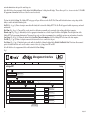
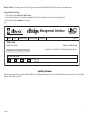
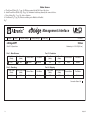
Status Screen:
a. Class Power (Watts) (Fig. 7a, pg. 10): Wattage required by the PoE class of the device.
b. Actual Power Draw (Watts) (Fig. 7b, pg. 10): Amount of watts being drawn by the connected device.
c. Device Status (Fig. 7c, pg. 10): Active or Inactive.
d. Port Status (Fig. 7d, pg. 10): Indicates whether port is Enabled or Disabled.
Fig. 7
WEBVIEW INTERFACE
Management Interface
Status
Setup
Network Settings
Security Settings
Site ID
v1.99.22
Events Log
eBridge4SPT
Status
Wednesday, Jul. 15 2015 [9:35 am]
Site ID: RJ Sports Wear
Port 1 : Main Entrance
Class Power
Actual Power Draw
(Watts)
(Watts)
a.
6.49
b.
3.85
Port 3 : Receiving
Class Power
Actual Power Draw
(Watts)
(Watts)
6.49
3.25
Device Status
c.
Active
Port Status
d. Enabled
Device Status
Port Status
Active
Enabled
Port 2 : Production
Class Power
Actual Power Draw
(Watts)
(Watts)
6.49
3.90
Port 4 : Shipping
Class Power
Actual Power Draw
(Watts)
(Watts)
6.49
3.25
Device Status
Port Status
Active
Enabled
Device Status
Port Status
Active
Enabled
Connection Status: OK
d.
d.
d.
rt: 162
- 10 -eBridge4SK