1
Walk-thru
Setting Up the System
There are documents in the Appendices of the User Manual that help you organize your
data in the fashion that will allow IOI to provide the most benefit to your operation. It is
best that you have your data organized before setting up the system. Take the 'walk
before you run' approach. To start, why not put in a dozen or so Fixed Asset with a
handful of Jobs and work with them to learn the process. Here are the steps that you
will follow to 'set-up' I'mOnIt!
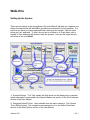
1) System Settings 'Tool Tips' explain the field values on the display and a complete
screen description is presented in the System Master sub-section of the File Processes
section of the User Manual
2) Designate Default Printer (also available from the menu selection File\ System
Tools\ Define Printer) The complete screen description is in the Define Printer subsection of the Other Options section of the User Manual
Version 5.6
~ 14 ~