1
Einstein Platform User’s Manual
11
• Name the ROM dump either: 717006 (MP2x00 US) 737041 (MP2100 D) 747129 (eMate 300)
• Put the file on the compact flash, next to Einstein.rex file.
• Run the X server.
Xfbdev on the Zaurus
Xfbdev -screen 320x240@270 -dpi 100 &
needs
to
be
run
at
270
degrees:
• Run Einstein Platform with:
/mnt/cf/einstein --machine=XXXX --width=YYYY --height=ZZZZ /mnt/cf
where XXXX should be either: 717006 (for a MP2x00 US) 737041 (for a MP2100 D) 747129 (for an eMate
300)
and YYYY and ZZZZ should be set properly.
5.3
Options
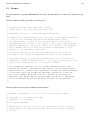
./einstein --help will print some help about the options. The options are summarized below:
--width
Set the width of the screen (in portrait mode). Default is 320.
--height
Set the height of the screen (in portrait mode). Default is 480.
--log or -l
Set the log file. Default is to not log. This option is incompatible with –monitor.
--machine or -m
Set the machine. Choose 717006 for a MP2x00 US, 737041 for a MP2100D or 747129 for an eMate 300.
--machine option can be omitted with a 717006 ROM file.
--monitor
Run in monitor mode.
--ram
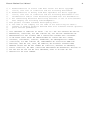
Set the RAM size in 64 KB increment. 1 will mean 64 KB of RAM. 64 is the default setting (4 MB). The
maximum is 255 (nearly 16 MB).