1
PTS User Manual
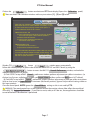
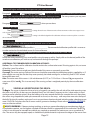
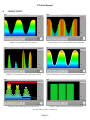
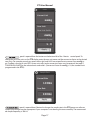
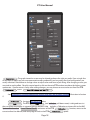
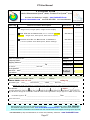
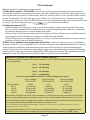
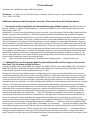
Example of Calibration window 3. Pressure. Note the repeat calibration bars at lower right.
Window [3] Click on
(at top of PTS Calibration window). Follow the written prompts.
Place sensor round sensing pad / on a level flat surface with no weight on it.
Click the
button in window. Wait briefly.
Now place the 30g calibration weight directly over the sensing pad. Let go of the weight.
Click the
button in window. Wait briefly.
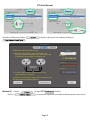
NOTE: 30 g centered on and covering the sensor active pad area = 30.969 mmHg on the pressure scale.
Please refer to following illustration.
The Consistency function in the lower right corner is used to validate multiple
calibration & conditioning measurements to confirm the accuracy of the user’s placement of the calibration weight precisely covering the active sensing pad surface (0.375 inch). Select the number of repeat
attempts “(in the last # calibrations)” scroll function you will to use in averaging the weight calibrations.
Remove and carefully re-center the Calibration Weight squarely on the sensing pad between clicks of the
button. Repeat as many times as required to achieve consistency (high average number). Sensors will perform better if this repetition is performed 4 - 5 times, or any time there is a question of
accuracy.
(See Conditioning Sensors under topic Parts List and Sensor Specifications.
Click
button at the bottom of the Calibration screen
when done.
Navigation using
,
, and
, or
are available on the 3 calibration screens. Use as appropriate to navigate around these screens.
For further information on units see topic CONVERSION VALUES.
⚠ IMPORTANT NOTE: Routine calibration using ONLY the
function is
suggested if cables have not been disconnected, and sensor is in regular or frequent use.
Page 9