1
502 052 02
28 Writing on the Screen.
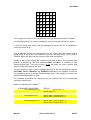
Writing on the screen can be done with different characters and symbols in various
sizes, all independent of each other and at the same screen. This means that it is
simple to combine text and graphics because all text is written in graphic mode. All
texts and symbols can be placed on the screen in any pixel position, so text can be
written in proportional writing and with any line spacing.
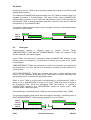
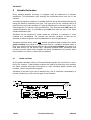
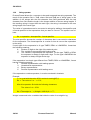
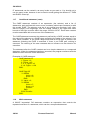
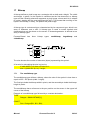
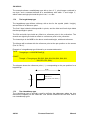
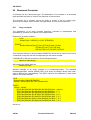
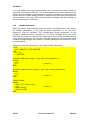
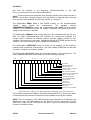
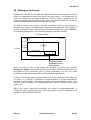
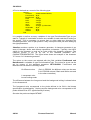
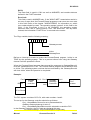
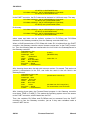
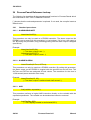
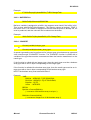
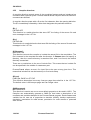
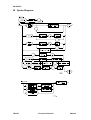
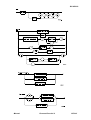
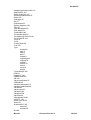
All what is written on the screen, is written in windows. First the basic window is
selected (the window is automatically opened by the selection) and following a
number of windows can be opened from that basic window (only used in PD5020).
The following description is only concerning writing in the basic window.
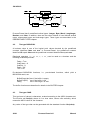
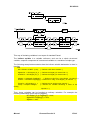
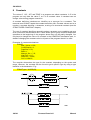
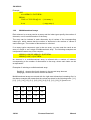
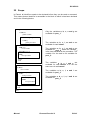
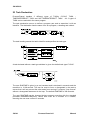
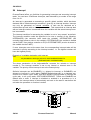
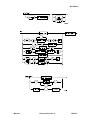
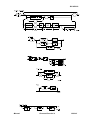
ScreenInfo.Width
0
0
ScreenY
screen
ScreenX
Height
ScreenHeight
basic window
Pen.AbsY
Pen.AbsX
ABCDEFGH
ScreenInfo.ScreenWidth
Pen.ForeGround
Pen.BackGround
Pen.CharGen
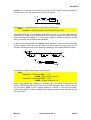
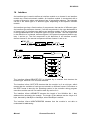
When you want to write at the screen, two standard procedures are available:
Display and Update. When these procedures are called, different parameters must
be passed to the procedures. One of these parameters, the first one, holds
information of the charactergenerator, writing-mode and penposition.
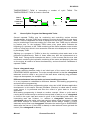
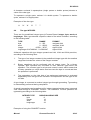
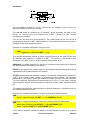
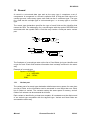
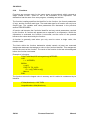
Writing on the display always requires a pen. If no pen is mentioned in the statement
for writing - e.g. Display() - DefaultPen is used as default. If a local DefaultPen is
declared, it will be used - otherwise the globally declared DefaultPen will be used.
The pen holds information on charactergenerator, colours, window number, pen
position etc.
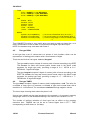
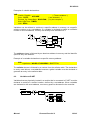
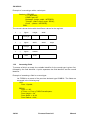
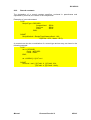
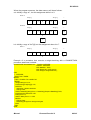
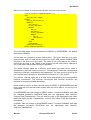
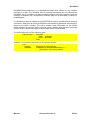
Before the above mentioned procedures are called, a charactergenerator, a
foreground- and a background-colour and a pen-position must be assigned to the
variable of type PenInformationType.
Manual
Process-Pascal 4.0
67/141