1
Chapter 6: Advanced Chassis Setup
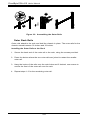
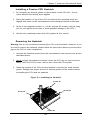
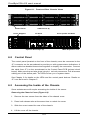
Figure 6-2. Removing the Chassis Cover
14
12
1
12
13
1
6-4 System Fans
Three 8-cm hot-swap fans provide the cooling for the system. It is very important
that the chassis top cover is properly installed and making a good seal in order for
the cooling air to circulate properly through the chassis and cool the components.
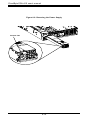
System Fan Failure
Fan speed is controlled by system temperature via a BIOS setting. If a fan fails,
the remaining fans will ramp up to full speed and the overheat/fan fail LED on
the control panel will turn on. Replace any failed fan at your earliest convenience
with the same type and model (the system can continue to run with a failed fan).
Remove the top chassis cover while the system is still running to determine which
of the fans has failed.
Caution: Except for short periods of time, do not operate the server without the chassis cover in place. The cover must be in place to allow proper airflow and prevent
overheating.
6-3