1
Sage Developer’s Guide, Release 6.9
Everybody who uses Sage is encouraged to contribute something back to Sage at some point. You could:
• Add examples to the documentation
• Find bugs or typos
• Fix a bug
• Implement a new function
• Contribute a useful tutorial for a mathematical topic
• Translate an existing document to a new language
• Create a new class, create a fast new C library, etc.
This document tells you what you need to know to do all the above, from reporting bugs to modifying and extending
Sage and its documentation. We also discuss how to share your new and modified code with other Sage users around
the globe.
Here are brief overviews of each part; for more details, see the extended table of contents below. No matter where you
start, good luck and welcome to Sage development!
• Trac server: all changes go through the the Sage Trac server at some point. It contains bug reports, upgrade
requests, changes in progress, and those already part of Sage today. Click here for more information.
Importantly, you will need to create a trac account in order to contribute.
• Source code: You need your own copy of Sage’s source code to change it. Go there to get it and for instructions
to build it.
If you have never worked on software before, pay close attention to the prerequisites to compile on your system.
• Conventions: read our conventions and guidelines for code and documentation.
For everything related to manuals, tutorials, and languages, click here.
• Git (revision control): To share changes with the Sage community, you will need to learn about revision control;
we use the software Git for this purpose.
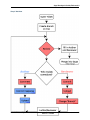
– Here is an overview of our development flow.
– Unfamiliar with Git or revision control?
– How to install it?
– How to configure it for use with Trac?
CONTENTS
1