1
1.3.2
File Menu
1.3.2.1
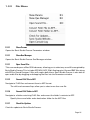
Show Params
Opens the Sonic Studio Process Parameters window.
1.3.2.1
Show Que Manager
Opens the Sonic Studio Process Que Manager window.
1.3.2.1
Open Sound File...
This command opens a Mac OS file browser, allowing you to select any sound file recognized by
Sonic Studio Process. This includes AIFF, WAV, AIFC 32 bit floating point files and BWF files along
with SD2 or Sound Designer II files with region definitions. Sonic Studio Process is also able to
open audio files by dragging and dropping the files into the Parameters window.
1.3.2.2
Convert FLAC File to AIFF
Navigate to FLAC files and convert them to AIFF format.
The shift and command keys allow you to select more than one file.
1.3.2.6
Convert FLAC Folder to AIFF
Navigate to a folder containing FLAC files and convert the folder’s contents to AIFF.
1.3.2.7
Specify the source folder and a destination folder for the AIFF files.
Check For Updates
Check for updates to Sonic Studio Process.
Page 16