1
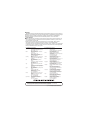
6. SETTING FROM GX DEVELOPER
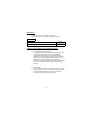
The intelligent function module switches are used to make the mode
setting, default operation setting, battery error detection setting, and
response monitoring time setting.
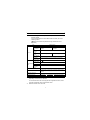
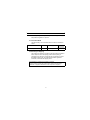
Switch number
Switch 1
Description
Mode setting
Default operation setting/battery error detection
setting
Response monitoring time setting
For system use (Do not set.)
Switch 2
Switch 3 (Lower byte)
Switch 4 to 5
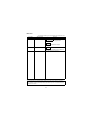
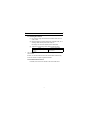
(1) Mode setting (Switch 1)
Select the MES interface module operation mode.
Setting
number
0000h
Online
0001h
Hardware test
0002h
Self-loopback
test
Item
Description
Normal operation mode
Tests the ROM/RAM/intelligent function
module switch settings.
Executes the 10BASE-T/100BASE-TX
interface self-diagnostics test.
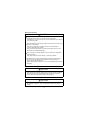
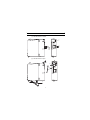
(2) Default operation setting/battery error detection setting (Switch 2)
Select the default operation setting/battery error detection setting
for the MES interface module.
b15
to
Specify "0".*
b3
b2
b1
b0
Switch 2
Default operation setting [Account setting]
Battery error detection setting
0: Detects battery errors.
1: Does not detect battery errors.
0: Operates according to [Account setting].
1: Operates according to the default.
User name :QJ71MES96
Password
:MITSUBISHI
Default operation setting [Network settings]
0: Operates according to [Network settings].
1: Operates according to the default.
IP ADDRESS :192.168.3.3
Subnet mask :255.255.255.0
* When other than 0 is specified in this area, "Switch
setting error" (0180h) occurs at hardware test.
7