1
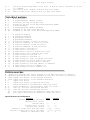
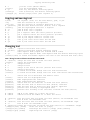
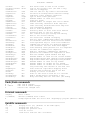
Buffer list commands
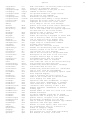
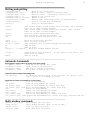
:sf[ind] {file}
CTRL-W ]
CTRL-W f
CTRL-W ^
CTRL-W n or :new
CTRL-W q or :q[uit]
CTRL-W c or :cl[ose]
CTRL-W o or :on[ly]
Split window, find {file} in 'path' and edit it.
Split window and jump to tag under cursor
Split window and edit file name under the cursor
Split window and edit alternate file
Create new empty window
Quit editing and close window
Make buffer hidden and close window
Make current window only one on the screen
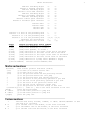
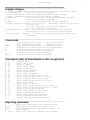
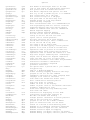
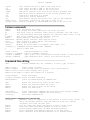
CTRL-W
CTRL-W
CTRL-W
CTRL-W
CTRL-W
CTRL-W
CTRL-W
Move
Move
Move
Move
Move
Move
Move
j
k
CTRL-W
W
t
b
p
cursor
cursor
cursor
cursor
cursor
cursor
cursor
to
to
to
to
to
to
to
window below
window above
window below (wrap)
window above (wrap)
top window
bottom window
previous active window
CTRL-W r
CTRL-W R
CTRL-W x
Rotate windows downwards
Rotate windows upwards
Exchange current window with next one
CTRL-W
CTRL-W
CTRL-W
CTRL-W
Make all windows equal height
Decrease current window height
Increase current window height
Set current window height (default: very high)
=
+
_
19
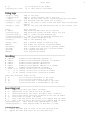
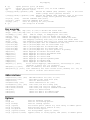
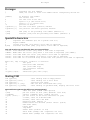
Buffer list commands
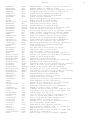
:buffers
or
:files
list all known buffer and file names
:ball
:unhide
or
or
:sball
:sunhide
edit all args/buffers
edit all loaded buffers
:badd {fname}
:bunload[!] [N]
:bdelete[!] [N]
add file name {fname} to the list
unload buffer [N] from memory
unload buffer [N] and delete it from the buffer list in current
window
:[N]buffer [N]
:[N]bnext [N]
:[N]bNext [N]
:[N]bprevious [N]
:bfirst
:blast
in new window
:[N]sbuffer [N]
:[N]sbnext [N]
:[N]sbNext [N]
:[N]sbprevious [N]
:sbfirst
:sblast
to
to
to
to
to
to
:[N]bmod [N]
:[N]sbmod [N]
to Nth modified buf
arg/buf N
Nth next arg/buf
Nth previous arg/buf
Nth previous arg/buf
first arg/buf
last arg/buf
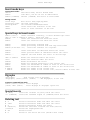
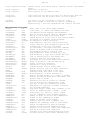
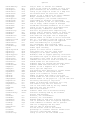
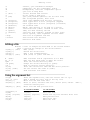
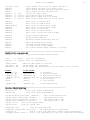
Syntax Highlighting
:syntax on
:syntax off
:syntax
:syntax
:syntax
:syntax
:syntax
:syntax
start using syntax highlighting
stop using syntax highlighting
keyword {group-name} {keyword} ..
match {group-name} {pattern} ...
region {group-name} {pattern} ...
sync [ccomment | lines {N} | ...]
[list]
list current syntax items
clear
clear all syntax info
add a syntax keyword item
add syntax match item
add syntax region item
tell syntax how to sync
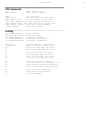
:highlight clear
clear all highlight info
:highlight {group-name} {key}={arg} .. set highlighting for {group-name}
:filetype on
switch on file type detection, without syntax highlighting
:filetype plugin indent on turn on file type detection, with auto indenting and settings