1
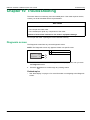
Troubleshooting
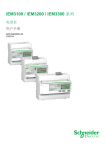
iEM3100 / iEM3200 / iEM3300 series user manual
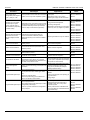
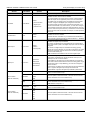
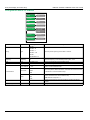
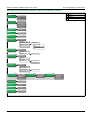
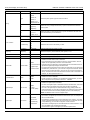
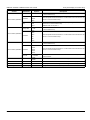
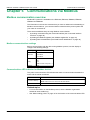
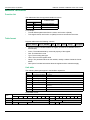
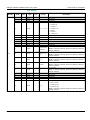
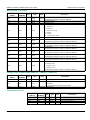
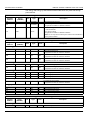
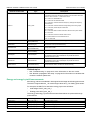
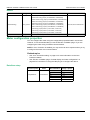
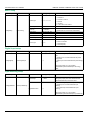
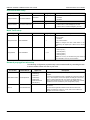
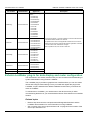
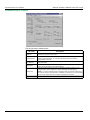
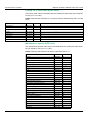
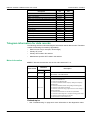
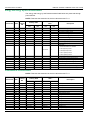
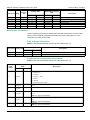
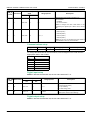
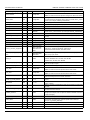
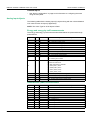
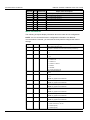
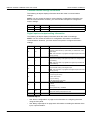
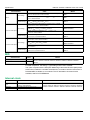
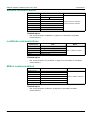
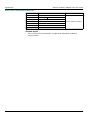
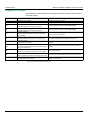
Diagnostic codes
If the diagnostics code persists after following the instructions below, please contact
Technical Support.
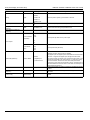
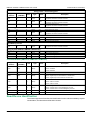
Diagnostic code1
Description
Possible solution
–
LCD display is not visible.
Check and adjust LCD contrast.
–
Push buttons do not respond.
Restart the meter by powering off and powering on again.
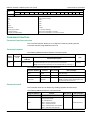
101
102
Metering stops due to an EEPROM error.
Press OK to display total energy consumption.
Metering stops due to a lack of a calibration table.
Press OK to display total energy consumption.
Metering continues.
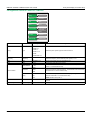
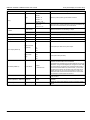
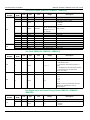
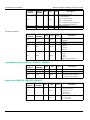
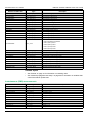
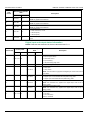
201
202
203
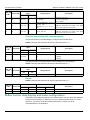
Mismatch between frequency settings and frequency
measurements.
Metering continues.
Mismatch between wiring settings and wiring inputs.
Metering continues.
Phase sequence reversed.
Metering continues.
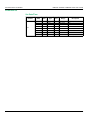
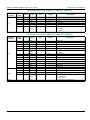
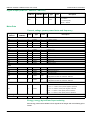
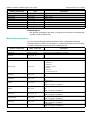
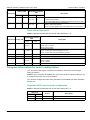
204
205
206
207
Total active energy is negative due to incorrect voltage
and current connections.
Metering continues.
Date and Time have been reset due to a loss of power.
Metering continues.
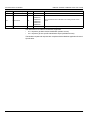
Pulse is missing due to overload on energy pulse output.
Metering continues.
Abnormal internal clock function.
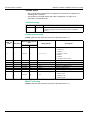
1
94
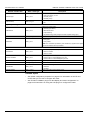
Enter configuration mode and select Reset Config.
Enter configuration mode and select Reset Config.
Correct the frequency settings according to the nominal
frequency of the power system.
Correct the wiring settings according to wiring inputs.
Check the wire connections and correct the wiring settings if
needed.
Check the wire connections and correct the wiring settings if
needed.
Set the Date and Time.
Check the energy pulse output settings and correct if needed.
Restart the meter by powering off and powering on again then
reset the date and time.
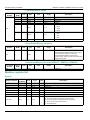
Not all diagnostic codes apply to all devices.
DOCA0005EN-05