1
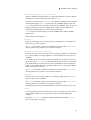
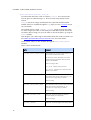
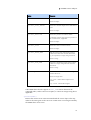
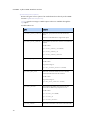
13. mx.ODBC Subpackages
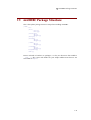
mxODBC selects the subpackage by trying to import the available ODBC driver
subpackages in the following order:
1. mx.ODBC.Windows
2. mx.ODBC.iODBC
3. mx.ODBC.unixODBC
4. mx.ODBC.DataDirect
The mx.ODBC.Manager package then behaves just like the driver manager chosen
by this process.
13.3 mx.ODBC.Windows -- Windows ODBC
Driver Manager
Tested with Windows XP, Vista, 7.
mxODBC links against the Windows ODBC driver manager on Windows. This is
the only mxODBC interface subpackage available on Windows.
13.3.1 Connecting to a Database
Always use the DriverConnect() API to connect to the data source if you need
to pass in extra configuration information such as names of log files, etc.
13.3.2 Supported Datatypes
The subpackage defaults to SQL type binding mode (see the Datatypes section for
details), but reverts to Python type binding in case the connection does not
support the ODBC SQLDescribeParam() API. MS Access is one candidate for
which this API is not useable.
13.3.3 File Data Sources
If you want to connect to a file data source (without having to configure it using
the ODBC manager), you can do so by using the FILEDSN= parameter instead of
the DSN= parameter:
DriverConnect('FILEDSN=test.dsn;UID=test;PWD=test')
133