1
Patch Module 2.5 Primary Developers
Chapter 2: Creating and Editing Patches
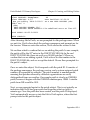
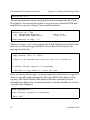
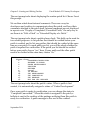
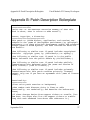
Copy routine lines from a packman message into the description?
No//
The next prompts have to do with descriptions for individual routines. If
your patch affects more than one routine, you can describe the changes to
each routine so that patch subscribers know what they’ll be installing and
what it will do.
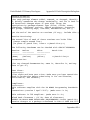
DESCRIPTION OF ROUTINE CHANGES:
THERE ARE NO LINES!
Edit? NO//
ROUTINE CHECKSUM:
THERE ARE NO LINES!
Edit? NO//
Select ROUTINE NAME:
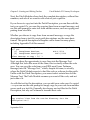
Next, we have the option to enter a description of routine changes. Most
developers do not use this option, since the information can be included in
the Patch Description. However, if you want to have a separate description
of what specific changes are made in which routines, you have the option
to do so here.
Then we are asked about the checksum. This is a holdover from when
checksums had to be calculated manually. These days, KIDS and the Patch
Module calculate checksums automatically, and it’s best not to mess with
that process. Leave this field blank.
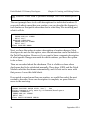
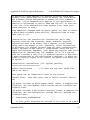
If our patch covered more than one routine, we could then select the next
routine to describe. Since our description is complete, we press Enter to
move to the next step.
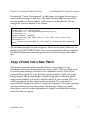
Select ROUTINE NAME:
DISPLAY ROUTINE PATCH LIST: Yes//
Yes
editing comments only seen by releasers/developers
INTERNAL COMMENTS:
THERE ARE NO LINES!
Edit? NO//
Select PATCH RELEASE CHECK:
14
September 2014