1
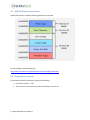
Section 4.1 describes how to make an SD card for the Spark. Optionally a disk image for 8GB SD card is also available from the Shiratech site. Using Win32 Disk Imager or similar tool an SD card can be produced. The following paragraphs describe how to download SW for each of these options. 4.1 Preparing an SD card The following procedure describes how to make a bootable SD card: For booting from an SD card, it should include three partitions. Let us assume that SD card is detected as /dev/sdx in the host system, in that case there should three partitions detected in the SD as sdx1(FAT partition), sdx2(ext3), sdx3(RAW). For Partitioning the SDCARD use a disk utility to create of a 21MB FAT partition (can be larger) and a Ext3 partition which leaves at least 1MB free to use for the RAW partition (A2). These partitions should include the following files in each partition (Assuming the device associated with SD card is sdx): sdx1 - (FAT partition) - Contains Kernel image, Device Tree Binary, u-boot.scr (u-boot script for configuring the FPGA) and FPGA configuration file in Raw Binary Format. sdx2 - ( EXT3 Filesystem ) - Contains the Filesystem After partitioning FAT and EXT3 partitions on SD card, you can use the following method to create the 3’rd partition of type 0xa2: $ sudo fdisk /dev/sdx Enter the following options one by one, 13 | Spark-100 SW user manual 1.0