1
Connecting the Rain Sensor
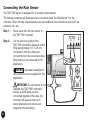
The TBCTMWP sensor is designed for a normally closed sensor.
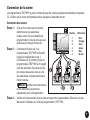
The following example will illustrate how to connect a wired Toro RainSensorTM to the
controller. Other normally closed sensors can be installed to the controller as well, such as
moisture, rain, etc.
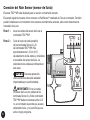
Step 1 –
Route wires from the rain sensor to
the TBCTMWP controller.
Step 2 –
Cut the wire loop (yellow) from
TBCTMWP controller’s Sensor A and B.
Strip approximately 1/2" (1.25 cm)
of insulation from the wires and
connect them to the rain sensor wires.
Wire polarity is not observed in this
application.
NOTE: Use water sealed/proof
wire connectors (not supplied) for this
application.
IMPORTANT: If a rain sensor is not
installed, the TBCTMWP controller’s
Sensor A and B wires must be
connected together. Otherwise, the
controller will assume that rain is
being detected and it will prevent
programs from activating.