1
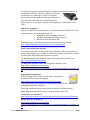
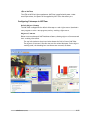
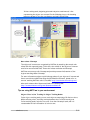
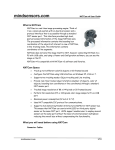
NXC/NBC Library functions are available at: http://www.mindsensors.com/index.php? module=documents&JAS_DocumentManager_op=viewDocument&JAS_Document_id= 57 Connecting NXTCam Wiring for NXTCam NXTCam may be connected to any of the sensor ports of NXT using standard NXT connector cable. In your program, select the appropriate port number to which NXTCam is connected. WARNING Do not connect the NXTCam to any motor port, as the voltage applied by the motor port may damage the electronics of NXTCam. During offline operations, such as programming and configuration, NXTCam must be connected to PC (using USB cable) as well as NXT (using standard NXT connector cable) while NXT is powered ON. During runtime (or autonomous) operations on NXT, the USB connection to PC must be removed. NOTE: While NXTCam is connected to NXT as well as PC, the PC communication takes priority over any other communication. In other words, while NXTCam is connected to PC as well as NXT, if you run a program on NXT, it will not be able to talk to NXTCam. Mounting NXTCam on your contraption The holes on the NXTCam enclosure are designed for tight fit of Technic pins (or axles) with ‘’ cross section. The holes however are not designed for repeated insertions/removals of these pins. To mount NXTCam v2 on your contraption we suggest that you use two dark gray ‘Technic Axle 3 with Stud’ as shown. Insert axles from the front (lens side) of the NXTCam and secure with a bushing on the back or mount it on your contraption directly. Alternately, you may use blue ‘Technic Axle Pin with Friction’, as shown. While disassembling contraption, leave the axles and/or pins on NXTCam. mindsensors.com 3/12