1
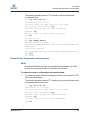
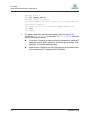
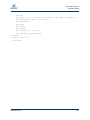
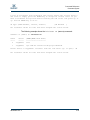
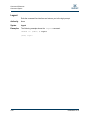
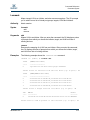
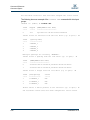
S CLI Usage Working with SAN Router Configurations Working with SAN Router Configurations Successfully managing routers with the command line interface depends on effective router configurations. Key router management tasks include modifying configurations, backing up configurations, and restoring configurations. Modifying a Configuration The router has these major areas of configuration: Management port configuration requires using the following commands: set mgmt (see page 2-42) show mgmt (see page 2-69) ISCSI port configuration requires using the following commands: set iscsi (see page 2-40) show iscsi (see page 2-60) Virtual port groups configuration requires the following commands: set vpgroups (see page 2-49) show vpgroups (see page 2-84) LUN mapping requires using the following command: lunmask add (see page 2-21) Saving and Restoring Router Configurations Saving and restoring a configuration helps protect your work. You can also use a saved configuration as a template for configuring other routers. Save Blade Configuration and Persistence Persistent data consists of system settings, virtual port group settings, LUN mappings, discovered FC targets, and discovered iSCSI initiators. To save a blade’s configuration and persistent data: 1. To generate a file (iSR6200_FRU.bin) containing the saved data (see page 2-12), execute the fru save CLI command. This command stores the file locally on the router in an FTP directory. 2. 1-4 To transfer the saved data from the router to a workstation, execute an FTP utility on a workstation. ISR654601-00 A