1
Adding Files to the Project
10.3.1
File Extensions
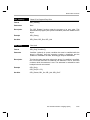
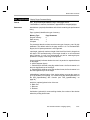
Files are identified by their file extension. The following table lists the
assumptions made based on the file extension.
Extension
Assumptions
*.* or .c*
C source file. May be compiled and linked.
.a* or .s*
Assembly source file. May be assembled and linked.
.o* or .lib
Object or Library file. May only be linked.
.cmd
Linker command file. May only be linked. See the
Code Generation Tools online help for more
information on the linker command file.
other
Unrecognizable file. Unrecognized files are not
added to the project.
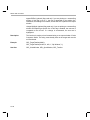
Only one linker command file can be specified for a project. Otherwise, there
is no limit on the number of files that can be added to a project.
All files added to the project are displayed with absolute path names. They
are stored, however, with relative path names so that the project can be easily
moved to a different directory. The absolute path names are determined
every time the project is opened. Path names are stored relative to the project
make file. For example, if your make file is in path c:\version1\linker\make\
and your source file is in path c:\version1\source\ then the relative path to
your source file is ..\..\source\. Each ..\ indicates to backup one directory level.
If your source file is stored on another drive, the source file is stored with an
absolute path since no relative path exists. If you now move or copy your
project make file from c:\version1\linker\make\ to c:\version2\linker\make\, the
source file is assumed to be located in c:\version2\source when you open the
project. When you move a make file, rescan all dependencies to make sure
that all references are resolved.
10-6