1
Troubleshooting
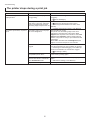
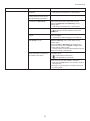
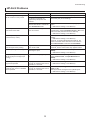
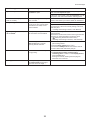
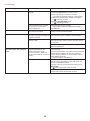
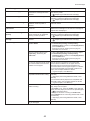
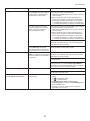
HP-GL/2 Problems
Phenomenon
Cause
Corrective Action
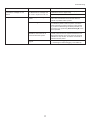
Lines or images are missing in the
HP-GL/2 data that was printed.
The memory is full.
Check the size of the data in the print job.
An HP-GL/2 command not
supported by this printer was
received.
Check the print job and settings.
The printer has received print data
that includes HP RTL commands
when Auto Rotate is On.
Set Auto Rotate to Off before attempting to print
again.
(→"Main Menu Settings," User Manual)
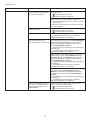
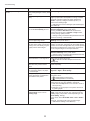
Lines are printed too thick or thin
from the HP-GL/2 data.
The Line Width setting in the main Confirm the selection in Line Width. If fine lines are
printed faintly, setting ThickenFineLines to On in the
menu is incorrect.
main menu will print the lines more distinctly.
(→"Main Menu Settings," User Manual)
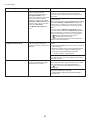
HP-GL/2 jobs are printed in
monochrome (or color).
The Color Mode is incorrect.
On the printer Control Panel, check the Color Mode
setting.
(→"Main Menu Settings," User Manual)
However, for optimal Printhead performance, the
printer consumes trace amounts of color ink even
when Monochrome is selected as Color Mode.
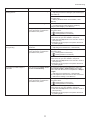
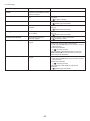
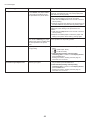
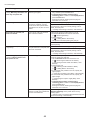
Printed colors are inaccurate in
lines during HP-GL/2 printing
AdjustFaintLines in the main
menu is set to On.
Selecting Off may help produce the expected results.
However, lines in some colors may appear broken.
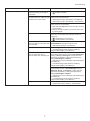
HP-GL/2 printing takes a long time. Large print jobs with a lot of data
take longer to print.
On the printer Control Panel, set Input Resolution to
300dpi.
(→"Main Menu Settings," User Manual)
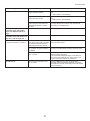
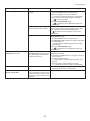
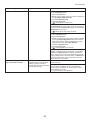
The printer stops when printing a
HP-GL/2 job (the carriage stops
moving)
The printer is analyzing the print
job.
Either wait a while for printing to resume, or on the
printer Control Panel, set Input Resolution to
300dpi.
(→"Main Menu Settings," User Manual)
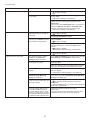
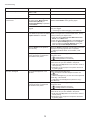
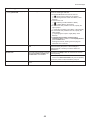
HP-GL/2 jobs are printed 6 mm
larger than specified
The page size of the HP-GL/2
print job, as created in the source
application, is incorrect.
In MAIN MENU, set PageSizeProcess1 to On.
(→"Main Menu Settings," User Manual)
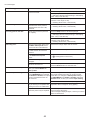
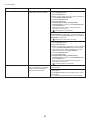
HP-GL/2 jobs are printed at
maximum size, even if a standard
size is specified
The page size of the HP-GL/2
print job, as created in the source
application, is incorrect.
In MAIN MENU, set PageSizeProcess2 or Conserve
Paper to On.
The layout will be changed to the optimal layout.
(→"Main Menu Settings," User Manual)
15