1
Chapter 1: Introduction to JavaScript
Basic Development Tools
All that you need to develop JavaScript applications is a text editor and a web browser. Here you’ll find
some useful recommendations for each, but if all you have is Windows Notepad and Internet Explorer,
you can easily write and test the examples in this book.
Choosing a Text Editor
Some people prefer to work within the black box of a WYSIWYG (What You See Is What You Get) editor
like Visual Studio when it is in design mode or Dreamweaver design mode. Microsoft FrontPage also
provides this functionality. I strongly warn against getting comfy with this type of tool, because it
generally does not accurately predict browser behavior and because you will need to spend most of your
time looking at the actual code anyway. However, both Visual Studio and Dreamweaver are fine choices
if you use only the text editing features. If you don’t want to shell out for these programs (and your
employer will not), here are some alternatives:
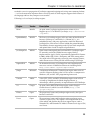
❑
Aptana (http://www.aptana.com): An Eclipse-based IDE with built-in Intellisense for help
remembering those pesky method and property names, as well as a CSS helper for styling
pages. There is a full free version, which is the one that most people use. For less than $100, you
can upgrade to the pro version, which also has some support for debugging JavaScript
applications right inside the IDE. Mac, Windows, Linux.
❑
Microsoft Visual Web Developer Express Edition (http://www.microsoft.com/express/
webdevelopment/): A full-featured IDE based on Visual Studio and tailor made for web
development. The especially useful thing about this one is you can configure it to debug your
JavaScript code outside of a browser. If you can’t afford Visual Studio but like those products,
definitely consider this one. Windows.
❑
Notepad++ (http://notepad-plus.sourceforge.net): Is an open source and free text
editor intended for use as an IDE. Although fairly bare bones with no intellisense, it has
excellent syntax highlighting and can even synchronize your project with a remote FTP or SSH
server via an extensive plugin library. Windows.
❑
Textmate (http://macromates.com/): Called the “missing editor” for OSX, Textmate is the
IDE of choice for developers on the Mac. Although at first glance this looks just like a text editor,
as you dig in you will find a world of useful macros and snippets to assist you. This is not a free
product but costs only about $50. Mac.
The Web Server
Although not required, it may be helpful down the road if you are developing with the context of a web
server on your machine, if your pages are simple static HTML with some JavaScript (and no Ajax), this is
not required. Simply point your browser to the page on your computer by using the file:/// directive in
17