1
2-Port SATA3 RAID/HyperDuo PCIe Card
your computer. If you want to configure your RAID drives, press and
hold the 2 keys, Ctrl and M, to enter the BIOS Setup Utility for this card.
You can configure the SATA RAID or HyperDuo modes in the BIOS
Setup.
5. RAID and HyperDuo Modes
5.1 RAID Modes
This chapter will help you to know the RAID and HyperDuo modes
supported by the SATA3 RAID/HyperDuo PCIe Card.
5.2 Non-RAID mode (Single Disk Mode)
This mode is the Single Disk mode. Each disk drive will be treated as
one disk volume in the operating system.
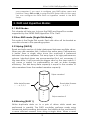
5.3 Striping (RAID 0)
Read and write sectors of data interleaved between multiple drives.
When any disk member fails, it affects the entire array. Performance
is better than a single drive since the workload is balanced
between the array members. This array type is for high performance
systems. Identical drives are recommended (but not necessary, if
the sizes differ, it will truncate the bigger drive so the sizes match, it
will cause a waste) for performance as well as data storage
efficiency. The disk array data capacity is equal to the number of
drive members times the smallest member capacity.
Stripe member 1
1
3
:
:
Write data Streams
… ….. 4, 3, 2, 1
2
4
:
:
Read data Streams
….. 4, 3, 2, 1
Stripe member 2
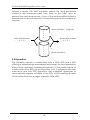
5.4 Mirroring (RAID 1)
Writes duplicate data on to a pair of drives while reads are
performed in parallel. The RAID controller performs reads using
advanced data handling techniques that distribute the workload in
a more efficient manner than using a single drive. When a read
3