1
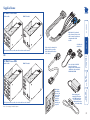
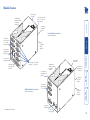
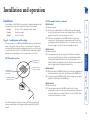
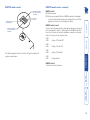
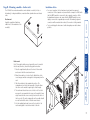
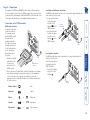
Further information Troubleshooting ........................................................................26 Getting assistance......................................................................27 Products in the X2-Series range................................................28 Cables .........................................................................................28 Radio Frequency Energy ...........................................................29 Installation ...................................................................................5 Stage A - Configuration switch settings ................................5 LOCAL module switches.....................................................5 REMOTE module switches .................................................6 Stage B - Mounting a module – desk or rack ........................7 Installation Advice..............................................................7 Stage C - Connections.............................................................8 Connections at the LOCAL module ...................................8 Connections at the REMOTE module..............................11 Operation...................................................................................14 Power and activity indicators...............................................14 General use ...........................................................................14 User arbitration and keyboard indicators ......................14 Visible image shadows .....................................................14 Locking and unlocking the system ......................................15 Installation and operation Configuration ............................................................................16 What are hotkeys? ...........................................................16 Entering, using and exiting configuration mode...........16 Password setting ...................................................................17 Password override.................................................................17 Hot plugging and mouse restoration ..................................18 Which restore setting do I use?.......................................18 Microsoft and Logitech -specific mouse settings ................18 Image controls - sharpness and brightness .........................19 Skew adjustment ..................................................................21 Miscellaneous settings..........................................................23 Flash upgrade ............................................................................24 Stage A - Download the upgrade files ................................24 Stage B - Create a startup diskette ......................................24 Stage C - Reconfigure the LOCAL connections ...................25 Stage D - Reconfigure the REMOTE connections................25 Stage E - Return all connections to their usual states ........25 Introduction .................................................................................2 Supplied items .............................................................................3 Module features ..........................................................................4 Special configuration Welcome Contents 1