1
Guest Failover Clustering
In the past, physical servers were usually affiliated with the nodes in a failover cluster. Today,
virtualization technologies make it possible to form a cluster with each node being a guest
operating system on virtual servers. This is known as guest failover clustering. To achieve a
guest failover cluster, you must have a quorum, a public network, a private network, and
shared storage; however, instead of using physical servers for each node in the SQL Server
failover cluster, each node is virtualized through Hyper-V. Organizations taking advantage of
guest failover clustering with SQL Server 2008 R2 must have the physical host running Hyper-V
on Windows Server 2008 R2, and the configurations must be certified through the Server Virtualization Validation Program (SVVP). Likewise, the guest operating system must be Windows
Server 2008 R2, and the virtualization environment must meet the requirements of Windows
Server 2008 R2 failover clustering, including passing the Validate a Configuration tests.
NOTE When implementing failover clusters, you can combine both physical and virtual
nodes in a single failover cluster solution.
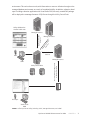
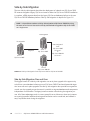
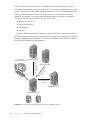
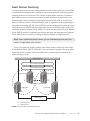
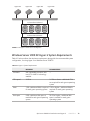
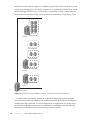
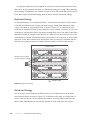
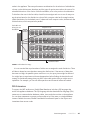
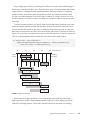
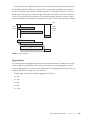
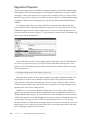
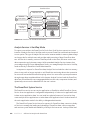
Figure 4-3 illustrates a multiple-instance guest failover cluster running SQL Server 2008
R2 on Windows Server 2008 R2. SQLNode1 is a virtual machine running on the server called
Hyper-V01, which is a Hyper-V host, and SQLNode2 is a virtual machine running on the
Hyper-V02 Hyper-V host.
Public Network
SQL Cluster\Instance02
SQL Cluster\Instance01
SQL Node1
SQL Node2
V
V
Heartbeat Network
Hyper-V01
Hyper-V02
P
P
SAN Storage
P = Physical Server
V = Virtual Server
FIGURE 4-3 A two-node guest failover cluster
Failover Clustering with Windows Server 2008 R2
CHAPTER 4
67