1
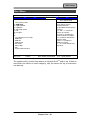
BIOS Setup
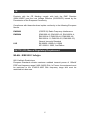
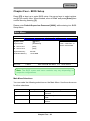
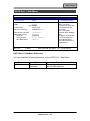
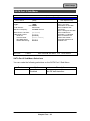
Advanced Menu Selections
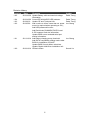
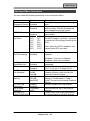
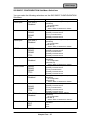
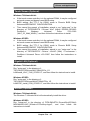
You can make the following selections on the Advanced Menu.
Feature
Boot-time
Diagnostic Screen
QuickBoot Mode
Options
Enable
Disabled
Enable
Disabled
USB 2.0 Control
Enable
Disabled
15 C
71 C
23 C
79 C
31 C
87 C
39 C
95 C
47 C
103 C
55 C
109 C
63 C
111 C
Disabled
Enable
Disabled
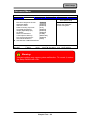
Passive Cooling
Trip Point
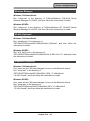
Core
Multi-Processing
Intel(R)
SpeedStep (tm)
CX States
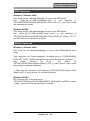
DVMT
Pre-Allocated
Total Graphics
Memory
PCI Hot-Plug
Resources
SATA Mode
Selection
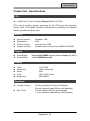
SIO SMC227
CONFGURATION
Enable
Disabled
Enabled
Disabled
32 MB
64 MB
128 MB
128 MB
256 MB
MaxDVMT
Enabled
Disabled
Compatible
AHCI
Description
Display the diagnostic screen during
boot
Allows the system to skip certain tests
while booting. This will decrease the
time needed to boot the system.
Enables Device 29 USB 2.0
functionality.
This value controls the temperature of
the ACPI Passive Trip Point – the point
in which the OS will begin throttling the
CPU.
Note: When the DTS is enabled, only
values below 97C are valid.
Determines whether the 2nd core is
enabled.
Disabled = 2nd core is disabled.
Enabled = 2nd core is enabled.
Allows more than two freq. range to be
supported
Enable CPU C-states: Main switch for
C0, C1, C2, C3, C4, Deep C4, C6
Select DVMT Pre-Allocated (Fixed)
Graphics Memory size used by the
Internal Graphics Device.
Select the amount of Total Graphics
Memory- Pre-Allocated + Fixed +
DVMT for use by the Internal Graphics
Device.
Enable/ Disable Hot-Plug support.
Determines how SATA controller(s)
operate.
These items control the configuration
of various National 393 SIO devices.
Chapter Four - 35