1
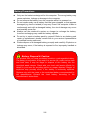
Battery Precautions Only use the batteries designed for this computer. The wrong battery may cause explosion, leakage or damage to the computer. Do not remove the battery from the computer while it is powered on. Do not continuously use a battery that has been dropped, or that appears damaged (e.g. bent or twisted) in any way. Even if the computer is able to continuously work with a damaged battery, the circuit damage may occur and possibly cause fire. Always use the notebook’s system or charger to recharge the battery. Incorrect recharging may make the battery explode. Do not try to repair a battery pack by yourself. Refer to any battery pack repair or replacement, please contact with to your service representative or qualified service personnel. Please dispose of a damaged battery promptly and carefully. Explosion or leakage may occur, if the battery is exposed to fire, improperly handled or discarded. Battery Disposal & Caution: The product that you have purchased contains a rechargeable battery. The battery is recyclable. At the end of its service life, under various state and local laws, it may be illegal to dispose of this battery into the municipal waste stream. Check with your local solid waste officials for details in your area for recycling options or proper disposal. Danger of explosion may possibly occur, if the battery is incorrectly replaced. Replace only with the same or the equivalent battery recommended by the manufacturer. Discard the used battery according to the manufacturer’s instructions. VIII