1
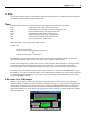
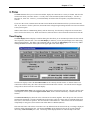
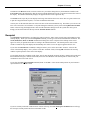
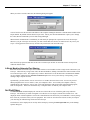
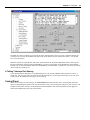
Chapter 7 Telescope 31 7. Telescope The Telescope menu contains a number of commands that allow you to check/set the status of the scope to which you are connected. Protocol There are four different ways to use Autostar Suite to communicate with and control you telescope. The protocol menu allows you to select how you want to talk to your telescope and how your telescope can talk back to you. None Selecting this menu item disconnect the Starmap from the telescope if it is presently connected. Autostar Via Comm Port Meade Instrument Corporation, has developed the Autostar family of computer controlled telescopes. These unique instruments can automatically drive the telescope to any object contained in its own database, or to any specified R.A. and Dec. coordinate. The coordinates may be supplied either from the telescope's control pendant or from an RS-232 interface. Autostar Suite supports many of the telescope's commands, but uses the programs values for R.A. and Dec. instead of the telescope's internal database. This assures future compatibility as new databases become available. WARNING: Use extreme caution when using the Autostar in the remote control mode. Autostar Suite cannot determine if there are any mechanical interference that may develop as the telescope is moved, such as, a camera extending to far from the back of the telescope. As a result, it is possible to move the telescope into positions that may cause serious damage to the equipment or personal physical injury! Via Modem Autostar suite can also control a telescope that is connect remotely via a telephone modem. In order to communicate via modem, the Autostar telescope should be connected to the modem. The modem is connected to an incoming phone line. The modem must be configured to automatically answer incoming calls and to communicate with the telescope at 9600 bits per second. You will need to consult the manufacturer’s literature to make configure these settings. With the Autostar telescope attached to it’s modem, you can then use this setting to dial up and control your remote telescope. When you select this option you will be prompted by a dialog box like the one below to supply the phone number and dialing instructions to the computer’s modem. Via Network Autostar suite can also control telescope remotely over a network connection. The connection may be a local area TCP/IP network, or over the internet. Thus you can operate you instrument from across the room or from around the world. In order to connect to a network telescope, the telescope must be connected to another computer on the network and must be running the Autostar Network Server module (see section below).