1
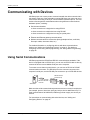
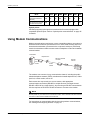
Introduction ION Setup User Guide Connecting to serial devices If you want to connect your computer to a single meter, you can use either RS-232 or RS-485: If the computer is less than 50 ft (15 m) from the meter, use either RS-232 or RS485. If the computer is more than 50 ft (15 m) from the meter, but less than 4000 ft (1200 m), use RS-485. To connect your computer to more than one meter, you must use RS-485. In this case, you need either: an RS-485 communications port on the computer, OR an RS-232 communications port and an RS-232 to RS-485 converter. Communications converters such as the COM32 or COM128 (legacy products) can support up to 32 and 128 devices, respectively. CAUTION Never connect the RS-232 terminals with the RS-485 terminals of any device. Doing so will damage the RS-485 driver circuits of every device at the site. Directly connecting a single device using RS-232 Use a suitable RS-232 cable to connect your workstation directly to a single ION meter. Both the workstation and the meter must have RS-232 communications ports. With a direct RS-232 link, only one meter can be connected to each serial port of the workstation. Refer to the meter’s installation manual for details on RS232 communications connections. Directly connecting multiple devices using RS-485 An RS-485 communications link allows you to connect your workstation to up to thirty-two devices using shielded twisted-pair wire. If your workstation is not equipped with an internal RS-485 communications card, you can connect an external RS-232 to RS-485 converter to the computer’s RS-232 serial port. NOTE Before connecting any communications cables, confirm that each device's communication port has been correctly configured. Refer to the meter’s technical documentation for instructions on checking and changing the communications configuration. COM128 (legacy device) considerations Below are the suggested DIP switch settings for the COM128 RS-232 to RS-485 communications converter (refer to the installation and operation manual for a complete list of mode settings): Page 14 © 2010 Schneider Electric. All rights reserved.