1
Chapter 4: Getting Started
Additional Examples and Tutorials
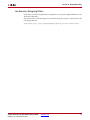
Numerous examples are used to illustrate System Generator features and functions in the
System Generator documentaton. These examples are found in the directory at pathname
<ISE_Design_Suite_tree>/sysgen/examples and are listed in the table below. In
addition to these examples, System Generator also includes demonstration models that
can be run from the demo page. Enter the following command at the MATLAB prompt:
demo blocksets xilinx
Note: If you are using the MATLAB help browser you can open and run the examples directly from
this page. To run an example, click on the link. MATLAB will change directories to the example
directory and open the example model.
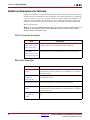
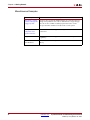
AXI4 Conversion Examples
Topic
Description
How to Migrate from
DDS Compiler 4.0 to
DDS Compiler 5.0
Design example showing how to migrate a non-AXI4 DDS
Compiler 4.0 block to an AXI4 DDS Compiler 5.0 block.
How to Migrate from
Fast Fourier
Transform 7.1 to Fast
Fourier Transform 8.0
Design example showing how to migrate a non-AXI4 Fast Fourier
Transform 7.1 block to an AXI4 Fast Fourier Transform 8.0 block.
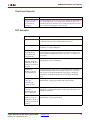
Black Box Examples
Topic
72
Description
Importing a VHDL
Module
A tutorial showing how to use the black box to import VHDL into a
System Generator design and how to use ModelSim to co-simulate
the VHDL module.
Simulating Several
Black Boxes
Simultaneously
Shows how black boxes can co-simulate simultaneously, using only
one ModelSim license.
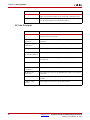
Dynamic Black Boxes
A tutorial showing how to parameterize the black box.
Importing a Verilog
Module
A tutorial showing how to use the black box to import Verilog into
a System Generator design and how to use ModelSim to co-simulate
the Verilog module.
Importing a Xilinx
Core Generator
Module
A tutorial showing how to import a COREGEN module as a black
box.
www.xilinx.com
System Generator for DSP Getting Started Guide
UG639 (v 14.3) October 16, 2012