1
Chapter 4 – Device Configuration
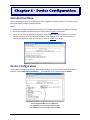
Introduction Menu
Use the Introduction Menu to configure your device, upgrade the device firmware, or develop a script
that automatically configures multiple devices.
Select:
●
●
●
Option A to configure the MultiConnect device. This chapter details Device Configuration settings.
Option B to upgrade the MultiConnect firmware. Refer to Chapter 5 for details.
Option C to enable a predefined configuration script. Chapter 6 provides examples of Tera Term
terminal emulator scripts for Windows. Modify a script example or use a terminal emulator to
develop a configuration script for your device. Refer to Chapter 6 for details.
Device Configuration
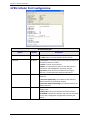
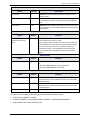
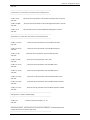
Use the Device Configuration menu to adjust device settings. To select an option, type the number or
character next to Enter option to modify => _ at the bottom of the window and press ENTER.
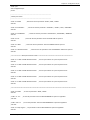
Device Configuration Menu set for a GPRS device.
For a GSM device, Current Settings would show GSM.
For a CDMA device, Current Settings would show CDMA.
22
Multi-Tech Systems, Inc. MultiConnect AW User Guide