1
Release Notes for R2006a
• Nonreliance on color coding as the sole means of conveying information
about working with a GUI
• Noninterference with user-selected contrast and color selections and other
individual display attributes, as well as noninterference for other operating
system-level accessibility features
• Consistent meaning for bit-mapped images used in GUIs
• HTML documentation that is accessible to screen readers
The MathWorks beUeves that its products do not rely on auditory cues as the
sole means of conveying information about working with a GUI. However, if
you do encounter any issues in this regard, please report them to the
MathWorks Technical Support group.
http://www.mathworks.com/eontaet_TS.html
Keyboard access to the user interface includes support for "sticky keys," which
allow you to press key combinations (such as Ctrl+C) sequentially rather than
simultaneously.
Except for scopes and real-time data acquisition, the MathWorks software does
not use flashing or blinking text, objects, or other elements having a flash or
blink frequency greater than 2 Hz and lower than 55 Hz.
Accessibility Support Details
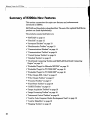
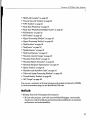
These notes about product accessibility cover the following topics:
• "Assistive Technologies" on page 39
• "Troubleshooting" on page 39
• "Documentation" on page 41
If you are using a screen reader, such as JAWS, see also "Installation Notes for
Accessibility Support" on page 43.
38