1
Setting Up a Nehvork Installation
Remote Client Access Configuration
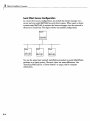
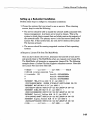
In a remote client access configuration, you install MATLAB and the license
manager on a central file server. (These instructions refer to this system
as your license server.) Users on client systems access MATLAB over the
network. This figure shows one possible configuration. The license manager
(FLEXnet) and MATLAB can be installed on the same server or on separate
servers.
If your license server is a PC, follow the instructions in "Overview of Steps
in Network Installation Procedure" on page 2-5. If your license server is a
UNIX system, follow the instructions in the installation documentation for
UNIX systems. A UNIX license server can serve PC clients and a PC server
can serve UNIX clients.
In remote client access configurations, it can be helpful to give clients a
script that sets up a shortcut to the network copy of MATLAB and specifies a
default startup folder for MATLAB. See "Licensing Components" on page 3-2
for more setup suggestions.
2-3