1
Other convenience functions
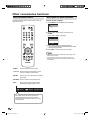
Menu operation buttons
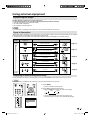
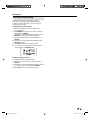
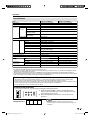
Quick guide for MENU operation
Use the following buttons on the remote control to
operate the menu.
example : Select Language
1 Press MENU and the MENU screen displays.
Main Menu
Picture
>>
Audio
Channel
Lock
Setup
ENTER : Set
: Select
2 Press ▲/▼ to select “Setup”, then press ▶ or
ENTER.
Press ▲/▼ to select “Language”.
Setup
Closed Caption
Language
Video Label
Auto Shut Off
>>
English
>>
Off
Reset
>>
: Select
: Adjust
3 Press ◀/▶ to select the desired language.
...on the following pages the MENU can be called
in the same way as here.
4 Press EXIT to return to the normal screen.
NOTE
• Some menu items may not displayed depending on the
selected input source.
• If no buttons are pressed for more than approx. 60
seconds, the menu screen will return to normal screen
automatically.
MENU:
Press to open the menu screen.
▲/▼/◀/▶: Press to select a desired item on the
screen or adjust a selected item.
ENTER:
Press to go to the next step or complete
the setting.
RETURN: Press to return to the previous step.
EXIT:
Press to exit from the menu screen.
All changed settings will be saved.
: Select
: Adjust
ENTER : Set
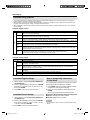
The lower part of the menu screen is an
operational guide for the remote control.
It will change in accordance with each menu
setting screen.
26
39X0131B_eng.indb 26
5/18/10 11:40:49 AM