1
SD-AT50
DX-AT50
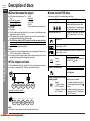
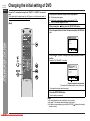
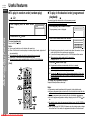
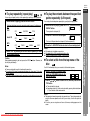
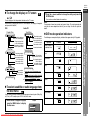
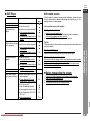
" To change the display on TV screen
You can display or hide the operation indicators on the TV screen.
While the disc is playing, press the ON SCREEN button. (The display is changed at
each press of this button.)
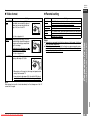
Audio CD
Track/Time
T
Remaining playback
time for the current track
Elapsed playback time
for the current track
Total number of tracks
Current track number
Total track/Time
Remaining playback
time for the current title
Elapsed playback time
for the current title
Total number of titles
Current title number
ALL
4/12 0:13:45 - 0:45:40
Total remaining
playback time for the disc
Total elapsed playback
time for the disc
Total number of tracks
Current track number
Bit rate
Layer number ! For an MP3 disc, the following is disRepeat indicator
played.
Image information
Current track name (yellow) elapsed
playback time for the current track
! If you press the RETURN
button, the
display disappears.
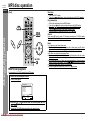
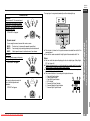
" To select a subtitle or audio language from
the disc menu
You can select the desired subtitle or audio language and sound system (Dolby Digital (5.1ch) or DTS sound) on your DVD if it has a disc menu.
1
While the disc is stopped or played,
press the MENU button to display
the disc menu.
Downloaded From Disc-Player.com Sharp Manuals
button to change the setting and press the
You can also use direct buttons for some discs.
Note:
The procedure shown here provides only general steps. The actual procedure for
using the disc menu depends on the disc you are using. See the disc jacket for
details.
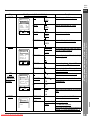
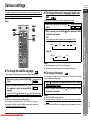
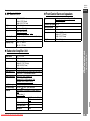
The following are examples of display indicators that appear during DVD playback.
Operation
When the power is
on without a disc
Disc data is being
read
Example
TV screen
ROADING
Type of disc
DVD
Stop
The display disappears.
The display disappears.
or
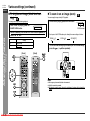
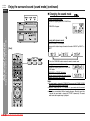
" DVD mode operation indicators
4/16 0:03:21 - 0:02:15
Remaining playback
time for the current chapter
Elapsed playback time
for the current chapter
Total number of chapters
Current chapter number
Title/Time
Press the , ,
ENTER button.
Play
Pause
Slow
DVD player display
- Various settings -
Chapter/Time
2
Advanced Disc Features
DVD
ENGLISH
Fast Forward
Fast Reverse
1.Highlights
2.Start Movie
E-36