1
AVS4YOU Programs Help - AVS Video to GO
Page 10 of 34
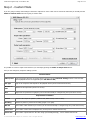
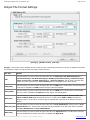
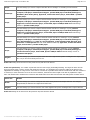
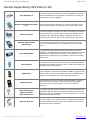
The possible devices presets include:
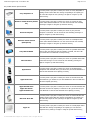
Sony PlayStation 3
- use this preset if you plan to watch your movie on a Sony PlayStation 3
gaming console with a hard drive storage. Depending on its capacity you
can select the output file size (entering it in digits or using the up and
down arrows);
Windows mobile devices (Pocket
PC)
- use this preset if you plan to watch your movie on a pocket PC that
works under Windows Mobile OS. You can choose the file size manually
(entering it in digits or using the up and down arrows);
Personal computer
- use this preset if you plan to watch your movie on your personal
computer or notebook. You can choose file size manually (entering it in
digits or using the up and down arrows);
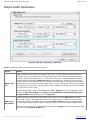
Windows mobile devices
(Smartphone)
- use this preset if you plan to watch your movie on a smartphone that
works under Windows Mobile OS. You can choose the file size manually
(entering it in digits or using the up and down arrows);
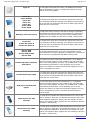
Sony PSP Handheld
- use this preset if you plan to watch your movie on a portable device with
memory stick card that can have the capacity of 512Mb, 1Gb and 2 Gb
(you should find out what kind of card you have);
Microsoft Zune
- use this preset if you plan to watch your movie on a portable device with
a hard drive storage. You can choose file size manually (entering it in
digits or using the up and down arrows);
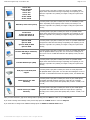
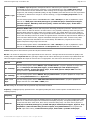
Apple iPhone
- use this preset if you plan to watch your movie on the Apple iPhone
smartphone with hard disk drive (you should see your iPhone datasheet to
find out what hard disc drive capacity you have);
Apple iPod Touch
- use this preset if you plan to watch your movie on an iPod Touch with
hard disk drive (you should see your iPod datasheet to find out what hard
disc drive capacity you have);
Apple iPod 5G Video
Apple iPod Classic
Apple iPod Nano 3G
- use this preset if you plan to watch your movie on an iPod with hard disk
drive that can have the capacity of 5 Gb and 10 Gb (you should see your
iPod datasheet to find out what hard disc drive capacity you have);
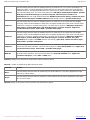
Microsoft Xbox 360
- use this preset if you plan to watch your movie on a Microsoft Xbox 360
gaming console with a hard drive storage. Depending on its capacity you
can select the output file size (entering it in digits or using the up and
down arrows);
Apple TV
- use this preset if you plan to watch your movie on a media player device
with hard drive storage. Depending on its capacity you can select the
output file size (entering it in digits or using the up and down arrows);
© Online Media Technologies Ltd., UK 2004 - 2009 All rights reserved.
www.avs4you.com