1
Chapter 3: Software Installation and Setup
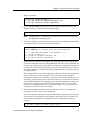
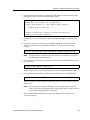
Here is an example of the commands in the previous steps:
ssr(config)# system set password login demo
ssr(config)# system set password enable demo
ssr(config)# save active
ssr# exit
ssr# system show active-config
Running system configuration:
!
! Last modified from Console on Mon Jan 19 12:12:19 1998
!
1 : system set name "ssr"
2 : system set location "Sunnyvale, CA"
3 : system set contact "John Smith"
4 : system set hashed-password login jNIssH c976b667e681d03ccd5fc527f219351a
5 : system set hashed-password enable zcGzbO 5d1f73d2d478ceaa062a0b5e0168f46a
6 : snmp set community public privilege read
7 : snmp set target 10.50.11.12 community public
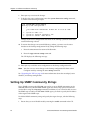
Caution: Test all the new passwords before saving the active configuration to the Startup
configuration file. As shown in the example above, the passwords are shown in the active
configuration in an encrypted format and will also appear this way in the Startup
configuration.
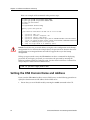
To keep your passwords secure, the SSR 2100 does not have a command for displaying
passwords. If you forget a password, you can remove the password by entering the
following command while in Configure mode. (See the SmartSwitch Router Command Line
Interface Reference Manual for more information.)
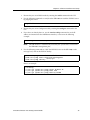
system set password login|enable none
Setting the DNS Domain Name and Address
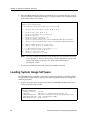
If you want the SSR 2100 to be able to access a DNS server, use the following procedure to
specify the domain name and IP address for the DNS server.
1.
32
Ensure that you are in Enable mode by entering the enable command in the CLI.
SmartSwitch Router 2100 Getting Started Guide