1
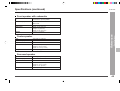
Connections (continued)
CD-DD4500
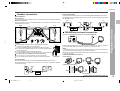
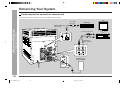
Speaker connection
1
Surround speakers
Black
Left
Right
Red
SURROUND
SURROUND
R
L
FM/AM loop antenna connection
Connect the FM/AM loop antenna to the ANTENNA jack.
Blue
Black
Black
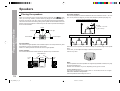
Caution:
Never mistake the MAIN and the SUBWOOFER terminals.
The unit or the speakers may be damaged.
Only the included speakers should be used with this product.
Do not use other speakers with this unit or use the supplied speakers with other units.
Do not mistake the right and the left channels.
The right speaker is the one on the right side when you face the unit.
Do not let the bare speaker wires touch each other.
Do not stand or sit on the speakers. You may be injured.
Do not mistake the conection of center and surround speakers.
,
Center speaker
Incorrect
Connect the center speaker wire to the CENTER SPEAKER jack as shown.
Use speakers with an impedance of 6 ohms or more, as lower impedance speakers
can damage the unit.
3
White
4
Black
Blue
2
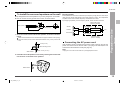
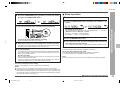
Position the FM antenna wire and rotate the AM loop antenna for optimum reception.
Place the AM loop antenna on a shelf, or attach it to a stand or a wall.
Notes:
Placing the antenna on the unit or near the AC power cord may cause noise pickup.
Place the antenna away from the unit for better reception.
Do not connect the attached FM antenna to an external FM antenna. Otherwise,
trouble may occur.
5
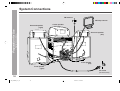
– System Connections –
Main terminals:
Connect the black wire to MAIN(–) terminal and the blue wire to the MAIN(+) terminal.
Subwoofer terminals:
Connect the black wire to the SUBWOOFER(–) terminal and the red wire to the
SUBWOOFER(+) terminal.
Right
Left
Red
Red
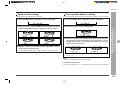
Connect each surround speaker wire to the SURROUND SPEAKER jack as shown.
Use speakers with an impedance of 8 ohms or more, as lower impedance speakers
can damage the unit.
Preparation for Use
Front speakers
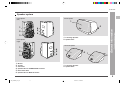
Installing the AM loop antenna:
< Assembling >
8
9
10
11
13
< Attaching to the wall >
14
15
Wall
Screws
(not supplied)
CENTER
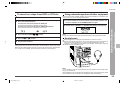
Demonstration mode (See page 15.)
11
7
12
Black
*CD_DD4500_P10_14
6
2001.4.19, 11:41 PM
11