1
R2N2 RAID IG.BOOK Page 2 Monday, September 9, 2002 12:01 PM
Adaptec SCSI RAID 2010S/2015S Installation Guide
NVRAM Reset
Adaptec ZCR controllers retain their setup parameters even when
powered off. These parameters are stored on the controller in an area
of nonvolatile memory called NVRAM. There is a possibility that,
through improper configuration, the controller can be put into a
state where it hangs the system. If this happens, the parameters
stored in the NVRAM can be restored to their default settings by
using SMOR’s Default command or RAIDUTIL’s -X command.
Flash Mode 0
The Adaptec controller firmware, BIOS, and SMOR are all
upgradable. There is a possibility that an unsuccessful upgrade
could render the controller inoperable. If this happens, you need to
reset the controller firmware, BIOS, and SMOR.
1
If your system hangs with the Adaptec ZCR controller
installed, shut down the system and remove the controller
from your system.
2
Using the system’s motherboard and SCSI BIOS, examine the
SCSI channels to see if they are operating.
3
Reinstall the Adaptec ZCR controller in your system.
Now, to reset the controller firmware, BIOS, and SMOR,
1
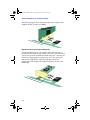
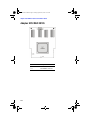
Install a jumper onFlash Mode 0 jumper connector. For the
location of the jumper connector, refer to Appendix A.
2
There are two options available for resetting, using SMOR.exe
or RAIDUTIL under DOS. A SMOR start floppy disk may be
created using instructions shown in the Software User’s Guide:
SMOR
a Insert the SMOR start floppy disk and start the system.
SMOR starts.
b Use SMOR to flash the controller firmware. The utility will
indicate when the flash has completed.
c Power down the system. Go toStep 3.
C-2